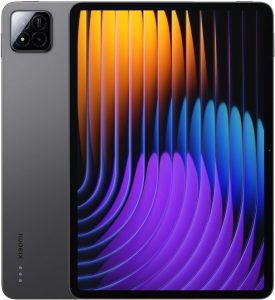
iPad Pro on M5: Faster Silicon, Smarter On-Device AI, Same Ultra-Portable Form
If you track gadget news today, the iPad Pro on M5 is the headline device for creators who want laptop-class power without a fan. This update isn’t just a speed bump: the M-series jump improves CPU/GPU throughput, extends battery efficiency under load, and—most importantly—enables heavier on-device AI so your workflows run with lower latency and more privacy.
What’s New with M5
- CPU/GPU uplift: higher multi-core ceilings, faster graphics for 3D, color, and timeline work.
- Neural performance: accelerated NPU for local transcription, image generation, background removal, and smart selection tools.
- Efficiency: better sustained performance at the same thermal envelope—useful for long editing or rendering sessions.
Display & Media
The Pro display continues to be a centerpiece: deep blacks, high peak brightness for HDR review, adaptive refresh for smooth UI and pencil work, and full coverage of creator color spaces. Combined with faster storage and memory bandwidth, you can scrub multi-layer timelines and preview effects without proxy gymnastics.
On-Device AI: Why It Matters
With M5, tasks that previously required a round-trip to the cloud now execute locally: speech-to-text in long interviews, semantic search across notes, intelligent masking for photos and video, noise removal in podcasts, and lightweight image generation for mood boards. Local inference cuts delay, preserves privacy, and works even when the connection is weak.
Pro Workflows That Benefit Most
- Video & color: faster exports, stabilized playback of HDR timelines, and responsive color grading with pencil.
- Photography: batch RAW edits, AI-assisted selections, and background removal directly on the device.
- Music & podcasts: real-time noise suppression and stem separation with lower CPU spikes.
- 3D/AR sketching: smoother viewport navigation and quicker baking for previews.
- Note-to-doc: transcription + summarization for lectures and meetings entirely offline.
Battery, Thermals, and Portability
iPad Pro’s advantage remains the same: silent, cool, and travel-ready. M5’s efficiency gains show up in sustained tasks—exports run longer at top clocks before throttling, while day-to-day usage stretches across a full workday with mixed creative loads.
Should You Upgrade?
Upgrade logic is simple:
- From older non-Pro or early Pro models: the jump in screen quality, storage speed, and M-class silicon is dramatic—worth it for any serious creative.
- From recent M-series iPad Pro: upgrade if you push multi-layer video, rely on AI features, or want the smoothest pencil latency for illustration/retouch.
- Writers/students: the value depends on pencil + keyboard use and whether on-device transcription/summarization saves you real time.
Bottom Line
The iPad Pro on M5 is the most convincing case yet for a tablet as a primary creative workstation. It’s not about replacing a desktop—it’s about delivering pro speed, on-device AI, and all-day battery in a bag-friendly slab. For readers scanning gadget news today, this is the model that tightens the gap between tablet and laptop without sacrificing portability.
FAQs
- Is the M5 iPad Pro faster in real projects or only in benchmarks?
- Yes, in real projects too. Wider memory bandwidth, faster storage, and a stronger GPU make timelines smoother, exports shorter, and AI tools (transcription, masking, cleanup) run locally with less wait.
- Can the iPad Pro on M5 replace a laptop?
- If your work is video/photo editing, note-taking, illustration, or design with iPad apps—often yes. For desktop-only plugins or heavy 3D rendering, a laptop is still more convenient.
- How is battery life during sustained workloads?
- M5’s efficiency keeps clocks higher for longer without fans. Expect better sustained exports and an all-day mixed workflow on a single charge.
- Should I upgrade from a recent M-series iPad Pro?
- Upgrade if you hit limits on multi-layer video, need the lowest Pencil latency, or rely on on-device AI (transcription, semantic search, smart masking). For light use, the jump is smaller.
- What’s the real benefit of on-device AI here?
- Lower latency, more privacy, and reliability offline: long-form speech-to-text, intelligent masking, audio noise cleanup, semantic search, and quick image generation—all without a cloud round-trip.