Apple MacBook Air 15 M3 · Impossibly thin, incredibly capable
Full bench sheet & specifications
17 ROWS · 10 GROUPS The Bench Sheet · MacBook Air 15 M3
Apple’s MacBook Air has been the benchmark for thin-and-light laptops since the M1 generation upended the category in 2020. The 15-inch variant, introduced with M2 in 2023 and refreshed with M3 in early 2024, answers a question a meaningful portion of the market was asking: what if the best everyday laptop just had more screen? The answer, it turns out, is that it becomes even harder to justify looking elsewhere — at least for users who live within Apple’s ecosystem and whose workloads stay short of sustained professional rendering or compilation tasks.
The M3 upgrade over the M2 15-inch is evolutionary rather than transformative: roughly 15–20% faster CPU throughput, a meaningfully improved GPU, hardware-accelerated ray tracing, and the addition of Wi-Fi 6E. What hasn’t changed is the fanless design, the precisely machined aluminium unibody, the 15.3-inch Liquid Retina display, or the battery that consistently outperforms every Windows ultrabook in its class. At $1,299, it occupies an interesting position — expensive relative to Windows competitors, but substantially cheaper than the MacBook Pro 14 that offers active cooling and a few extra ports.
// 01 Design & Build
At 11.5 mm thin and 1.51 kg, the 15-inch Air is genuinely remarkable for its footprint. A 15-inch Windows ultrabook at equivalent capability typically lands between 1.65 and 1.9 kg; the Air’s weight advantage is tangible in a bag over a full day. The flat-wedge profile — uniform thickness rather than the tapered wedge of older MacBook Air designs — lends it a purposeful, architectural quality that reads as premium without being ostentatious.
The aluminium unibody is machined to tolerances that feel qualitatively different from the flex-prone lids of most competitors. The hinge is firm enough to hold position on a desk when typing hard, but light enough to open one-handed. The fanless design is central to both the build and the experience: there are no vents on this chassis, no grilles, no gaps for thermal management. Heat dissipates passively through the aluminium body — a design decision that has implications for sustained performance, addressed in the Performance section. Cosmetically, it results in a cleaner, more resolved object than any fan-cooled laptop can achieve.
// 02 The Display
The 15.3-inch Liquid Retina display is the reason many buyers choose this over the 13-inch model, and it is genuinely excellent — within the constraints Apple has chosen. At 224 ppi, text and UI elements are rendered with a sharpness that makes 1080p Windows panels look immediately compromised by comparison. The P3 wide colour gamut is accurate and visually rich; colour-critical work, including photo editing, looks correct without calibration out of the box. True Tone, Apple’s ambient colour temperature matching, works unobtrusively and makes extended reading sessions noticeably more comfortable.
The limitations are real, however. 500 nits peak brightness is class-appropriate for indoor use but trails the 1,000–1,600 nit peaks increasingly common in premium Windows machines and in Apple’s own MacBook Pro lineup. Under strong direct light, the Air’s display becomes harder to read than those brighter panels. The fixed 60 Hz refresh rate is the other asterisk: competing ultrabooks at this price increasingly offer 90 or 120 Hz, and the difference in scrolling and animation smoothness — while not dramatic — is perceptible once you have spent time on a higher-refresh display. Neither limitation is a dealbreaker for the target audience, but both are deliberate product differentiators that keep clear air between the Air and the Pro.
Two-monitor support: M3 closes a significant gap over M2 — the MacBook Air 15 M3 can drive two external displays simultaneously (lid closed), up from one on the M2. This meaningfully expands desk setups for office use without requiring a Mac mini or Pro.

// 03 Performance
The Apple M3 is built on TSMC’s 3 nm process and represents a genuine generational step over M2 — approximately 15–18% faster in multi-core CPU tasks and around 20% faster in GPU workloads, with the addition of hardware-accelerated ray tracing that M2 handled in software. For everyday computing — compiling documents, browsing with dozens of tabs, editing RAW photos in Lightroom, running Xcode builds, video calls — the M3 Air is faster than any task you will throw at it without a hint of effort.
The fanless caveat matters for sustained heavy workloads. Under continuous CPU-intensive load — long Final Cut Pro exports, large Xcode compilations, extended 3D renders — the M3 Air throttles after several minutes as the aluminium body absorbs its thermal budget. The MacBook Pro 14, with an active cooling fan, maintains closer to peak performance through the same workload. In practice, the throttling is only relevant to users running professional-grade sustained tasks; for burst-heavy productivity work, the Air and Pro are effectively indistinguishable.
// 04 Battery Life
Battery life is the MacBook Air 15 M3’s single most compelling advantage over Windows competition. Apple’s 18-hour video playback rating is a controlled condition, not a day-in-the-life number — but independent testing consistently returns 14–16 hours under mixed real-world use, including web browsing, document work, video calls, and light photo editing. That figure is broadly double what premium Intel- or AMD-based 15-inch ultrabooks deliver under the same conditions. The reason is simple: M3’s unified memory architecture and 3 nm process mean the chip draws dramatically less power than x86 alternatives to accomplish the same work.
The 35 W USB-C charger included in the box tops off the battery overnight without complaint; the optional 70 W MagSafe brick significantly reduces charging times and is worth the upgrade for regular travellers. MagSafe 3 charging leaves both Thunderbolt ports free while charging — a practical benefit given the port count.
// 05 Keyboard, Trackpad & Ports
The Magic Keyboard on the MacBook Air is among the best laptop keyboards available anywhere. Key travel is short but satisfying; the mechanism is consistent and quiet, and the layout — including the full-height function row — is better suited to productive work than the compact rows found on many Windows ultrabooks. Touch ID, integrated into the power button, is fast and reliable. On a 15-inch chassis, the keyboard also benefits from a wider layout and a full numpad-free spread that leaves comfortable hand-resting real estate.
The Force Touch trackpad deserves its reputation. At this size — one of the largest glass trackpad surfaces on any laptop — it covers more area than many competing machines have dedicated to both touchpad and palm rest. Haptic click feedback is uniform across the entire surface; there is no dead corner. Multi-touch gesture support in macOS is implemented better here than on any competing platform.
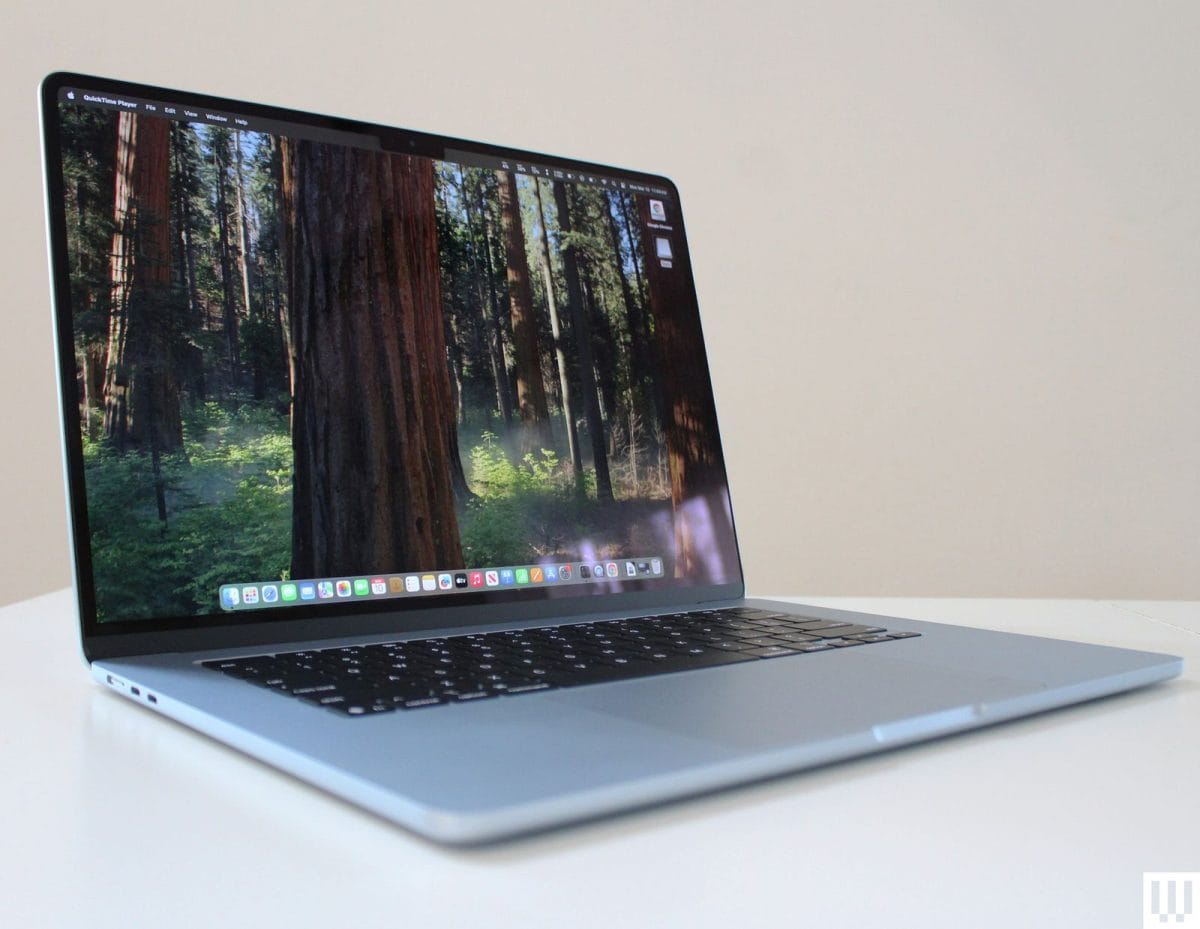
The port situation is the most legitimate complaint against the MacBook Air 15. Two Thunderbolt 4 ports — both on the left edge — plus MagSafe and a 3.5 mm headphone jack is the complete I/O inventory. No USB-A, no HDMI, no SD card slot, no additional USB-C on the right side. For users who carry dongles habitually, this is a known and manageable trade-off. For users coming from a Windows laptop that offers USB-A, HDMI, and SD slots natively, the adjustment is real. A quality USB-C hub addresses the gap practically, but adds a recurring frustration that Apple’s Pro line avoids by having more ports.
Wi-Fi 6E note: The M3 Air adds Wi-Fi 6E support over M2, enabling 6 GHz band connections for significantly improved throughput and reduced congestion on modern routers. Real-world speeds depend entirely on router capability, but this is the right move for a laptop that may serve its owner for five or more years.
// 06 macOS & Ecosystem
macOS is a material part of the MacBook Air 15’s value proposition, not a backdrop. The operating system is tightly integrated with M3’s hardware — the Neural Engine accelerates on-device machine learning tasks including Live Text, photo analysis, and Translate; the Media Engine handles ProRes and HEVC video decode in hardware, allowing smooth 4K playback without the CPU involvement that would drain battery on a software-decoded equivalent. System responsiveness is uniform: apps open instantly, switching is smooth, and the machine feels unhurried under multi-app workloads that would tax a lesser laptop.
The Apple ecosystem advantages are real and increasingly dense. AirDrop, Handoff, iPhone Mirroring (introduced in Sequoia), Universal Clipboard, and Continuity Camera make the Air a more capable device in the hands of iPhone users than any Windows machine can be. iCloud synchronisation across Mac, iPhone, and iPad works with a reliability that third-party cross-platform solutions rarely match. These are not theoretical conveniences — for users already in Apple’s ecosystem, they are daily-use features that make switching costly.
Software compatibility has converged substantially since the M1 transition. Most major professional applications — Adobe Creative Cloud, Microsoft Office, DaVinci Resolve, Xcode, Final Cut Pro — are fully Apple Silicon-native. The remaining exceptions are niche enterprise tools, not mainstream creative software. Rosetta 2 handles legacy Intel-compiled applications transparently and adequately when native versions are unavailable.

// 07 Value & Competition
At $1,299 for the base 8 GB / 256 GB configuration, the MacBook Air 15 M3 occupies a price point that sounds straightforward but requires scrutiny. The 256 GB base storage is genuinely tight for most users in 2024; practically speaking, most buyers should budget for the $1,499 tier (16 GB RAM / 256 GB storage or 8 GB / 512 GB storage) or accept that a hub and external drive become necessary accessories. The $1,699 configuration with 16 GB RAM and 512 GB storage is the configuration most professional buyers should target and represents the machine at its best.
Against its most natural competitors, the calculus runs as follows. The MacBook Air 13 M3 (from $1,099) offers identical performance and battery efficiency in a more portable form factor; the 15-inch Air charges a $200 premium purely for screen real estate and a marginally more comfortable keyboard layout. The MacBook Pro 14 M3 (from $1,599) adds active cooling for sustained performance, a 120 Hz ProMotion display, an HDMI port, and an SD card slot — it is the better machine for sustained professional workloads, but costs at least $300 more for the base configuration. Dell XPS 15 and similar Windows 15-inch ultrabooks match or exceed the Air’s raw multi-core numbers on paper while undercutting on price, but deliver roughly half the battery life and — for users in Apple’s ecosystem — none of the platform integration advantages.
- + 14–16 hrs real-world battery — best in class at this size
- + Fanless design: completely silent under any everyday load
- + M3 chip: fast, efficient, with hardware ray tracing
- + 15.3-inch P3 Liquid Retina display — sharp and accurate
- + Drives two external displays (M3 upgrade over M2)
- + Best trackpad and keyboard in the laptop category
- + 1.51 kg — lightest 15-inch laptop at this performance level
- + Wi-Fi 6E, Bluetooth 5.3, MagSafe 3
- + Deep ecosystem integration with iPhone, iPad, AirPods
- × Only 2 Thunderbolt ports — no USB-A, HDMI, or SD card
- × Throttles under sustained heavy CPU/GPU workloads (fanless)
- × 60 Hz panel — no ProMotion at any configuration
- × 500 nits brightness — dim vs premium Windows competitors
- × Base 8 GB RAM tier is constraining in 2024
- × Memory/storage soldered — not upgradeable post-purchase
- × macOS exclusivity — not viable for Windows-only software
The MacBook Air 15 M3 is the right machine for knowledge workers, students, and creative professionals who want the best battery life available in a thin-and-light 15-inch laptop, who already use — or plan to use — an iPhone, and whose heaviest workloads are burst-heavy rather than sustained. It is the ideal choice if you routinely work away from power outlets and find 7–8 hours on a Windows machine inadequate. It is not the right choice if you need an SD card slot or HDMI natively, if you run sustained video renders or code compilations for hours, if you require Windows-exclusive software, or if you want a 120 Hz display. For everyone else, it is one of the most complete all-day laptops available at any price.
Methodology · 14-day cycle
Compare against
Other top-rated laptops we've reviewed.
