Xiaomi Pad 7 Pro · Pro-grade power meets portable brilliance
Full bench sheet & specifications
44 ROWS · 13 GROUPS The Bench Sheet · Pad 7 Pro
Where it wins
- Stunning 144Hz AMOLED display, Snapdragon 8 Elite chipset, exceptional stylus precision, long-lasting 10,000mAh battery
Where it loses
- No headphone jack, HyperOS can feel bloated, limited availability outside Asia
Xiaomi’s tablet lineup has historically occupied an awkward middle ground — capable hardware undercut by software that felt unfinished and an accessory ecosystem that lagged badly behind Apple’s. The Pad 7 Pro, announced at MWC 2025 in March, represents the most convincing attempt yet to close that gap. It arrives with an 11.2-inch 3.2K LCD running at 144 Hz, a Snapdragon 8s Gen 3 processor, an 8,850 mAh battery, and a first-party keyboard-and-pen ecosystem modelled explicitly on the Apple approach. At a European launch price of €399 for the 8 GB / 256 GB configuration, it asks a direct question of both the iPad Air and the OnePlus Pad 3.
The answer is nuanced. The display is, without qualification, one of the finest LCD panels in any Android tablet at this price. The performance is strong, the battery is exceptional, and HyperOS 2’s Workstation Mode has matured into something genuinely useful for mobile productivity. The compromises — no OLED, accessories not included, software rough edges — are real but knowable. For Android users who want a capable, large-screen work-and-media device without crossing into iPad territory on price, the Pad 7 Pro is a serious option.
// 01 Design & Build
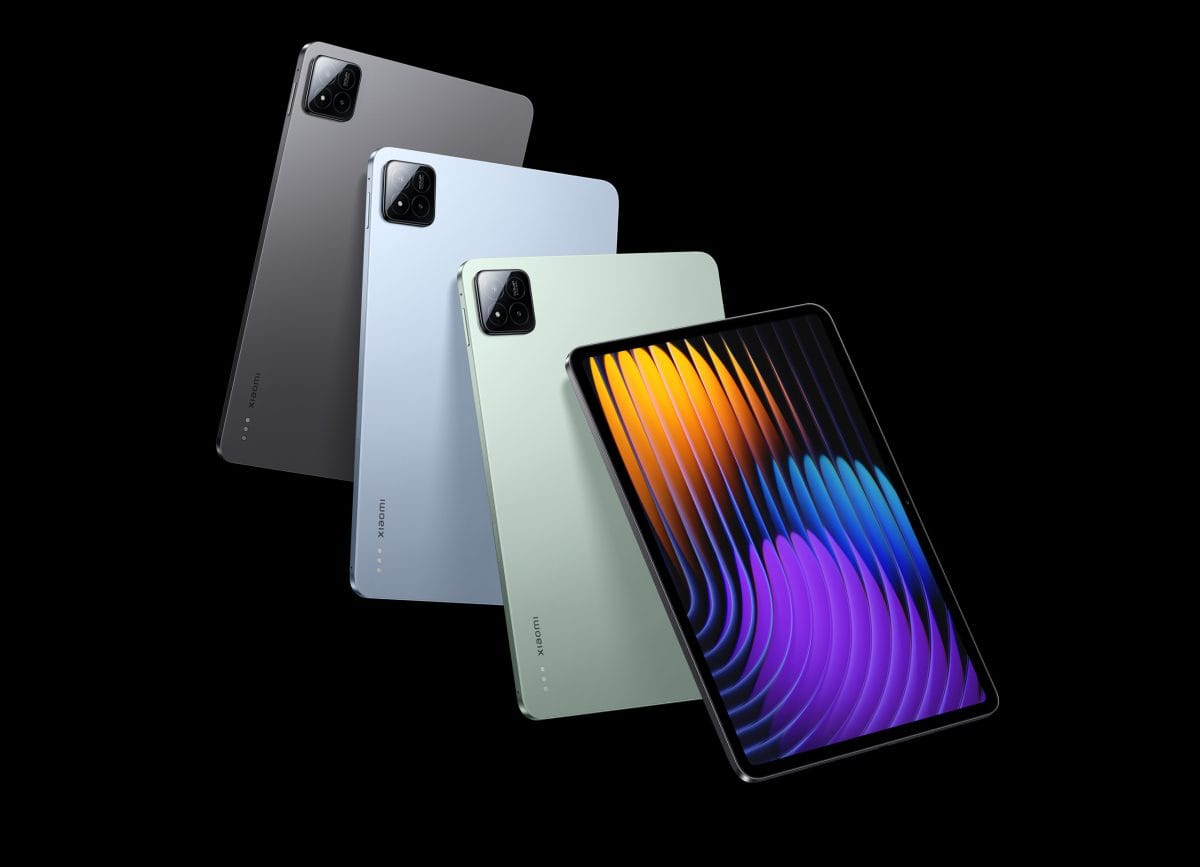
At 5.95 mm, the Pad 7 Pro is genuinely slim for an 11-inch tablet with a sub-6 mm chassis — thinner than the iPad Air M3 by a meaningful margin and lighter than it looks on spec sheets. The aluminium frame is well-machined with squared-off edges that feel premium in hand, though corners can become tiring over extended handheld use in portrait orientation. The rear panel has a subtle texture finish that resists fingerprints better than comparable glass-backed tablets.
The 3:2 aspect ratio is the correct choice for a productivity-oriented device. It splits the difference between the 4:3 of the iPad and the wider cinema ratios used by Samsung — more vertical space for documents and web pages than a 16:10 panel, without feeling square in landscape. The four speaker grilles are placed symmetrically on the short edges, which means stereo separation holds regardless of whether you are holding the tablet portrait or landscape. There is no IP rating listed in the official spec sheet — a genuine gap versus the Galaxy Tab S10 series.
// 02 The Display
This is the feature that justifies the Pad 7 Pro’s position in Xiaomi’s lineup. The 3.2K resolution across 11.2 inches produces 344 pixels per inch — sharper than the iPad Air M3’s Liquid Retina panel at 264 ppi, and noticeably so when reading text or viewing detailed photographs at arm’s length. The panel covers 100% of the DCI-P3 colour space with factory calibration that holds up to scrutiny; blues and greens in particular are rendered with saturation and accuracy that makes streaming HDR content visually engaging.
The 144 Hz refresh rate is not marketing padding here. Combined with a touch sampling rate tuned for the Focus Pen, UI navigation feels genuinely fluid. The adaptive rate management drops frequency on static content to conserve battery — a practical consideration on a device that could otherwise burn through its cell faster than the 8,850 mAh figure suggests. The panel tops out at 1,000 nits in high-brightness mode, which is sufficient for indoor use and most outdoor conditions, though direct sunlight will still wash it out.
LCD vs OLED trade-off: Rivals like the Galaxy Tab S10 use AMOLED for deeper blacks and better contrast ratios. The Pad 7 Pro’s LCD cannot match absolute black levels, and dark-mode content will show backlight bleed at very low brightness. For most daytime tasks — productivity, media, web — the resolution and colour accuracy advantage is the more noticeable attribute.

// 03 Performance
The Snapdragon 8s Gen 3 is Qualcomm’s trimmed-down version of the 8 Gen 3 platform — same TSMC 4 nm process, same Adreno 735 GPU, but with a CPU configuration that reduces the prime core count compared to the full 8 Gen 3. In everyday tablet use — browsing, document editing, video calls, light creative work — the performance gap versus the full Snapdragon 8 Gen 3 or 8 Elite (found in the OnePlus Pad 3) is largely academic. Apps open instantly, multitasking within HyperOS’s Workstation Mode is smooth, and the 12 GB LPDDR5X RAM variant barely hesitates under any realistic tablet workflow.
Where the distinction matters is in sustained GPU-intensive tasks: extended gaming sessions or GPU-compute workloads will see the 8s Gen 3 throttle sooner than the full 8 Gen 3 or Apple’s M3. Thermal management on the Pad 7 Pro is competent — a vapour chamber keeps sustained performance reasonable — but this is not the tablet to reach for if you want maximum gaming headroom.
// 04 Speakers & Media
The quad-speaker array is a genuine highlight of the Pad 7 Pro’s media experience. With drivers placed on both short edges, the stereo image stays correctly oriented whether the tablet is in landscape or portrait — a detail that sounds minor until you flip a device with asymmetric speaker placement and hear one channel diminish. Loudness tests place the Pad 7 Pro in the “Very Good” bracket; at maximum volume it remains clean, with low distortion and acceptable high-frequency extension.
The Dolby Atmos certification adds a spatial widening effect that is audible on orchestral music and action film soundtracks. What the speakers do not deliver is meaningful bass weight — the drivers are tuned toward clarity and presence in the mids and highs, and low-end content sounds thin at any volume. This is a common limitation for slim tablet chassis; the OnePlus Pad 3 and Galaxy Tab S10 face the same constraint, though the S10’s slightly larger cabinet gives it a marginal advantage in low-frequency body. For music listening with headphones via USB-C or Bluetooth 5.4, the Pad 7 Pro is fine — there is no headphone jack to lose here.
// 05 Productivity & Accessories
Xiaomi’s first-party accessory story has never been stronger. The Focus Keyboard connects via a three-pin magnetic connector on the tablet’s rear and features a floating hinge with stepless adjustment between 0 and 124 degrees — a design that is functionally equivalent to the Magic Keyboard’s mechanism and clearly informed by it. The 64-key layout includes a backlit keyboard with adjustable illumination and a physical trackpad with mechanical press feedback. Typing feel is good by tablet keyboard standards: key travel is limited by the thin chassis, but actuation is consistent and the deck does not flex under firm input.
The Focus Pen attaches magnetically to the tablet’s side and charges wirelessly in that position, eliminating the cap-loss problem of traditional styluses. Its 8,192 pressure sensitivity levels exceed the Apple Pencil Pro’s 4,096 and match the S Pen in specification; in practice the pressure curve feels natural for note-taking and annotation, though advanced illustration work will still favour the Apple Pencil’s latency and palm rejection. The pen includes multi-function buttons useful for quick tool-switching in Xiaomi’s Notes app.

HyperOS 2 Workstation Mode is the software layer that ties it together. Enabled from the control centre, it transforms the interface into a floating window desktop where up to four apps can run simultaneously in resizable, repositionable windows. It is not a full desktop Linux environment — Android app compatibility and window management still carry the limitations of the underlying platform — but it handles a browser alongside a document editor alongside a video call application without obvious complaint. For users whose tablet productivity needs stay within Android’s app ecosystem, it is a workable daily driver setup.
Accessory pricing: The Focus Keyboard and Focus Pen are sold separately. Combined, they add meaningful cost to the total package — worth factoring into comparisons against the iPad Air, where the Magic Keyboard and Apple Pencil Pro carry premium prices of their own. The Xiaomi accessory bundle remains the less expensive option overall.
// 06 Battery & Charging
The 8,850 mAh cell is among the largest in the 11-inch Android tablet segment, and real-world endurance reflects that figure. In mixed daily use — several hours of productivity in Workstation Mode, streaming, browsing, and some gaming — the Pad 7 Pro routinely reaches a full day and then some. The 144 Hz adaptive display management helps considerably; idle periods and static reading drop the panel’s power draw meaningfully. For users who primarily consume content, two-day cycles between charges are achievable on conservative settings.
67 W wired charging is faster than the 20 W Apple offers on the iPad Air and ahead of what Samsung provides on the standard Tab S10. The 67 W adapter is included in the box — a practical choice that removes the accessory upsell sting. The absence of wireless charging is the only meaningful gap; the Galaxy Tab S10 FE and some competitors offer it, though wireless charging on a tablet is a secondary convenience rather than a daily necessity for most users.
// 07 Software
HyperOS 2 on the Pad 7 Pro is noticeably more coherent than earlier MIUI-derived skins. The interface is clean in default form, Google services are fully integrated on the global ROM, and the system animations are well-paced for the 144 Hz panel. Workstation Mode — Xiaomi’s desktop-style multitasking layer — is the headline software feature and it functions reliably: up to four resizable floating windows, a persistent taskbar, and a quick-launch dock that persists across sessions.
AI features include on-device capabilities in the Notes app (summarisation, proofreading, transcription) and Google’s Gemini integration at the Android 15 layer. Neither is transformative on its own, but the Notes AI is genuinely useful for meeting summaries when paired with the Focus Pen for handwriting input. The software still carries Xiaomi-isms that Android veterans will find abrasive — notification handling differs from stock Android, some default apps are Xiaomi’s own, and update cadence for the global firmware has historically lagged the Chinese ROM. Xiaomi has not matched Samsung’s four-year OS update commitment in writing; the practical software longevity of this device remains an open question.
// 08 Value
At €399 / ~$430 USD for the 8 GB + 256 GB configuration, the Xiaomi Pad 7 Pro is positioned below the iPad Air M3 (which starts at $599 for 11 inches) and the OnePlus Pad 3. Even the Samsung Galaxy Tab S10 FE undercuts the premium Tab S10 while costing more than the Pad 7 Pro in most markets. What the Pad 7 Pro delivers at this price — a 3.2K 144 Hz LCD, a Snapdragon 8s Gen 3, an 8,850 mAh battery, and a functional accessories ecosystem — represents excellent component value. The gap in raw CPU/GPU performance versus the iPad Air M3 or OnePlus Pad 3 is real; the gap in price is real too, and often larger.
The accessories change the calculus. Adding the Focus Keyboard and Focus Pen brings the total package cost meaningfully higher — but still below a comparable iPad Air plus Magic Keyboard plus Apple Pencil Pro bundle. For Android-committed users who want a productivity setup, the Pad 7 Pro ecosystem wins on price at every tier.
- + 3.2K 144 Hz LCD — best display resolution in Android at this price
- + 8,850 mAh battery — genuine all-day and beyond endurance
- + 67 W fast charging included in box
- + Focus Keyboard + Focus Pen ecosystem is well-designed
- + HyperOS Workstation Mode is functional for real productivity
- + Snapdragon 8s Gen 3 — strong everyday performance
- + 100% DCI-P3 colour with accurate factory calibration
- + Competitive pricing vs iPad Air and Galaxy Tab S10
- × LCD — no OLED; blacks and contrast fall short of Galaxy Tab S10
- × No wireless charging
- × No IP dust or water resistance rating
- × Focus Keyboard and Focus Pen sold separately — total cost adds up
- × 8s Gen 3 lags iPad Air M3 and OnePlus Pad 3 in sustained CPU/GPU workloads
- × HyperOS update longevity policy less transparent than Samsung’s
- × Quad speakers lack low-end weight
The Xiaomi Pad 7 Pro is the right tablet for Android users who want an iPad-class display and productivity setup without committing to Apple’s ecosystem or paying iPad Air prices. It is particularly well-suited to students and remote workers who need a capable writing and document surface, a reliable keyboard dock, and enough battery to get through a full day untethered. It is not the correct choice for creative professionals who need sustained GPU performance, anyone who prioritises OLED contrast for dark-room media, or buyers who want guaranteed software support on a five-year horizon. If the €399 starting price is the ceiling and Android is the requirement, nothing at this price point challenges it on display quality.
Methodology · 14-day cycle
Compare against
Other top-rated tablets we've reviewed.
Camera samples 8
Real photos shot on this device · Flickr EXIF-verified