AI Tool

Perplexity Pages
Perplexity AI
Perplexity Pages
Turn any Perplexity research thread into a shareable, cited, formatted article in one click.
Turn any Perplexity research thread into a shareable, cited, formatted article in one click.
Perplexity Pages is a publishing feature built directly into Perplexity. It converts a Perplexity research thread into a structured, formatted, publicly shareable article — complete with section headings, inline citations, AI-generated images, and a clean reading layout — hosted at a unique perplexity.ai/page/… URL.
The origin idea is simple: Perplexity already produces well-organized, cited research answers. Pages asks — what if you could turn that answer into something you could publish and share, without starting over in Google Docs? The answer is a one-click “Convert to Page” button that takes your research thread and packages it into an article anyone can read without needing a Perplexity account.
It is not a separate product, a separate subscription, or a standalone tool. It is a feature of Perplexity — the same Perplexity you might already use for AI search and deep research. You cannot use Perplexity Pages without a Perplexity account. Its quality ceiling is Perplexity’s quality ceiling. Its limitations are Perplexity’s limitations. Understanding that context matters before you evaluate whether Pages is worth your time.
Perplexity launched Pages in mid-2024. In early 2026 the standalone “Create a Page” button in the Library tab was temporarily retired while Perplexity rebuilt the feature. The current and intended path is research first, then convert — meaning Pages is downstream of Perplexity’s search and research engine, not a free-standing article builder you can open cold.
To understand Pages, you need to understand where it sits. Perplexity is primarily an AI search engine that returns cited answers to queries, with “Pro Search” providing deeper multi-step research across the web. The platform has progressively added layers on top of that core: Deep Research (extended multi-source synthesis), Spaces (shared research workspaces), and Pages (publishing the output of any of those as a readable article).
Pages is the output layer. It sits at the end of the research workflow, not the beginning. You don’t open Pages and start writing. You research in Perplexity — a question, a topic, a multi-turn deep-dive — and then you hit “Convert to Page” when you want to publish what you found. The citations you accumulated, the sections Perplexity built, the images it can generate: all of that flows into the Page automatically.
This is its strongest argument as a product. The friction from “I know this” to “here’s a shareable article” is almost zero. No reformatting, no manually adding citations, no copy-pasting paragraphs into a CMS. The article exists as a side-effect of research you were doing anyway. That’s a genuinely new capability — and it’s why educators, researchers, and content strategists have adopted it faster than any other Perplexity feature since the core search.
If you’ve never used Perplexity for research, Pages will feel underwhelming. The output quality of a Page is directly proportional to the depth of the research thread behind it. A shallow question produces a shallow page. A carefully iterated deep-research thread produces something genuinely publication-worthy.
The full workflow from scratch to published Page:
The audience setting deserves special attention. Before publishing, you specify who the Page is for. Selecting “beginner” produces simpler language, more explanatory context, and fewer assumed terms. Selecting “expert” produces tighter, denser prose that skips over foundational explanations. This one toggle meaningfully changes the output — a useful lever that most Pages alternatives don’t offer at all.
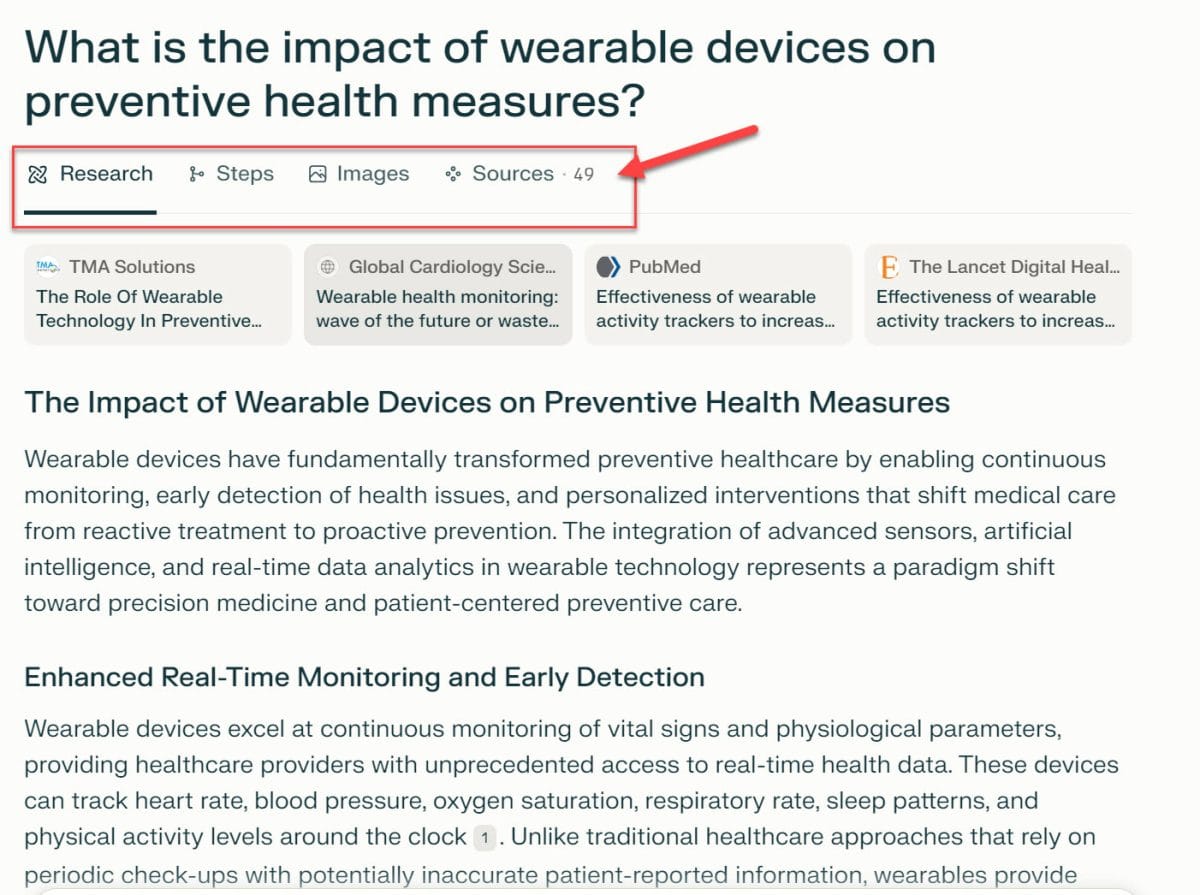
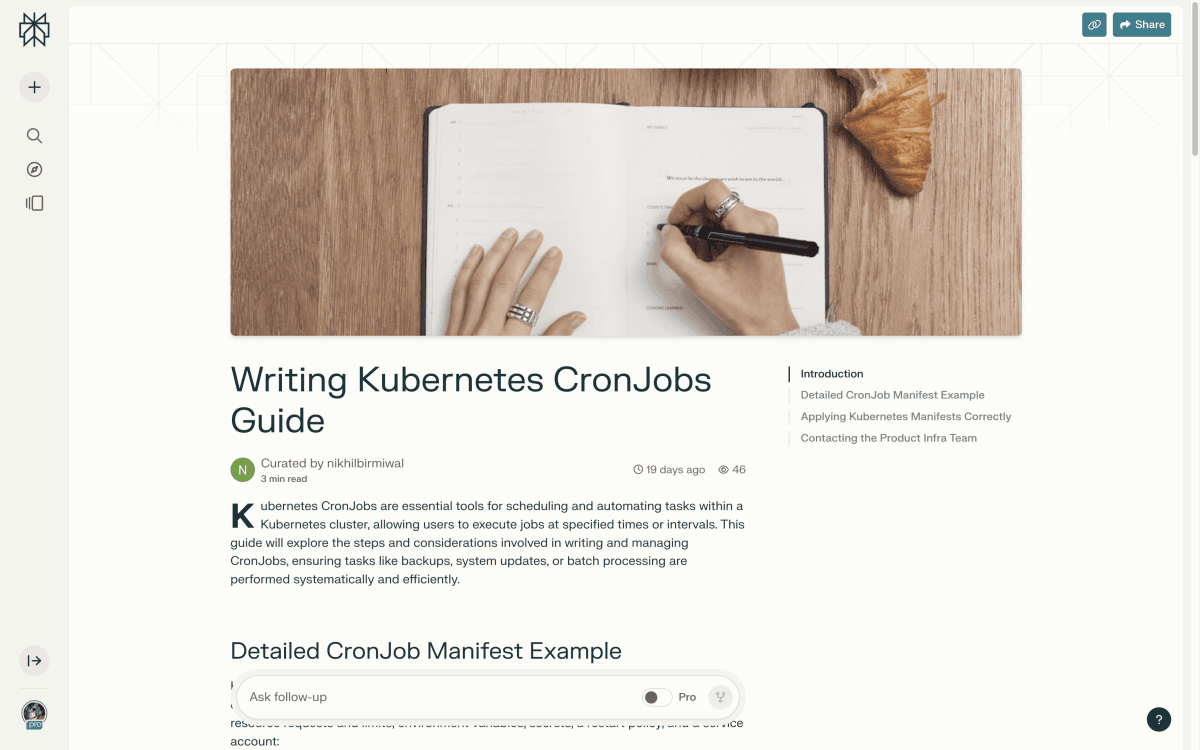
A published Perplexity Page looks like a well-formatted long-form article. Structurally, you get: a header with a title and optional AI-generated cover image, numbered or headed sections with prose content, inline citation superscripts that link to source URLs, and a clean reading experience on mobile and desktop with no Perplexity UI chrome visible to readers.
The citations are the standout element. Every factual claim in a Perplexity Page links to the web source Perplexity used. This is not decorative — these are the same citations that Perplexity’s search engine retrieved and used to generate the content. Readers can click through and verify every claim. For academic summaries, research briefs, and fact-heavy explainers, this changes the trust calculus of sharing AI-generated content significantly. You’re not just publishing AI text; you’re publishing AI text with a source trail.
What you don’t get: a truly blank-slate writing environment. Pages is not a WYSIWYG editor. You can rearrange sections and edit text, but you cannot apply custom styling, embed widgets, add custom HTML, or control the typography. The Page looks like a Perplexity Page. Period. If your brand requires anything else, you’ll be disappointed.
A normal Perplexity answer is ephemeral: it lives in your chat thread, visible only to you (unless you share the thread link), formatted as a conversational response. It’s designed to answer your question. A Page is designed to inform a reader who wasn’t part of the conversation.
The differences in practice:
a/perplexity-answer b/perplexity-page
Both emerge from the same underlying research engine and carry the same citations. The Page is structurally reformatted for reading by someone other than the person who asked the question.
Use answers for your own research. Use Pages when you want someone else to benefit from what you found.
Perplexity Pages is accessible on both the free plan and the Pro plan ($20/mo). The distinction matters: the free plan supports basic Pages functionality — converting a thread to a Page, basic editing, and publishing. The Pro plan unlocks the full depth of the research that can feed a Page.
The practical difference: a free-tier Page is the output of a limited research thread — fewer sources, shallower synthesis, no Deep Research backing. A Pro-tier Page can be built from a full Deep Research session — 20+ sources, multi-step synthesis, richer structure. The Page feature itself costs nothing extra. What you’re paying Pro for is the quality of the research that flows into the Page.
If your primary goal is publishing articles, subscribe to Perplexity Pro for the research depth, not for Pages. The Page feature itself is free. The Deep Research engine that makes Pages worth publishing is what Pro unlocks. Don’t confuse the output feature with the underlying capability.
Students can access Pro features for $10/mo via SheerID verification — a genuine advantage for the academic use cases where Pages shines hardest.
The task: summarize the last five years of peer-reviewed research on microplastic uptake in freshwater fish species for a weekly seminar group. Old approach: 2–3 hours of manual reading, note-taking, and drafting a shared Google Doc.
New approach: three Deep Research queries in Perplexity Pro, each focused on a different dimension of the topic — mechanisms, geographic distribution, toxicological effects. Each query returned 10–15 cited sources. The student refined each thread with follow-up questions, then hit “Convert to Page.” Perplexity organized the three threads into a single structured article with a clear introduction, three main sections, inline citations, and a synthesized conclusion.
The student edited two paragraphs where Perplexity overstated certainty in emerging research, added a section note about methodological limitations, and published. Seminar group received a URL. Every factual claim was traceable. No one questioned the sourcing.
Quarterly brief for a fintech client: produce a concise, sharable market overview for prospects. Previously involved a junior analyst, a brief, two rounds of edits, and a PDF distributed via email.
The strategist ran a Perplexity Deep Research session on the target market, asked follow-up questions focused on recent regulatory changes and competitive dynamics, and converted the thread. Set audience to “beginner” — Perplexity simplified the jargon. Rearranged two sections for narrative flow, regenerated the header image to match client brand colors (limited — the image generation doesn’t accept brand guidelines, so this required post-production). Published.
The honest limitation: the client wanted to add a proprietary data table and a call-to-action button. Pages supports neither. The strategist ended up embedding the Page URL in a client email with a custom intro paragraph rather than sharing the Page directly — a workaround, not a workflow.
Teachers frequently need explainers at a specific reading level — clear, accurate, linkable, updatable. The old approach: write from scratch, manually add Wikipedia/NIH links, share as a PDF that goes stale.
The teacher ran a Perplexity thread on CRISPR basics, iterating until coverage included mechanism, real-world applications, and ethical considerations. Set audience to “beginner.” Converted to Page. The output was close — a well-structured four-section explainer with diagrams sourced from cited papers and readable prose. Two edits: simplified one technical paragraph further by hand, and swapped a section image that showed lab equipment for one that showed a conceptual diagram.
Published and shared the URL with students. The citations gave students a vetted reading list. The Page URL was stable over multiple months — unlike a shared Google Doc that can be accidentally edited. The teacher updated it once mid-semester by generating a new thread, converting, and replacing the URL.
Here’s a single Deep Research session in Perplexity Pro, converted to a Page:
The converted Page included an automatically generated title, a 400-word executive summary section, four substantive sections with 22 inline citations, a country-comparison section with a structured list, and an AI-generated cover image. Total research-to-published time: 11 minutes.
Section 1: The State of Global SMR Deployment [~600 words · 8 citations]
Section 2: Leading Countries and Key Players [~500 words · 6 citations]
Section 3: Cost Realities and the Economies of Scale [~450 words · 5 citations]
Section 4: Regulatory Barriers and the Licensing Gap [~380 words · 3 citations]
Section 5: The Five-Year Outlook [~350 words · 2 citations + editorial note]
Total: ~2,280 words · 24 sources cited · 1 cover image · 2 section images
The output was accurate and well-organized. One section contained a figure (the cost trajectory) that was described in prose but not visualized — Pages doesn’t render data charts, only prose and images. That’s the gap between “polished enough to share” and “publication-ready for a serious outlet.” For a policy briefing passed internally, it worked. For a public-facing report for an energy company, it would need significant editorial work and a proper layout pass.
bench –tool=pages-alternatives –metric=speed,citations,editability,ownership subjective
a/perplexity-pages b/gamma
Gamma is an AI-powered presentation and document builder. It can produce articles, decks, and web pages from a prompt. The overlap with Pages is real but narrower than it looks — the core use cases are different.
Verdict: Pages for research-heavy, citation-driven articles. Gamma for anything that needs visual design, brand identity, or export. They solve adjacent problems, not the same one.
a/perplexity-pages b/notebooklm
NotebookLM is Google’s document-grounded research assistant. It synthesizes from sources you upload rather than sources it retrieves from the web. The two tools face opposite directions — Perplexity is outward (web research), NotebookLM is inward (your documents).
Verdict: Use Pages when your source material lives on the web. Use NotebookLM when your source material lives in your files. Not a choice between quality — a choice between data source.
No review of Perplexity Pages is complete without spending real time on where it falls short. Several of these limits are structural, not incremental bugs — they reflect deliberate product decisions that may never change.
This is the single biggest caveat with Perplexity Pages and it needs to be stated plainly: there is no export function. You cannot download a PDF. You cannot export Markdown. There is no API to extract your Page’s content programmatically. The article you create lives on Perplexity’s servers. Full stop.
In practice, this means every Page you publish is permanently dependent on Perplexity remaining operational and continuing to host it. If Perplexity changes its pricing model, retires Pages, or goes under, your published content disappears. For personal research notes that you’d otherwise throw away: irrelevant. For anything you intend to own, archive, or publish to your own domain: a hard blocker.
Published Pages are public and hosted by Perplexity. You cannot make a Page private or password-protected on the free plan — published means publicly searchable on Perplexity’s library. If your Page contains sensitive competitive research, client deliverables, or anything proprietary, this is the wrong tool. Copy the content to a private document first; use Pages only for genuinely public-facing output.
You can rearrange sections, edit prose, and regenerate images. You cannot apply custom styling, add HTML, embed data charts, insert custom components, or control the typography. A Page looks like a Page. If your use case requires a specific visual presentation — a branded report, a formatted white paper, a structured table with sortable columns — Pages cannot produce it. You will need a different tool for the final mile.
The “Create a Page” standalone entry point was retired in early 2026 while Perplexity rebuilt the feature. As of mid-2026 the path is “Convert to Page” from within an existing thread — which means you cannot start with Pages intent; you have to research first. This is arguably the right UX decision, but it does change the workflow significantly, and documentation online remains inconsistent because tutorials written for the old entry point are now wrong.
All Pages share the same visual template. There is no option to differentiate the reading experience between a casual blog post and a formal research brief. When readers encounter enough Perplexity Pages, they will recognize the format instantly — which is fine if your goal is credibility and citation traceability, and a limitation if your goal is brand differentiation or distinctive editorial voice.
Perplexity Pages generates content from web sources via an AI synthesis layer. The output is well-structured and citable, but it is not original in the journalistic or SEO sense of the word. Every Page is, at its core, a reorganization and summarization of material that already exists on the web.
This matters in two ways. First, Google’s content quality guidelines — particularly the E-E-A-T framework (Experience, Expertise, Authoritativeness, Trustworthiness) — increasingly penalize AI-synthesized content that adds no original insight. A Perplexity Page about “the best EV batteries in 2026” will cite sources but will not contain original reporting, proprietary data, or editorial perspective. For SEO purposes on your own site, publishing a converted Page verbatim would likely perform poorly. The citations prove provenance, not originality.
Second, because Perplexity Pages are published on Perplexity’s own domain (perplexity.ai), any SEO benefit flows to Perplexity, not to you. Your Page may rank. Your website won’t benefit from it.
Treat a Perplexity Page as a research draft, not a final publication. Use it for internal sharing, seminar distribution, client briefings, and knowledge transfer between colleagues — contexts where SEO is irrelevant and speed plus citations are the metric. When you need SEO-viable content, use the Page as a structured first draft and rewrite it substantially with original commentary before publishing to your own domain.
Content marketers have found a productive middle ground: Pages for rapid topic exploration and source aggregation, followed by substantial human editing before moving the content into a CMS. The Page saves the research phase; it does not replace the editorial phase.
The quality of your Page is capped by the depth of your research thread. Run Deep Research, ask multiple follow-up questions, explore sub-topics before hitting Convert. A shallow thread makes a shallow Page. Five minutes of extra iteration in the thread pays back tenfold in the Page quality.
Most users ignore the audience setting and accept whatever Perplexity generates. Setting “beginner” for a school audience or “expert” for a peer audience makes a measurable difference in prose density and assumed background knowledge. Try generating the same thread twice with different audience settings and compare — the contrast is significant.
After conversion, you can insert new sections by describing what you’d like to add. If your Page covers three of five relevant dimensions and misses two, describe the missing sections and Perplexity will generate them with the same citation depth as the original. This is faster than going back to the thread and converting again.
Once published, the Page URL is stable but the underlying edit path requires your account. Save your edit URL separately from the public URL. If you log out and return, finding the edit view can be non-obvious in the current interface — particularly with the 2026 feature rebuild still settling.
Because there is no export, your only recourse against content loss is manual copying. After publishing a Page you intend to keep long-term, copy the text into Notion, Google Docs, or your CMS of choice as a backup. Not elegant — but critical if the content has lasting value.
No. Basic Pages functionality is available on the free plan. What Pro unlocks is the quality and depth of the research feeding the Page — specifically Deep Research sessions (20+ sources, multi-step synthesis). The Page feature itself is free; paying Pro improves what flows into it.
No, not officially. As of mid-2026, there is no export function. Your only options are manual copy-paste into another tool, or browser-level “Save as PDF” from the published URL (which captures the styled reading view). Export is the most-requested missing feature and may arrive in a future update.
Published Pages are publicly accessible and searchable on Perplexity’s library. There is currently no private or unlisted option. If your content is sensitive, do not publish it as a Page — keep it as a thread or copy it into a private document.
A shared thread link lets anyone see your conversation, including your questions and Perplexity’s iterative answers. A Page strips the conversational format and presents the material as a standalone article with a title, structured sections, and a clean reading layout. Pages are meant for readers who weren’t part of the research conversation.
Possibly, but any traffic goes to perplexity.ai, not your website. If your goal is SEO for your own domain, Pages is the wrong tool. The ranking authority, any backlinks, and any organic traffic from a successful Page all accrue to Perplexity.
Gamma is a visual document and presentation builder that produces branded, designed output you can export. Pages produces research-backed articles with automatic citations, hosted on Perplexity. Gamma excels at visual design and exportability; Pages excels at citation depth and research-to-publish speed. They’re complementary, not competitive.
Perplexity retired it in early 2026 as part of a feature rebuild. As of mid-2026, the path is to start a research thread and then use “Convert to Page” from within the thread. The standalone creation flow is being rebuilt but does not yet have a confirmed return date.
Because Pages are publicly hosted with no access controls, other users can read and copy the content. This is a real concern for anyone publishing original analysis or proprietary research. Until private/unlisted visibility options are added, treat any published Page as fully public-domain in practical terms.
Not directly. Pages are hosted on Perplexity’s domain, so SEO benefit flows to Perplexity, not your site. The content is also AI-synthesized without original reporting, which performs poorly under Google’s E-E-A-T guidelines if published verbatim. Use Pages as a research and drafting tool, then rewrite substantially and publish to your own domain for SEO purposes.
Perplexity Pages is genuinely impressive within its lane. If you use Perplexity for research and want to share the output as a formatted, cited article, nothing else closes that gap as cleanly or as fast. The automatic inline citations alone put it a generation ahead of any manually-assembled doc for academic and research use cases.
The ceiling is real. You don’t own the content. You can’t export it. It’s publicly visible by default. The visual template is fixed. For anyone whose work requires brand identity, content ownership, or private distribution, those aren’t minor caveats — they’re hard blockers that make Pages the wrong tool entirely.
The sweet spot is researchers, educators, and analysts who need to share findings fast and don’t need to own the output permanently. For that audience, Pages is one of the most useful things Perplexity has shipped. Note that it is not a standalone product — you’re getting the publishing layer of a broader platform. See the main Perplexity review for the full picture, and consider NotebookLM if your sources are private documents, or Gamma if you need visual polish and export.
Every verified price, limit, and model change we have tracked for Perplexity Pages.
One email when Perplexity Pages changes price or limits. No account, no spam.