AI Tool

Jules
Google
Jules
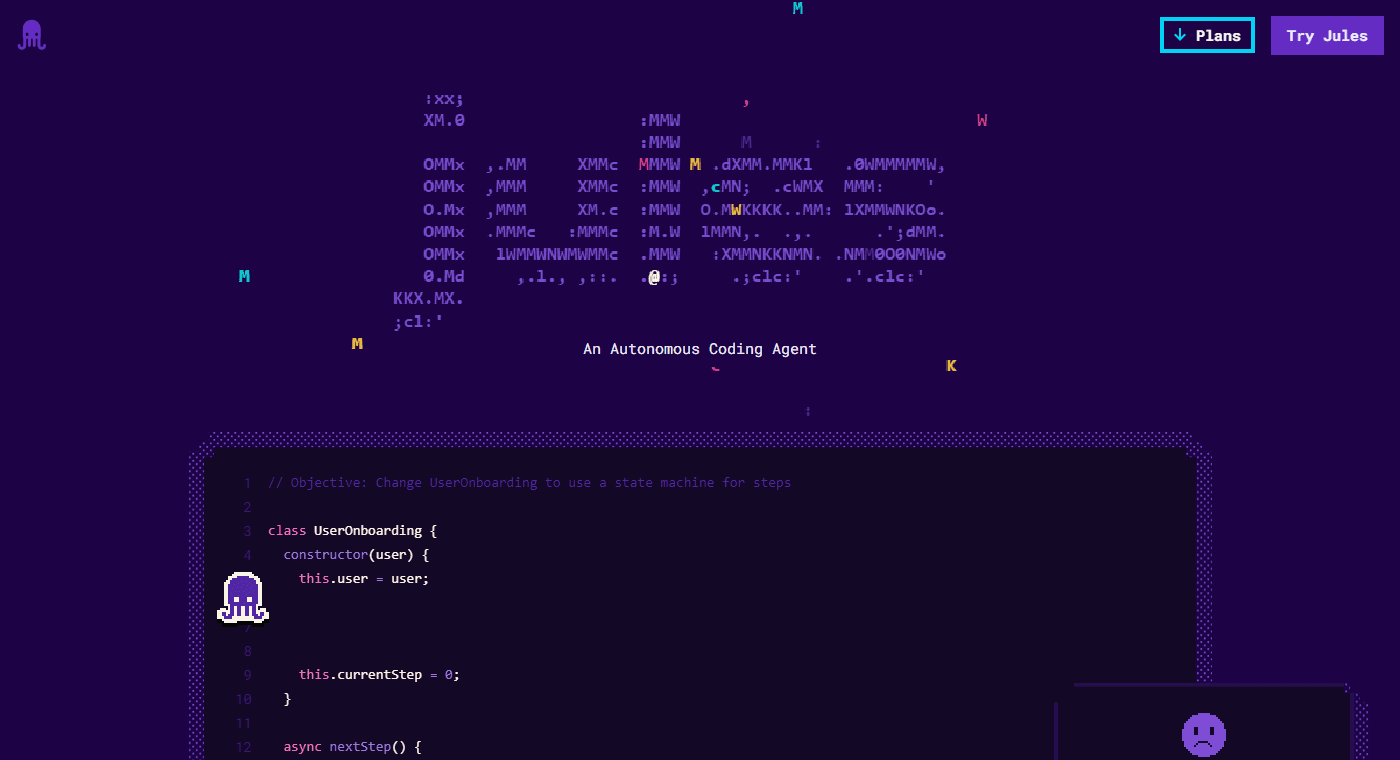
Google's async coding agent. Clones a GitHub repo into a cloud VM, plans and executes a task, opens a pull request.
Google's async coding agent. Clones a GitHub repo into a cloud VM, plans and executes a task, opens a pull request.
Google announced Jules as a public beta at I/O 2025, on May 19, 2025 — the changelog entry is literally titled “Jules is here.” It launched powered by Gemini 2.5 Pro, positioned specifically as an asynchronous coding agent: submit a task, close the tab, come back later. Just under three months later, on August 6, 2025, Google took Jules out of beta and into general availability. Google’s own announcement noted that during the beta, thousands of developers had tackled tens of thousands of tasks, producing more than 140,000 code improvements shared publicly — a fast graduation by the standards of this category.
The pace of shipping since GA has been unusually aggressive for a Google product. A command-line tool, Jules Tools, arrived October 2, 2025, followed a day later by the Jules REST API on October 3. Gemini 3 Pro became available inside Jules on November 19, 2025. Scheduled Tasks — recurring, unattended maintenance jobs — shipped December 10, 2025. MCP support landed February 2, 2026, and Gemini 3.1 Pro followed on March 9, 2026. Google’s public changelog lists dozens of smaller releases in between, roughly one every one to two weeks since launch — a genuinely fast cadence for an agentic product still labeled “Public Beta” in its own FAQ.
Jules sits inside Google Labs alongside experiments like NotebookLM and Google Antigravity, not inside Google Cloud’s enterprise product line. That matters for how it’s priced (bundled into consumer Google AI subscriptions, not sold as a standalone SaaS seat) and for who can access paid tiers today — more on both below.
Jules is not an editor, and unlike Claude Code or Codex it has no interactive local terminal loop where you watch it work keystroke by keystroke. Every Jules task runs in a fresh cloud virtual machine: Jules clones your repository, installs dependencies using setup scripts you configure ahead of time, makes the requested changes, runs your tests, and reports back with a diff and a summary. You can leave the moment you submit a task — that’s the entire design premise.
Three surfaces exist today:
npm install -g @google/jules) for managing sessions from your terminal, including an interactive TUI dashboardAll three route through the same session model: a source (a connected GitHub repo), a session (one unit of delegated work, started with a prompt), and activities within that session (plan generation, messages, progress updates). GitHub is currently the only supported source — there’s no GitLab or Bitbucket integration as of this writing.
Sign in with a Google account at jules.google.com, accept the one-time privacy notice, then connect GitHub and choose which repositories Jules can access — all or a specific subset. Once connected, a repo selector and prompt box appear. Pick a repository and branch (Jules remembers your last-used repo), write a specific prompt, and click Give me a plan.
Jules generates a plan before touching any code — you review and approve it before execution starts, the same plan-then-execute pattern Claude Code and Codex both use. Drop an AGENTS.md file at your repo root and Jules reads it automatically to understand your conventions, the same file Codex CLI and Claude Code’s CLAUDE.md-equivalent ecosystem are converging around. Enable browser notifications and you genuinely can close the tab; Jules pings you when the plan is ready or the task completes.
You don’t have to open jules.google.com at all. Apply the label jules (case-insensitive) to any GitHub issue and Jules picks it up automatically, comments on the issue as it works, and links the resulting pull request when it’s done.
The core design bet is that most coding tasks don’t need you watching. Where Claude Code and Codex CLI are built around a live, interactive terminal session you can steer turn by turn, Jules defaults to fire-and-forget: submit, walk away, review a finished diff later. You can still intervene — typing into the chat box mid-task lets you redirect Jules, and there’s a pause button that halts work without losing state — but the default posture is delegation, not pairing.
Each task gets its own disposable VM rather than a shared session, which has a real security upside: nothing persists between tasks unless you explicitly export it, and one task’s dependencies can’t leak into another’s. The tradeoff is startup latency — a fresh VM has to clone the repo and install dependencies before real work starts, which is part of why Jules pushes hard on reusable environment configuration (see below) rather than accepting a cold start on every run.
Jules also runs a “Critic” agent — introduced in September 2025, expanded with a “Planning Critic for Auto-Approved Plans” in January 2026 — that reviews the primary agent’s own plan and output before handing it back to you, functioning as an automatic first-pass review layer independent of your own.
Jules Tools is a genuine command-line surface, not a thin wrapper. Install it with npm install -g @google/jules, authenticate with jules login, and you get a jules command built around a remote subcommand for managing cloud sessions:
Run jules with no arguments and you get an interactive TUI dashboard — session list, a side-by-side diff viewer, and guided flows for starting new tasks, without leaving the terminal. It’s not a local execution engine like Claude Code’s CLI; every session it manages still runs in Jules’ cloud VMs. Think of it as a terminal-native remote control rather than a second execution mode.
The REST API, in alpha since October 2025, is the integration layer: generate an API key from Jules’ settings (up to three at a time), then create sessions, list activities, approve plans, and send follow-up messages entirely programmatically against jules.googleapis.com. This is what powers Jules’ Slack, Linear, and Render integrations, and it’s the path if you want to build Jules into your own internal tooling or CI pipeline rather than using the web UI or CLI directly.
Scheduled Tasks (shipped December 2025) convert any one-off task into a recurring job — pick a frequency and cadence from the same input box you’d use for a normal prompt, and Jules runs it automatically going forward. Google ships three templated scheduled tasks borrowed from Stitch, Google’s internal AI design tool team: a performance-obsessed agent that optimizes the codebase incrementally, a design-focused agent that adds UI polish and accessibility fixes, and a security-focused agent that watches for vulnerabilities. Editing an existing scheduled task isn’t supported yet — you delete and recreate it.
Suggested Tasks (also December 2025) flips the model from reactive to proactive: instead of waiting for a prompt, Jules scans a connected repo and surfaces issues or improvements it thinks are worth fixing, which you can approve into a real task with one click.
The prompt was two sentences: “Can you bump the version of next.js to v15 and convert the project to use app directory?” Jules cloned the repo into a fresh VM and came back with a plan touching 22 files before writing anything — reviewable and editable before approval, not a black box.
After approval, Jules executed the migration, including the exact package.json version bump (10.2.3 → 15.4.5) and the structural directory changes app-directory migration requires. The diff viewer showed line-level changes with the same red/green convention as a normal GitHub diff, and the task ended with a one-click “Publish Branch” action ready for a pull request.
Rather than remembering to ask for a security pass, the Stitch-derived “Security” scheduled task template was set to run weekly against a production repo. Jules’ own framing is blunt about the job: “a security-focused agent who protects the codebase from vulnerabilities and security risks” — running unattended, with no human re-prompting required between runs.
The value here isn’t any single run — it’s consistency. A scheduled agent that checks every week catches drift a human reviewer doing ad hoc audits will eventually miss, precisely because it doesn’t get busy or forget.
Using the documented quickstart flow: list connected sources with a single authenticated GET, then POST a new session with a prompt and "automationMode": "AUTO_CREATE_PR". Jules returns a session ID immediately and works asynchronously; polling GetSession afterward surfaces the resulting pull request URL directly in the JSON response once it’s ready — no UI interaction required anywhere in the loop.
This is the piece that makes Jules genuinely embeddable rather than just usable: a CI job, a custom Slack bot, or an internal tool can kick off real coding work and get a mergeable PR back without a human touching jules.google.com at all.
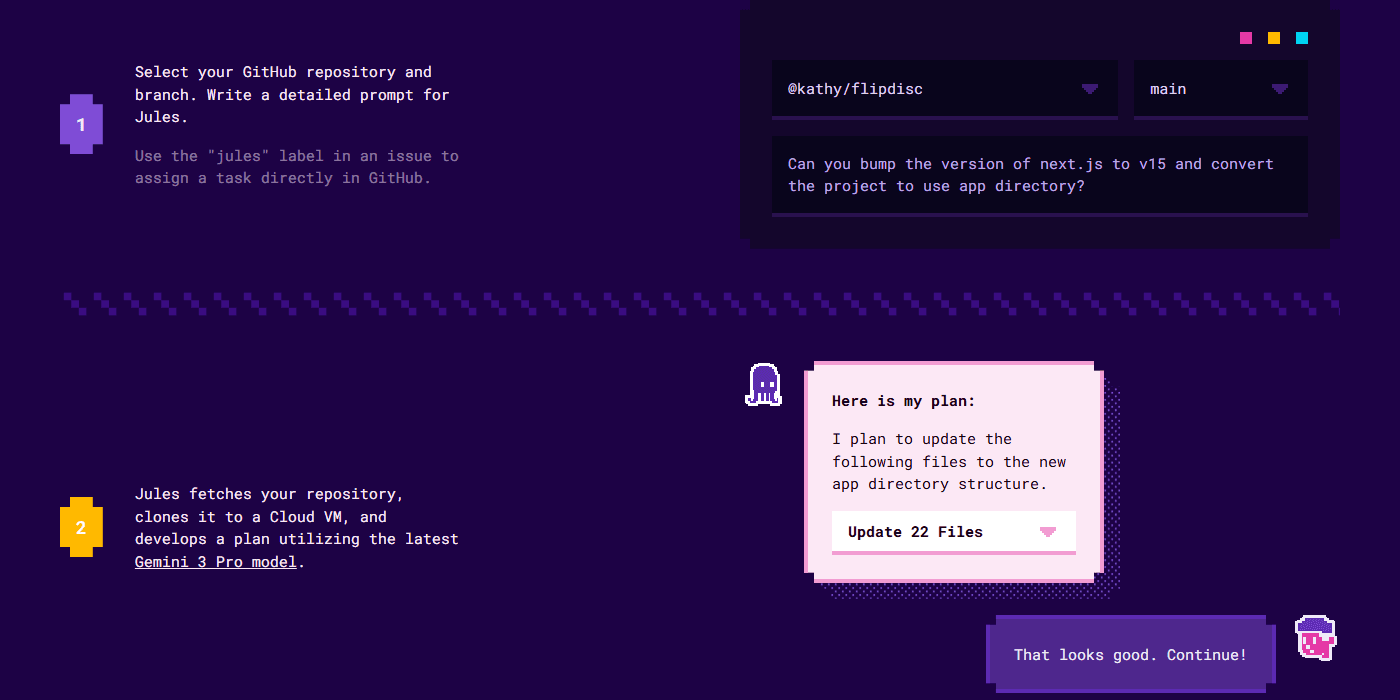
This is Jules’ own documented example flow, prompt and plan verbatim:
I plan to update the following files to the new app directory structure.
> Update 22 Files
[Approve] [Request changes]
Note what’s absent: no code has been written yet. Jules treats the plan as a real checkpoint, not a formality — you’re approving a scope and an approach, not rubber-stamping a fait accompli. That’s the same discipline Claude Code and Codex both apply, and it’s what makes fully unattended, scheduled runs trustworthy enough to leave alone.
a/jules b/claude-code
Read the full Claude Code review. Both are agentic and plan-then-execute, but Jules is cloud-only and async by design, while Claude Code is terminal-native and built for live, steerable sessions.
Verdict: Jules for GitHub-native background maintenance you can queue and forget. Claude Code for real-time, steerable, terminal-first work where you want to watch and redirect as it goes.
a/jules b/openai-codex
Read the full OpenAI Codex review. Codex cloud and Jules solve a similar problem — background, delegated tasks — but Codex is one surface inside a much larger multi-tool product, while Jules is built around async delegation from the ground up.
Verdict: Jules if async GitHub delegation is genuinely your whole use case. Codex if you also want a live local agent and don’t mind a bigger, more complex product to learn.
a/jules b/cursor+copilot
Read the full Cursor review and GitHub Copilot review. Neither is really a competitor to Jules in the strict sense — they’re editor-native tools for the moments you’re actively typing, which Jules doesn’t touch at all.
Verdict: not really a choice between them — Jules for the tasks you’d rather not sit through, Cursor or Copilot for the moments you’re actively at the keyboard. Most GitHub-heavy teams end up running one of each.
Jules is genuinely good at what it does, but the scope is narrower than its competitors and a few limits are worth knowing before you commit a workflow to it.
There’s no GitLab, Bitbucket, or self-hosted git support — GitHub is the only connected source today. Google’s own documentation is explicit that only English is officially supported at this time, which matters if your team works in another primary language.
Google’s own docs state plainly that paid Jules plans currently require a Google AI subscription tied to an individual @gmail.com-style account. Workspace and enterprise accounts don’t have an upgrade path yet — Google says they’re working on it, but if you’re a business user who needs more than the free tier’s 15 tasks/day today, you’re filling out an interest form and waiting.
Jules explicitly does not support long-lived commands like npm run dev in setup scripts — discrete install/test commands only. If your workflow depends on watching a dev server respond in real time, Jules isn’t the tool for that step.
If your Google One plan is shared with family members, Jules task limits are not pooled — each person gets their own individual allowance under the same subscription, which is worth knowing before you assume a family Ultra plan gives one power user 300 tasks/day to themselves.
Despite reaching general availability back in August 2025, Jules’ own FAQ still describes it as “currently in Public Beta.” Individual features — the REST API especially — are explicitly labeled alpha, with the caveat that specifications, API keys, and definitions may still change before stabilization.
Jules, Codex CLI, and a growing list of other agents all read AGENTS.md automatically. Writing one good file per repo briefs every compatible agent you run against that codebase — it’s quickly becoming a de facto standard worth maintaining regardless of which single tool you prefer.
Skip jules.google.com entirely for routine work — label an issue “jules” and let Jules comment and link its PR automatically. It keeps the whole workflow inside GitHub, where the rest of your team already lives.
Jules accepts image uploads (PNG/JPEG, 5MB total) at task creation — a UI mockup, a screenshot of a visual bug, or a design reference measurably improves output on front-end tasks. Images only attach at initial task setup, not in follow-ups, so front-load them.
The built-in Performance, Design, and Security scheduled-task templates (borrowed from Google’s Stitch team) are a fast way to get continuous maintenance running without writing your own prompts from scratch. Start there, then customize once you see what each one actually surfaces.
If you find yourself starting Jules tasks the same way repeatedly, that’s the signal to move to the REST API. Three lines of curl can do what used to be a manual repo-selector-and-prompt-box routine, and it’s the only path to wiring Jules into your own CI or bots.
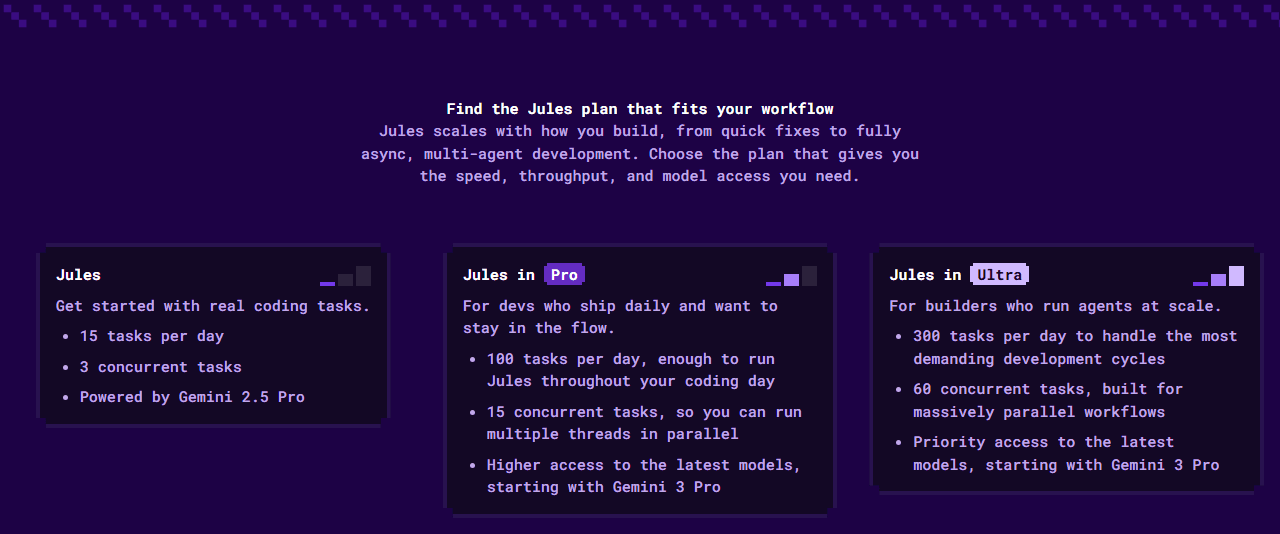
Jules has three tiers, and — unlike every other tool in this comparison set — the paid ones aren’t sold as a standalone Jules subscription. They’re a benefit bundled into Google’s broader Google AI Pro and Google AI Ultra plans.
Jules (Free) gives every user 15 tasks per day on a rolling 24-hour window, 3 concurrent tasks, running on Gemini 2.5 Pro — no credit card, no trial expiration. For evaluating Jules on real work, or for light personal use, this is the most generous free tier of any tool reviewed on this site.
Jules in Pro comes with a Google AI Pro subscription and raises the ceiling to 100 tasks/day and 15 concurrent tasks, with higher access to the latest models starting with Gemini 3 Pro. On Google’s own pricing page (checked live, Canadian pricing shown) Google AI Pro is listed at CA$26.99/month; Google has published U.S. list pricing for this tier at $19.99/month since Google AI Pro’s 2025 debut at Google I/O.
Jules in Ultra comes with a Google AI Ultra subscription: 300 tasks/day, 60 concurrent tasks, and priority access to the newest models. Google’s pricing page lists Ultra starting from CA$139.99/month; the U.S. list price has been $249.99/month since launch. Both Pro and Ultra also unlock expanded limits across Gemini, Google Antigravity, and AI Studio — Jules is one benefit among several in a much larger AI subscription, not a line item you pay for on its own.
Jules task limits are not shared or pooled on a family Google One plan — each family member gets their own individual task allowance. And per Google’s own FAQ, paid Jules access currently requires an individual @gmail.com-style account; Workspace and enterprise upgrade paths aren’t live yet.
bench –plan=all –metric=tasks,concurrency july 2026
It’s a real, ongoing free plan — 15 tasks per day and 3 concurrent tasks with no expiration date and no credit card required. Paid Pro and Ultra tiers exist for higher volume, but Free isn’t a trial that runs out.
No — GitHub is currently the only supported source for both the web app and the REST API. If your team is on GitLab or Bitbucket, Jules isn’t usable today regardless of which plan you’re on.
Not yet in a standard way. Paid Jules plans currently require an individual Google AI Pro or Ultra subscription tied to a personal @gmail.com-style account. Google has said it’s working on upgrade paths for Workspace and enterprise accounts, and business users can fill out an interest form in the meantime.
No. Google’s documentation states plainly that Jules does not use private repository content to train its models — privacy is described as a core design principle, separate from whatever training settings apply to Gemini elsewhere in Google’s consumer products.
Gemini’s chat interface answers questions and writes snippets you copy-paste yourself. Jules is agentic: it clones your actual repository into a real VM, makes the change directly in your codebase, runs your tests, and hands you a pull request. It’s a different category of tool, not a different UI on the same thing.
No. Jules’ documentation is explicit that long-running processes such as npm run dev or watch scripts aren’t supported in setup scripts — use discrete install and test commands instead. This is a real limitation if your validation workflow depends on a live running server.
Jules earns its place on the strength of one thing most competitors don’t offer at all: a genuinely usable free tier, backed by a fast, well-documented CLI and API, and a GitHub-native workflow so tight you can run the entire thing from an issue label. Scheduled and suggested tasks turn it into something closer to ongoing infrastructure than a one-off tool, and the disposable-VM-per-task model is a sound security default.
It loses points on scope and access. No live pairing, GitHub only, English only, and — for now — no real path for Workspace or enterprise teams to pay for more than the free tier. Those are all things Google has signaled it’s working on, not permanent ceilings, but they’re real today. If your whole workflow already lives on GitHub and you’re comfortable with async delegation, Jules is the best free way into this category. If you need live editing, multi-host git support, or a straightforward business seat you can buy today, look at Claude Code or Codex instead.
Every verified price, limit, and model change we have tracked for Jules.
One email when Jules changes price or limits. No account, no spam.