Shutdown data checked Oct 26, 2026 · 41 apps tracked · 20 dying now · next: Crunchyroll (Nintendo Switch app) in 3 days
Shutdown data checked Oct 26, 2026 · 41 apps tracked · 20 dying now · next: Crunchyroll (Nintendo Switch app) in 3 days
AI Tool
OC
OpenAI Codex
OpenAI
OpenAI Codex
OpenAI's agentic coding platform — CLI, desktop app, Chrome extension, IDE plugins and mobile — that writes, reviews and now operates software autonomously on the GPT-5.6 model family.
OpenAI released Codex CLI on April 16, 2025, as an open-source coding agent that runs locally in the terminal — TechCrunch’s Kyle Wiggers covered the debut the same day. It was a narrow, developer-focused tool: connect OpenAI’s models to local code and command-line tasks, let it write and edit files, run commands, and stay entirely on your machine. A month later, on May 16, 2025, OpenAI announced a separate research preview called Codex Cloud, powered by codex-1, a version of the o3 reasoning model tuned specifically for software engineering. It ran in isolated cloud sandboxes rather than your terminal, and ChatGPT Plus users got access the following month.
For most of 2025, Codex CLI and Codex Cloud were two related but distinct products. That changed fast starting in 2026. OpenAI shipped a desktop Codex app in February 2026 built to manage multiple coding agents over longer stretches, alongside two model updates in the same month: GPT-5.3-Codex on February 5, then GPT-5.3-Codex-Spark a week later — a lower-latency variant that ran on Cerebras hardware and was reportedly about 15x faster than earlier Codex models. GPT-5.4 followed on March 5. Later that March, OpenAI announced plans to fold the ChatGPT desktop app, Codex, and ChatGPT Atlas into a single “superapp,” alongside an agreement to acquire Python tooling company Astral. Reuters reported in April 2026 that competitive pressure from Anthropic’s Claude Code was a direct factor in redirecting OpenAI’s resources toward Codex and enterprise tooling. The merge completed on July 9, 2026, when the standalone Codex desktop app was folded into the main ChatGPT desktop app.
The upshot: “Codex” today isn’t one product, it’s a brand spanning a CLI, an IDE extension, a cloud task runner, a desktop app, a web app, and — as of March 2026 — a dedicated application-security agent. All of it now runs on the GPT-6 model family (Astra, Sol, Luna) and shares usage limits with ChatGPT’s broader “Work mode” agentic features. That’s a very different shape than it had a year ago, and it’s worth understanding before you pick a plan.
NOTE · adoption, for context
Codex crossed 1 million developers in the month before its February 2026 desktop launch. After GPT-5.3-Codex shipped, Fortune reported 1.6 million weekly active users at companies including Cisco, Nvidia, Ramp, Rakuten, and Harvey. By mid-March 2026, usage had passed 2 million weekly active users — up roughly fivefold since the start of the year, and reportedly up from about 5% of Claude Code’s usage to roughly 40% between September 2025 and January 2026.
What Codex actually is
Codex is OpenAI’s agentic coding system, and today it spans more entry points than any competitor covered on this site:
Codex CLI — a terminal agent you install with a curl script, npm, or Homebrew
Codex IDE extension — works inside VS Code, Cursor, Windsurf, VS Code Insiders, plus native integrations for Xcode and JetBrains IDEs
Codex cloud — isolated cloud environments that run tasks in parallel, triggerable from the web, GitHub, Linear, or Slack
ChatGPT desktop app — as of July 9, 2026, Codex mode lives inside the main ChatGPT app for macOS and Windows rather than as a separate app
ChatGPT web and mobile — Work mode in the browser, plus Codex access on iOS
All of it runs on one shared “App Server” architecture that OpenAI documented in February 2026 — the same engine powers the CLI, the VS Code extension, the web app, the desktop apps, and third-party IDE integrations, keeping long-running sessions and approval requests consistent no matter which surface you’re using. A Windows-native build shipped in March 2026 with PowerShell support and an OS-level sandbox using restricted tokens and filesystem ACLs, so Windows isn’t a second-class citizen the way it is with some competing tools.
First five minutes in action
The fastest path is the CLI. One command installs it on macOS or Linux:
terminal
curl -fsSL https://chatgpt.com/codex/install.sh | sh
codex
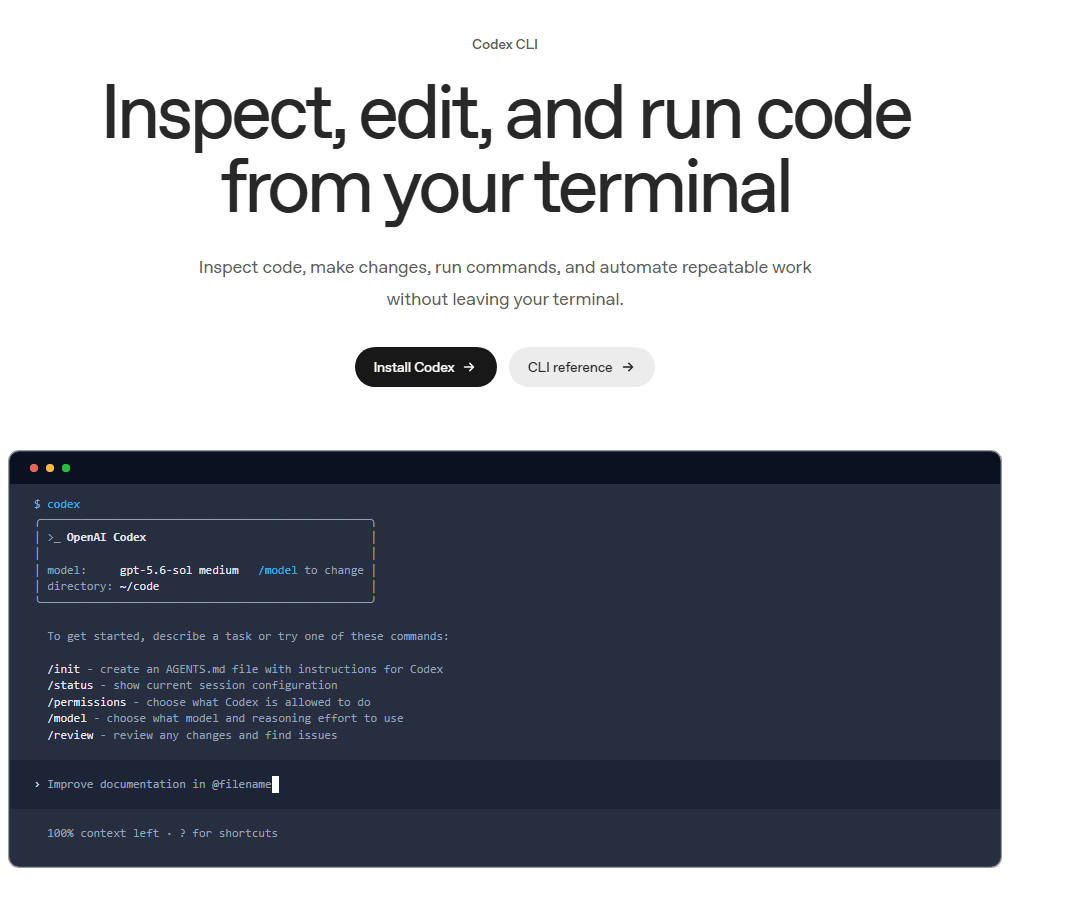
npm (npm install -g @openai/codex) and Homebrew installs work too, and there’s a native Windows path. The first run drops you into a boxed terminal UI showing the active model (gpt-5.6-sol medium by default) and the working directory, with a handful of slash commands surfaced immediately: /init to generate an AGENTS.md file, /status for session info, /permissions to control what Codex can touch, /model to switch models or reasoning effort, and /review to audit changes before they ship.
AGENTS.md plays the same role CLAUDE.md plays for Claude Code — a persistent instruction file at your repo root that Codex reads automatically on every session, describing your stack, conventions, and what not to touch. It’s genuinely cross-tool: several competitors including Jules also read AGENTS.md, so one file can brief multiple agents.
Unlike Claude Code, which runs exclusively on Claude, or Cursor, which lets you pick between vendors, Codex runs on OpenAI’s own models exclusively — but there are now several to choose from, and picking the right one materially changes both quality and how fast you burn through your usage limits.
GPT-6 Astra — the flagship: strongest for complex coding, computer use, research, and cybersecurity tasks
GPT-6 Sol — the balanced default, competitive with the older GPT-5.6 Sol at meaningfully lower cost
GPT-6 Luna — fastest and cheapest in the family, aimed at lighter or high-volume workloads
GPT-5.3-Codex-Spark — a low-latency model on Cerebras hardware, in research preview and limited to ChatGPT Pro subscribers
Reasoning effort is a separate dial from the model itself, with six levels — Low, Medium (default), High, Extra High, Max, and Ultra. Ultra mode is qualitatively different: it delegates work across subagents automatically rather than running as a single agent, which OpenAI recommends for large tasks that split cleanly into parallel chunks. You can set both from the CLI directly:
terminal
codex –model gpt-5.6-sol
codex exec -m gpt-5.6-terra “Review the current changes”
Practically: Terra is the right default for most day-to-day work, Sol earns its cost on genuinely hard problems, and Luna is what you reach for when you’re burning through a lot of small, repetitive tasks and don’t want to eat your Sol allowance doing it.
The IDE extension and Codex cloud, in depth
The CLI is the original surface, but the IDE extension and cloud are where Codex has invested most in 2026.
IDE extension
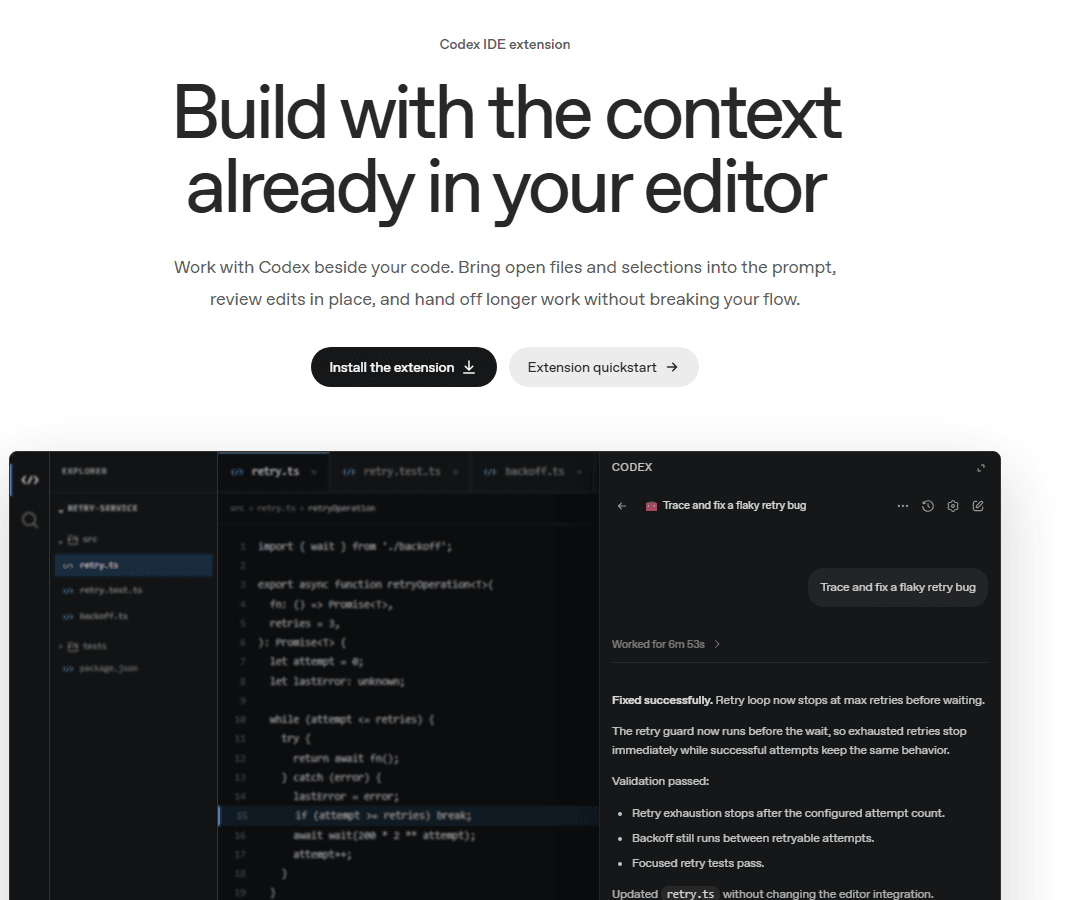
Installed into VS Code, Cursor, Windsurf, or via native plugins for Xcode and JetBrains, the extension pulls in whatever you already have open — active files, a text selection, a recent chat — without you re-explaining context. Edits show up as a focused diff next to your code rather than in a separate pane, and you can escalate a task to Codex cloud mid-conversation if it turns out to be bigger than a quick edit.
codex · codex-ide-extension.png
fig · Codex IDE extension reviewing a fix in place · source: developers.openai.com/codex/ide
Codex cloud
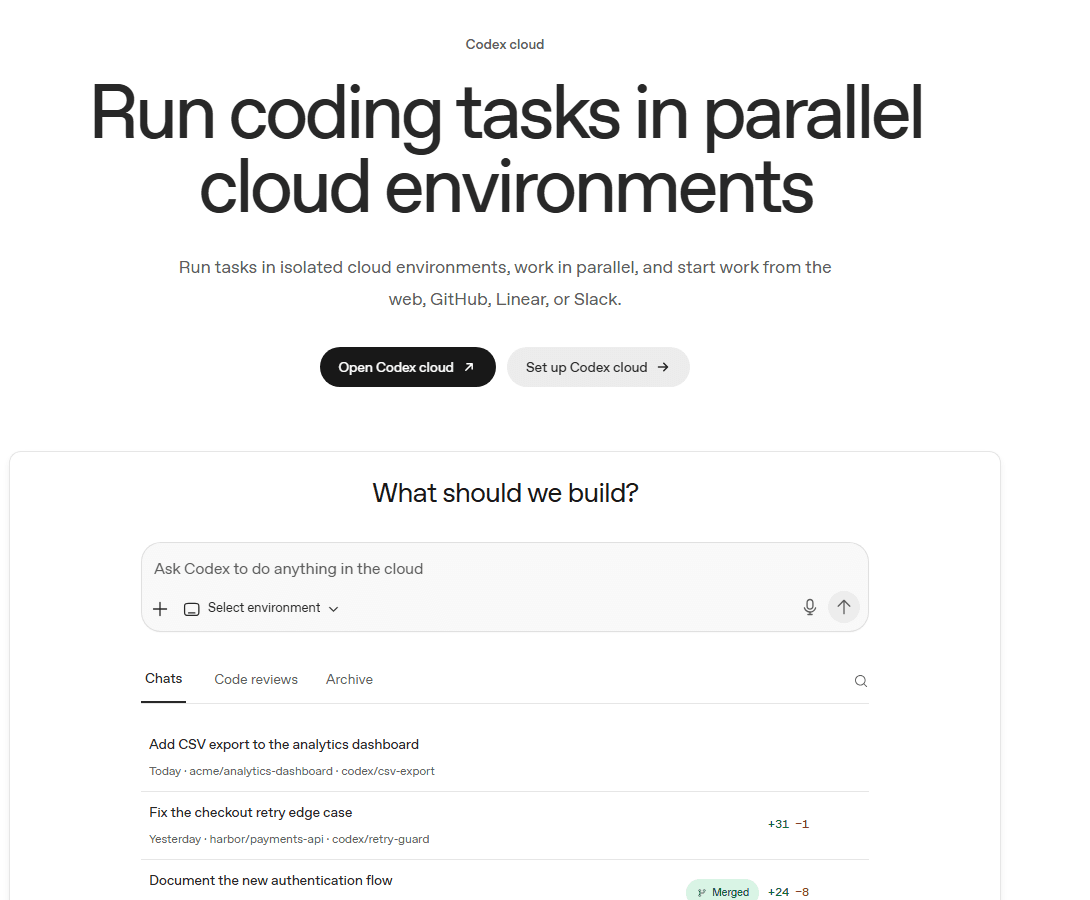
Codex cloud runs tasks in isolated, parallel cloud environments you configure per-repository — dependencies, secrets, setup scripts. You can kick a task off from the web UI, from a GitHub pull request or issue by tagging @codex, from a Linear issue, or from a Slack thread, then walk away. Each environment is reusable, so repeat runs against the same repo don’t pay a cold-start tax every time.
codex · codex-cloud-parallel-tasks.png
fig · Codex cloud running several tasks in parallel · source: developers.openai.com/codex/cloud
Three real workflows, end-to-end
case-study #01 · terminal-native refactor
Migrate an Express API off a deprecated ORM pattern
The brief: a mid-size API had 40+ files using a Prisma client pattern the team was retiring. Run codex from the repo root, describe the target pattern, and let the plan-then-execute loop take over. Codex’s plan step listed every file it intended to touch before writing anything, flagged two files with dynamic query builders for manual review, and proposed running the test suite after each batch.
What stood out: the /review command run afterward caught an edge case Codex’s own execution had introduced — a missing null check on a newly async code path — before it ever reached a PR. That built-in self-review step is one of the more genuinely useful CLI additions in 2026.
// scope: 40+ files · self-caught regression before review · plan approved in one pass
case-study #02 · in-editor bug fix
Trace and fix a flaky retry bug from the IDE extension
A retry helper occasionally kept waiting after it should have given up — a classic ordering bug. With retry.ts and its test file open, the prompt was simply “trace and fix a flaky retry bug.” Codex worked for just under seven minutes, then reported back: the retry guard now runs before the wait, so exhausted retries stop immediately while successful attempts keep the same behavior.
The validation summary listed exactly what it checked — retry exhaustion stops after the configured attempt count, backoff still runs between retryable attempts, and the focused retry tests pass — before showing a two-line diff for approval. No unrelated files touched, no unrequested refactor.
// runtime: 6m 53s · 2 files touched · diff limited to the actual bug
case-study #03 · parallel cloud delegation
Run three unrelated tasks in the background at once
Codex cloud’s real value shows up when you stop treating it as one conversation. Three tasks queued in parallel environments: adding CSV export to an analytics dashboard, fixing a checkout retry edge case in a payments API, and documenting a new authentication flow — the last one triggered directly from a GitHub issue rather than the web UI. Each ran in its own isolated environment against its own repo, so none of the three could interfere with the others’ dependencies or state.
The checkout fix came back first, with a +31/−1 diff and a linked pull request ready for review. The CSV export task and the docs task followed within the hour. None of them required babysitting — the only manual step was opening the resulting PRs.
// 3 tasks parallel · fastest returned a mergeable PR in under an hour
Real prompt, real output
This is the actual documented interaction from OpenAI’s own IDE extension walkthrough — not a paraphrase:
codex ide · prompt
Trace and fix a flaky retry bug
codex · result (6m 53s)
Fixed successfully.
Retry loop now stops at max retries before waiting.
The retry guard now runs before the wait, so exhausted retries stop
immediately while successful attempts keep the same behavior.
Validation passed:
– Retry exhaustion stops after the configured attempt count.
– Backoff still runs between retryable attempts.
– Focused retry tests pass.
Updated retry.ts without changing the editor integration.
Edited retry.ts +2 -2
Three things worth noting: the summary states what changed and why in plain language before showing the diff, it explicitly calls out what it verified rather than just claiming success, and the diff itself is two lines — the scope matched the bug, not an opportunistic rewrite.
Security and enterprise: Codex Security, RBAC, and the fine print
OpenAI introduced Codex Security in March 2026 — a dedicated application-security agent, not a coding assistant with a security flag turned on. It builds a threat model of a repository before hunting for vulnerabilities, then validates suspected issues in sandboxed environments to cut false positives before proposing patches. It’s derived from an earlier internal project called Aardvark, and had been in private beta since 2025 with testers including Netgear.
OpenAI said it tested the tool on 1.2 million commits over 30 days, finding nearly 800 critical-severity and more than 10,000 high-severity issues across projects including Chromium, OpenSSL, PHP, the Git service GOGS, and GnuTLS — with beta testing reportedly cutting false positives by more than 50%. CSO Online reported that 14 of the vulnerabilities it found in open-source projects received official CVE identifiers. In June 2026, Codex Security and GPT-5.5-Cyber were both used at the launch of the “Patch the Planet” initiative to help open-source maintainers find and fix vulnerabilities at scale.
WORTH KNOWING
SecurityWeek reported in March 2026 that researchers had found — and OpenAI patched — a vulnerability in Codex’s cloud execution environments where a maliciously crafted GitHub branch name could inject commands during task setup and retrieve GitHub authentication tokens. It’s fixed, but it’s a useful reminder that any agent running code against your live repos and credentials is a real attack surface, not just a productivity tool.
On the enterprise side, Business and Enterprise/Edu plans add SAML SSO, MFA, SCIM provisioning, domain verification, role-based access control, a Compliance API with audit logs, and requirements.toml-based managed configuration policies that admins can push across a workspace. Enterprise and Edu customers on flexible pricing aren’t bound by the fixed per-seat rate limits that apply to individual and Business plans — usage there scales against purchased credits instead.
Codex vs Claude Code
a/openai-codex b/claude-code
Read the full Claude Code review. Both are agentic, terminal-capable coding systems with CLI, IDE, and cloud surfaces — the real difference is breadth versus depth.
codex wins at
genuine free tier — Claude Code has none
more surfaces: CLI, IDE, cloud, desktop, web, mobile
native GitHub/Linear/Slack task triggers
dedicated Codex Security scanning agent
lower entry price ($8-20/mo vs $20/mo minimum)
claude-code wins at
deeper subagent orchestration and hooks
multi-model reasoning depth (Opus tier)
tighter, more terminal-native design philosophy
simpler, more stable pricing structure
MCP ecosystem maturity
Verdict: Codex if you want the broadest coverage from a single ChatGPT account and value the free/low-cost entry points. Claude Code if you want the single most autonomous terminal agent and don’t mind paying a flat $20+/month for it.
Codex vs Cursor
a/openai-codex b/cursor
Read the full Cursor review. Cursor is a purpose-built AI editor; Codex’s IDE extension bolts agentic coding onto whatever editor you already use, including Cursor itself.
codex wins at
free tier and lower-cost entry plans
true background/cloud task delegation
works inside Cursor, VS Code, Xcode, and JetBrains alike
enterprise security and compliance depth
cursor wins at
tab-complete and next-edit prediction while typing
multi-vendor model picker (Claude, Gemini, GPT)
codebase-wide indexing purpose-built for the editor
faster, more polished onboarding for editor-first devs
Verdict: Cursor if inline autocomplete while typing is your main workflow. Codex if you want one agent that follows you between editor, terminal, and cloud without buying a second subscription.
Codex vs GitHub Copilot
a/openai-codex b/github-copilot
Read the full GitHub Copilot review. Copilot is the cheap, mature, editor-native suggestion engine; Codex is the more autonomous agent with a bigger surface footprint.
codex wins at
autonomous multi-file and cloud tasks
dedicated security-scanning agent
Slack, Linear, and Render integrations beyond GitHub
free tier that isn’t a time-limited trial
copilot wins at
price at $10/mo for individuals
native PR review inside GitHub itself
broader IDE support maturity (JetBrains, Visual Studio)
simplicity — one product, one price, no model-tier maze
Verdict: Copilot if you want cheap, mature autocomplete tightly bound to GitHub. Codex if you want an agent that can also run unattended in the cloud and audit your codebase for vulnerabilities.
Where Codex gets it wrong
No honest review skips the rough edges, and Codex has a few that are specific to how fast it has grown.
The model-naming maze
GPT-6 Astra, GPT-6 Sol, GPT-6 Luna, plus the previous-generation GPT-5.6 Sol/Terra/Luna and GPT-5.3-Codex-Spark research preview, are all selectable at once, each with different capability, speed, and credit cost. New users have no obvious default beyond “whatever’s selected,” and picking wrong quietly burns through your usage allowance faster than it should.
Usage limits are shared, and that’s not always obvious
Codex usage draws from the same pool as ChatGPT’s broader Work mode, and — where priced — features like ChatGPT for Excel and Workspace Agents. If you’re using ChatGPT heavily for non-coding work on the same plan, you may hit your Codex limit faster than the sticker price implies. The rate card documentation is thorough, but it takes real reading to understand before you commit to a plan.
The Pro jump is steep
Plus is $20/month. The next tier up, Pro, starts at $100/month for 5x the usage, or $200/month for 20x — there’s no middle ground. That mirrors the exact complaint developers have about Claude Code’s Max tiers, and it’s the same math problem: casual users are fine on the cheap end, serious daily users get pushed to a $100-200/month decision fast.
A real security incident, now patched
The GitHub branch-name injection vulnerability disclosed in March 2026 was fixed quickly, but it’s a fair data point on how much attack surface a cloud-execution coding agent actually carries. If you’re granting Codex cloud access to private repos with real credentials, treat that access with the same care you’d give any other CI system with write access.
Product identity is in flux
Folding the standalone Codex desktop app into ChatGPT proper (July 2026) and the earlier plan to merge Codex, the ChatGPT app, and Atlas into one “superapp” make sense from OpenAI’s side, but from a user’s seat it means Codex isn’t a fixed target — the surfaces, naming, and even the app you open keep shifting. If you want a tool that looks the same in a year, this is worth weighing.
Power-user tips
TIP 01 · Write a real AGENTS.md, and nest it for big repos
Treat AGENTS.md like a proper system prompt: stack, conventions, files to leave alone, what to ask before doing. For large monorepos, nest additional AGENTS.md files in subdirectories so Codex only loads the context relevant to the part of the repo it’s actually touching — it also stretches your usage limits further.
TIP 02 · Default to Terra, reach for Sol deliberately
GPT-6 Sol is competitive with the older GPT-5.6 Sol at a fraction of the credit cost. Save GPT-6 Astra (and definitely Spark, while it’s Pro-only) for the tasks that actually need flagship reasoning — architecture decisions, gnarly bugs, security review — not routine edits.
TIP 03 · Use the “jules” pattern in reverse — label GitHub issues for @codex
Tag @codex in a GitHub PR or issue to delegate work without opening a terminal or the web UI at all. Combined with automatic PR reviews, this turns Codex into a background participant in your normal GitHub flow rather than a separate tool you have to remember to open.
TIP 04 · Check /status before a long session
/status in the CLI shows your current session configuration and remaining usage headroom. Running it before kicking off a large refactor avoids getting cut off mid-task on a big multi-file job.
TIP 05 · Reuse cloud environments instead of rebuilding them
Codex cloud environments persist per repository. Configure setup scripts and dependencies once, and every subsequent cloud task against that repo starts warm instead of paying a full dependency-install tax on every run.
Pricing, in real terms
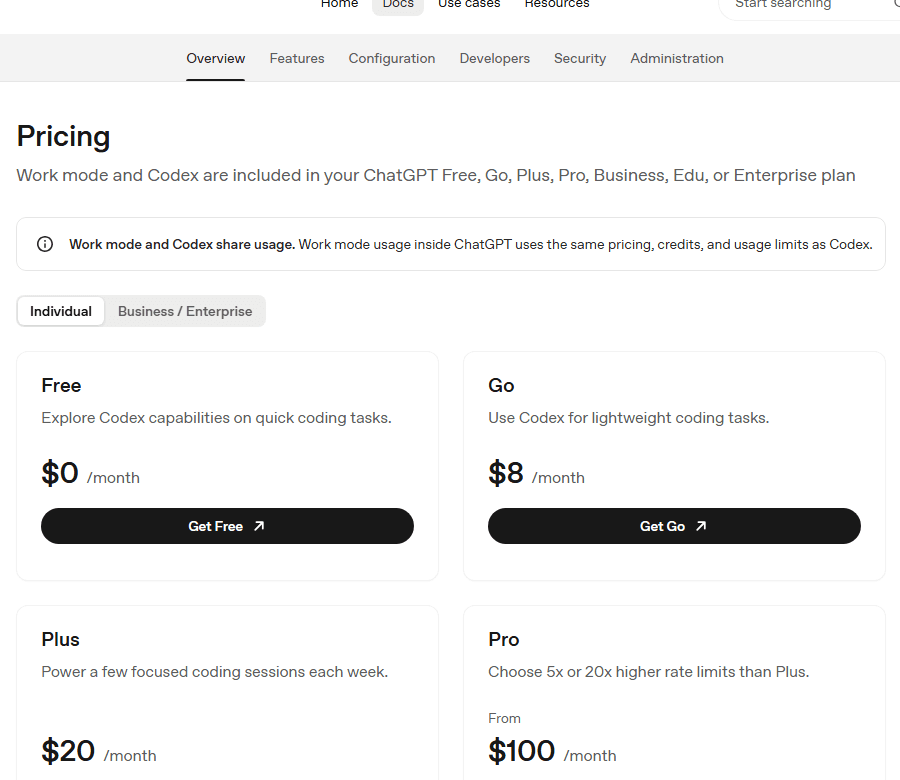
Codex is included across every ChatGPT tier, from Free through Enterprise, which is the single biggest difference from Claude Code and most of its other direct competitors.
Free ($0/mo) gives you Codex access for exploring quick coding tasks — a real, ungated free tier rather than a time-boxed trial. Go ($8/mo) is built for lightweight coding use. Plus ($20/mo) is the first tier with full access across the web, CLI, IDE extension, and iOS, plus cloud-based integrations like automatic code review and Slack.
Pro starts at $100/month for 5x the usage limits of Plus, or $200/month for 20x — the same two-tier structure Claude Code uses for its Max plans, confirmed directly by OpenAI’s support documentation. As of September 10, 2026, OpenAI paused new sign-ups to the $200/mo 20x tier; existing subscribers keep it, and new users top out at the $100/mo 5x tier. Pro also unlocks GPT-5.3-Codex-Spark in research preview.
Business ($20/user/month billed annually, 2+ seats, or $25/user/month billed monthly) adds larger cloud VMs, a dedicated workspace with SAML SSO and MFA, and no default training on business data. Enterprise and Edu plans are custom-priced and add SCIM, EKM, domain verification, RBAC, audit logs via the Compliance API, and data retention/residency controls.
API key access is also available for CI and shared automation environments, billed per token against the standard rate card rather than a monthly subscription — useful for variable workloads where a flat plan would overpay.
Full “superapp” consolidation — the ChatGPT desktop app, Codex, and ChatGPT Atlas continue merging into one product surface, following the July 2026 Codex-into-ChatGPT-desktop merge.
Astral integration — OpenAI’s planned acquisition of Python tooling company Astral is expected to bring faster dependency and environment tooling directly into Codex’s local and cloud environments.
GPT-5.3-Codex-Spark graduation — the Cerebras-hosted low-latency model is still a Pro-only research preview; broader availability and API access are the logical next step.
Codex Security expansion — following the “Patch the Planet” initiative, expect deeper integration of security scanning into the default Codex cloud workflow rather than a separate opt-in product.
Legacy rate-card migration — OpenAI has flagged that a subset of Enterprise customers still on the old rate card will be migrated to the new token-based credit pricing used across the rest of the product.
FAQ
Is Codex actually free, or is it a trial?
It’s a real free tier, not a time-boxed trial — OpenAI’s own pricing page lists Free at $0/month alongside Go, Plus, Pro, Business, and Enterprise. Usage limits on Free are the lowest in the lineup and reset periodically, but there’s no expiration date on the plan itself.
Do I need ChatGPT Plus to use the CLI?
No. Codex CLI works with Free, Go, or Plus ChatGPT accounts (and Business/Enterprise), each with different usage ceilings. Plus is the first tier that also includes cloud-based integrations like automatic code review and Slack alongside the CLI, IDE extension, and web access.
What’s the difference between Codex and Codex cloud?
Codex is the umbrella brand. Codex cloud specifically refers to tasks run in isolated cloud environments — as opposed to the CLI or IDE extension, which work against your local machine. You can start a task locally and hand it off to Codex cloud mid-session, or trigger cloud tasks directly from GitHub, Linear, or Slack.
Does Codex train on my code?
By default, OpenAI does not use inputs or outputs from business users — ChatGPT Business, Enterprise, or the API — to train its models. For individual Plus and Pro accounts, conversations may be used to improve models unless you turn off training in ChatGPT’s data controls settings.
How does Codex compare to Jules for background tasks?
Both can run tasks unattended in the cloud and open pull requests, but Jules is purpose-built around that async, GitHub-native workflow from the ground up (see our Jules review), while Codex cloud is one of several surfaces inside a much larger product. If background delegation is your only use case, Jules is the more focused tool; if you also want a terminal and IDE agent from the same account, Codex covers more ground.
Is the recent security vulnerability still a risk?
No — the GitHub branch-name injection issue that SecurityWeek reported in March 2026 has been patched. It’s worth knowing about mainly as a reminder that cloud-execution agents with repo and credential access are a real attack surface, and standard hygiene (no secrets committed to the repo, reviewed third-party dependencies) still applies.
The most widely available agentic coding stack, built on the widest ChatGPT install base.
Codex earns its place near the top of this category on sheer reach: a genuine free tier, five distinct surfaces sharing one account, a dedicated security-scanning agent with real published results, and enterprise controls that match anything Claude Code or Copilot offer. For teams and individuals who already live inside ChatGPT, nothing else in this category covers as much ground from one subscription.
It loses ground on focus. The model-naming maze (Sol/Terra/Luna/Spark/legacy GPT-5.x), shared usage pools across ChatGPT’s other agentic features, and a product surface that’s still visibly reshaping itself month to month all cost real points against Claude Code’s tighter, more predictable design. If you want the single most autonomous, most opinionated terminal agent, Claude Code still edges it out. If you want the broadest, most flexible entry point into agentic coding — including a free one — Codex is the one to install first.
Every verified price, limit, and model change we have tracked for OpenAI Codex.
2 weeks ago · FEATURE
Anant Kumar builds tools to compare loan valuations and analyze credit agreements, using Codex for code review and faster follow-ups. Source: OpenAI. — source
3 weeks ago · FEATURE
Across recruiting, engineering, and operations, Oracle turns specialist knowledge into fast, repeatable workflows with ChatGPT Work and Codex. Source: OpenAI. — source
3 weeks ago · PRICE
LegalOn cut estimated daily Codex costs by 65% while maintaining development speed. It matched Astra, Sol, and Luna to tasks and managed budgets strategically. Source: OpenAI. — source
4 weeks ago · FEATURE
We’re collecting real stories of builders, tinkerers, researchers, and creators who are using Codex to do incredible things. If you want to be a part of the next chapter. Source: OpenAI. — source
1 month ago · FEATURE
With Codex, GPT-Live-1, and GPT-6 Astra, Proaction builds, operates, and sells modern fleet management faster. Source: OpenAI. — source
2 months ago · FEATURE
César de la Fuente’s lab uses Codex and ChatGPT to search living and extinct genomes for antimicrobial candidates to fight drug-resistant infections. Source: OpenAI. — source
2 months ago · FEATURE
Engineers at 1Password use Codex to rapidly build new features and internal tools, reaching production-readiness while maintaining rigorous security policies. Source: OpenAI. — source
2 months ago · FEATURE
Status: ResolvedAll impacted services have now fully recovered.Affected components Codex API (Operational). Source: OpenAI.
2 months ago · FEATURE
Status: IdentifiedSome users may encounter errors when using Codex with API authentication. We are working on implementing a mitigation.Affected components Codex API. Source: OpenAI.
3 months ago · FEATURE
OpenAI began a limited preview of an Ultrafast service tier running GPT-5.6 Sol at up to ~14x speed (~750 tokens/sec) on Cerebras hardware. No pricing or GA date announced yet. — source
Watch this tool
One email when OpenAI Codex changes price or limits. No account, no spam.