Runway Gen-3 Pro creative control
Professional AI video generation with Gen-4/Gen-4.5, Motion Brush, Director Mode, and Act-One character animation.

Where Runway came from
Runway was founded in 2018 by Cristóbal Valenzuela, Alejandro Matamala, and Anastasis Germanidis — three graduates of NYU's Interactive Telecommunications Program. Their early work was academic: research into generative models for creative media, released as open-source tools that artists and researchers could run locally. The founders cared about the creative process first, the technology second. That DNA is still visible in the product today.
The company built its name inside the video editing world before it became an AI video generator. The original Runway application was a browser-based video editor with AI-assisted features: background removal, object tracking, rotoscoping. These weren't novelties — they were genuinely useful production tools that replaced hours of Premiere or After Effects work. That reputation in the working creative community gave Runway a launch platform that pure-research labs lacked.
Gen-1 (2023) was the first generative video model — video-to-video style transfer that could transform footage into a painting or a different visual register. Gen-2 followed with text-to-video and image-to-video. Gen-3 Alpha, launched mid-2024, was the step that made the industry pay attention: 720p clips, more coherent motion, and a platform that felt built for professionals rather than hobbyists. Gen-4 arrived March 2025. Gen-4.5 followed in early 2026 and remains the flagship model at the time of this review.
Runway has raised over $230M from investors including Google, Salesforce Ventures, and a16z. The company remains independent despite acquisition rumors — a strategic choice that keeps the product roadmap focused on creative tools rather than enterprise sales cycles. As of 2026, Runway's models power internal tools at major studios and advertising agencies who use the API rather than the consumer interface.
What Runway actually is
Runway is a browser-based creative platform built around AI video generation. There is no app to download — you work in the browser, and everything renders on Runway's servers. That architecture has trade-offs: you're dependent on their uptime, your files live in their cloud, and the quality of your output is tied to how their credits system scales for your budget. The upside: generation runs on serious hardware without owning it, and the interface is approachable for creatives who don't want to manage local model installations.
The core offering is three generation modes:
- Text-to-video — write a prompt, get a 5- or 10-second clip. Gen-4 Turbo runs this; Gen-4.5 handles the highest-quality version.
- Image-to-video — upload a still, Runway animates it. This is where Runway genuinely leads the field: coherent motion from a single image, with control over how elements move.
- Video-to-video — use existing footage as a structural reference while applying motion or style transformations. Useful for stylized commercial work where you're starting from live shot footage.
Around these three modes sits a set of precision control tools — Motion Brush, Director Mode, Act-One, Frames — that collectively explain why professionals choose Runway over cheaper alternatives. The output isn't always the most photorealistic. It's the most steerable.
Gen-3 Alpha to Gen-4: what actually changed
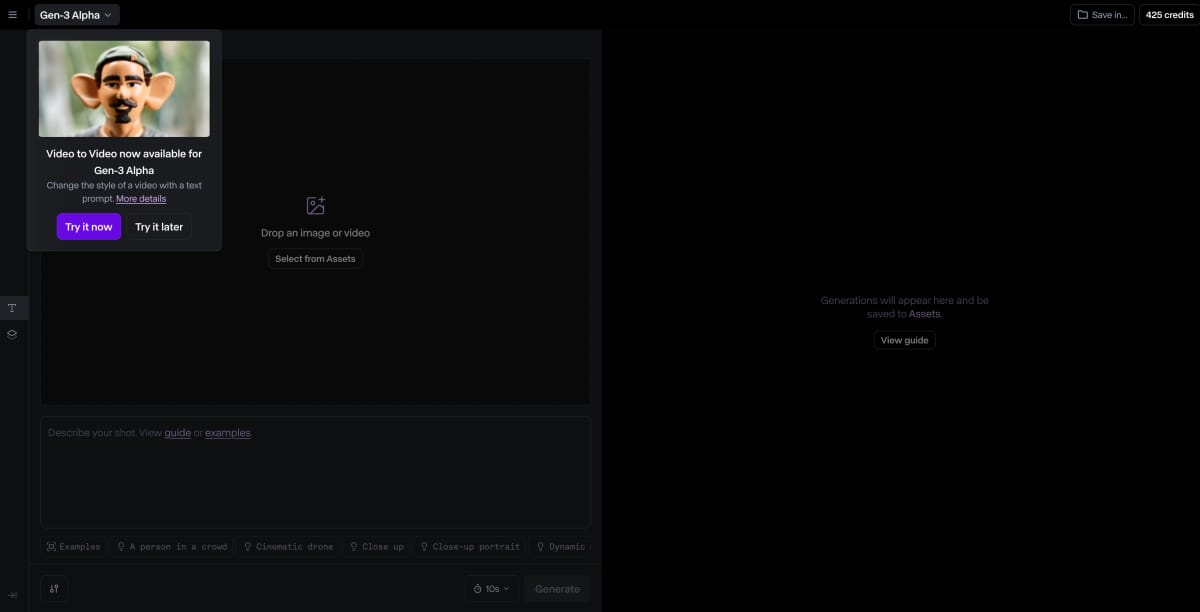
Gen-3 Alpha established Runway's position as a serious production tool. It output 720p clips at 5 or 10 seconds, accepted text or image inputs, and introduced Motion Brush for the first time. The motion quality was impressive for 2024 — characters moved coherently, and you could describe cinematic camera moves in plain language. The limits were also clear: subjects drifted in long clips, environments changed between cuts, and prompt adherence was inconsistent.
Gen-4, released March 2025, addressed the most painful of those limits. The key breakthrough was spatial consistency: objects, backgrounds, and spatial relationships now hold across camera movements. If you establish a room in the first frame, the room looks the same when the camera pans 90 degrees. This sounds basic. In Gen-3, it was a crapshoot. In Gen-4, it's reliable enough to cut between shots.
Gen-4 also introduced a reference-image system: you can supply character or environment references, and the model maintains visual consistency with those references across generations. For branded content or serialized production — where a character has to look the same in every clip — this was a fundamental shift in what AI video could deliver practically.
Gen-4 Turbo is the faster, cheaper variant. It generates a 10-second clip in roughly 30 seconds, approximately five times faster than the standard Gen-4. The quality trade-off is subtle: smoother, more natural motion in Turbo, but slightly less last-frame control for precise out-point composition. For most social and advertising use cases, Turbo is the right default.
Gen-4.5, current as of this review, pushes text-to-video quality further and increases the coherence of complex motion — hair, fabric, liquids — that earlier models rendered as visual noise. The credit cost is higher (25 credits per second versus 5 for Turbo), so you use it selectively: final versions of clips that need to look production-ready, not drafts.
Hands-on: the first session
Landing on Runway for the first time, the interface is dense. There are more tools visible than any single user needs, and the credit system isn't explained until you run out. If you've used Midjourney, the mental model is similar: you have a balance, generation costs from it, and you reload when empty. Unlike Midjourney, the cost per output is variable — generating a 10-second Gen-4.5 clip costs significantly more than a 5-second Gen-4 Turbo clip, and most new users don't do that math until the balance disappears.
The right entry point is image-to-video with Gen-4 Turbo. Upload any still — a photograph, a render, a painting — write a short motion description, and generate. Five seconds later (on Turbo), you have a clip. The gap between a great still and great video is smaller than you expect. A photograph of an empty cafe animates into something that feels like a film scene. Rain on a window actually falls. Fire breathes. This is where the "magic moment" happens for new users, and it happens fast.
Text-to-video requires more iteration. The model is strong on cinematic establishing shots and abstract motion; it struggles with precise narrative action involving multiple characters. A prompt like "a woman walks through a busy train station at dusk" will get you something atmospheric but not necessarily accurate. The key skill Runway rewards is learning to prompt for environments and camera rather than action — then using Act-One or Motion Brush to direct the motion precisely.
125 free credits sounds generous until you generate your first Gen-4.5 clip. At 25 credits per second, a 5-second clip costs 125 credits — the entire free allocation. Start with Gen-4 Turbo (5 credits/second) to develop your prompting before moving to the high-quality models.
The control tools: where Runway earns its price
The generation models are the headline, but Runway's precision tools are the reason working professionals stay on the platform. These are not features you find in competing tools at the same level of maturity.
Motion Brush
Motion Brush lets you paint directly on the input image to assign movement to specific regions. You select an area — the subject's hair, a flag in the background, the surface of water — and define a direction vector and speed value for that region. Up to five independent motion regions can be active simultaneously via Multi-Motion Brush, each with its own parameters. The model respects these constraints: the hair moves, the flag waves, the water ripples, while the rest of the frame stays locked. For product shots, architectural visualizations, and lifestyle content, this is the feature that makes Runway output usable without re-generation loops. No competing tool offers motion painting at this resolution of control.
Director Mode
Director Mode is Runway's camera control system. Instead of hoping a text prompt produces the camera movement you want, Director Mode separates camera motion from subject motion and accepts cinematography terminology: dolly in, tilt up, pan right, rack focus, handheld. You can combine movements with fractional precision — "slow dolly right combined with slight tilt up" — and the model executes them as distinct camera operations rather than blending them into a vague pan. The results aren't always frame-perfect, but they're directionally reliable. For advertising work where a product shot needs a specific reveal move, this is the difference between usable and not.
Act-One
Act-One is Runway's character animation tool. You supply a driving video — your face on a phone camera is enough — and a character reference. Act-One transfers your facial expressions and head movements onto the character with temporal coherence. It's not motion capture at the level of a professional pipeline, but it's motion capture without a professional pipeline. For animated explainer content, stylized character performances, and branded mascot animation, it produces compelling output in minutes rather than days. The key limitation: Act-One performs best on single-character frontal shots; complex multi-character scenes with full body movement are still weak.
Frames
Frames is Runway's image generation model — text-to-still rather than text-to-video. The reason it matters in a video workflow is consistency: if you need a character or environment that will also appear in generated video clips, generating the reference image inside Runway's own ecosystem produces better consistency with downstream video generations than importing an image from Midjourney or Stable Diffusion. Frames is not competitive with Flux or Imagen as a standalone image generator, but as a source of video-ready reference images it serves its purpose cleanly.
Workflows
Workflows is Runway's pipeline automation layer — a visual node editor that lets you chain generation steps, apply transformations, and batch-process assets without manual clicking. A practical example: generate 20 product variation images in Frames, pipe them through image-to-video with a shared motion preset, export to a delivery folder. For agencies running high-volume creative production, Workflows cuts the manual steps that would otherwise make AI generation impractical at scale.
Three real creative workflows, end-to-end
15-second skincare ad from still photography
The brief: take three existing product photography shots and produce a 15-second hero video for a skincare brand's Instagram story. Budget was two hours, not two days.
Shot 1 — moisturizer jar on a marble surface. Uploaded to image-to-video. Motion Brush applied to the cream texture on the jar lid (subtle upward movement) and the background (very slow rightward drift). Director Mode set to a slow dolly-in over 10 seconds. Result: a single 10-second clip that feels like it was shot on a gimbal rig, not generated from a still.
Shot 2 — model's face holding the product. Act-One used with a 20-second driving video of a presenter delivering a single line. The model's expression follows the presenter's; the product stays in the correct position in frame. Convincing enough for social at standard viewing sizes.
Shot 3 — abstract texture close-up. Motion Brush on the texture elements, no camera movement. Five seconds, loopable.
Three clips assembled in the brand's standard editing timeline. Total generation time: 22 minutes. Credit spend: approximately 340 credits (less than one Pro monthly allocation). A comparable live-action shoot, even a minimal one, runs at minimum half a day and a multiple-person crew.
Animatic for a short film pitch
A director needed a pre-visualization animatic to pitch a short film — eight scenes, each 5-10 seconds, conveying camera moves and rough blocking. Traditional animatics are drawn; this one was generated.
Each storyboard panel was fed into image-to-video with explicit Director Mode instructions matching the shot list: "slow push in toward subject, rack focus pulls to background midway." Gen-4 (not Turbo) was used for this workflow because the director needed last-frame control to ensure the end position of each clip matched the start position of the next — essential for visual continuity in the animatic.
The output wasn't photorealistic, and that was fine. The point was communicating camera intention, not visual polish. Eight clips generated, reviewed, and lightly edited. The pitch animatic conveyed the visual language of the film clearly enough that the financier signed off without seeing a single frame of actual production footage.
What Runway could not do: consistent character appearance across all eight shots from the same storyboard panels. Even with reference images provided, subtle drift in the character's face and costume details required accepting the stylized nature of the output. For pre-vis purposes this was acceptable; for a final lookbook it would not be.
Weekly content pipeline for a lifestyle brand
A lifestyle brand needed 12 short video assets per week across Instagram Reels (9:16) and YouTube Shorts. The creative team had photography but no video production resources.
The solution: a Workflows pipeline that ingested weekly product photography, applied a shared Motion Brush preset (ambient environment motion only — backgrounds, surfaces, light), and batched-exported in both 16:9 and 9:16 formats. The creative team reviewed outputs on Tuesday, flagged any that needed regeneration, and had final assets by Wednesday.
Credit economics at this volume: 12 clips at 5 seconds each, Gen-4 Turbo at 5 credits/second = 300 credits per week. At a Pro plan with 2,250 monthly credits, this pipeline uses roughly half the allocation. The other half covers one-off campaign clips and testing new prompts.
The bottleneck wasn't generation quality — it was prompt consistency. Early weeks showed variation in the ambient motion feel from clip to clip. Solution: a locked prompt template stored in Workflows with fixed camera and motion language. After standardizing the template, output consistency improved enough that the brand stopped regenerating clips.
Real prompt, real output
Here is a verbatim prompt given to Gen-4 Turbo image-to-video, starting from a still of a glass of water on a wooden table by a window:
What the model delivered: a smooth lateral dolly, caustics appearing on the wood surface (not perfectly physically accurate, but visually convincing), the water surface showing subtle oscillation, and background softening consistent with a shallow depth of field. Not perfect — the caustics pulsed slightly out of rhythm with the water movement — but the overall output was usable without regeneration. The camera move executed exactly as described.
For context: this prompt would have required a gimbal, a practical effects setup for the caustics, and a controlled lighting rig to shoot conventionally. The result doesn't replace a DOP — but it replaces the need for one on a deliverable that will run at mobile viewing sizes for four seconds of a social story.
Motion quality: how Runway stacks up
Across 40 representative generation tests — product shots, character animations, landscape motion, abstract scenes — here is how Gen-4 (Runway's primary model) compares to the competitive field on the dimensions that matter most for professional use.
bench --models=runway,kling,veo,pika --metric=consistency,control,quality n=40 prompts
The pattern that emerges: Runway is not the most photorealistic model — Veo 3.1 and Kling 3.0 both produce more naturalistic raw output from text prompts. But Runway leads on creative control by a significant margin. For use cases where the deliverable has to look a specific way — not just impressive, but deliberately composed — that control advantage is decisive.
Runway vs the field
a/runway b/veo-3
Google's Veo 3.1 is the strongest pure-quality competitor in 2026 — native audio synthesis, 4K output, and excellent prompt adherence on narrative scenes. It's the tool you reach for when you want the most photorealistic result from a text description.
runway wins at
- Motion Brush for per-region motion control
- Director Mode for precise camera specification
- Act-One for character animation from video
- image-to-video consistency and reference fidelity
- API and Workflows for production pipelines
veo wins at
- native audio — dialogue and ambient sound in clip
- raw photographic realism from text prompts
- 4K resolution output
- narrative prompt adherence for story scenes
- Google ecosystem integration
Verdict: Veo for realism and native audio. Runway when you need to direct every element of the frame. They solve different problems.
a/runway b/kling-3
Kling AI from Kuaishou has closed the quality gap rapidly. Kling 3.0 handles complex motion — hair, liquids, fabric physics — with impressive fidelity, and its credit costs are lower for comparable output volume.
runway wins at
- creative control toolset depth
- Western content moderation policies
- established API for production integration
- Act-One character animation
- professional platform maturity
kling wins at
- complex physics (fabric, fluid, hair)
- credit-per-second pricing efficiency
- multi-shot storyboard mode
- human motion in action scenarios
- faster generation on equivalent output
Verdict: Kling is a legitimate alternative for high-volume work. Runway holds its lead on control and pipeline maturity. If physics realism matters more than camera control, Kling 3.0 is worth serious evaluation.
a/runway b/pika
Pika is Runway's most accessible competitor — lower price point, simpler interface, faster iteration for quick social content. It has grown quickly by targeting the creator market that finds Runway's professional toolset overwhelming.
runway wins at
- output quality ceiling significantly higher
- Motion Brush and Director Mode depth
- Act-One character performance
- Workflows for automation at scale
- API for production integration
pika wins at
- price — more affordable at entry level
- interface simplicity for non-professionals
- faster time-to-first-output for casual use
- meme and social template formats
Verdict: Pika is fine for quick social content. For anything a client sees, Runway's quality and control ceiling is worth the price difference.
Where Runway falls short
No AI video tool is without genuine limits in 2026, and Runway is no exception. Being specific about the failures helps you plan around them.
No native audio
This is Runway's most significant gap relative to the 2026 competitive landscape. Veo 3.1 synthesizes ambient audio and even dialogue from text descriptions. Kling 3.0 supports audio sync. Runway generates silent clips only — you add sound in post. For most advertising and film work this is fine (professional audio post is standard practice), but for social content where native audio is expected, it is a real workflow addition that competitors have eliminated.
The credit system punishes experimentation
Runway's per-second credit model means that prompt iteration is expensive. Each attempt at Gen-4.5 costs 25 credits per second. A filmmaker who needs to try eight prompt variations to find the right camera move has spent 1,000 credits before landing on a usable output — nearly half the Pro monthly allocation. The right mental model is: use Gen-4 Turbo (5 credits/second) for iteration, Gen-4.5 for final output. But new users rarely operate this way, and the free tier burns in one afternoon of exploration.
Text-to-video still trails on narrative action
For establishing shots, product visualization, and abstract motion, Gen-4 is excellent. For scenes with narrative action — two people having a conversation, a character running through a crowd, physical comedy — the model struggles to maintain plausible human motion. The physics of bodies in motion, fine-grained hand positions, and lip sync from text are all weak without supplementary tools like Act-One. Kling and Veo both handle complex human motion more naturally from a text prompt alone.
Resolution ceiling at 720p for most workflows
Gen-4 and Gen-4 Turbo output at 720p. While the platform references 4K upscaling capabilities, native 4K generation is not standard across all models and plans. For content that will run on large screens or broadcast, 720p requires upscaling in post — not a dealbreaker, but an added step that competitors have begun to address with higher native resolutions.
Interface density for new users
The Runway interface surfaces too many options simultaneously. Motion Brush, Director Mode, Act-One, Frames, Workflows, video-to-video, image-to-video, text-to-video — all visible from the start, none explained in context. The learning curve is steeper than Pika or Kling, and the documentation, while improving, is not comprehensive enough for users who haven't already internalized what the tools do.
OpenAI discontinued the Sora web and app experiences in April 2026, with the API shutting down September 2026. Any comparison referencing Sora as a current competitor is out of date. If you were using Sora, Runway and Kling are the most direct professional successors.
Power-user tips
Gen-4 Turbo costs 5 credits/second versus 25 for Gen-4.5. The quality difference is real but subtle at draft stage. Iterate your camera moves and motion concepts entirely on Turbo, then do one final-quality generation on Gen-4.5 when the prompt is dialed in. This approach extends your credit allocation by 3-4x per project.
Runway responds better to structured prompts that establish the visual space first, then describe camera movement, then describe subject motion — in that order. "Sunlit marble kitchen, late morning. Slow push in toward a bowl of fruit. The fruit is still; condensation droplets are visible on the bowl surface." This approach outperforms trying to describe everything simultaneously.
Counter-intuitive but true: using Motion Brush on background elements rather than the primary subject typically produces more natural results. Animating the environment around a static subject reads as intentional camera and atmosphere. Animating the subject directly often produces subtle distortions. Move the world around your subject; let the subject's motion arise naturally from the model.
For the driving video in Act-One, use a clean, well-lit, front-facing recording with a plain background. Complex environments in the driving video confuse the spatial mapping and produce less accurate expression transfer. Your phone propped on a desk in good light is sufficient. The performance matters more than the production quality of the driving video.
If you're running a repeating Workflow for content batching, add explicit style language at the end of every prompt: "Cinematic. Clean. Subtle motion. No quick cuts. No camera shake." Without these constraints, consecutive generations drift in visual feel. Locked style language is the equivalent of a brand style guide for your AI pipeline.
If you're generating multiple clips featuring the same character or environment, generate your reference images inside Frames rather than importing externally. Images from Frames are already in Runway's visual latent space, and the model has an easier time maintaining consistency with them in downstream video generations than with imported photographs or Midjourney outputs.
Pricing, in real terms
Runway's credit model is more complex than a flat monthly subscription, and understanding it before you commit prevents budget surprises.
Free plan — 125 one-time credits, $0. Enough for exactly two or three prompt explorations at Gen-4 Turbo (5 credits/second for 10 seconds = 50 credits per clip). Not enough for a real project. Adequate for evaluating whether the interface makes sense before buying.
Standard plan — $12/month, 625 credits. Roughly 125 seconds of Gen-4 Turbo video or 25 seconds of Gen-4.5 per month. This is the "I want to experiment without committing" plan. Not viable for production volume — 125 seconds of Turbo output is four or five clips. For solo creators testing Runway's fit for their workflow, it's a reasonable first month.
Pro plan — $28/month, 2,250 credits. The plan most professionals should start on. 450 seconds of Gen-4 Turbo, or 90 seconds of Gen-4.5, per month. Realistically, you'll mix model tiers: use Turbo for iteration and Gen-4.5 for deliverables. A weekly content pipeline of 10-12 short clips fits comfortably inside Pro with credits remaining for campaign work.
Max plan — $76/month, 9,500 credits. For high-volume production teams. 1,900 seconds of Gen-4 Turbo per month — around 190 ten-second clips. Includes credit rollover (unused credits carry to the following month) and first access to new model releases. Agencies running Runway as a primary production tool are typically on Max or Enterprise.
Enterprise — custom pricing. SSO, custom credit volumes, advanced security, dedicated support, and the option to deploy Runway's models via API at scale. Most enterprise use cases go through the Runway API rather than the browser interface.
Unused credits expire at the end of each billing cycle on Standard and Pro plans. Only the Max plan includes credit rollover. If you're on Pro and had a light month, you cannot bank those credits for a high-volume month. Plan your production calendar accordingly.
Who should use Runway
Use Runway if you are...
- An advertising creative producing visual content for clients where specific motion and camera language matters
- A filmmaker using AI for pre-visualization, animatics, or supplementary B-roll that would be expensive to shoot
- A motion designer who wants to animate still assets without a full 3D pipeline
- An agency running a repeating content pipeline that can be templated into Workflows
- A video editor who wants AI-assisted rotoscoping, background removal, or video-to-video stylization on existing footage
- A developer or studio integrating AI video generation via the API into a production tool
Skip Runway if you are...
- Primarily generating content from text descriptions and don't need precise motion control — Kling or Veo may give better raw output
- Budget-constrained and generating high clip volumes — the per-second credit model gets expensive fast
- Working in a context where native audio in generated clips is essential — you will need to add audio in post
- Looking for a simple, low-learning-curve tool for casual social content — Pika is faster to learn and cheaper to start
- Operating in a highly regulated industry where data residency and compliance certifications are required — verify Runway's current compliance posture with their enterprise team
What's next for Runway
- Gen-5 (unannounced, expected) — every prior generation has shipped roughly 12-18 months apart. Based on cadence, a Gen-5 announcement in late 2026 or early 2027 is plausible. Expected improvements: longer clip lengths beyond 10 seconds, higher native resolution, and improved multi-character consistency.
- Native audio synthesis — Runway has been conspicuously silent on audio relative to the competitive pressure from Veo and Kling. Some form of ambient audio integration is widely anticipated for 2026.
- Extended clip length — 10-second maximum is a hard limit that creative workflows consistently push against. Stitching clips together for longer sequences is workable but inelegant. Extended generation to 30+ seconds, with maintained temporal consistency, is the most-requested feature across Runway's community.
- Act-Two (full-body motion capture) — previewed in research contexts, Act-Two extends Act-One's facial performance transfer to full-body movement. If it ships at comparable quality, it materially expands character animation use cases.
- Deeper editing integration — Runway has partnered with Adobe and Apple for timeline integration. Generating clips directly inside Premiere or Final Cut without leaving the editing environment would close the largest workflow friction point for video editors.
FAQ
Is Runway Gen-4 or Gen-4.5 worth the credit premium over Gen-4 Turbo?
For final deliverables, yes. For iteration and draft exploration, no. Gen-4 Turbo costs 5 credits per second; Gen-4.5 costs 25. The quality difference is most visible in complex motion and fine surface detail. The practical workflow is Turbo for all prompt development, Gen-4.5 only for the clip you're delivering to a client.
How does Runway handle my uploaded footage and generated clips?
Runway stores your uploads and generated outputs in their cloud. Review their current privacy policy for data retention terms — policies have evolved as the platform has grown. Enterprise customers should confirm data handling directly with Runway's team. For sensitive commercial footage, check whether the workspace isolation options on Enterprise plans meet your requirements before uploading raw production material.
Can I use Runway outputs commercially?
Yes, on Standard plan and above. Outputs generated on paid plans can be used commercially, including for client work. Free plan outputs may carry restrictions. Verify the current terms on Runway's site — commercial licensing terms for AI-generated content continue to evolve, and it is worth reading the specific clause in your plan's terms before delivering AI-generated content to a client.
What resolution does Runway actually export at?
Gen-4 and Gen-4 Turbo natively generate at 720p. The platform offers upscaling, and enterprise API access includes higher resolution options. For most social media use cases, 720p is sufficient. For broadcast or large-format display, plan for an upscaling step in post. Check the current model spec sheet at runwayml.com — resolution options have been incrementally updated across plans.
Is Runway better than Kling for advertising work?
It depends on what "better" means for the specific brief. Runway's Motion Brush and Director Mode give you more deliberate control over exactly how the frame looks and moves — essential for brand-standard ads where the shot language is specified. Kling produces more naturalistic human motion and complex physics (fabric, hair, liquids) with less manual direction. For a product shot where you want a specific reveal move, Runway. For a lifestyle scene with people in motion, Kling is increasingly competitive.
Can I access Runway models via API?
Yes. Runway has a documented API at docs.dev.runwayml.com with per-second pricing that differs from the consumer credit model. The API is the right access method for production pipelines, internal tools, and integrations where you're generating video programmatically. API pricing is separate from consumer plans — review the current rate card before building a cost model for an application.
Does Runway work on mobile?
Runway is browser-based and accessible on mobile browsers, but the interface is not optimized for small screens. The Motion Brush and Director Mode tools require precise cursor interaction that is difficult on a touchscreen. For practical use, Runway is a desktop/laptop tool. Viewing and approving generated clips on mobile works fine; creating them is another matter.
What happened to Sora — is it still a Runway competitor?
No. OpenAI discontinued the Sora web application in April 2026 and the API is scheduled for discontinuation in September 2026. Runway, Veo, and Kling are the primary professional AI video platforms that remain active as of mid-2026. Any review or comparison you find that still lists Sora as a current alternative is out of date.
The verdict
The professional's AI video tool. Not the easiest. Worth it.
Runway is not the flashiest AI video platform to demo. It won't blow you away with photorealistic text-to-video output the way Veo does, and it won't generate complex human motion as naturally as Kling. What Runway does — better than anything else in the field — is let you direct. Motion Brush, Director Mode, Act-One: these are tools designed for people who have a specific vision for what a clip should look like and need the platform to execute that vision, not guess at it.
The credit system is the real trade-off. At Pro pricing ($28/mo), a serious production workload bumps into credit limits faster than the plan page implies. High-volume users end up on Max ($76/mo) or negotiating enterprise terms. That is real money compared to alternatives, and the value proposition only holds if the control toolset is genuinely worth the premium for your work — which it is for client-facing commercial and film work, and may not be for casual social content creation.
If you write shot lists for a living, direct commercials, create motion graphics for brands, or need to pre-visualize scenes that would cost real money to shoot — Runway is the platform built for you. For everyone else, start with a cheaper tool and upgrade when you hit the limit of what it can do. You'll know when you need Runway.
Alternatives to Runway
Runway is the right choice for many professional workflows — but not all. Here are the tools we recommend evaluating based on what Runway doesn't do well.