Shutdown data checked Oct 26, 2026 · 41 apps tracked · 20 dying now · next: Crunchyroll (Nintendo Switch app) in 3 days
Shutdown data checked Oct 26, 2026 · 41 apps tracked · 20 dying now · next: Crunchyroll (Nintendo Switch app) in 3 days
AI Tool
LD
Luma Dream Machine
Luma AI
Luma Dream Machine
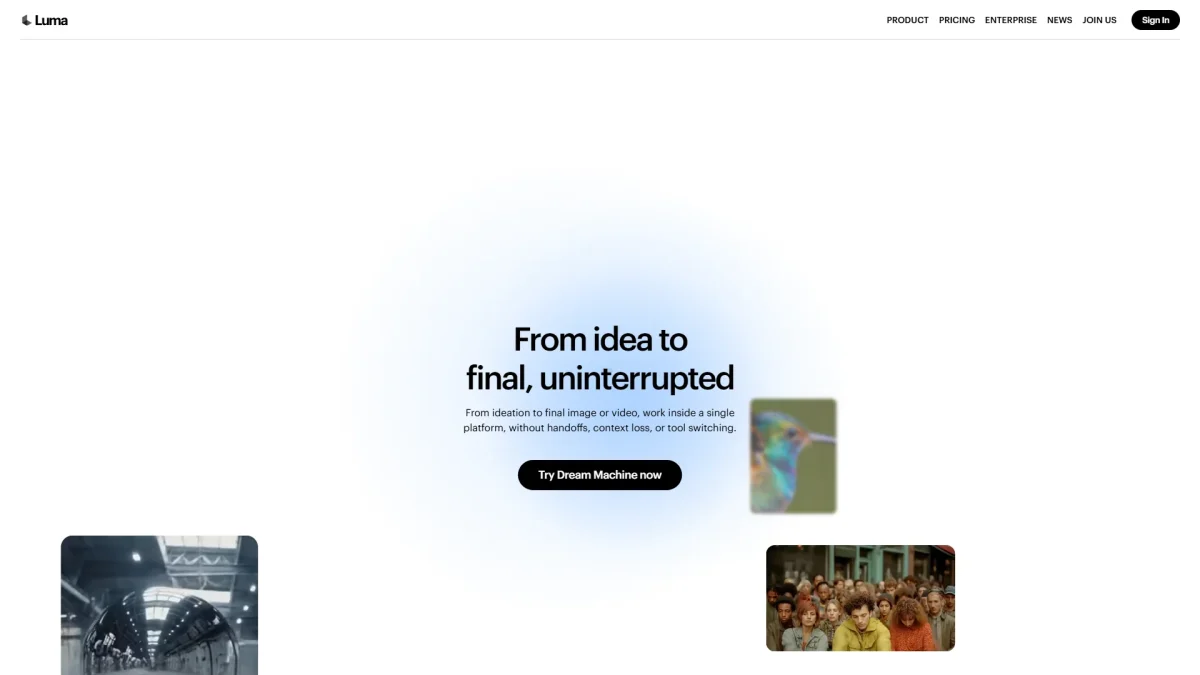
AI video generator with the best natural motion physics in the consumer tier — fabric, water, and human movement that actually behaves, powered by the Ray3 model.
Luma AI launched as a 3D capture company — their original product used your phone camera to build NeRF-based 3D models. Dream Machine, released in mid-2024, was a sharp pivot: a consumer-facing text-to-video and image-to-video generator built on their own proprietary video diffusion architecture. The name stuck. Today it sits at lumalabs.ai as Luma’s flagship product, with the underlying model family branded as Ray.
The positioning is deliberate. Where OpenAI’s Sora announced itself as a world simulator and Google’s Veo 3 leans into audio-native cinematic production, Dream Machine went after a specific claim: the best natural motion in the consumer AI video market. Cloth physics, water behavior, hair movement, and human biomechanics — the kinds of motion that expose every competing model as a blurry guess — have been the product’s core engineering bet from day one.
By 2026 the bet has delivered. Ray3, the current flagship model, benchmarks alongside Veo 3 for physical realism and leads every other model — Runway Gen-4, Kling AI, Midjourney Video — by a meaningful margin. Dream Machine is not the cheapest option, not the most cinematic, and not the longest per clip. But for the particular problem of “make this thing move like it has weight and physics,” nothing touches it in the consumer tier.
The Ray model lineup
Luma’s video models have iterated through several generations. Understanding the lineup matters because the platform exposes them all and different plans unlock different models.
Ray2 (Flash and Standard)
Ray2 is the workhorse model — fast, reliable, and still genuinely impressive for most use cases. Ray2 Flash costs 11 credits per second of generated video and prioritizes speed. Ray2 Standard at 32 credits per second steps up quality for hero shots. Motion is smooth, particularly on organic subjects. For social content, product showcases, and anything that doesn’t need the full Ray3 budget, Ray2 Standard hits a comfortable price-to-quality curve.
Ray3 and Ray3.14
Ray3 is the model Luma describes as “reasoning-driven” — it doesn’t just diffuse pixels, it applies a chain-of-thought pass to interpret your prompt before generating, then evaluates its own output against quality thresholds and retries internally if necessary. The practical result is dramatically better prompt adherence: ask for a specific camera movement, specific lighting, a character doing a specific action, and Ray3 delivers it with a precision Ray2 can’t match.
Ray3.14 is the current production version, adding native 1080p generation, 4x faster generation speed compared to the original Ray3, improved stability on long prompts, and a 3x reduction in credit cost versus Ray3 initial pricing. It also introduces true HDR output — rendered natively in 10, 12, and 16-bit formats, making Dream Machine the only consumer AI video tool with genuine HDR generation rather than post-processed tone mapping.
At the top end, Ray3.14 supports HiFi Diffusion — a technique that takes a draft video and masters it to production-ready 4K HDR with professional-grade EXR frame export. That output slot connects directly to a DaVinci Resolve or Premiere timeline without color grading rework. It’s a meaningful differentiator for freelance and professional video work.
NOTE · generation speed comparison
Ray3.14 generates a 5-second clip in roughly 30–60 seconds. Kling AI takes 1–3 minutes for equivalent quality. Runway Gen-4 runs 1–2 minutes. The gap is noticeable when you’re iterating through 15 variations in a creative session.
luma-dream-machine · luma-ui.png
fig · The Dream Machine app · source: lumalabs.ai
Photon: the image model
In late 2024 Luma released Photon, a dedicated image generation model built on the same Universal Transformer architecture as the Ray video models. The addition matters because it turns Dream Machine from a video-only tool into a unified visual production environment. Generate a reference image in Photon, animate it in Ray3 — same platform, same character consistency, no export/import friction.
Photon’s headline capability is multi-image prompting: feed it several reference photos and it synthesizes a new image that inherits visual identity from all of them. For character consistency across a video series this is genuinely useful — define a character once in Photon, animate them across multiple Ray3 clips, and the face and costume stay locked. Competing tools require third-party pipelines or ControlNet setups to achieve the same result.
The model also handles text rendering in images with notable accuracy — readable signs, labels, and on-screen text that most image generators mangle. Processing speed is claimed at up to 800% faster than comparable models, which in practice means near-real-time generation for exploratory work. Photon is available on Plus and above; Lite users get limited access.
First generation walkthrough
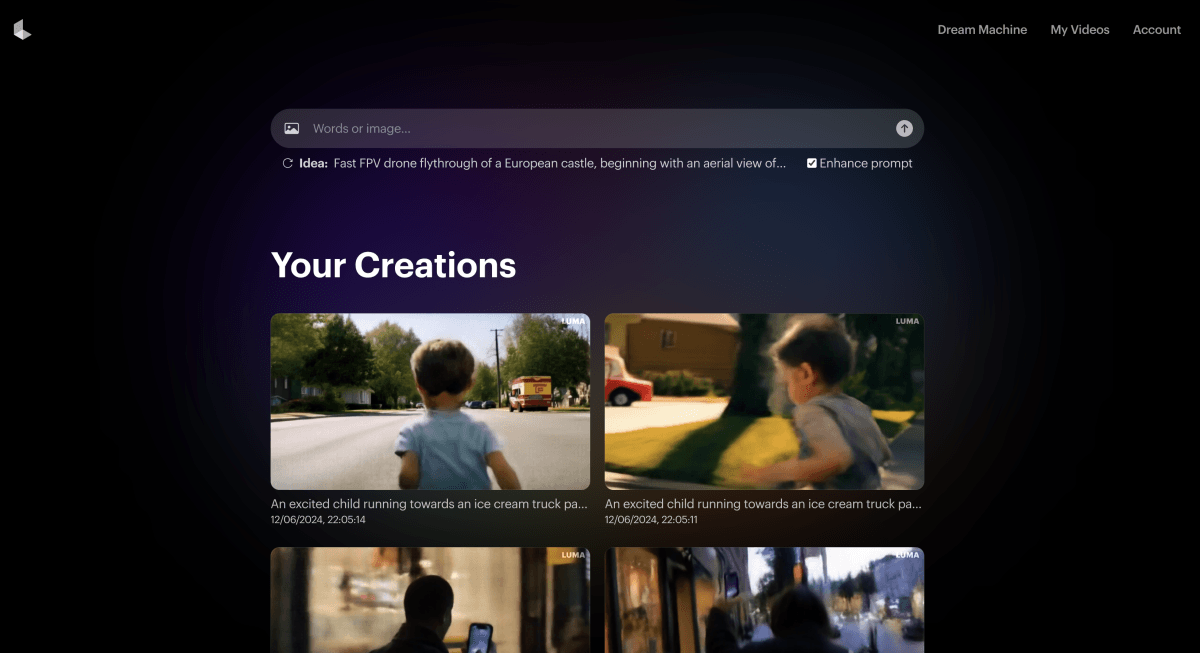
The Dream Machine interface is one of the cleaner AI video UIs on the market. The home screen shows a persistent prompt bar at the bottom, your recent generations in a masonry grid above, and a left rail for navigating between Ideas, Boards, and the model picker. No settings sprawl, no nested menus of parameters to tune before you can generate anything.
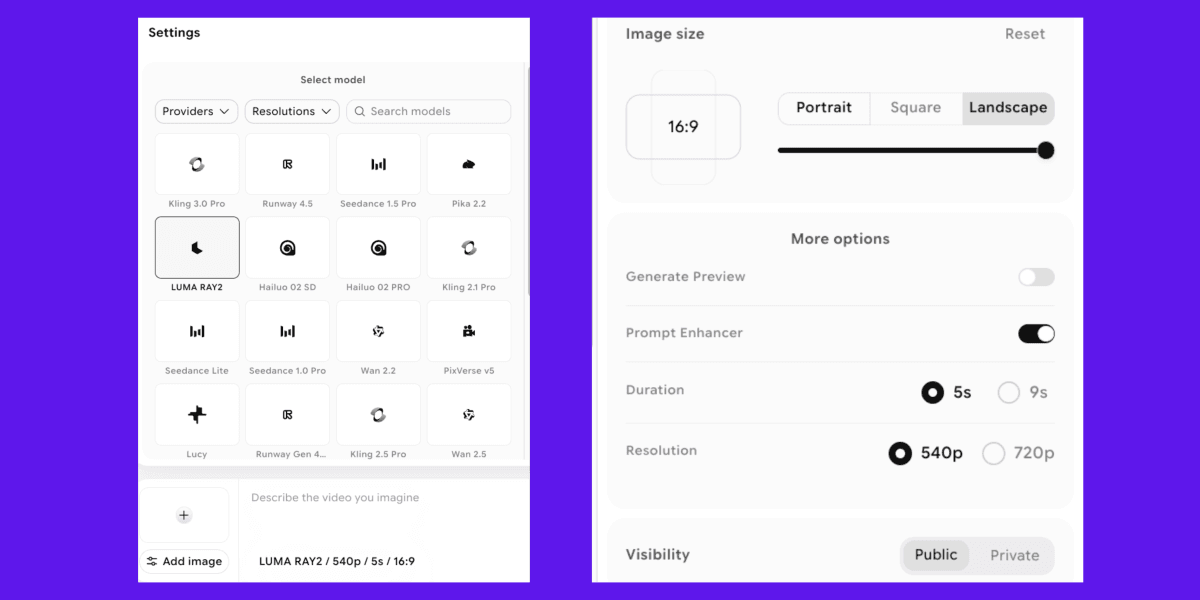
A first generation from text goes like this: type your prompt, choose a model (Ray2 Flash, Ray2 Standard, or Ray3), pick an aspect ratio (16:9, 9:16, 1:1, 4:3), set duration (5 or 10 seconds), and hit generate. The default lands you a 5-second 720p clip in under a minute. If you’ve uploaded a reference image, an image-to-video tab puts it as the start frame immediately.
prompt.txt · product-hero-shot
A glass perfume bottle sitting on a white marble surface. Camera pushes in slowly. Late afternoon sunlight catches the glass and casts a sharp prism of color across the surface. Water droplets on the bottle surface. The light shifts slightly as if a cloud moved.
That prompt, run through Ray3.14 Standard at 10 seconds, produces exactly what it describes — the light shift is subtle and physically coherent, the droplets catch and scatter light with the kind of material accuracy that looks like a product shoot. The same prompt through Ray2 Flash produces a good result but the light shift is more abrupt and the water behavior looks slightly interpolated. The quality delta between tiers is real, and it shows most obviously on material physics and lighting.
Natural motion: the real differentiator
The claim that Dream Machine leads on natural motion isn’t marketing. It comes from a specific architectural decision: Ray was trained with an emphasis on physics coherence, not just visual plausibility. The difference is visible and meaningful.
Fabric drapes. When you generate a cloth material — a shirt in wind, curtains, a flag — Ray3 produces motion where the cloth has mass. Folds form based on gravity and air resistance. Competing models (Runway, Pika, older Kling versions) tend to produce fabric that moves like a texture rather than a material — convincing at a glance, wrong to anyone who’s ever touched fabric.
Water behaves. Surface tension, ripples, the way water sheets off a surface — Ray3 handles this category consistently. The benchmark here is simple: generate “a glass of water being poured on a hot skillet.” Most models produce something that looks vaguely like water. Ray3 produces something with correct behavior at the pour point, correct steaming, correct scatter pattern.
Human movement has follow-through. Gesture animations in competing tools often stop exactly where the instruction says to stop — an arm raises, freezes at the top, then the clip ends. Ray3 applies the principle of follow-through that animators learn in year one: motion overshoots slightly, decelerates, settles. The result is movement that reads as alive rather than mechanical.
This matters most for specific use cases: fashion, product visualization, nature and food content, character performance. For abstract visuals, logo animations, or VFX-style content, the natural motion advantage is less pronounced — every major model is strong there.
luma-dream-machine · luma-clip.png
fig · A Dream Machine clip · source: tomsguide.com
Camera controls and keyframes
Dream Machine offers two layers of camera control: cinematic presets and manual specification.
Cinematic presets
The preset list includes Push In, Pull Out, Smooth Pan, Dynamic Orbit, Dolly Left/Right, Tilt Up/Down, and Handheld Shake. Each preset maps to a specific camera motion that Ray3’s generation process respects. For straightforward commercial and social content, presets get you 90% of what you need without writing a camera description in prose.
Prompt-driven camera
Ray3’s instruction-following quality means you can describe camera behavior in natural language and get it. “A slow dolly backward revealing a room, then a cut to a close-up on the protagonist’s hands” — Ray3 attempts the full description, including the cut. This level of prompt adherence isn’t consistent across all models, but it works more often than it fails on Ray3.
Keyframes
The keyframe system lets you set a start frame and an end frame, then generate the video between them. Upload two images — say, a product on a shelf and the same product close-up — and Ray3 interpolates motion, camera movement, and visual continuity between them. This is the feature that unlocks serious production work: you can use Photon to generate reference frames, then use Ray3 keyframes to create controlled scene transitions without AI improvising your composition.
Ray3.14 expanded keyframe support to include mid-clip reference frames — you’re not limited to start and end. You can pin a character’s position at the 3-second mark of a 10-second clip and let the model handle the motion before and after. Combined with the Modify Video feature (which adjusts an existing first or last frame to guide transitions), this gives a level of directorial control that was only available in professional VFX pipelines a year ago.
Extend
Individual Ray clips cap at 10 seconds. The Extend feature generates additional segments from the last frame of any clip, chaining them into longer sequences. Each extension adds 5–10 seconds. Drift across many extensions is real — expect minor visual variation in character appearance and environmental detail after 3–4 extensions — but for establishing shots, B-roll, and ambient scene-building, extended chains work cleanly.
Boards: the creative workflow layer
Boards is Dream Machine’s answer to the “how do you actually organize a project” problem that every generative AI tool has ignored. The Ideas section is a flat dump of everything you’ve ever generated — useful for rediscovering that clip from three weeks ago. Boards layers project organization on top: create a Board per project, drag generations into it, build out a visual storyboard or concept board inside the same interface.
Two board types exist. Artboard is for visual concept work — think of it as a moodboard where some elements are generated and some are uploaded references, arranged freely on a canvas. Storyboard is a sequential layout for scene planning — you arrange clips in order, add notes per shot, and use it as a production document for a shoot or a longer edit.
The practical impact: Dream Machine is the only major AI video tool that doesn’t require you to manage an external folder of exports, a Notion board of references, and a separate prompt log just to run a coherent creative project. Everything lives in one place. For solo creators this saves meaningful time. For small agency workflows it removes coordination overhead.
TIP · use Boards as a brief
Drop a client’s reference images into an Artboard at the start of a project, generate 10–15 Photon images exploring directions, move the approved direction into a Storyboard, and use those as keyframes for Ray3 generation. The entire visual development pipeline — reference, exploration, approval, production — stays in one Luma project.
Three real workflows
case-study #01 · social content for a skincare brand
From product photo to Instagram Reel in 90 minutes
asset: product still shot · output: 6 × 10-second clips · model: Ray3.14 Standard
Starting point: a clean product photo — serum bottle on a bathroom shelf, natural light. Goal: produce six distinct short video assets for a campaign, each with different environment and motion, no studio shoot, $0 in production budget beyond the Dream Machine Plus subscription.
Using the product photo as the start-frame keyframe, six prompts were written for different environments: morning bathroom light with steam, a marble counter with water, outdoor terrace in golden hour, close-up showing product texture, slow rotation reveal, hand picking up the bottle. Each generation: Ray3.14, 10 seconds, 1080p, camera Push In or Smooth Pan depending on the shot.
Four of the six clips required zero adjustment. One clip had incorrect shadow direction (regenerated with a more explicit lighting note). One clip had a hand model with odd proportions (regenerated, second attempt clean). Total generation time: 47 minutes including prompt refinement. Export to phone in H.264, add music and copy overlays in CapCut — total asset delivery 90 minutes.
// wall-clock: 90 min from single product photo to 6 deliverable assets · studio shoot alternative: $800–2,000 half-day
case-study #02 · pre-visualization for a short film
Storyboard to animatic for a pitch deck
asset: hand sketches, 8 scenes · output: animatic, ~2 min · model: Ray2 Standard + Ray3.14
A short film director needed an animatic — a rough moving version of the storyboard — to show a potential investor what the film would feel like before committing to production. Traditional animatic: hire an animator, $3,000–8,000, two weeks. Dream Machine approach: photograph the storyboard sketches, use them as image-to-video start frames, generate Ray2 Standard clips that approximate the intended camera moves, assemble in DaVinci Resolve.
Eight scenes, most 5–10 seconds. Character faces were left out of most shots intentionally (AI character faces still drift on close-ups) — the focus was environment, camera movement, and mood. Ray3.14 was used only for the two hero shots requiring the most precise motion. Ray2 Standard handled the establishing shots at lower cost.
The Storyboard feature in Boards made scene sequencing fast — shots were arranged in order with per-shot prompt notes, serving as both a production log and a hand-off document to the editor. The final animatic required about 20 minutes of edit work in Resolve: assembling the clips, adjusting timing, adding scratch dialogue.
// wall-clock: 4 hours from sketch photos to delivered animatic · traditional alternative: $3,000+, 2 weeks
case-study #03 · generative B-roll for a YouTube documentary
A YouTube documentary creator needed B-roll for a video about the history of a remote geographical region — aerial landscape shots, period-appropriate crowd scenes, abstract concept visualizations. No stock footage matched the specifics. A drone permit would take months. Dream Machine was the only viable path.
Landscape shots performed best: Ray3 handles terrain, atmospheric perspective, and natural light with very high consistency. Twenty landscape clips across different times of day and weather conditions were generated with near-zero regeneration needed. The cinematic camera presets (Push In over a ridge, Dolly over a valley floor) matched the aerial footage style the creator wanted.
Historical crowd scenes were harder — Ray3 handles crowd motion plausibly but clothing period-accuracy degrades at distance. The workaround: use wide establishing shots where details are small, not close-ups. Abstract concept visualizations (time passing, systems thinking) were the strongest category — prompts like “a river delta viewed from satellite altitude, time lapse of branching” produced visually distinctive results with no comparable stock footage alternative.
// 40+ clips generated · total credit spend: ~6,400 credits (within Plus plan monthly allocation) · stock footage cost estimate: $400–1,200
luma-dream-machine · luma-keyframes.png
fig · Keyframes & camera control · source: aiproductivity.ai
Where it falls short
Ten seconds is a real constraint
This is the most consistent friction point. Every competitor has similar or worse limits — Runway Gen-4 is also 10 seconds, Kling goes up to 10 seconds on slower tiers — but users keep bumping into it. The Extend feature works, but coherence degrades across many extensions, and assembling a 60-second sequence from six 10-second clips with consistent character appearance requires careful keyframe management. For narrative work, this is the tool’s clearest ceiling.
Credit burn on Ray3 can surprise you
Ray3.14 is meaningfully cheaper than original Ray3, but the credit math still catches new users off guard. On the Plus plan ($29.99/mo, 10,000 credits), a 10-second Ray3.14 Standard 1080p generation costs roughly 300–800 credits depending on resolution and HDR settings. That’s 12–33 top-tier generations per month. Heavy iterators will burn through Plus credits in a focused afternoon session. The Unlimited plan ($94.99/mo) exists for this reason — 10,000 fast credits plus unlimited relaxed-mode generations.
Audio is still catching up
Dream Machine’s native audio sync feature launched in beta in early 2026. As of this review it handles ambient sound well — environmental audio matching the visual — but lip sync and precise sound effect timing remain rough. If you’re producing content where audio is primary, you’ll be adding sound in post. This is not a differentiator against competitors; most AI video tools are in the same position.
Close-up faces require patience
Human face close-ups are the most variable output category. Ray3 is meaningfully better than Ray2, but across multiple generations of the same character, facial features drift. Eye shape, lip proportions, and skin tone all vary run-to-run unless you’re anchoring with keyframe reference images. The fix exists — use Photon to establish a face, keyframe it into every Ray3 generation — but it adds workflow friction that doesn’t exist for non-human subjects.
WARNING · free tier reality check
The free tier is real — you can generate actual clips without paying. But generations are watermarked, output is capped at 720p draft resolution, queue priority is lowest, and the monthly credit allocation is small enough that you’ll hit the ceiling quickly in a single session. It’s genuinely useful for evaluation, not for production. Lite at $9.99/mo is the true entry point if you plan to use this regularly.
Pricing, in real terms
Dream Machine’s pricing changed significantly through 2025–2026, moving from a simpler plan structure to a credit-based system that makes tier comparisons more complex. Here’s what the plans actually mean for different usage patterns.
Free
Watermarked output, 720p draft quality, lowest queue priority, non-commercial. Enough to see whether the tool fits your workflow. Not enough to build a production habit.
Lite — $9.99/mo ($7.99/mo annual)
3,200 monthly credits. Full Ray3 access, 4K with upscaling, high priority. The watermark remains — this tier is non-commercial. At 32 credits per second for Ray2 Standard, that’s 100 seconds of Ray2 Standard video per month, or a lot more on Ray2 Flash at 11 credits/second. The commercial restriction makes Lite a personal/exploration tier.
Plus — $29.99/mo ($23.99/mo annual)
10,000 monthly credits, commercial use, no watermark, HDR access, high priority. This is the plan that makes sense for professional creators, social media managers, and small agencies. Commercial use unlocks everything. At Ray3.14 Standard generation costs, budget 12–30 hero-quality clips per month, with considerably more if you’re mixing in Ray2 Flash for drafts.
Unlimited — $94.99/mo ($75.99/mo annual)
10,000 fast credits plus unlimited relaxed-mode generation. Relaxed mode uses lower-priority queue slots — slower, but unlimited. For high-volume iterators or teams running Dream Machine as part of a production pipeline, this tier pays for itself quickly. HDR, 4K, commercial use, highest priority all included.
The comparison to buy on price alone: Kling AI starts at about $6.99/mo and Runway Gen-4 runs similarly to Dream Machine Plus at $35/mo. Dream Machine is not the cheapest option. You’re paying the premium for natural motion quality and the Ray3 physics advantage.
Dream Machine vs the field
a/dream-machine b/runway-gen-4
Runway Gen-4 is the professional-grade competitor — strong at cinematic style consistency, well-established API, widely used in post-production pipelines. Pricing is comparable; the motion quality gap is Dream Machine’s main claim against it.
dream machine wins at
natural motion physics — fabric, water, hair
generation speed (Ray3.14 vs Gen-4)
true HDR output, native 16-bit
Photon integration: image + video same platform
Boards for project organization
runway wins at
cinematic style consistency and grain
more established professional API
longer track record in post-production use
motion brush for fine-grained object control
video-to-video style transfer
Verdict: Dream Machine for motion-forward work and product/nature content. Runway for style-specific cinematic looks and established production pipelines.
a/dream-machine b/sora
Sora by OpenAI is the most recognizable AI video name, built on a Diffusion Transformer architecture with a strong focus on physical world simulation. It’s available in ChatGPT Plus and Pro.
dream machine wins at
generation speed — significantly faster
standalone platform, no ChatGPT subscription required
Boards + Photon workflow integration
credit-based pricing more predictable
Ray3 keyframe control more granular
sora wins at
access for existing ChatGPT subscribers — no new account
cinematic quality on wide establishing shots
longer potential output (up to 20 seconds)
OpenAI ecosystem integration
brand recognition, easier client conversations
Verdict: Dream Machine if video generation is a core tool in your workflow. Sora if you’re already in the ChatGPT ecosystem and video is occasional.
a/dream-machine b/kling-ai
Kling AI from Kuaishou is the price challenger — strong quality at $6.99/mo entry pricing, with notably good consistency on character subjects. The motion quality gap with Ray3 is real but the price gap is also real.
dream machine wins at
natural motion physics by a clear margin
generation speed on Ray3.14 vs Kling
true HDR and 4K production output
Photon + Boards all-in-one workflow
Ray3 reasoning improves prompt adherence
kling wins at
price — $6.99/mo vs $29.99/mo for commercial use
character consistency across generations
longer clip options on higher tiers
strong face generation on human subjects
better value for high-volume social content
Verdict: Kling if budget is the primary constraint and quality is good enough. Dream Machine if physics and motion quality are non-negotiable.
a/dream-machine b/pika
Pika focuses on consumer-friendly AI video with strong lip sync, special effects (Pikaffects), and a highly approachable interface. It’s a different use case segment — entertainment and playful content over production-grade video.
dream machine wins at
physical realism — no contest
professional output quality and HDR
production workflow (Boards, Photon, keyframes)
API for developer and agency use
commercial licensing clarity
pika wins at
fun consumer effects (Pikaffects)
lip sync and talking video
ease of use for non-technical users
mobile-first workflow
lower barrier to first generation
Verdict: Pika for entertainment and talking-video content. Dream Machine for anyone where output quality will be judged professionally.
luma-dream-machine · luma-pricing.png
fig · Plans and pricing · source: imagine.art
Who should use Dream Machine
Dream Machine lands cleanest for a specific creative profile. If your work falls into these categories, it’s likely the right tool at the right price:
Motion and content designers who need physically plausible video for client deliverables
Social media creators in fashion, beauty, food, and product verticals where motion quality reads directly as production value
Filmmakers and directors using AI for pre-visualization, concept development, and pitch materials
Agencies running high-volume creative campaigns who need fast iteration at commercial-grade quality
Developers building video generation into products via the Dream Machine API
Photographers looking to extend their still images into motion assets without a separate video production workflow
Skip it if your situation looks like this:
Budget is tight — Kling AI at $6.99/mo covers many of the same use cases for far less
You need clips longer than 10 seconds without careful management of extension chains
Audio-visual sync is a primary requirement — the audio feature is still in beta
You work exclusively in a mobile-first workflow — web is the primary interface, mobile is secondary
FAQ
Is Dream Machine the same as Luma AI?
Dream Machine is Luma AI’s consumer product. Luma AI is the company behind it. The underlying video model family is Ray. Think of it as: Luma AI the company, Dream Machine the platform, Ray the model. The URL is lumalabs.ai but the product is referred to as Dream Machine in most UI and marketing.
What’s the maximum video length?
Individual generations cap at 10 seconds. The Extend feature lets you chain clips from the last frame — you can build sequences of 30–60 seconds or longer this way, but visual drift across many extensions is a real consideration. For narrative work requiring long-form coherence, chaining more than 4–5 clips needs careful keyframe management.
Can I use Dream Machine output commercially?
Yes, on Plus and Unlimited plans. The Free and Lite tiers are non-commercial. Plus at $29.99/mo is the entry point for commercial use. Always verify the current terms at lumalabs.ai — commercial licensing terms for AI-generated video are evolving across the industry.
What’s the difference between Ray2 and Ray3?
Ray2 is faster and cheaper — good for drafts, B-roll, and content where prompt adherence precision isn’t critical. Ray3 applies reasoning before generating, which means dramatically better prompt following, more accurate physics, and higher temporal consistency. Ray3.14 is the current production version, adding 4x speed improvement and native 1080p over original Ray3 at 3x lower cost.
Does Dream Machine have an API?
Yes. The API supports text-to-video, image-to-video, and video-to-video generation. API access is available on Plus and above, with a Python SDK and REST endpoint. Enterprise plans include higher rate limits and dedicated infrastructure options.
How does Photon compare to Midjourney or DALL-E?
Photon’s core advantage is not raw image quality but workflow integration — it shares the same character reference system as Ray, making image-then-animate a first-class workflow without export steps. For pure image generation quality at the top end, Midjourney and Flux are stronger. Photon is the right choice when your images are inputs to a Ray video pipeline.
What resolution can Dream Machine output?
Ray3.14 generates natively at 1080p and supports upscaling to 4K on Plus and above. HDR output (10, 12, 16-bit) is available on Plus and Unlimited. EXR frame export for professional color grading pipelines is available at the highest quality tiers. The free tier is limited to 720p draft resolution.
How does Dream Machine compare to Veo 3?
Luma’s own benchmark places Ray3 at state-of-the-art alongside Veo 3 for physical realism and instruction following. Veo 3 has a significant advantage in audio generation — native audio matching is a Veo 3 flagship feature that Dream Machine’s beta audio feature hasn’t matched yet. For pure video quality, the models are genuinely competitive. For audio-native production, Veo 3 is ahead.
The motion leader. Limited by clip length, priced for professionals.
Dream Machine is the clearest answer to “which AI video tool makes things move like they have weight.” Ray3’s physics lead over Runway, Kling, and Pika is real and visible on any motion-forward content — fabric, water, human gesture, material surfaces. Photon + Boards turns it into a coherent creative production environment rather than a standalone generator. The API is solid for teams building generation into products.
The ceiling is honest: 10 seconds per clip, a credit system that burns fast at Ray3 Standard, audio sync still in beta, and a price tag that’s 4x Kling for commercial use. None of those are disqualifying for the right use case — product visualization, social content, pre-vis, B-roll library building — but they need to fit your workflow math before committing to Plus.
Start on the free tier, run 5–10 generations of your actual content, and compare the motion quality directly against whatever tool you’re currently using. The difference either justifies $29.99/mo for you or it doesn’t. The honest answer usually shows up in the first water pour or fabric drape you generate.