Ideogram Typography champion
The only AI image generator purpose-built for legible text in images. Ideogram 3.0 renders type at ~90% accuracy — posters, logos, social ads, and packaging in one step.

Where Ideogram came from
The four people who built Ideogram had a very specific grudge. Mohammad Norouzi, William Chan, Chitwan Saharia, and Jonathan Ho all worked together at Google Brain on Imagen — Google's text-to-image research project. They understood the architecture of these models at a level most users never see, and they kept watching the same failure mode repeat itself: AI image generators were spectacular at rendering photons but pathetically bad at rendering letters. A model that could conjure a hyper-realistic forest at golden hour would confidently produce a sign that read "CFFEE SHOPe." It was embarrassing, and nobody seemed to be attacking it seriously.
They left Google Brain in late 2022 and founded Ideogram with a specific mandate: build a text-to-image model where text in the image is actually legible. Not a bolted-on OCR correction pass. A model that understands typography as a first-class visual element, not an afterthought.
The public beta launched in August 2023. First impressions were polarizing: the art quality was middling compared to Midjourney v5, but the text worked. Designers who'd spent hours manually adding type in Photoshop after generating a background image suddenly had a shortcut. The model had found its niche on day one.
Ideogram raised $16.5 million in seed funding from Andreessen Horowitz and Index Ventures on launch, then $80 million in February 2024 after the 1.0 model shipped. Version 3.0 arrived in March 2025, closing the gap on photorealism while holding the text accuracy advantage. By 2026 the platform has grown a substantial community of designers, marketers, and content creators who essentially moved their text-heavy creative work here and never looked back.
What Ideogram actually is
Ideogram is a web-based text-to-image generator built around a proprietary diffusion model, accessible at ideogram.ai and on iOS. You type a prompt, pick a style and aspect ratio, and get a grid of results in five to ten seconds. So far, familiar.
What separates it is the training methodology. Ideogram's model treats typographic elements — letterforms, kerning, the spatial relationship between words and visual elements — as semantically meaningful parts of the image, not just pixel patterns that happen to look like text. When you prompt "a vintage coffee shop sign that says Grand Roast" the model doesn't generate a sign-shaped blurry blob and then try to apply letters. It composes the image the way a designer would: sign first, typography as a structural element, atmosphere around it.
The product wraps that model in a set of tools purpose-built for creative production work:
- Magic Prompt — prompt expansion that adds typographic and compositional detail automatically
- Canvas — a layered editor for inpainting, outpainting, and iterative editing
- Magic Fill — selective inpainting to replace specific regions while holding everything else
- Style References — upload up to three images to pull an aesthetic into any generation
- Character Consistency — maintain the same character's appearance across multiple images (added 2025)
- Remix — iterate from a generated image rather than re-prompting from scratch
The platform also exposes an API and a Python SDK, which means teams can pipe Ideogram into automated workflows — batch generating product mockup variants from a CSV, for instance.
The text-in-image problem, explained
To understand why Ideogram exists, it helps to understand why every other image generator fails at text. Standard diffusion models learn from enormous datasets of image-caption pairs. The caption for a photo might say "a neon sign reading OPEN 24 HOURS" — but the model never learns to read those words; it learns the rough visual pattern of "glowing text shape." At inference time it reconstructs a plausible-looking arrangement of shapes that might be letters but often aren't. Midjourney v6 gets through short words with modest reliability. Anything longer than two words degrades fast.
Ideogram's training incorporates explicit typographic supervision — the model is trained to understand the relationship between specific character sequences and their rendered forms. This is technically harder and required the founders' backgrounds in diffusion model research to execute properly. The payoff is a model that in testing produces legible text in roughly 90% of generations, compared to roughly 30% for Midjourney and around 40–50% for DALL-E 3.
The 90% figure covers single-word to short-phrase accuracy on standard Latin-script text. Long sentences, unusual typefaces, and non-Latin scripts see lower accuracy. Ideogram is still the clear leader, but set expectations accordingly: budget for a few regenerations on anything complex.
This distinction matters enormously for a specific category of work: anything where the image is the design. A social media ad with a headline. A poster with event details. A product label. A meme. A logo concept. These aren't edge cases — they're the daily bread of thousands of working designers and marketing teams. Before Ideogram, the workflow was generate-in-AI, add-text-in-Photoshop, done. Ideogram collapses that to a single step.
First five minutes
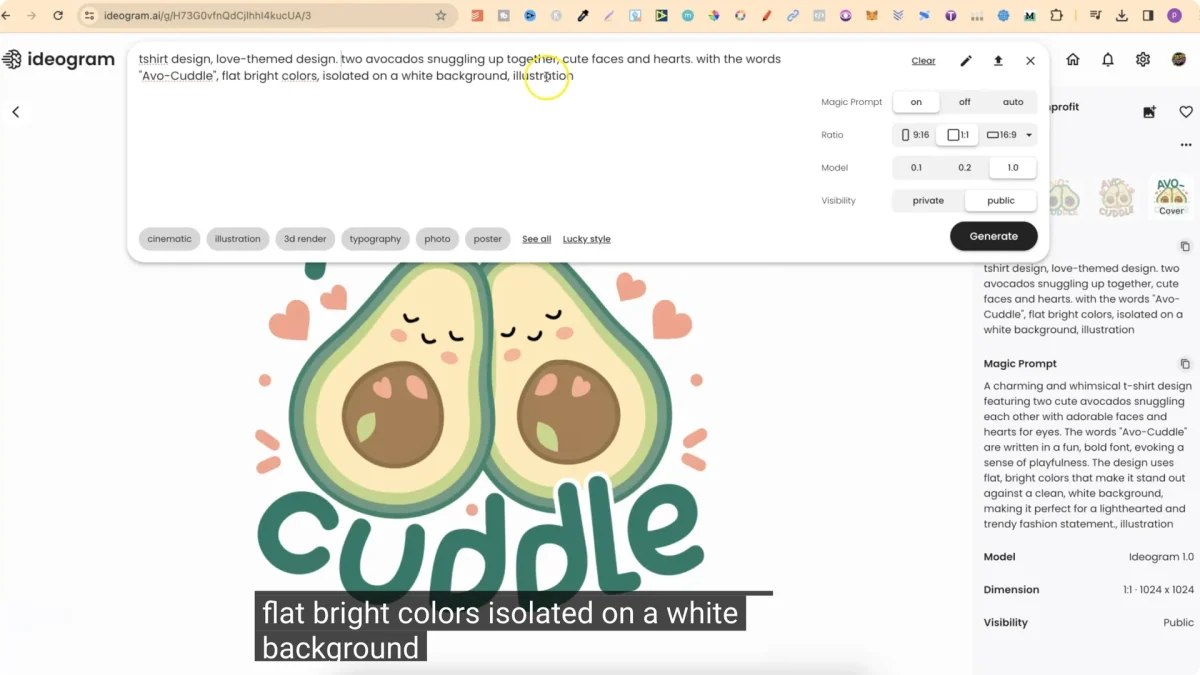
There's no software to install. Go to ideogram.ai, sign in with Google or email, and you're looking at the generation interface immediately. The free tier gives you a meaningful daily quota of slow-priority images — enough to genuinely evaluate the tool before you spend anything.
Type your first prompt. Try something with text in it immediately: "a bold poster for a jazz festival, white type on black, reads BLUE NOTE SUMMER 2026, geometric design." Hit generate. Four variations appear in roughly eight to twelve seconds. On the Plus plan with priority compute, that drops to five seconds.
The first thing you'll notice: the text actually says what you asked for. The second thing: the overall composition is cohesive — the typography isn't pasted onto an unrelated background but is architecturally part of the image. The third thing: you have four variations, and there's usually at least one that's ready to use or within one edit of ready.
For comparison, try the same prompt in Midjourney. You'll get four images with beautiful atmosphere and approximately three words out of five correct, misspelled in ways that look convincing but aren't. You'll then spend time in Photoshop or Canva correcting the type. That's the moment Ideogram's value proposition becomes viscerally obvious.
Magic Prompt: your prompt engineer in the loop
Most users don't write great prompts. They describe what they want in conversational language and hope for the best. Ideogram's Magic Prompt system converts that into a detailed generative description — adding specifics about typography style, layout composition, lighting, color relationships, and visual atmosphere that the model needs to produce a polished result.
Here's what that transformation looks like in practice:
The expanded prompt is structurally richer — it specifies color relationships, typeface class, spacing, material feel, and output format. The resulting images are consistently more composed and closer to what a professional designer would brief.
Magic Prompt is on by default and you can toggle it per generation. For users who already write detailed prompts, turning it off gives you more direct control. For everyone else, keep it on — it consistently improves first-generation quality and cuts the number of regenerations needed to get a usable result.
One nuance worth knowing: Magic Prompt sometimes interprets your intent creatively rather than literally. If you need the text to read exactly a specific phrase, enclose it in quotes in your prompt and re-read the expanded version before generating. Catching a Magic Prompt paraphrase is cheaper than regenerating after the fact.
Canvas and Magic Fill
Canvas is Ideogram's answer to the question every designer asks after getting a good generation: "I love it — can I just change this one thing?" It's a browser-based editing environment that lets you work on a generated image with inpainting, outpainting, and layer-aware tools.
The most useful Canvas operations in practice:
- Outpainting — extend the canvas beyond the generated image boundary. Essential when you generated in 1:1 but need a 16:9 banner. Ideogram fills the new region coherently, matching lighting and style.
- Magic Fill — brush over a region and describe what should replace it. The model replaces only that region, respecting the surrounding image. Use it to swap a background element, adjust a product label, or correct a garbled word mid-image.
- Object removal — paint over something you don't want and leave the description blank. The model fills with contextually appropriate content.
- Text correction — if one word in a five-word headline came out garbled, brush exactly that word and retype the prompt with just the correct word. Faster than regenerating the whole image.
Magic Fill is the Canvas feature with the highest practical leverage. The regenerate-everything loop — which is the workflow in tools without a canvas — wastes a lot of time when you have an image that's 90% right. Magic Fill lets you fix the 10% without touching the 90. For production work, this is the difference between a tool that's interesting and a tool that's in your daily workflow.
If text renders correctly in 3 out of 4 words but one character is wrong, don't regenerate. Open Canvas, use Magic Fill to brush just the incorrect word, type the correct text in the fill prompt, and generate. The rest of the image stays untouched. This is consistently faster than prompting from scratch and preserves the composition you wanted.
Canvas also supports the Remix workflow — starting from a generated image and steering it in a new direction by adding to or modifying the prompt. This is useful for exploring variations of a concept without starting fresh: keep the spatial composition from a first pass and change the typographic style, or keep the color scheme and change the subject. Experienced Ideogram users often treat the first generation as a rough layout and refine through Remix rather than trying to nail everything in a single prompt.
Style References: brand consistency without prompting expertise
The hardest problem in AI image generation for commercial work isn't quality — it's consistency. Generating one great image is easy. Generating twenty images that all look like they're from the same brand is hard. Style References are Ideogram's answer to this.
You upload between one and three reference images. Ideogram analyzes them and extracts a style fingerprint — color palette, texture, lighting conditions, compositional tendencies, typographic personality. Every subsequent generation applies that fingerprint. The result is a set of images that feel cohesive without you having to describe the style in words, which is notoriously difficult even for experienced prompt writers.
In practice, this feature does two very useful things. First, it lets you pull in your own brand aesthetic — upload examples of your brand's visual language and every Ideogram generation for that project will match. Second, it lets you reference a style you admire but can't describe precisely. "Generate in the style of mid-century travel poster design" as text is imprecise. Uploading three mid-century travel posters as references is exact.
Style Codes — 4.3 billion randomly explorable presets generated from the reference system — add a discovery layer for users who want to explore styles without committing to references they already own. Click generate with a random Style Code and Ideogram applies a consistent visual treatment you can save and reuse. It's one of those features that sounds like a gimmick until you accidentally land on a treatment that's exactly right for a project.

Generation modes: Design, Realistic, 3D, Anime
Ideogram exposes four distinct generation modes, each tuned for a different aesthetic target:
Design mode
The mode Ideogram is built for. Graphic design compositions — posters, logos, cards, infographics, social assets. Text rendering is at its sharpest here. Use Design for anything where text and layout are the primary visual elements. This is where Ideogram leaves every competitor behind.
Realistic mode
Photorealistic output — product shots, lifestyle photography, architectural visualization. Ideogram 3.0 closed a significant gap with competitors in photorealism, and the output is now competitive with Midjourney v6 for many use cases. It still trails Midjourney for ultra-high-fidelity portraiture and for images where atmospheric nuance is the entire point. For product context shots and clean commercial photography aesthetics, it's excellent.
3D mode
Rendered 3D visuals with appropriate depth, lighting, and material quality. Useful for product visualization mockups, game-adjacent assets, and anything that needs a three-dimensional feel without the overhead of actual 3D software. The text rendering advantage carries into 3D — if you need a 3D-rendered product box with legible copy, this mode handles it.
Anime mode
Stylized anime and manga-adjacent illustration. Weaker than dedicated anime models but competent for mixed workflows. Text rendering in anime mode is more variable — highly stylized letterforms sometimes interpret text as a visual element rather than literal copy. For text-critical work in anime style, verify carefully.
Three real workflows, end-to-end
Generate a week's worth of promotional posts for a product launch
The task: a small skincare brand needs Instagram square posts for a product launch week. Each post has a different headline and image concept, but they need to look like a coherent campaign. The brand has three existing brand photos and a visual identity guide.
Step 1: Upload the three brand photos as Style References. Generate a single test image with a simple headline. Verify the style fingerprint matches the brand's color palette and typographic weight. It does — the warm tones, clean sans-serif type, and soft gradient backgrounds all carry through.
Step 2: Write seven prompts, one per post, all referencing the same saved Style Code. Prompts vary the subject and headline copy ("Glow starts here", "Clean beauty, real results", "New: Luminance Serum") while keeping the structural description consistent.
Step 3: Generate all seven. Five are ready to use. One has a minor layout issue — the headline is slightly cramped in the upper-left corner. Open Canvas, use Remix to adjust the composition, done. One has a misspelled word in the subline. Magic Fill corrects it in thirty seconds.
Rapid logo concepting before briefing a designer
The use case isn't generating a production-ready logo — it's generating enough visual direction that a conversation with a real designer becomes specific rather than abstract. A thirty-minute Ideogram session produces more tangible starting points than a two-hour brief meeting.
Prompt 1: "minimal logo for a café called Lantern Coffee, warm amber and cream palette, hand-drawn lantern icon, lowercase humanist serif wordmark, clean background." Four options. One has exactly the right mood: the lantern is elegant, the wordmark reads "Lantern Coffee" correctly, the palette is on brief.
Prompt 2: Same concept but "geometric modernist lantern, all-caps condensed sans-serif." Four more. Different direction — sharper, more urban. Also strong.
Prompt 3: "badge format, circular lockup, vintage texture, reads LANTERN COFFEE EST. 2026 around the perimeter." This is where Ideogram's text rendering earns its keep — perimeter text on a circular badge is exactly the kind of layout that breaks every other generator. Ideogram produces it, correctly, on the first try.
A music festival poster, date/venue/lineup all readable
This is the stress test. Five lines of text on a single image: festival name, headliner, supporting acts, date, venue. In Midjourney, this produces beautiful incomprehensible blurs. In DALL-E 3, you might get two lines right and lose the rest. In Ideogram, this is normal work.
Prompt: "music festival poster in retro 1970s concert style, reads DESERT FREQUENCY FESTIVAL at top in large display type, below that MIDNIGHT ATLAS, then SOLAR HAZE / THE DUNES, then AUG 15–17 2026, then JOSHUA TREE AMPHITHEATER, warm ochre and burnt sienna palette, psychedelic geometric border."
Generation 1: Festival name correct. Headliner correct. Supporting acts correct. Date correct. Venue has one character transposed — "AMPHITHEATER" reads "AMPHITHEATRE." Given the British spelling exists, this is barely a flaw. One Magic Fill pass on that line fixes it.
Generation 2 (for comparison): A different compositional take. All five lines render correctly on first pass. No correction needed.
Benchmark: text accuracy vs competitors
bench --metric=text-accuracy,art-quality,consistency n=50 prompts · Design mode
The story these numbers tell is consistent with what practitioners report: Ideogram dominates on the dimension it was built for and is competitive but not dominant on pure visual quality. If text is in the image, there's no contest. If text isn't in the image, the choice between Ideogram and Midjourney is closer and depends on the specific aesthetic target.
Ideogram vs Midjourney
a/ideogram b/midjourney
Midjourney is the reigning aesthetic benchmark for AI image generation — its v6 and v7 models produce work that consistently feels crafted rather than computed. For pure visual quality with no text requirement, it remains the gold standard. But the moment you need words in the frame, the comparison collapses in Ideogram's favor.
ideogram wins at
- text in images — 90% vs 30% accuracy, no contest
- logos, posters, any typographic composition
- brand consistency via Style References
- Canvas editing + Magic Fill iteration loop
- accessible pricing with a real free tier
- web interface — no Discord required
midjourney wins at
- pure photorealism and atmospheric quality
- fine art and editorial aesthetics
- complex human portraiture
- cinematic lighting and dramatic composition
- broader model ecosystem and community
Verdict: If your image needs text in it, use Ideogram. If it doesn't — and you care more about artistic quality than practicality — Midjourney. Many working designers use both: Midjourney for art direction and pure visual exploration, Ideogram for anything that ships to the public with copy on it.

Ideogram vs DALL-E 3
a/ideogram b/dall-e-3
DALL-E 3 is OpenAI's image generator, baked into ChatGPT and available via API. Its great strength is prompt understanding — it reads complex instructions with fewer interpretive errors than most competitors. Its text rendering sits above Midjourney but well below Ideogram.
ideogram wins at
- text accuracy — 90% vs ~48%, significant gap
- multi-line and complex typographic layouts
- Design mode graphic output
- Style References for brand consistency
- Canvas iterative workflow
dall-e 3 wins at
- ChatGPT integration — no context switch
- complex multi-element prompt following
- API accessibility and ecosystem
- generating from natural conversation
Verdict: Ideogram is the better dedicated image tool. DALL-E 3 is more convenient if you're already living in ChatGPT and your text requirements are modest. For production design work with legibility requirements, Ideogram wins clearly.
Ideogram vs Flux
a/ideogram b/flux-by-black-forest-labs
Flux by Black Forest Labs is the most technically sophisticated open-weights model available — its Pro tier rivals Midjourney on photorealistic quality. It has made significant progress on text rendering compared to earlier open models, but it still trails Ideogram's purpose-built approach.
ideogram wins at
- text accuracy — notably better, especially multi-word
- graphic design output (Design mode)
- integrated Canvas and editing workflow
- no-install, consumer-ready interface
- Style References for repeatable brand aesthetics
flux wins at
- open weights — self-host, fine-tune, full control
- photorealistic quality approaching Midjourney
- pipeline integration for developers
- no per-image credit cost if self-hosted
Verdict: Ideogram for consumer and design-team use where text matters. Flux for developers who want to build on top of the model, self-host, or push photorealistic quality limits without per-credit billing.
Where Ideogram gets it wrong
No honest tool review skips the failure modes. Here are Ideogram's consistent pain points as of mid-2026:
Multi-person scenes
Put two or more people in a realistic scene and the proportion and facial geometry degrade noticeably. Hands in particular are still a problem. For product-context shots with one subject, Ideogram's Realistic mode holds up. For groups, team portraits, or anything requiring multiple correctly-formed humans, use a different tool or plan for significant editing time.
The 40% regeneration reality
Despite leading on text accuracy, roughly 40% of generations still require at least one regeneration or a Canvas edit pass before they're ready for production use. This is better than the competition, but it means you need to budget time for iteration. The 90% text accuracy figure describes individual character legibility — compositional choices, layout balance, and stylistic interpretation all add additional rejection rate on top of that.
Artistic sophistication ceiling
Ideogram's output reads as competent and sometimes excellent, but it rarely reads as inspired. Midjourney at its best produces images with an aesthetic quality that stops people mid-scroll. Ideogram produces images that accomplish their brief with precision. If your primary goal is art direction — mood, emotion, visual surprise — Ideogram is the practical workhorse, not the creative leader.
Style consistency breaks under pressure
Style References work well for moderate variation. Generate twenty images using the same Style Code and the first fifteen are consistent; by image twenty, drift accumulates. For large campaigns that need tight brand compliance, Style References reduce the problem dramatically but don't eliminate it. Manual review of every generation is still necessary.
Non-Latin script text is less reliable
The text accuracy advantage is primarily Latin-script. Cyrillic, Arabic, CJK, and other scripts see noticeably lower accuracy — sometimes as low as 50–60% for complex scripts. If you're producing multilingual assets, test thoroughly before committing to Ideogram for non-Latin text work.
Pricing, in real terms
Ideogram runs a credit-based system with tier-gated features. Here's what each tier actually gives you:
Free tier covers a meaningful daily quota of slow-priority generations — enough to evaluate the tool genuinely. Generations are public by default on the Free tier, which is the meaningful limitation. If you're generating commercial or confidential work, you need at least the Plus plan for private generations.
Plus at $20/month is the tier most working designers will land on. 1,000 priority credits per month, private generations, Canvas access, Style References. Priority processing is noticeably faster than Free — five to eight seconds versus ten to fifteen. For a designer using Ideogram for commercial client work, this tier makes sense on day one.
Pro at $60/month adds 3,000–3,500 priority credits (sources vary slightly) and bulk CSV generation for batch workflows. If you're producing high-volume assets — a hundred social posts per month, automated product visualization pipelines — Pro pays for itself fast. For individual creatives, Plus is usually sufficient unless you're hitting credit limits.
Teams at $30/user/month (with a minimum of two members) splits the difference for small studios. The annual billing discount is meaningful: the Plus plan drops to $15/month annually.
A standard Quality generation in Balanced mode costs 7 credits. At 1,000 credits/month on Plus, that's roughly 140 high-quality images. In practice, most users generate in Turbo mode for exploration (3.5 credits each, ~285 images/month) and Quality mode for final candidates. Budget accordingly. Heavy users who hit the 1,000 ceiling regularly should move to Pro.
The API is available separately at pay-per-call pricing, which is the right path for developers building on top of Ideogram or for teams who want to integrate generation into their production tools without committing to a seat-based plan.

Who this is actually for
Strong fit
- Graphic designers creating posters, logos, event materials, social assets
- Marketing teams producing ad creative with headlines and CTAs baked into the image
- Small business owners who need promotional graphics but don't have a designer on staff
- Social media managers creating branded templates and campaign variations
- E-commerce sellers building product mockup and packaging concepts
- Anyone who currently exports an AI image and then adds text in Canva or Photoshop
- Teams building automated content pipelines that require text-in-image output
Weak fit
- Fine art and editorial photography workflows where pure aesthetic quality matters most
- Multi-person portrait work or complex human figure composition
- Workflows requiring non-Latin script text at high accuracy
- Developers who need to self-host or fine-tune the model weights
Images generated on paid plans are yours to use commercially per Ideogram's terms. Free tier generations are public and may have different terms. If you're using Ideogram for client work, confirm you're on a paid plan before delivering. And as with all AI-generated content: verify that your outputs don't closely reproduce any specific copyrighted design before publishing.
What's next
- Character Consistency (live) — maintain a consistent character appearance across a set of images, added mid-2025. Removes one of the biggest blockers to using AI for illustrated narratives and character-driven brand assets.
- Custom model training — fine-tune Ideogram on your specific brand assets for even tighter style lock. Useful for product lines requiring pixel-level brand compliance across hundreds of assets.
- Editable text layers — post-generation layer-aware text that can be modified without regenerating the image. If this ships at the quality suggested, it closes the last gap between Ideogram and a hybrid AI/design tool.
- Print on demand integration — direct pipeline from generation to print-ready files, aiming at the POD merchandise market where text accuracy is table stakes.
- Video generation — Ideogram has signaled intent to extend the text-rendering advantage into short video and animated assets. No public timeline.
- Enhanced API + MCP server — expanding programmatic access to enable richer integration into design tools, CMS platforms, and automated creative workflows.
FAQ
Is Ideogram really that much better at text than Midjourney?
Yes, significantly. In practice, Ideogram produces legible text in roughly 90% of generations; Midjourney gets there around 30% of the time. For anything longer than one word in a prominent position, the difference is immediately visible. Midjourney has improved — v6 and v7 handle short common words reasonably — but multi-line layouts, curved text, and unusual typefaces still break it regularly. Ideogram was built specifically to solve this problem and it shows.
Can I use Ideogram for logo work?
For ideation and client direction-setting, yes — it's excellent. Generating thirty logo concepts in thirty minutes before a client meeting is a legitimate use case. For final production-ready logos, the output typically needs cleanup in a vector application like Illustrator. AI image generators produce raster images; logos need to be vector. Treat Ideogram as the ideation phase, not the delivery phase.
What are Style References and how are they different from img2img?
Style References extract the aesthetic fingerprint from your reference images — color palette, texture, lighting, compositional tendencies — and apply it to new generations. They don't copy the reference image; they copy its style. Img2img (or image-to-image) directly transforms a reference image into a new image. Style References give you consistent brand aesthetics without copying the source material. The distinction matters if you're uploading third-party images as references.
Is the free tier actually useful?
For evaluation, yes. For production work, no. The critical limitation isn't the daily generation quota — it's that free tier generations are public. If you're generating anything for a client, a brand, or any commercial context, the free tier is a liability. The Plus plan at $20/mo gives you private generations, priority processing, and full Canvas access.
How does Magic Prompt affect text accuracy?
Magic Prompt generally helps for overall composition but can paraphrase your specific text instructions. If you need exact phrasing, put the text in quotes in your original prompt ("reads: GRAND OPENING"), then review the expanded Magic Prompt output before generating to verify your text wasn't altered. Magic Prompt adding styling instructions around your text is fine — Magic Prompt rewriting your text is not.
Can I use Ideogram via API in production workflows?
Yes. The REST API and Python SDK support full programmatic access — you can send prompts, receive images, and pipe them directly into your tools. The Pro plan's CSV batch generation is the lower-code path for non-developers. For development teams building automated asset pipelines, the API plus the text rendering advantage makes Ideogram the obvious choice for any workflow that produces image assets with copy.
What about Ideogram for meme creation?
This is one of Ideogram's most popular informal use cases. The ability to generate an image with specific readable text already in it — rather than overlaying text in a separate app — is exactly what meme creators have wanted from AI. The caveat: meme creation at scale involves cultural sensitivity considerations that are entirely your responsibility. Ideogram will generate whatever you prompt; what you publish is on you.
How does Ideogram handle NSFW content?
Default generation applies safety filters. The platform doesn't have a consumer-facing toggle for explicit content. API access with appropriate terms may have different parameters for enterprise use cases. For general commercial and creative work, the default filters are unobtrusive — they primarily block explicit content and don't interfere with normal design and marketing workflows.
The verdict
The only image generator where text in the image actually works.
Ideogram occupies a niche that sounds narrow until you realize how much professional design work involves words. Posters, ads, logos, packaging, social assets, banners — if text is structural to the image, Ideogram is the only tool that handles it without a manual Photoshop finishing pass. The 3.0 model closed the photorealism gap enough that Realistic mode is now competitive for product and lifestyle shots, which means the tool earns its place in workflows that extend beyond pure typography work.
Its ceiling is real: pure artistic quality, atmospheric photorealism, and complex figure work still favor Midjourney. And the 40% regeneration rate reminds you this is still probabilistic output, not deterministic design software. But the free tier lets you verify the value proposition in twenty minutes, and the $20 Plus plan is the right price for what working designers and marketers actually get out of it.