PixlRun / Free tool
Resize one photo for every social platform at once.
Drop a photo below and get 10 exact-size crops for every major platform - Instagram, TikTok, YouTube, X, Facebook, LinkedIn and Pinterest - in seconds, entirely inside your browser.
Drop a photo - it opens in Studio instantly
JPG, PNG or WebP - processed entirely on your device.
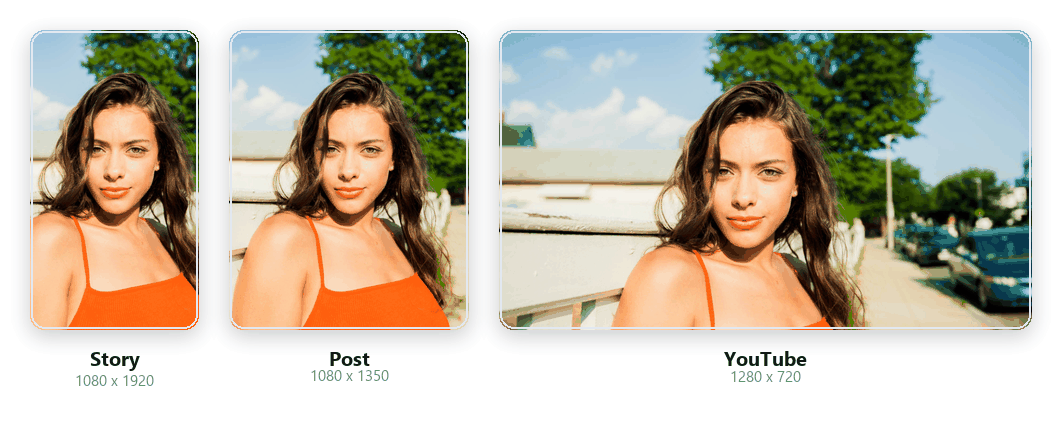
One photo, ten exact sizes - this shows 3 of them, real on-device crops.
Why one photo, ten exact sizes
Every platform wants a different crop of the same photo, and cropping each one by hand in an editor is slow and easy to get slightly wrong - a face half cut off here, awkward empty space where the subject should be there. PixlRun's Resize for Social does it once: drop in a photo, mark one focal point, and it computes a correctly-framed, exact-pixel crop for all 10 presets simultaneously.
Every crop uses cover-crop - the target frame is filled completely and only the excess is trimmed away, the same underlying idea as CSS's own background-size:cover. The one focal point you set keeps your subject centered in as many of the 10 frames as each aspect ratio physically allows, and clamps at the photo's own edges instead of cropping past them.
Extremely large photos (roughly 48 megapixels and above) are automatically scaled down to fit browser memory limits, the same safety cap used across PixlRun's other on-device tools.
TikTok / Reels / Shorts safe areas
TikTok, Instagram Reels and YouTube Shorts all place their own UI on top of your video or image - captions, your profile info, and a rail of like/comment/share icons - which can cover the edges of whatever you post. The tool's own "Show safe zones" toggle overlays a rough guide for where that overlap usually falls on any of the three 9:16 presets.
These margins are intentionally conservative and generic - roughly the top 10% and bottom 15-20% of the frame on all three, plus an extra ~12% down the right edge for TikTok's icon rail - not measured pixel-for-pixel against any single app build, because every platform ships UI changes without notice. Treat the overlay as a starting point, not a guarantee, and always preview your export inside the actual app before posting.
Safe-zone margins are approximate; last reviewed July 2026, updated quarterly.
How it works
Drop in a photo and PixlRun decodes it directly in your browser using the canvas element - it never leaves your device. Drag the focal point over the thumbnail preview to tell PixlRun what matters most in the shot; every one of the 10 preset cards recomputes its crop from your original photo's own pixels the moment you move it.
When you download a size - alone or all at once as a ZIP - PixlRun draws that exact crop straight onto a canvas sized to the preset's exact target resolution in a single step, then exports it as PNG (lossless) or JPEG at quality 92 (visually excellent, smaller files), whichever you've selected. Nothing is watermarked, nothing is uploaded, and the ZIP is assembled on-device using the open-source JSZip library.
How it compares
| Tool | Free tier | Multi-size in one go | Price for full features | Runs on your device |
|---|---|---|---|---|
| PixlRun Resize for Social (this tool) | Free, all 10 sizes | Yes - one crop, ten presets at once | Free | Yes |
 Canva Canva | Requires a free account | One size at a time on the free plan | $14.99/mo Canva Pro (whole suite, not sold standalone) | No, uploads to their servers |
 Kapwing Kapwing | Free tier available | Yes, multiple export sizes inside their editor | Paid plan required for full export/safe-zone tools - check current pricing | No, uploads to their servers |
| Generic free resizers | Free | No - one size per pass, repeat manually | Free (often ad-supported) | Varies - most upload to a server |
Canva's Pro price ($14.99/mo, whole suite) is verified against Canva's own pricing page. Kapwing specifics beyond having a free tier are not independently verified here - check Kapwing's current pricing before relying on them. "Generic free resizers" describes the common single-size-at-a-time pattern of many free web tools, not one named product. Figures as of July 2026, subject to change.
Current social image sizes (2026)
The exact recommended upload resolution for each placement below - this is also exactly what each matching preset in Studio exports at.
| Platform | Placement | Recommended size | Aspect ratio |
|---|---|---|---|
| Post (feed) | 1080 x 1350px | 4:5 | |
| Square post | 1080 x 1080px | 1:1 | |
| Story / Reels | 1080 x 1920px | 9:16 | |
| TikTok | Video / photo post | 1080 x 1920px | 9:16 |
| YouTube | Video thumbnail | 1280 x 720px | 16:9 |
| YouTube | Shorts | 1080 x 1920px | 9:16 |
| X (Twitter) | Post image | 1600 x 900px | 16:9 |
| Post image | 1200 x 630px | 1.91:1 | |
| Post image | 1200 x 627px | 1.91:1 | |
| Pin | 1000 x 1500px | 2:3 |
Sizes reflect each platform's own current published or widely-documented upload recommendations as of July 2026; platforms occasionally revise these without notice.
FAQ
What sizes can I export at once?
Ten ready-to-post sizes from one photo: Instagram Post (1080x1350), Instagram Square (1080x1080), Instagram Story/Reels (1080x1920), TikTok (1080x1920), YouTube Thumbnail (1280x720), YouTube Shorts (1080x1920), X/Twitter Post (1600x900), Facebook Post (1200x630), LinkedIn Post (1200x627) and Pinterest Pin (1000x1500). Every preset exports at that platform's own exact recommended resolution.
Does resizing lose quality?
No extra generation loss beyond the crop itself: each preset is cropped and drawn directly from your original photo in a single canvas step, then exported at that preset's exact pixel dimensions - nothing is routed through a lossy intermediate resize. Choose PNG for a lossless file or JPEG at quality 92 for a smaller, visually excellent file.
What if my photo is smaller than a preset's resolution?
PixlRun still creates the file - browsers can always scale an image up - but it shows a small "will upscale" note on any preset whose target resolution is larger than what your original photo's cropped region can provide, so you know that particular size may look softer than the others. It's a warning, not a block.
Is my photo uploaded to a server?
No. Cropping, focal-point positioning and exporting all happen entirely on-device using your browser's canvas - your photo is decoded, cropped and re-encoded locally, and is never sent anywhere. The only thing this page downloads besides its own code is the JSZip library, used only for the optional "Download all" button.
How does one focal point work across 10 different crops?
Drag a single point on your photo to mark its most important part - a face, a product, a logo. Every preset recomputes its own crop around that same point, centering it as closely as each aspect ratio allows and clamping at the photo's edges so the crop never runs off the image.
Are the TikTok/Reels/Shorts safe-zone overlays pixel-perfect?
No, and we don't claim they are. They're conservative, generic margins based on typical UI chrome (captions, profile info, like/comment/share icons) across TikTok, Instagram Reels and YouTube Shorts, meant as a rough guide - not measured against any one app build. Platforms adjust their layouts often; treat the overlay as a starting point and preview your final export inside each app before posting. Last reviewed July 2026, updated quarterly.