AI Tool

Notion AI
Notion
Notion AI
AI writing, Q&A, and agents built into your Notion workspace
AI writing, Q&A, and agents built into your Notion workspace
Notion AI is not a standalone chatbot you open in a new tab. It is AI that lives inside your existing Notion workspace — embedded in your pages, your databases, your meeting notes, your team wikis. That positioning is the whole point, and it is both the product’s greatest strength and its most significant constraint.
When you ask Notion AI a question, it is not searching the internet. It is reading your documents. The brief you wrote in March. The project retrospective from Q4. The decision log nobody updated. That is a fundamentally different value proposition from ChatGPT or Claude. Those tools are brilliant generalists. Notion AI is a specialist who has read everything your team has ever written.
The suite in 2026 has four distinct capability layers: AI writing inside pages, Ask Notion (Q&A across your entire workspace and connected tools), AI Meeting Notes (transcription and summarization without a bot joining your call), and AI Agents (autonomous multi-step task runners). Each layer is genuinely useful. Each requires at minimum the Business plan.
Notion launched its first AI features in early 2023 as a $10/month add-on bolt-on — a writing assistant that could summarize, rewrite, and generate text inside pages. Useful, but thin. The AI add-on model persisted through 2023 and 2024, giving Notion a clean revenue line but fragmenting the experience: AI felt tacked on, not native.
The inflection point came in 2025, when Notion restructured its pricing entirely. The separate AI add-on was retired. AI was bundled into the Business plan at $20/user/month, with basic writing features trickling down to Plus. More importantly, the product roadmap shifted — AI became the reason to upgrade, not a feature you pay separately for.
September 2025 brought AI Agents: Notion’s first genuinely autonomous AI that could run multi-step workflows across the workspace. February 2026 (Notion 3.3) added Custom Agents — team-built automation that runs on schedules or triggers, connecting Notion to Slack, calendar, GitHub, Figma, Linear, and MCP integrations. By early 2026, Notion AI had transformed from a writing assistant into something closer to an AI-native operating system for knowledge work.
The model question also evolved. Notion 3.2 (January 2026) added a proper model picker. As of September 2026 the choices are GPT-6, Claude Opus 5.5, and Gemini 3.1 Pro, or leave it on Auto and let Notion select the best fit for each task. Context travels with you when you switch models mid-conversation — a small but genuinely useful touch.
Open any page in Notion. Press the spacebar in an empty paragraph — the AI menu appears. Or type /AI for the full command palette. The first thing most users try is “Summarize this page.” It works exactly as expected: a tight, readable summary appears in seconds.
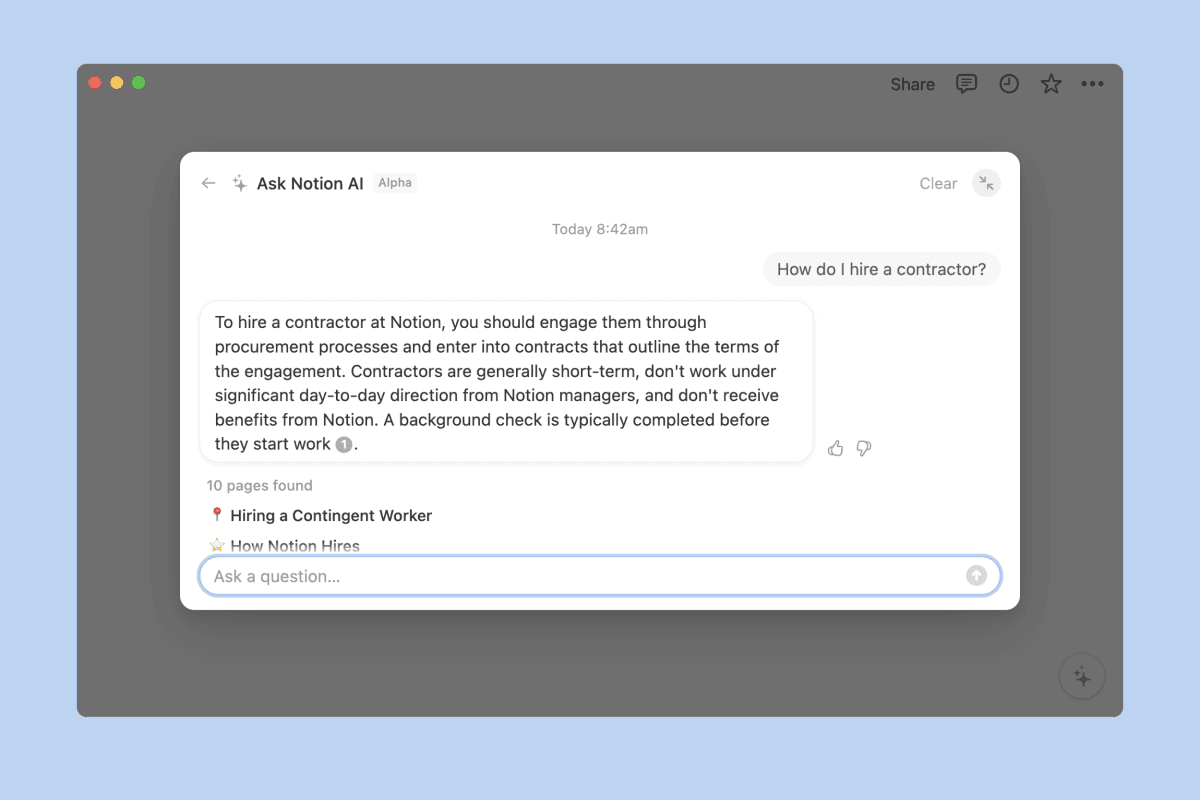
The more revealing test is Ask Notion. Click the AI button in the left sidebar (or press Cmd+J on Mac, Ctrl+J on Windows) and ask something that crosses multiple pages: “What did we decide about the pricing strategy in Q1?” Notion AI reads across your entire workspace — not just the current page — and returns an answer with references to the specific pages it pulled from. You can click those references and jump directly to the source.
That clickable sourcing is the detail that earns trust. You’re not getting an AI answer you have to verify manually. You’re getting an answer with receipts. The AI tells you which document it read, which section it found relevant, and lets you audit the chain. For teams who’ve been burned by confident AI hallucinations elsewhere, this is the thing that makes Notion AI feel different.
Ask Notion searches pages you have access to. If your team uses private teamspaces extensively, the AI’s answers will have gaps. The Business plan’s private teamspace support means each person’s AI sees their own access scope — which is correct behavior, but worth knowing when you’re expecting a “complete” organizational answer.
Ask Notion is the feature that separates Notion AI from a generic writing assistant. It is a conversational search layer over everything in your workspace — and now, with AI Connectors, everything in your connected tools too.
The connectors currently supported include Slack, Google Drive, GitHub, and Asana. Once connected (via Settings → Notion AI → AI Connectors), Ask Notion can search across Slack channel histories and Google Drive documents alongside your Notion pages. Ask “what’s the latest status on the rebranding project?” and it surfaces the Slack thread from last Tuesday and the Notion doc from last month, synthesized into a single coherent answer.
In practice, the quality of answers depends heavily on how well-organized your Notion is. If your workspace is a dumping ground of half-finished pages and stale docs, the AI will find those too and present them with misplaced confidence. Garbage in, garbage out — but with a very polished interface. Teams that maintain their Notion rigorously get dramatically more useful results than teams that treat it as a scratch pad.
There is a latency consideration. Ask Notion is not instant on large workspaces. Complex cross-workspace queries with multiple connectors can take 5-12 seconds — perceptible, especially if you’re used to Google’s instant results. For routine “where is that doc” queries, it’s fast enough. For synthesis questions that pull from many sources, you feel the work it’s doing.
The original Notion AI use case — generating and improving text inside documents — remains the most broadly accessible feature. On Plus and Business plans, pressing Space in an empty block opens an AI prompt. The commands are what you’d expect: write, summarize, improve writing, fix spelling and grammar, translate, make shorter, make longer, change tone.
What distinguishes Notion’s implementation from pasting the same text into ChatGPT is context awareness. When you ask Notion to summarize, it summarizes the current page. When you ask it to continue writing, it reads everything above the cursor. The workspace database properties can be auto-filled by AI — type a company name into a database, ask AI to populate the description, industry, and website fields, and it does it without leaving Notion.
The AI blocks feature — inline AI-generated content embedded directly in your page — is the less obvious but very practical addition. Instead of a one-time generation, an AI block is live: it reads specified source pages and updates its output when those sources change. A weekly status summary that auto-populates from your project pages is a five-minute setup in Notion and a significant time save for PMs who write the same summary every Friday.
Create an AI block that reads your sprint database and generates a weekly summary. Set the source pages once, and every Monday the block regenerates from the updated data. What used to take 30 minutes of copy-paste now takes zero minutes.
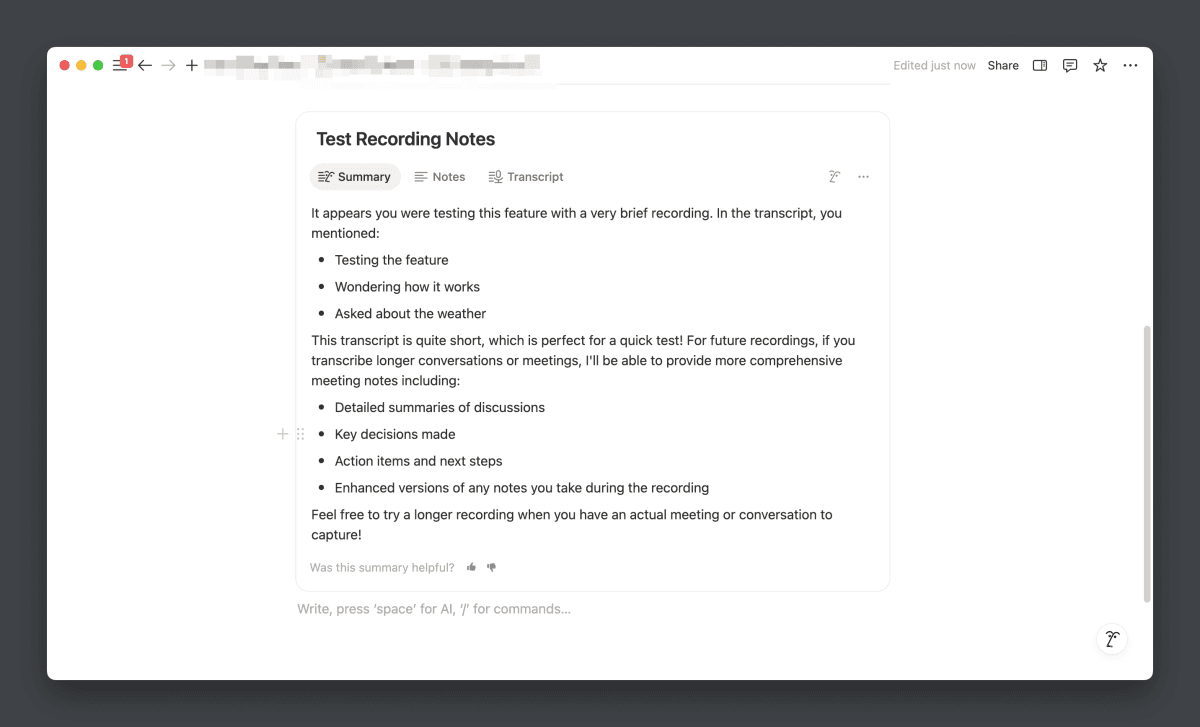
AI Meeting Notes is Notion’s answer to Otter.ai and Fireflies — and its key differentiator is that it doesn’t require a bot to join your call. No awkward “Notetaker has joined the meeting” notification. No paranoid colleagues asking what that participant is. You tap Record in the Notion mobile app (or desktop), it listens via your microphone, and you get a structured doc when you’re done.
The output is genuinely useful. Notion AI produces: a structured summary, a bulleted list of action items (with who said they’d do what), a decision log, and a searchable full transcript. All of it lands in your workspace as a standard Notion page, meaning it immediately becomes part of your Ask Notion knowledge base. Yesterday’s meeting decisions are findable next week through Q&A.
Transcription supports 16 languages as of 2026. Accuracy is strong on clear audio with minimal crosstalk — on par with dedicated transcription tools. In noisy or multi-speaker environments the word error rate climbs, as it does for every tool in this category. The meeting summary is usually accurate even when the transcript has minor errors, because the AI is doing semantic understanding, not literal transcription.
The privacy profile is cleaner than you might expect. Notion processes transcription with 30-day data retention at the LLM provider level (zero for Enterprise). The audio itself is not stored after processing. For teams in regulated industries, Enterprise gives you the zero-retention guarantee in writing.
Enterprise Search is currently in beta for Business and Enterprise plan users. It extends Ask Notion’s scope beyond your connected tools and into a true organizational search: natural language queries that return results from Notion, Slack, Google Drive, GitHub, and future integrations in a unified results view.
The value is clearest in onboarding scenarios. A new team member can type “where do we document our security policies?” and get back a ranked list of the actual pages, Slack channels, and Drive documents where that information lives — rather than asking around or searching three apps manually. The time-to-first-useful-answer for new employees drops significantly.
For power users who already know their workspace well, Enterprise Search adds the cross-tool synthesis: “What decisions did the design team make about the checkout flow?” pulls the Figma comment thread, the Notion spec, and the Slack discussion into one answer. The information was always there across three apps. Now it’s findable in one place.
The Notion Agent — the single instance you access from the sidebar — runs up to 20 minutes of autonomous multi-step work. You give it a goal in plain language: “Create a content calendar for Q2, pull in our past top performers, and assign each post to someone from the content team.” It builds the database, populates it from your existing pages, and creates the assignments. You review the result. You don’t orchestrate the steps.
Custom Agents, added in Notion 3.3 (February 2026), are the more powerful version: team-built AI workflows that run on a schedule or on a trigger, 24/7, without a human initiating them. A Custom Agent can monitor a Slack channel for certain keywords, create a Notion task when it finds one, and send a confirmation back to Slack — all automatically. They can read private Slack channels (with explicit permissions configured per workspace).
As of May 4, 2026, Custom Agents consume Notion credits at $10 per 1,000 credits, billed monthly with no rollover. Heavy automation workloads can add meaningful cost on top of the $20/user Business base. Budget for this before deploying agents at scale — the pricing is still new and the cost curves aren’t fully established.
The quality of agent output tracks closely with the quality of your instructions. Notion doesn’t yet have a “system prompt” equivalent for Custom Agents in the way that, say, Cursor has .cursorrules. The workaround is to build detailed instruction templates into the agent’s initial prompt. Teams that invest in this setup get reliable, repeatable output. Teams that write vague instructions get vague automation.
Since January 2026 (Notion 3.2), Notion AI exposes a model picker. As of September 2026 the three options are GPT-6, Claude Opus 5.5, and Gemini 3.1 Pro, plus an Auto mode that Notion uses to route each request to the best-fit model for the task type.
In practice, Auto handles 90% of use cases well. The manual picker matters most when you’re doing specific kinds of heavy lifting: complex structured reasoning benefits from Claude, long-form generation from Gemini’s context window, and structured data tasks from GPT. But for typical ask-and-answer and document generation workflows, you’ll rarely need to touch the model selector.
Notion maintains a firm position on training data: customer content is never used to train models without an explicit opt-in. Enterprise customers get zero-data-retention contracts with LLM providers, meaning the model providers don’t log your content at all. For regulated industries — legal, healthcare, finance — this is the deciding factor.
scorecard –tool=notion-ai –metric=features,ease,value,support PixlRun assessment
The setup: a Custom Agent runs every Friday at 4pm. It reads three Notion databases — the sprint board, the bug tracker, and the roadmap page — then generates a status summary and posts it to the #product-updates Slack channel. No human writes the update; the PM reviews and approves a draft before it posts.
The draft quality is consistently 80-90% usable without edits. The agent correctly identifies which tasks moved from “in progress” to “done,” flags blockers mentioned in page comments, and formats the output to match the team’s preferred structure (which was specified once in the agent instructions). The PM spends 3 minutes reviewing instead of 30 minutes writing.
The failure mode: when the Notion databases were inconsistently updated by the team, the agent’s summaries reflected the inconsistency. The agent is only as good as the data it reads — it does not infer things that aren’t written down. This pushed the team toward better Notion hygiene, which is arguably a side benefit.
A new marketing manager joins and opens Notion for the first time. Instead of asking their manager for everything, they open Ask Notion and type: “Give me an overview of how we do content at this company — our process, our style guide, and who’s responsible for what.”
Notion AI reads the content strategy page, the brand guidelines doc, the editorial calendar database, and the team directory — and returns a structured answer with direct links to each source. The new hire follows the references, reads the actual docs, and has a working mental model of the team’s process by end of morning. Questions that would have taken a week of Slack messages to answer are answered in an hour of Ask Notion exploration.
The limit: Ask Notion is only as comprehensive as the workspace. Pages that were never created, decisions that were only made in Slack, undocumented tribal knowledge — none of that surfaces. The AI exposes gaps in your documentation as clearly as it exposes the documentation itself.
AI Meeting Notes runs in the background on mobile during a client call. Nobody joins the meeting as a bot. When the call ends, Notion AI has generated: a two-paragraph executive summary, a list of six action items with named owners (pulled from who said what), three decisions documented with context, and the full searchable transcript.
The action items are imported directly into a Notion task database via a one-click prompt: “Add all action items from this meeting as tasks.” The tasks appear, pre-populated with owner names and the meeting page linked as context. The follow-up email is drafted by Ask Notion from the summary — “write a follow-up email summarizing today’s discussion and next steps.” First draft in 20 seconds; sent in 5 minutes.
What’s genuinely impressive: three weeks later, when a question comes up about what was decided in that call, Ask Notion surfaces the meeting page, the exact decision, and who made it. The meeting isn’t lost in email or in someone’s personal notes — it’s findable organizational memory.
a/notion-ai b/chatgpt-and-claude
This is the comparison that matters most for potential buyers. ChatGPT and Claude are the general-purpose alternatives — more capable as raw AI, but they have no idea your company exists. Notion AI knows your company but is a weaker general model.
Verdict: They’re not substitutes. Most teams end up using Notion AI for workspace Q&A and meeting notes, and ChatGPT or Claude for everything else. The switching cost of always grabbing context from Notion to paste into Claude is real — that’s Notion AI’s moat.
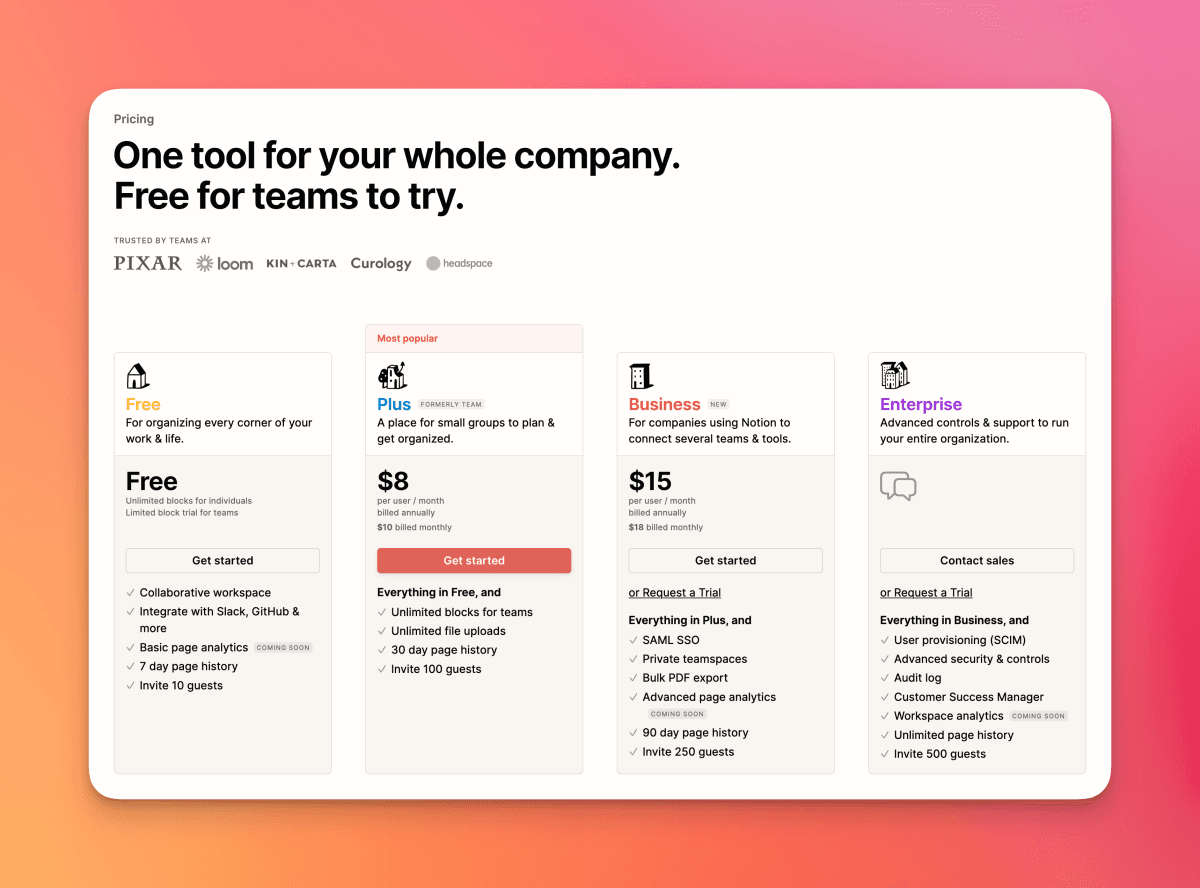
The free tier includes a one-time trial of 20 AI responses — enough to understand what the product does, not enough to evaluate it seriously. The trial does not reset monthly. This is a deliberate upgrade prompt, not a usable free tier for AI features.
Plus at $10/user/month (billed annually) includes basic AI writing features — the inline generation, summarization, and grammar fixing. It does not include Ask Notion, AI Meeting Notes, AI Agents, or Enterprise Search. If you’re on Plus and expecting the workspace Q&A, you’ll be disappointed.
Business at $20/user/month (billed annually) is where the full AI suite lives. Everything unlocks: Ask Notion, AI Meeting Notes, AI Agents, Enterprise Search (beta), AI Connectors, and the model picker. This is the plan you need to evaluate Notion AI properly. At $20/user, a 10-person team pays $200/month for Notion + AI combined — cheaper than running Notion Plus plus a separate AI subscription for everyone.
Custom Agents add Notion credits on top of any plan: $10 per 1,000 credits per month, with no rollover. Light automation (a few agents running weekly) costs very little. Heavy automation pipelines can push the effective cost up substantially. Budget conservatively until you’ve measured your actual credit consumption.
Enterprise adds zero-data-retention guarantees with LLM providers, advanced security controls, and custom pricing. For healthcare, legal, or financial teams, the zero-retention clause justifies the Enterprise conversation.
Yes, if you want the features that define Notion AI: Ask Notion, AI Meeting Notes, AI Agents, and Enterprise Search all require Business at $20/user/month. The Plus plan has limited AI writing only. The free tier has a non-resetting 20-response trial. If you want to evaluate the full product, you’ll need Business.
No, by default. Notion’s policy is that customer content is never used for model training without explicit opt-in. Enterprise customers get zero-data-retention contracts with LLM providers (GPT, Claude, Gemini), meaning even the providers don’t log your content after the request is processed.
Yes, via AI Connectors. Connect Slack, Google Drive, GitHub, and Asana in Settings → Notion AI → AI Connectors. Once connected, Ask Notion and Enterprise Search pull from those sources alongside your Notion pages. Each connector is opt-in and configurable at the workspace admin level.
No bot joins your call. AI Meeting Notes transcribes via your device’s microphone — you tap Record in the Notion mobile or desktop app before or during the meeting. Transcription happens in the background even if you switch apps or lock your screen. When you stop recording, the meeting summary, action items, and transcript are automatically added to your workspace as a Notion page.
As of January 2026 (Notion 3.2), users can choose between models — as of September 2026 the options are GPT-6, Claude Opus 5.5, and Gemini 3.1 Pro — or use Auto mode (which routes to the best model per task). Context and conversation history are preserved when you switch models. Auto is the right choice for most workflows.
Custom Agents are AI workflows you build to run automatically on a schedule or trigger — for example, monitoring Slack for keywords and creating Notion tasks, or generating a weekly report from your databases. They went from free to credit-based pricing on May 4, 2026: $10 per 1,000 Notion credits per month, with no rollover. Light use costs a few dollars extra per month; heavy automation pipelines can cost meaningfully more.
NotebookLM is focused on uploaded documents you explicitly load — academic papers, PDFs, research sources. It is excellent and free for that specific use case. Notion AI covers your entire living workspace: docs that update, databases that grow, meetings that happened this morning. NotebookLM is for research grounding; Notion AI is for organizational memory. They solve different problems.
It works for solo users, but the value scales with workspace richness. A solo freelancer with 200+ Notion pages of client work, project notes, and research will find Ask Notion genuinely useful. If your Notion usage is minimal — a few personal to-do lists — the $20/month Business plan is hard to justify for AI alone. Solo users with lightweight Notion usage are better served by a standalone ChatGPT or Claude subscription.
Notion AI earns its score by solving a problem that standalone AI tools cannot: it knows what your team has written, decided, and planned. Ask Notion is the feature that makes it click — real-time Q&A across your entire workspace, with source references you can audit. AI Meeting Notes removes one of the most tedious tasks in knowledge work. And AI Agents, while still maturing, are a genuine glimpse at AI-native automation.
The caveats are real. The Business plan requirement at $20/user means small teams pay a premium for what is essentially Notion + AI bundled. As a raw language model, it doesn’t touch standalone Claude or ChatGPT. And the quality of everything — the Q&A, the summaries, the agent outputs — scales directly with how well-maintained your Notion is. It’s not a tool that compensates for chaos; it’s a tool that amplifies good habits.
For teams already running on Notion who want AI that knows their business: it’s the clearest recommendation we can make. For solo users or small teams evaluating whether to move to Notion for the AI: evaluate the workspace product first, then treat the AI as a compelling bonus. If Notion already makes sense for you, the AI layer absolutely justifies the Business plan.
Every verified price, limit, and model change we have tracked for Notion AI.
One email when Notion AI changes price or limits. No account, no spam.