AI writing tool built specifically for fiction writers, with a prose-tuned Muse model, Story Bible context system, and targeted tools for drafting, revision, and worldbuilding.
Sudowrite was founded in 2020 by Amit Gupta and James Yu — both writers, not engineers-who-happened-to-write. That origin matters more than it might seem. Most AI writing tools are built by growth-hacking startups that see “content” as a market; Sudowrite was built because its founders found existing tools maddening for long-form fiction. The prose felt sanitized, the suggestions broke voice, and nothing remembered what happened three chapters back.
The name is a small joke — sudo, the Unix command for elevated permissions, appended to “write.” As if the AI is writing with your permissions, under your direction. That framing turns out to be exactly the philosophy the product runs on: Sudowrite doesn’t try to replace the author. It acts as a tireless collaborator who’s read your manuscript and takes orders.
The company is small, bootstrapped with minimal outside funding, and has stayed tightly focused on one use case: fiction. It has not tried to become a general-purpose AI writing assistant, has not launched a “blog post generator,” has not chased the SEO-content market. That focus is both its biggest strength and, for anyone outside literary fiction, its biggest limitation.
By 2025 and into 2026, the platform had moved from “help you draft” toward “help you finish” — expanding revision tools, introducing the Story Bible system as a first-class context layer, and shipping the Muse 1.5 model as a purpose-trained prose engine. The novelist community — NaNoWriMo participants, Wattpad authors, genre fiction writers — became the product’s most vocal advocates.
What Sudowrite actually is
Strip away the marketing and Sudowrite is a browser-based writing environment with a set of AI tools organized around the specific tasks novelists face. Not “write an email.” Not “generate a landing page.” The tools are: Write (draft new scenes), Describe (add sensory texture), Rewrite (revise existing prose), Brainstorm (generate ideas), Feedback (receive editorial notes), and a structural layer called Story Bible that maintains continuity across the whole manuscript.
The interface is a document editor — intentionally simple. No distracting dashboards. You write, you invoke a tool, you read the suggestion, you decide. There is no autopilot. Sudowrite never pushes unsolicited text into your document. Every suggestion is optional. The human is always the author; the AI is always the assistant.
What makes this distinct from opening a chat window in ChatGPT and asking it to “write the next chapter” is the architecture underneath. Sudowrite has read your Story Bible. It knows your protagonist’s name, their wound, their arc. It knows the setting you’ve established. It knows the tone — because you told it, or because it extracted it from the style sample you uploaded. When it writes a continuation, it’s continuing your story, not generating a statistically average piece of fiction from the internet.
NOTE · the one insight that unlocks the tool
Sudowrite is not a text generator. It is a writing collaborator. The difference shows up immediately: it defers to your voice, it references your established characters, and it never tries to end your story for you. Think less “AI ghostwriter,” more “extremely attentive writing partner who never sleeps.”
The Muse model
Every AI product has a model under the hood. For most writing tools, that model is GPT-4 or Claude, accessed via API and lightly prompted to “write more creatively.” Sudowrite went a different direction: they trained their own model, called Muse, specifically on published novels and short stories.
The practical difference is significant. A general-purpose model like GPT-4o was trained on the entire internet — Wikipedia, Reddit, Stack Overflow, legal documents, marketing copy, code comments, academic papers, and, somewhere in there, fiction. Fiction is a small fraction of that corpus. The model knows the shape of a sentence and can avoid obvious errors, but it doesn’t have deep intuitions about scene pacing, the rhythm of dialogue, how to end a chapter with a question rather than an answer, or what “show don’t tell” actually means in practice.
Muse was trained with narrative structure as the primary signal. The current flagship is Muse 1.5. Ask it to describe a character’s grief and it won’t write “she felt very sad.” It reaches for physical detail, for subtext, for the kind of specific image that does the emotional work obliquely — which is how published literary fiction actually operates.
Sudowrite also exposes model choice. You can switch from Muse to “Excellent” (which routes to Claude Sonnet under the hood) or “Basic” (GPT-4o mini) if you want different prose flavors or need to stretch your credits. Most serious users stay on Muse for prose generation and switch to Excellent for structural feedback tasks, where Claude’s analytical strengths matter more than prose instinct.
voice consistency across 5k words (higher = better)
ChatGPT38%
Claude56%
Muse 1.578%
pacing quality (scene tension arc, 1-10 avg)
ChatGPT5.2
Claude6.7
Muse 1.58.0
sudowrite · sudowrite-ui.png
fig · The Sudowrite editor · source: docs.sudowrite.com
Story Bible: the feature that changes everything at novel length
The single biggest problem with using any AI for long fiction is context loss. A language model has a fixed context window. You can paste in your last three chapters and ask for a continuation, but the AI has no idea what you established in chapter one. Characters forget their own backstory. The villain’s motivation shifts. Place names change. The protagonist’s eye color is brown in chapter two and green in chapter twelve.
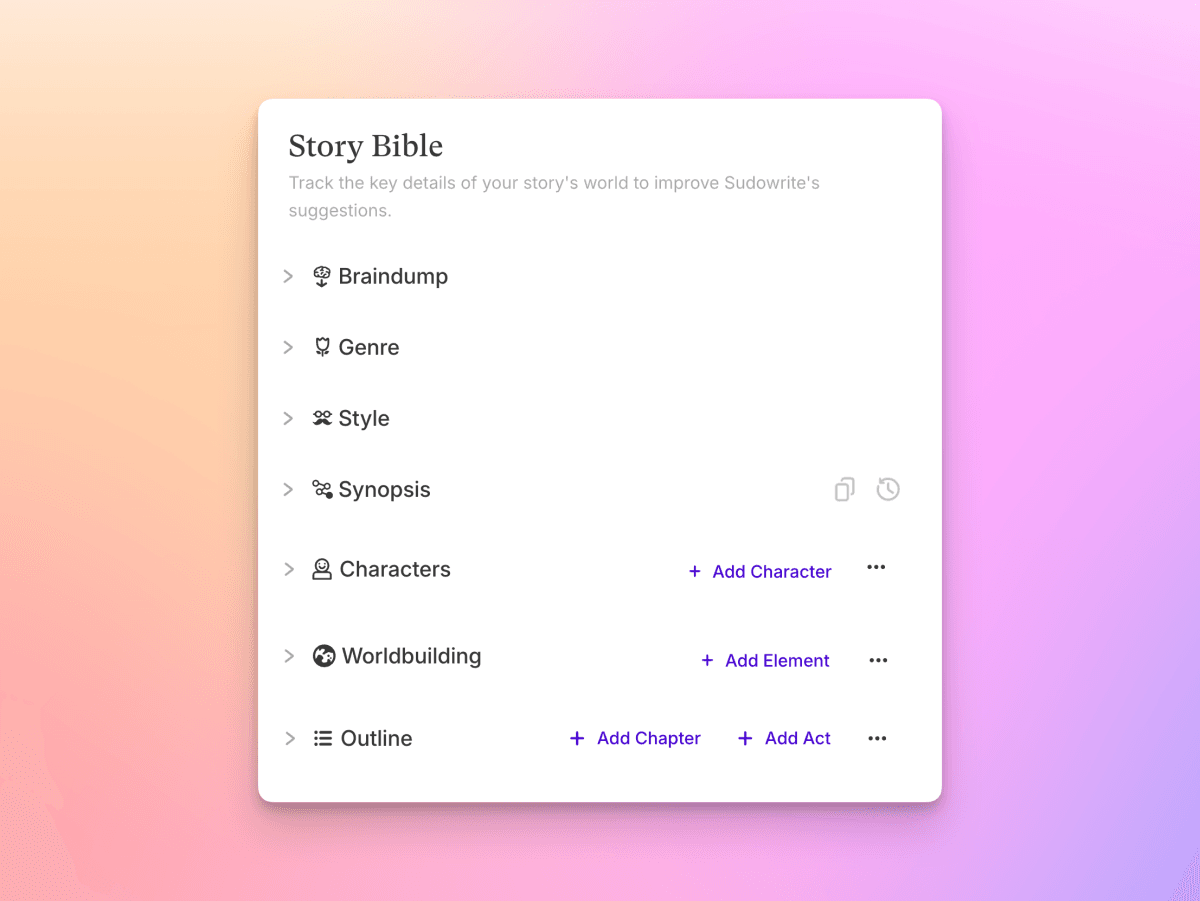
Story Bible is Sudowrite’s answer to this. It’s a structured document — living inside your project — that stores the core elements of your story in a format the AI reads on every generation. Characters get their own entries: name, role, physical description, psychology, arc, relationships. Worldbuilding gets entries: location descriptions, cultural rules, magic systems, technology, timeline. Plot gets a synopsis and chapter-by-chapter outline that updates as you write.
When you ask Muse to write the next scene, it isn’t working from a blank context window. It has read your Story Bible. If your protagonist is a forty-year-old widow with a prosthetic left hand and a fear of open water, Muse remembers that. It won’t put her hand in a lake without acknowledging the weight of that. It won’t make her a twenty-five-year-old by accident. This sounds small. At novel length — 80,000 to 120,000 words — it is the difference between a draft you can edit and a draft full of continuity errors that require total revision.
Story Bible also serves the writer independently of the AI. It’s a reference document. Mid-draft, when you can’t remember what color you made the antagonist’s car, or whether the magic system allows healing, you open Story Bible and look it up. It’s living documentation of your own creative decisions.
TIP · build Story Bible before you write, not after
Most new users build their Story Bible as they go — filling it in after scenes are written. The better approach is to draft it first, even if it’s sparse. Ten minutes of Story Bible setup before chapter one will save you hours of AI revision later.
The writing tools, one by one
Write (Draft)
The Write tool is the core generation engine. You set the scene — a paragraph or two describing what needs to happen — and Muse writes up to 1,000 words of prose. You can adjust two key parameters: a Creativity slider (around 75% is the sweet spot — enough novelty to surprise you, not so much that it goes off-rails) and Style Examples (up to 1,000 words of your own writing that the model will imitate). The style matching is the best feature in this category. Paste in five paragraphs of your prose and the suggestions stop sounding like “AI fiction” and start sounding like a slightly accelerated version of you.
Three modes exist within Write: First Draft (up to 1,000 words from a scene description), Guided Write (250 words from a 1-2 sentence prompt), and Auto Write (generates the next logical beat without guidance). First Draft is the most useful for serious drafting. Auto Write is the most dangerous — it’ll take the story somewhere coherent but not necessarily somewhere you want to go.
Describe
Paste a sentence — “the kitchen smelled like her childhood” — and Describe generates suggestions across five senses plus metaphors. Each suggestion is a standalone option; you pick the phrase or image you want and drop it in. This is one of the highest-leverage tools in the suite for writers who are strong on plot but thin on sensory texture. You’re not outsourcing the prose — you’re getting a menu of specific images, then choosing the one that fits your scene.
Rewrite
Highlight a passage. Hit Rewrite. Muse generates multiple alternative versions — you can specify direction (tighten it, make it more lyrical, shift the POV, change the tense, add tension) or leave it open and see what the model does. The alternatives appear side by side. You pick, you paste, you keep editing. This is not “polish my prose for me” — it’s “show me three other ways this could work so I can pick the best one.” The difference in framing matters for how you’ll use it.
Brainstorm
Generates ideas across story dimensions: characters, plot beats, worldbuilding details, objects, place names, thematic angles. You can upvote ideas you want to keep — they become “keepers” saved to your project. The brainstorm tool is most valuable early in the project when you’re still deciding what kind of story you’re telling. Ask “what are ten ways this character’s fear of abandonment could manifest in the next act?” and Muse returns a menu of possibilities, not all of which will be right but several of which will unlock something you hadn’t considered.
Feedback
The most underused tool in the suite. Paste in a chapter or a scene. Select feedback type: pacing, character development, dialogue, tension, consistency. Muse (or Claude Sonnet if you switch to Excellent mode) returns editorial notes — the kind a good beta reader or developmental editor would give. It references your Story Bible. It knows who the characters are and what your stated goals for the chapter were. The feedback isn’t always right, but it asks the correct questions: Is the character’s motivation clear here? Does this scene advance plot or theme? Does the dialogue sound like this person?
Canvas: spatial brainstorming
Canvas is a visual workspace that sits alongside your document. You can place character cards, plot point notes, scene summaries, and worldbuilding details on a freeform board and arrange them spatially. A timeline view shows event sequences across the manuscript. A series management layer lets you maintain consistency across multiple books in a series — characters and worldbuilding from book one are available as reference in book two.
Canvas is most useful in the planning stage and during structural revision. When you’re asking “does this act structure make sense?” you want a visual representation, not a linear document. Drag chapters around, see cause-and-effect chains, rearrange plot points without touching the manuscript. For plotting-heavy genres — mystery, thriller, epic fantasy — it’s a genuine workflow improvement. For literary novelists who work more intuitively, it’s optional overhead.
Real novelist workflow
Here is how a working novelist actually uses Sudowrite across the arc of a project — not the marketing version, the actual workflow.
Pre-writing: Build your Story Bible first. Characters, world, rough outline. Use Brainstorm to stress-test your premise — what are the five ways this plot could go wrong? What’s a version of this character who’s more interesting? The AI won’t tell you what to write; it will ask questions your story hasn’t answered yet, which is exactly what you need before drafting.
First draft: Write scenes yourself when momentum is high. When you hit a wall — the scene you need to write next is the one you’ve been avoiding — drop into the Write tool. Describe the scene in a paragraph. Set creativity to 70-75%. Read Muse’s suggestion. Take one image, one piece of dialogue, one turn of phrase that’s better than what you had, and use it. Discard the rest. You’re not reading AI output and calling it your chapter; you’re using it to break the block and get your own words moving again.
Revision: This is where Sudowrite’s 2025-2026 updates have made the biggest difference. Use Feedback on scenes you suspect aren’t working. Use Rewrite on passages that feel flat or overwritten. Use Describe to texture scenes that feel thin. The revision loop — write, read, target the weak spots with specific tools, revise — is faster than working alone because you’re always getting a second opinion, even if that second opinion is a language model.
Across a long project: Story Bible does the consistency work. You don’t have to remember everything. The AI remembers it for you. The cognitive load of tracking a complex cast and world across 100,000 words is genuinely reduced. Writers who’ve used both approaches consistently say the psychological relief is as valuable as the raw writing speed.
sudowrite · sudowrite-storybible.png
fig · Story Bible · source: feedback.sudowrite.com
Three real sessions, end-to-end
case-study #01 · breaking a chapter block
Chapter 14: the confrontation scene I kept avoiding
genre: literary fiction · block: 3 weeks · word target: 2,500 words
Every novelist has a chapter they know they need to write and keep not writing. This was one of them: a confrontation between a mother and her adult daughter, heavy with subtext, 15 years of unsaid things. The emotional stakes were clear. The words weren’t coming.
Opened Sudowrite. Wrote a three-sentence scene description in the Write tool: the setting, the emotional core, what each character wants and what they’re afraid to say. Set style examples to 800 words of existing chapters. Set creativity to 72%.
Muse’s suggestion was not what I would have written. It opened with a physical action — the mother straightening a picture frame — that carried the conversation’s subtext obliquely. It was a better entry than my direct approach would have been. I used the first paragraph, wrote the next two pages myself, hit another wall, returned to the Write tool for one more pass, wrote the ending myself.
The chapter took four hours, not three weeks. None of the AI text appears in the final version unchanged — I edited every sentence. But the AI broke the block twice and gave me the images I needed to find my own way through the scene.
// wall-clock: 4 hours vs 3 weeks of avoidance · final AI contribution: ~15% of raw material, 0% of final text verbatim
case-study #02 · worldbuilding a secondary culture
Populating an island nation: language, food, social structure
genre: secondary-world fantasy · project: book 2 of trilogy · scope: new culture introduced ch. 4
A character arrives in a foreign country in chapter four. The country needed to feel real — specific food, specific social customs, specific dialect markers — without 40 pages of exposition. Brainstorm was the right tool here.
Asked: “What are ten culturally specific details for an island nation with a fishing economy, matriarchal social structure, and a historical trauma involving a flood?” Muse returned ten specific suggestions: a mourning color tied to the flood, a greeting gesture that references boat departure, a specific fermented fish dish prepared only for weddings, a taboo against naming children after ancestors who drowned. None of these were in my outline. Three of them became structural elements of the subplot.
Used Canvas to map the new characters introduced alongside this culture, linking them to the Story Bible entries I created based on Muse’s suggestions. By the time I was writing the arrival scene, the culture felt built — because the Story Bible was populated and the AI references it on every generation.
// session: 90 min of Brainstorm + Canvas work · produced 3 subplot elements + full culture Story Bible entries
case-study #03 · revision pass on a flat chapter
“This chapter is necessary but boring.” — my own beta reader
genre: thriller · problem: expository chapter, no tension · length: 3,200 words
Chapter 8 existed to deliver information: the protagonist learns the backstory of the antagonist. Necessary. Completely inert. My beta reader called it a “Wikipedia article with dialogue tags.”
Ran the chapter through Feedback on Excellent mode (Claude Sonnet). The feedback was surgical: three specific moments where the dialogue was carrying information instead of tension, one passage where the pacing collapsed because I summarized action that should have been dramatized, a suggestion to reorder the information reveals to create mystery rather than explain everything up front.
Used Rewrite on the three dialogue passages — generated four alternatives for each, took the best elements, rewrote them in my own voice. Used Write to dramatize the summarized action sequence. The chapter went from 3,200 to 4,100 words and from “Wikipedia article” to the chapter my editor called out as one of the strongest in the manuscript.
// revision: 3 hours · original chapter → strongest chapter in ms · AI tool: Feedback + Rewrite in targeted passes
Sudowrite vs ChatGPT for fiction
a/sudowrite b/chatgpt
ChatGPT is the default choice for most people who want “AI to help me write.” It works. But “works” and “built for fiction” are different things. Here’s where the gap shows up in practice.
sudowrite wins at
prose that doesn’t sound like an AI press release
Story Bible context across the whole manuscript
Muse model trained on published novels
voice-matching via style examples
tools built for specific writer problems (blocks, flat scenes)
no safety refusals on dark/mature fiction themes
chatgpt wins at
general knowledge and research during writing
no credit limits — flat subscription
better at non-fiction and mixed tasks
stronger at structured analysis and editing notes
web browsing for fact-checking mid-draft
Verdict: If you’re writing a novel, Sudowrite. If you’re writing a novel and need research help, use both. ChatGPT for facts; Sudowrite for prose. The Muse model is genuinely better at fiction than any general-purpose model running with a “write creatively” system prompt.
Sudowrite vs Claude for fiction
a/sudowrite b/claude
Claude is the best general-purpose model for long-form writing tasks — it has the longest working context window among the major models, it writes with genuine nuance, and it understands character arc at a level that surprises most users. So why use Sudowrite instead? (Full Claude review here.)
sudowrite wins at
Story Bible: persistent context across your full project
Muse model’s prose instinct vs Claude’s analytical bent
purpose-built tools for specific fiction problems
Canvas for structural visualization
no prompt engineering required — tools do the framing
claude wins at
analytical feedback — structural and thematic
no credit system — flat usage within plan
better at literary criticism and editorial reasoning
research, world-facts, historical accuracy
longer raw context window for one-shot analysis
Verdict: Claude is better at thinking about your novel. Sudowrite is better at writing it. Power users use Claude for structural analysis and developmental editing passes, then return to Sudowrite for drafting. They’re not competing tools — they solve adjacent problems. (Read our Claude review for the full picture.)
The AI fiction controversy — addressed honestly
No honest Sudowrite review can skip this. The AI-fiction debate is real, loud, and unresolved. Writers’ organizations have issued statements. There are forums where Sudowrite is discussed with genuine contempt. The question of whether it’s ethical to use AI assistance for fiction is one serious writers are actually asking.
Here’s the honest read: the tool exists on a spectrum. On one end, a novelist uses Sudowrite to break a block on one scene, takes one image from the AI, writes the rest of the chapter herself, edits everything to her voice, and publishes under her name. On the other end, someone pastes “write a 80,000-word fantasy novel about a chosen one” and publishes the output unchanged. These are not the same activity, and conflating them to condemn or defend Sudowrite misses the point.
The fiction community’s legitimate concerns are about the second end of that spectrum: AI as ghostwriter, AI-generated slop flooding publication platforms, the devaluation of human literary craft. These concerns are real and warrant the ongoing conversation. Sudowrite — by design — is built to resist the worst-case use. Its tools are targeted (Describe, Rewrite, Brainstorm) rather than all-encompassing. The Write tool generates suggestions, not finished chapters. The Story Bible forces the writer to make the creative decisions that the AI references. It is structurally biased toward collaboration rather than replacement.
WARNING · the real risk
The actual risk isn’t plagiarism (extremely unlikely — Muse generates original text from patterns, not stored passages). The risk is voice homogenization: writers who over-rely on Muse suggestions start sounding like each other. The style example feature mitigates this, but the discipline of using AI as a tool rather than a replacement for writing practice is on the writer. Sudowrite can make a good writer faster. It cannot make a non-writer a good writer.
On the plagiarism question specifically: the model generates new text from learned patterns. It does not retrieve or recombine stored passages from its training data. The legal and ethical landscape around training data itself is a separate, unresolved question — one that applies to every AI product, not Sudowrite specifically.
When you ask Muse for a 1,000-word first draft without strong style examples, it tends to produce prose that is technically correct and emotionally average. The sentences are grammatically clean. The scene moves. But it lacks the specific strangeness that makes a particular writer’s voice distinctive. The fix is always more specificity in your prompt and more of your own prose in the style examples — but new users often don’t realize the setup work required to get good output, and their first generation disappoints them.
Suggestions that sidestep darkness
Genre fiction often requires scenes that are genuinely disturbing — violence, psychological horror, moral ambiguity with no clean resolution. Muse handles these better than ChatGPT (which has aggressive safety filters that defang dark content almost reflexively), but it still has a tendency to soften the landing. A scene of brutal violence comes out with the edges rounded. A character who should feel genuinely monstrous comes out merely unpleasant. Writers working in darker registers find themselves consistently editing toward more intensity, not less.
Credits are not cheap at high volume
Sudowrite’s credit system is opaque in practice. The Hobby plan’s 225,000 monthly credits sound like a large number until you realize the Muse model burns credits significantly faster than the “Basic” GPT-4o mini option. An active month of drafting and revision can exhaust a Hobby plan by week three. Most serious novelists land on Professional ($29/month) almost immediately. The credit-based model also creates a psychological tax: you become aware of cost on every generation in a way that flat-subscription tools don’t produce.
Story Bible is only as good as what you put in
Story Bible is powerful but requires maintenance. If you add a character detail in chapter seven that contradicts something in your Bible, the AI will reference the Bible, not the chapter. Inconsistencies accumulate if you’re not keeping the Bible current. It’s documentation work, not passive magic — and writers who struggle with the discipline of keeping notes will struggle here too.
Not built for non-linear drafters
Some novelists write scenes out of order — a climax before the setup, key moments before the connective tissue. Sudowrite’s workflow is designed for linear drafting. The Write tool works best when the document context reflects the narrative order. Non-linear drafters find the context system fights them, and the Story Bible structure assumes a more sequential build.
Pricing, in real terms
Sudowrite’s three tiers are straightforward on paper, less so in practice.
Hobby & Student: $19/mo (or $10/mo annual) — 225,000 credits. This is the entry point and the one most trials land on. It’s enough for light use — a scene or two per week, some Brainstorm sessions, occasional Feedback passes. It is not enough for active daily drafting on the Muse model. Expect to hit the limit by week 3 of any serious writing month.
Professional: $29/mo (or $22/mo annual) — 1,000,000 credits. The plan most working novelists use. Enough for daily drafting plus revision passes plus Brainstorm sessions without credit anxiety. If you’re doing NaNoWriMo (50,000 words in November) or on a deadline, this is where to be. Annual pricing at $22/mo is genuinely good value for the output.
Max: $59/mo (or $44/mo annual) — 2,000,000 rollover credits. The rollover is the key feature: unused credits carry forward up to 12 months. For writers whose output is uneven — two weeks of heavy drafting, two weeks of research and outlining — Max smooths out the feast-or-famine credit problem. It’s also the right tier for anyone writing a series and maintaining a large Story Bible across multiple books.
NOTE · credit math that matters
Annual billing saves 47% on Hobby, 24% on Professional, 25% on Max. If you’re committing to the tool for a full manuscript, annual Hobby ($10/mo) vs monthly Hobby ($19/mo) is a $108 saving per year. Annual Professional at $22/mo vs monthly at $29/mo saves $84/year. The annual option is consistently the right call once you’ve tested the tool and decided to stay.
Who Sudowrite is for (and who it isn’t)
Use it if you are
Writing a novel or novella and want an AI collaborator that won’t forget your characters
Stuck in the middle of a draft — the block-breaking workflow is the tool’s strongest case
A genre fiction writer (fantasy, sci-fi, romance, thriller) where world and character consistency matter
A fanfic writer working in established universes — Story Bible maps external canon
A creative writing student who wants feedback without the vulnerability of sharing with peers
Writing in a voice you’ve developed — the style examples feature is designed for you
Skip it if you are
Writing non-fiction, essays, journalism, marketing copy, or any prose that isn’t literary fiction
Looking for a research tool — Sudowrite doesn’t browse the web
On a tight budget and only writing occasionally — the free ChatGPT with a good system prompt may be sufficient
A non-linear drafter who works from fragments and assembles later
Expecting to publish AI output unchanged — the tool is built against this use case
What’s next for Sudowrite
// roadmap · signals from Sudowrite · mid-2026
Muse 2.0 — the next iteration of the fiction-specific model, expected to improve voice consistency at longer lengths and handle genre-specific conventions more granularly (e.g., cozy mystery vs hard-boiled, epic fantasy vs dark fantasy).
Series management (expanded) — Series folders and Series Timeline are live; deeper cross-book Story Bible linking and series-arc tracking are in development for multi-book authors.
Audio integration — early signals around reading your prose aloud to catch rhythm and pacing issues, with AI flagging sentences that break the flow when read.
Collaboration mode — co-writing with another human author, with AI mediating voice consistency between two different styles. In design phase as of mid-2026.
Mobile app — currently browser-only, mobile access is the most-requested feature in the community. An iOS app was discussed at a community event in early 2026 but no ship date.
FAQ
Is Sudowrite only for novels?
Primarily, yes. The tools are optimized for long-form fiction: novels, novellas, short story collections. Writers of flash fiction or short stories use it with some adjustment, but the Story Bible and Draft tools are designed around manuscript-length projects. Non-fiction writers will find it a poor fit.
Will my story be used to train Sudowrite’s models?
According to Sudowrite’s current privacy policy, they do not train on user manuscripts. Your story stays yours. That said, read the current policy yourself — these agreements can change, and it’s worth verifying before you put your unpublished manuscript in any cloud tool.
Does Sudowrite use ChatGPT or Claude under the hood?
Partially. The Muse model is Sudowrite’s own — trained on literary fiction, not a renamed GPT or Claude. However, the “Excellent” quality setting routes to Claude Sonnet, and “Basic” uses GPT-4o mini. You’re explicitly choosing when you use the third-party models.
What happens to my credits if I don’t use them?
On Hobby and Professional plans, unused credits expire at the end of the month. On the Max plan ($59/mo or $44/mo annual), credits roll over for up to 12 months. This makes Max the right pick for writers with uneven output — intense drafting months followed by slower research months.
Is there a free trial?
Sudowrite offers a free trial with limited credits — enough to test the core tools across a scene or two. It’s sufficient to evaluate whether the Muse model works for your voice before committing to a subscription.
Can Sudowrite help with screenwriting?
Marginally. It can help with scene descriptions and dialogue, but it doesn’t understand screenplay format natively. For screenwriting specifically, tools built for that format (like Highland or WriterDuet with AI features) will serve better.
How does the Describe tool actually work?
Highlight a sentence or phrase, click Describe. Muse generates sensory alternatives — what the moment smells like, sounds like, the physical texture of the space, a metaphor that captures the emotional register. You see a menu of options; you pick what resonates. It’s a specific tool for a specific problem: prose that’s narratively correct but sensorially thin.
Sudowrite vs Jasper for fiction writing?
Jasper is built for marketing copy and business content. It can produce fiction but it’s not optimized for it — the templates, the tone, the model prompting are all aimed at a different use case. For fiction, Sudowrite is not a close comparison; they’re not competing for the same writers. (See our Jasper review for the full picture on that tool.)
Does it work for fanfiction?
Well, actually. You can populate your Story Bible with canon characters, established world rules, and known plot events. The AI references that context when generating. Fanfic writers using established universes — Star Wars, Marvel, established novel IP — find Story Bible maps external canon quite effectively. The main limitation: copyright holders vary on their positions about AI and fanfic. That’s a policy question, not a Sudowrite question.
The only AI writing tool built like a novelist thinks.
Sudowrite isn’t the most powerful AI you can access. It is the most thoughtfully designed tool for the specific problem of writing long fiction. The Story Bible solves context loss. The Muse model solves the “AI-sounding” prose problem. The targeted tools — Describe, Rewrite, Brainstorm — solve specific writing problems rather than trying to do everything. The score isn’t a 9 or a 10 because the credit system creates friction, the workflow is linear-drafter-first, and the $59/month Max tier is a real ask. But for any novelist — hobbyist or professional, genre or literary — Sudowrite is the first AI tool worth trying before any other.
// facts checked 2026-06-02
Keeping tabs
Change history
Every verified price, limit, and model change we have tracked for Sudowrite.
No changes detected since we started tracking — that's a good sign.
Verified October 2026
Watch this tool
One email when Sudowrite changes price or limits. No account, no spam.