AI Tool

Descript
Descript
Descript
AI-powered audio and video editor where you edit by editing the transcript — delete words to cut video, rearrange text to rearrange clips.
AI-powered audio and video editor where you edit by editing the transcript — delete words to cut video, rearrange text to rearrange clips.
Descript is an all-in-one audio and video editor built on a single radical idea: the transcript is the timeline. Import a recording, and Descript transcribes it automatically in 25 languages. From that point on, every word in the text is linked to the exact frame in the video. Edit the words, and you edit the footage.
On top of that core idea, Descript has layered a surprisingly comprehensive production stack: remote recording via Descript Rooms (a browser-based recording studio for remote guests), a built-in screen recorder, AI audio enhancement called Studio Sound, an AI voice cloner called Overdub, an agentic AI co-editor called Underlord, and a multitrack timeline for B-roll, titles, and music. It ships on Mac, Windows, and in the browser.
The company was founded in 2017 by Andrew Mason — yes, the Groupon founder — and has raised over $100M from investors including Andreessen Horowitz. The product has been through several meaningful reinventions: it started as a podcast editor, expanded into video, introduced AI voice cloning well before that was fashionable, and in 2024 shipped Underlord as a full agentic editing layer. By 2026 it has added AI Avatars and Translation & Dubbing into 30+ languages, positioning itself less as an editor and more as an end-to-end content production platform.
The user Descript was built for is legible from the feature list: someone who records themselves talking — as a podcaster, YouTuber, course instructor, or marketer — and wants to get from raw recording to polished output as fast as possible without learning a professional NLE.
The best way to explain Descript’s core mechanic is to describe what traditional video editing feels like first. In Premiere Pro or DaVinci Resolve, you scrub a waveform, find your in-point, mark it, find your out-point, mark it, delete the clip, close the gap, repeat. For a 45-minute podcast recording, this process can take hours. Every “um,” every false start, every section you want to re-order requires manual scrubbing.
In Descript, you read the transcript like a Google Doc. You see “um, so, like, uh” scattered through the text. Select them with the cursor and hit Backspace — gone from both the transcript and the video. You find a section in the middle that would work better as an intro. Cut it, paste it at the top. The video clip moves with it, perfectly trimmed. A five-minute tangent that isn’t working: select the whole paragraph and delete it. That’s it.
The fidelity of the sync is what makes this feel like magic rather than a gimmick. Descript’s transcript doesn’t drift from the media — each word is time-coded at the frame level. When you delete word-level text, the corresponding audio and video are removed to the millisecond. When you reorder, transitions are handled automatically. The tool even accounts for cross-talk in multi-speaker recordings, keeping each speaker’s words linked to the correct track.
Stop thinking about your recording as media. Think of it as a document. The transcript is the edit — the timeline is just the playback view. Once this clicks, Descript’s speed advantage over traditional editors becomes visceral.
There is a meaningful caveat: this approach is native to dialogue-heavy content. The more of the recording that is speech, the more leverage you get. B-roll-heavy documentary work, music videos, and heavily stylized montages don’t benefit from the text paradigm because there is no stable transcript to edit against. Descript knows its audience and doesn’t pretend otherwise.
Download the Mac or Windows app or open the browser version. Create a project, drag in an audio or video file. Descript sends it for transcription — a 30-minute recording comes back in under two minutes for most English-language content. The transcript appears inline with the waveform below it and the video preview above.
The first thing most new users do is click words in the transcript and notice the playhead snaps to that exact moment in the video. It takes about ninety seconds before the first “oh” moment: they realize they can select text and delete it like a word processor.
The second thing that tends to impress is the Remove Filler Words button. One click, and Descript runs through the entire transcript flagging every “um,” “uh,” “like,” and “you know.” A small dialog shows you the count — sometimes 200+ in a 30-minute recording. You review them one by one or accept them all. What would have been 45 minutes of manual scrubbing takes under ten seconds of AI processing and a few minutes of review.
By the end of a first session, most users have a rough cut they’d be comfortable publishing. The learning curve for basic editing is genuinely close to zero — if you can edit a Google Doc, you can edit in Descript. The more advanced features (Underlord, multitrack, Rooms) take longer to absorb but are not required to extract most of the value.
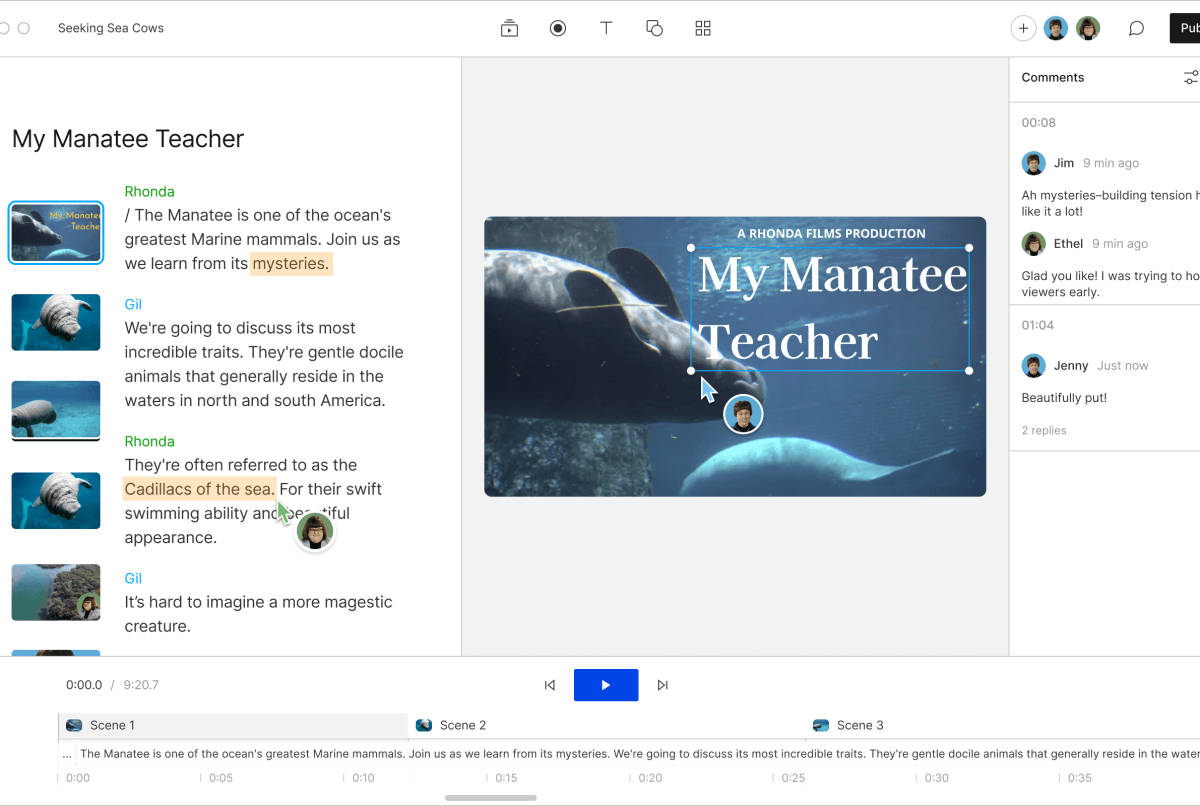
Underlord is Descript’s agentic AI layer, launched in 2024 and significantly expanded through 2025 and 2026. It lives in a side panel and accepts natural-language prompts. The mental model is a junior editor who has already watched your full recording and can act on requests without you scrubbing a single frame.
The tasks Underlord handles reliably out of the box:
Where Underlord is more limited is subjective creative judgment. Asking it to “make the pacing feel more energetic” produces inconsistent results — sometimes it tightens pauses well, sometimes it clips things that shouldn’t be cut. The sweet spot is well-defined, repeatable tasks rather than open-ended creative direction. Think of it as a capable assistant running proven playbooks, not a creative director making judgment calls.
By 2026, Descript has pushed Underlord further into full content generation: Generate Video with AI (create a video from a prompt and script), AI Avatars (a realistic on-screen presenter built from your likeness), and Translation & Dubbing that localizes a finished video into 30+ languages with lip-synced AI voice. These are significant feature additions that represent a genuine expansion of scope — Descript is now willing to call itself an AI content studio, not just an editor.
Studio Sound is the feature that consistently surprises people trying Descript for the first time. Apply it to a recording made on a laptop microphone in an echo-y room, and the output sounds like it came from a treated studio. Background hum disappears. Room reverb collapses. Levels normalize. Breath sounds reduce. The whole pass costs about 10 AI credits and takes a few seconds to process.
How good is it really? Good enough to replace Adobe Audition’s noise reduction and normalization for most podcast and voiceover workflows. It won’t satisfy an audio engineer with a finely tuned monitoring setup — there are artifacts in harder source material, and the EQ profile it applies is “clean broadcast” rather than “distinctive character” — but for creators who don’t want to think about audio processing at all, the output is production-ready.
The most practical use case is remote recordings. When guests join a Descript Room from home on consumer equipment, their audio is often rough — AC noise, road traffic, cheap laptop mics. Studio Sound normalizes the variability. A podcast where the host sounds great but guests all sound different becomes consistent in one pass. This is the feature that makes Descript defensible for distributed podcast teams who don’t control their guests’ recording setups.
Run Studio Sound on each track before you start editing the transcript. With noise removed, transcription accuracy improves measurably — the speech recognition engine handles cleaner audio better, and you’ll spend less time correcting transcript errors before you can begin editing.
Overdub is Descript’s AI voice cloning feature. Train it on 10-15 minutes of your own voice (a training script designed to cover phonetic range), and Descript builds a model of your voice. From that point on, you can type words and have Descript synthesize them in your voice to patch into recordings.
The primary use case is corrections. You finish a podcast episode and notice you mispronounced a guest’s name in the intro. Or you need to update a sponsor read after recording. Or a statistic in a published video turns out to be wrong. Without Overdub, these fixes require finding a quiet room, re-recording the line, and carefully matching room tone. With Overdub, you type the correction into the transcript at the right position and Descript synthesizes the patch.
How convincing is the clone? For short corrections of a word or phrase, very convincing — especially when Studio Sound has normalized the surrounding recording, closing the gap between your live voice and the synthesized patch. For longer passages of fully synthesized audio, the rhythm becomes slightly mechanical. The voice is tonally accurate but lacks the natural prosodic variation that comes from genuine speech. Use Overdub for patches, not for generating extended new narration.
Overdub is available on all paid plans in 2026. Descript also offers a voice-from-upload path for creators who have significant existing recordings but don’t want to do a formal training session.
Descript requires agreement that you will only create an Overdub of your own voice, or a voice for which you have explicit consent. The platform includes a consent flow during training. For content creators, the standard guidance applies: disclose AI voice use when it is material to your audience’s trust. Correcting a mispronunciation is different from building a fully synthetic host — treat them accordingly.
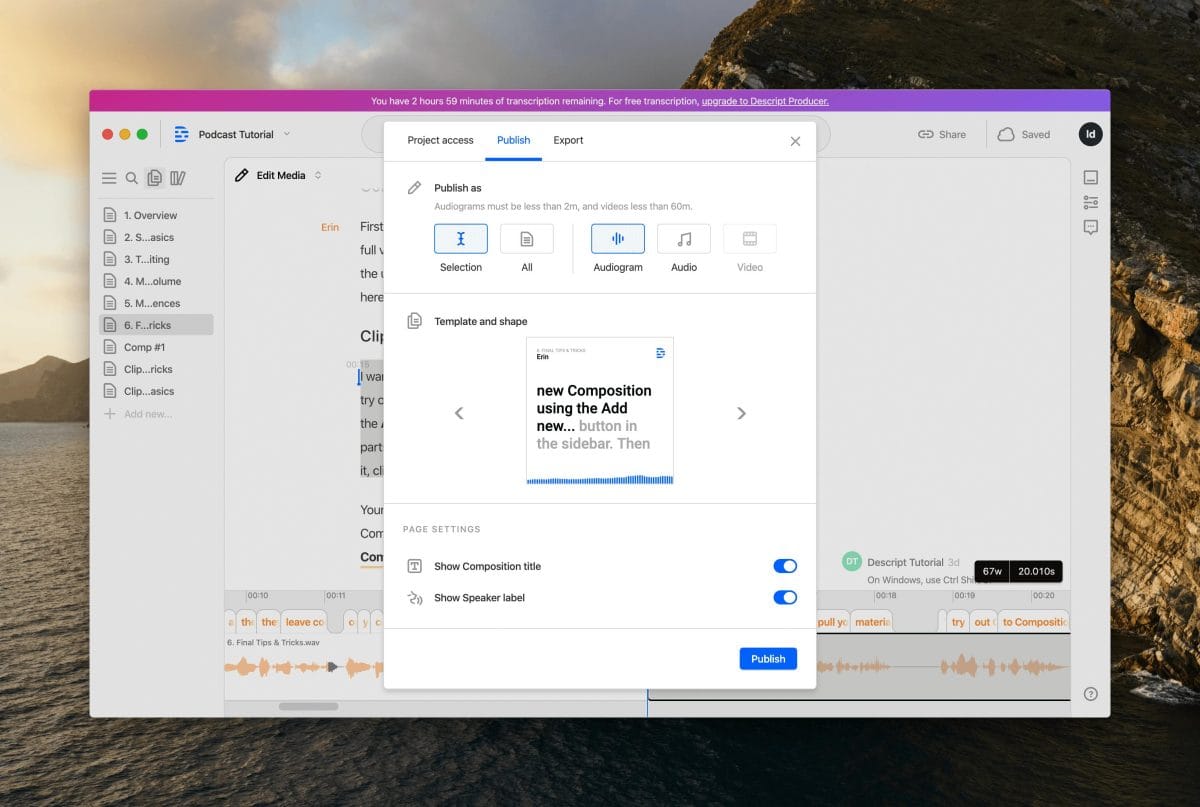
Two smaller AI features that have quietly become essential for talking-head video creators.
Eye Contact correction redirects the speaker’s gaze toward the camera in post-processing. When you’re looking at notes, at a second monitor, or at your interviewee rather than the lens, the footage looks slightly evasive. Eye Contact runs a face-tracking pass and adjusts gaze direction frame by frame. The effect is subtle by design — it doesn’t look synthetic, it looks like you happened to be facing the camera the whole time.
The technology works well for mild deviations (glancing at a side monitor). It is less reliable on large deviations (looking completely away from the camera) and on subjects wearing glasses that partially occlude the iris. For solo-recording YouTubers and course creators who inevitably glance at notes or scripts, it handles the majority of frames convincingly.
Filler word removal is worth its own paragraph even though it fits under the text editing paradigm, because the AI layer around it goes further than simple find-and-replace. Descript identifies false starts, repeated phrases, and configurable silence gaps — not just a list of banned words. The result is a transcript with potential cuts highlighted rather than auto-applied, so you review each one and accept or dismiss with a click. For a 30-minute recording with 180 filler words, this takes about two minutes of review rather than forty-five minutes of scrubbing.
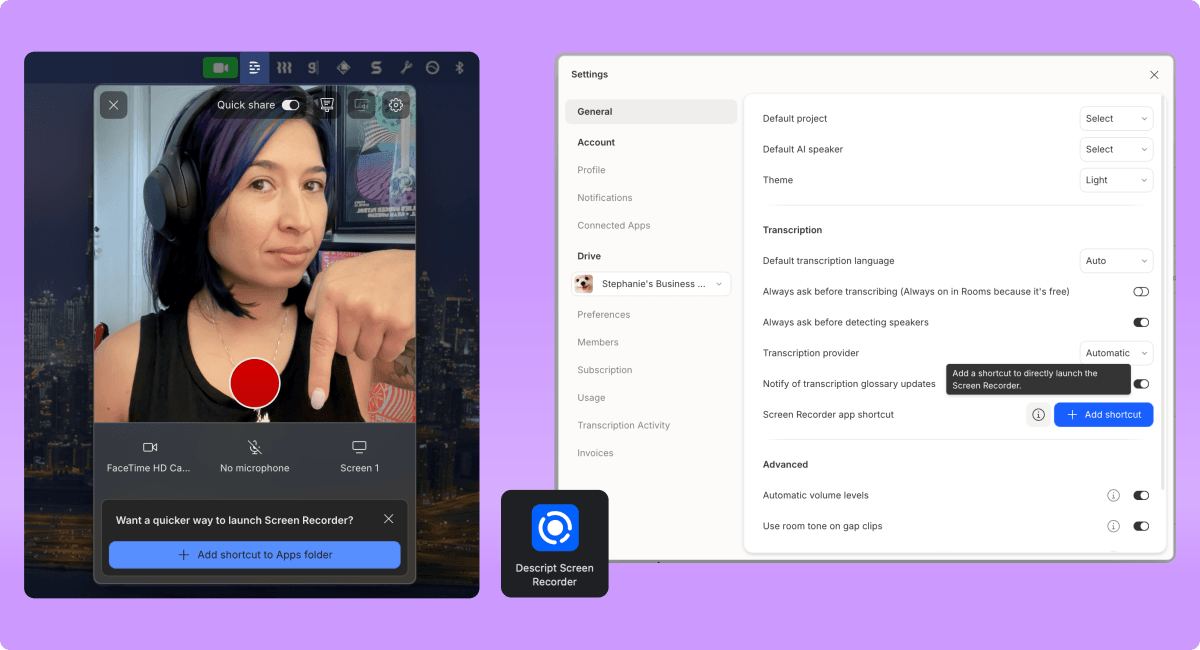
Descript ships a built-in screen and webcam recorder. Hit record, and it captures your screen, camera, and microphone simultaneously into separate tracks. This means you can edit the screen recording and the narration independently in the transcript view. For product tutorials, software walkthroughs, and course demos, this is a genuinely convenient workflow: record yourself walking through a product, then clean up the narration in Descript without ever opening a separate video timeline.
Descript Rooms is the remote recording studio. Guests receive a link, join in a browser with no download required, and each participant’s audio and video is recorded locally on their machine in high quality — not compressed over the network the way Zoom does it. After the session, all tracks upload separately to your Descript project. The result is multi-track audio from each participant, ready for Studio Sound, text editing, and Underlord’s post-production pass.
Rooms is a credible Riverside and Squadcast competitor for the podcaster segment. Where it wins: everything stays in one tool — you record, edit, and export without switching apps. Where it loses: video quality is capped at 1080p on Hobbyist (4K on Creator and above), and Riverside has a more mature guest experience with better resilience for unstable connections.
Both hosts open a Descript Rooms session. Each records locally in their browser — separate, high-quality audio tracks. After the session, Descript uploads and transcribes both tracks automatically. The project opens with two labeled speaker tracks and a full synchronized transcript.
Step 1: apply Studio Sound to both tracks simultaneously. The guest recorded on a MacBook Air with air conditioning noise — thirty seconds later, the track is broadcast-quality. Step 2: run Underlord’s filler word removal — 212 instances flagged across both speakers. Review pass takes eight minutes. Step 3: read through the transcript and delete the ten-minute tangent in the middle that didn’t land. Mark the three best exchanges for social clips. Step 4: ask Underlord to generate show notes and chapter markers. Light review, done.
Export as MP3 for the podcast feed, MP4 for YouTube, and three 60-second clips for social — all from the same project, one export dialog.
Record using Descript’s built-in screen recorder. The result is two tracks: the screen capture and the webcam, each with a separate audio track, synced at the frame level. The narration transcribes automatically.
Edit the narration text to remove mistakes and tighten pacing — the screen recording follows automatically, keeping clicks and cursor movements aligned with the updated voiceover. Apply Studio Sound to the narration. Apply Eye Contact correction to the webcam track — the presenter was glancing at their notes frequently. The resulting footage looks direct and engaged throughout.
Export at 4K (Creator plan), upload directly to the course platform. No additional editing software required. The combination of text-based editing and Eye Contact makes the production quality feel considerably higher than a self-recorded screen tutorial usually achieves.
A marketing team finishes a product demo video. Legal review comes back with three required changes: a product name changed in the latest release, a pricing figure needs updating, and a compliance phrase must be added to the intro. Without Descript, this means a re-record session, studio booking, and full re-export of everything downstream.
With Overdub already trained on the narrator’s voice, the team opens the project in Descript. They click the outdated product name in the transcript, type the correct name, and Descript synthesizes the correction in the narrator’s voice and drops it into the timeline. Same for the pricing figure. The compliance phrase is typed into the transcript at the intro position — five words generated and placed automatically. Total turnaround: under twenty minutes.
No studio. No talent scheduling. No re-export of the full upstream edit. The fix is a transcript edit.
a/descript b/premiere-pro
Adobe Premiere Pro is the professional standard for video editing. In 2026, Premiere added its own text-based editing via the Transcript panel, which closed some of Descript’s structural lead. The question is no longer “can Premiere do text-based editing?” but “which tool is a better fit for dialogue-driven workflows as a whole?”
Verdict: Descript for podcasters, YouTubers, and anyone whose content is primarily speech. Premiere for narrative film, branded commercial work, or anything requiring professional color and motion design. The two tools serve genuinely different productions.
The entire editing model rests on the transcript being accurate. When it is not — heavy accents, poor source audio, dense technical jargon, overlapping speakers — the transcript has errors, and editing from it means editing against wrong text. Applying Studio Sound before transcription helps, but it does not fully solve the problem for the hardest source material. Build transcript cleanup time into your workflow, especially for technical content or non-native English speakers.
Descript’s timeline is powerful for dialogue-driven content but it is not Premiere Pro. There is no keyframing. Color grading options are minimal. Motion graphics are template-based rather than composited. Audio routing doesn’t approach what Logic Pro or Pro Tools offer. If your workflow requires any of these regularly, Descript is a pre-production and rough-cut tool, not a finishing tool.
Studio Sound, Eye Contact, Underlord actions, and Overdub all consume AI credits. The Free plan gives 100 credits one-time — enough to explore, not enough to work. Hobbyist provides 400 per month; Creator provides 800 (plus 500 bonus on sign-up). Creators producing multiple episodes per week will find themselves budgeting credits or upgrading plans. Run the math on your production volume before committing to a tier.
Simple audio podcasts export quickly. Multi-track video projects with Studio Sound, Eye Contact, and multiple B-roll layers can take 10-20 minutes to export at 4K. This is not unusual for cloud-rendered exports, but it means the “fast turnaround” promise requires planning. Export overnight works well. Export two minutes before a deadline does not.
For individual word or short phrase corrections, Overdub is convincing in most listening conditions. For multi-sentence synthesized passages, the rhythm is subtly flat — the natural variation in speech energy and prosody that a human produces spontaneously is harder to replicate at length. Use Overdub for patches, not for generating new narration sections from scratch.
Descript’s 2026 pricing has four public tiers. Prices below are month-to-month; annual billing saves 23-35%. Annual billing prices are: Hobbyist $16/mo, Creator $24/mo, Business $50/mo.
bench –tool=descript –metric=plans-vs-needs 2026 pricing · month-to-month
* Free plan AI credits are 100 one-time, not recurring monthly.
The plan that makes sense for most working creators is Creator at $24/mo annual. It provides 30 hours of transcription per month — enough for two or three weekly podcast episodes plus a YouTube production schedule — plus 800 AI credits (roughly 80 Studio Sound applications) and 4K export. The Hobbyist plan works for casual creators producing one piece of content per week, but the 10-hour transcription ceiling and 1080p export cap are real limitations for professional output. Business is worth it only if you need team collaboration across up to five seats or produce at volume above 40 hours monthly.
This tool earns its score for a specific audience. Being clear-eyed about which side of this line you sit on will save you frustration.
ElevenLabs is the right choice if your primary need is standalone AI voice generation beyond Overdub’s correction use case — it produces more expressive synthesis and supports a far larger voice library. Otter.ai is the right choice if your primary need is meeting transcription and team collaboration rather than media production. Riverside beats Descript on remote recording quality and guest experience but requires a separate editor for post-production. The creator who wants a single tool from record to publish is the user Descript is uniquely positioned for.
For dialogue-heavy content, yes. The text-based editing surface handles rough cuts, pacing, filler removal, and section reordering entirely through the transcript. You would only touch the timeline to add B-roll, titles, or music — and for audio-only podcasts, none of those apply.
For clear English-language audio with a decent microphone, word error rates are in the 3-7% range — competitive with dedicated transcription services. Non-native English, technical jargon, and overlapping speakers can push that to 10-20% error rates, which requires meaningful cleanup time before text-based editing is reliable. Apply Studio Sound before transcribing to improve accuracy on rough source audio.
For short corrections — a word, a phrase, one sentence — yes, especially with Studio Sound normalizing the surrounding audio. For multi-sentence synthesized passages, the rhythm is subtly flat under close listening. Use Overdub for patches, not for generating new narration sections from scratch.
For most podcast production workflows, yes — Studio Sound handles noise reduction, normalization, and basic EQ better than most creators would do manually in Audition or GarageBand. For engineers mixing to spec for broadcast or streaming platform loudness targets, use a real DAW for the final master.
Both record locally for maximum quality and upload post-session. Riverside has a more mature guest experience and handles unstable connections more gracefully. Rooms’ advantage is that everything stays in one tool — record, edit, and export without switching apps. For teams already in Descript, Rooms is the right call. For teams that want the best standalone recording experience and are comfortable editing elsewhere, Riverside wins on recording quality.
Creator at $24/mo annual covers two or three weekly episodes comfortably: 30 hours transcription, 800 AI credits, 4K export, and 15 hours of Rooms recording per month. Hobbyist at $16/mo annual works for casual one-episode-per-week creators at 1080p. Business is warranted when you need team seats or volume above 40 hours monthly.
Transcription supports 25 languages. The Translation & Dubbing feature (added in 2025-2026) supports 30+ languages for full video localization with AI-voiced, lip-synced dubbing. Accuracy varies by language — major European and Asian languages perform well; lower-resource languages show higher error rates.
Descript stores your media in the cloud (5GB on Free, up to 2TB on Business). Files are processed on Descript’s servers for transcription and AI features. Descript’s privacy policy states they do not use your content to train AI models without explicit consent. For sensitive recordings, verify their Data Processing Agreement before using the platform for confidential content.
Descript’s text-based editing paradigm is not a gimmick — for dialogue-driven content, it is genuinely the most efficient editing surface available. The AI layer around it (Studio Sound, Overdub, Underlord, Eye Contact) removes the most painful repetitive tasks from the workflow without asking you to learn a new profession. The result is a product that lets a solo creator produce at a quality level that previously required a production team.
The honest limitation is the depth ceiling. When your content demands real color grading, complex audio mixing, or precise motion design, Descript is not the right tool and doesn’t pretend to be. For everything it is designed for — podcasts, talking-head video, tutorials, remote recordings — it sets the bar in 2026.
Every verified price, limit, and model change we have tracked for Descript.
One email when Descript changes price or limits. No account, no spam.