AI Tool

Otter.ai
Otter.ai
Otter.ai
AI meeting assistant that auto-joins Zoom, Meet, and Teams via OtterPilot, transcribes in real time, and lets you chat with your entire meeting archive.
AI meeting assistant that auto-joins Zoom, Meet, and Teams via OtterPilot, transcribes in real time, and lets you chat with your entire meeting archive.
Otter.ai was founded in 2016 by Sam Liang and Yun Fu, two engineers with backgrounds at Google and academia respectively. The original product was straightforward: record audio, get a transcript. The company’s first wave of growth came from the journalism and research communities — people who needed word-for-word records of interviews and couldn’t afford professional transcription services at $1–2 per minute.
The 2020 remote work explosion changed everything. Suddenly millions of people were conducting their professional lives over Zoom, Google Meet, and Teams. Otter had transcription infrastructure that was already good, and the demand for meeting notes became massive. Monthly active users grew by an order of magnitude in 2020 alone. The company pivoted its marketing from “transcription tool” to “AI meeting assistant” and never looked back.
The real inflection point came in 2023 when Otter launched OtterPilot — the bot that auto-joins your meetings so you don’t have to open the app manually. Before OtterPilot, Otter was a tool you had to remember to start. After OtterPilot, it was a system that ran in the background. Habit formation collapsed from months to hours. That one feature turned Otter from a utility into infrastructure.
By early 2025 the company crossed $100M in annual recurring revenue and announced what it called an “industry-first AI Meeting Agent Suite” — tools that didn’t just record meetings but actively participated in them. The SDR Agent can run product demos on your website autonomously. The Sales Agent coaches reps in real time during customer calls. The Recruiting Agent captures candidate insights and syncs them to Greenhouse. Otter’s positioning has shifted from note-taker to AI teammate, and the product is being built to match that ambition.
Strip away the positioning and Otter does three things: it captures audio, it turns that audio into text with speaker labels, and it uses AI to make that text useful. Everything else — the bot, the summaries, the chat interface, the agents — sits on top of those three primitives.
What that means in practice: every meeting you run through Otter produces a searchable, shareable, commentable document. Every sentence is timestamped. Every speaker is identified. Every action item is extracted. You can read the full transcript, read the AI summary, or skip straight to asking AI Chat a question about what was said.
The key integrations are Zoom, Google Meet, and Microsoft Teams — the three platforms that collectively handle the vast majority of professional video calls. Otter also integrates with Google Calendar and Microsoft Calendar for scheduling, Salesforce and HubSpot for CRM syncing, and Slack for sharing summaries. For power users, there’s now an MCP server integration that lets other AI tools query your Otter meeting archive.
Three things distinguish Otter from generic transcription:
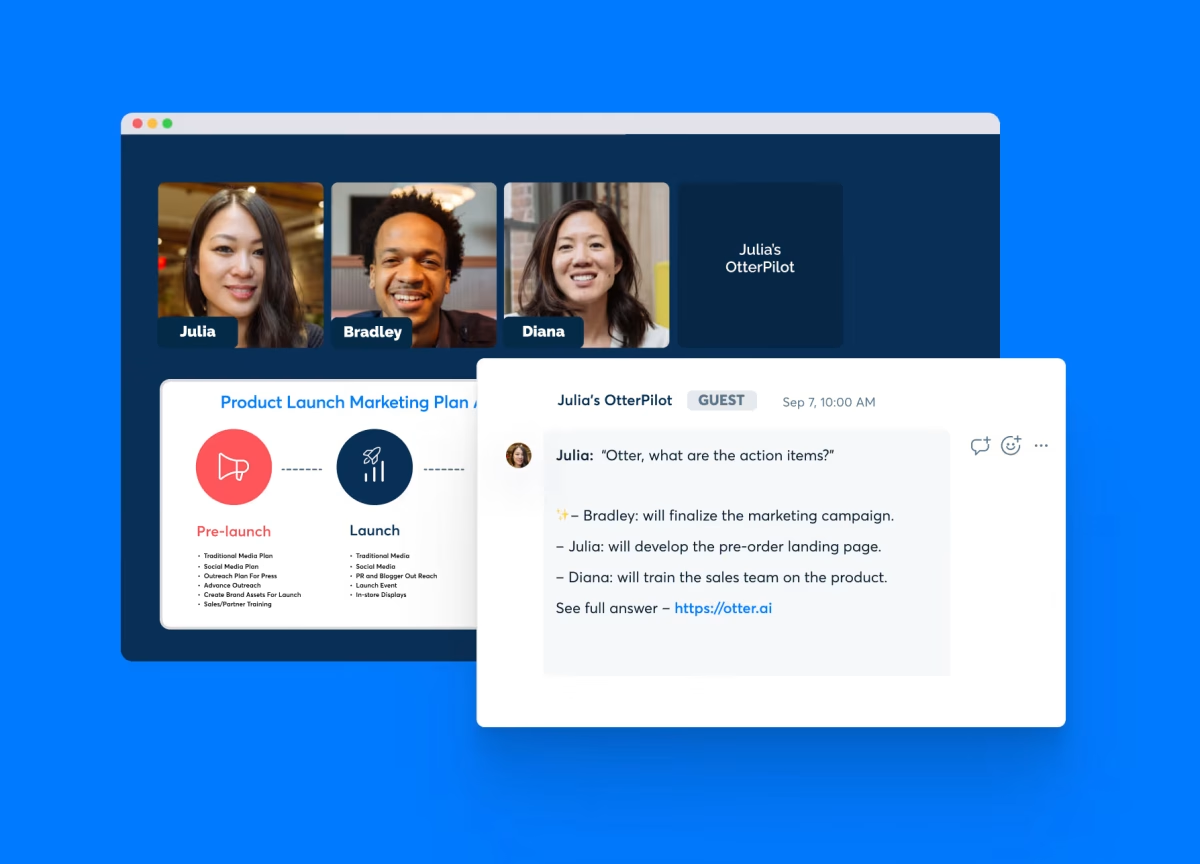
OtterPilot is the piece of Otter that most people underestimate before they use it and can’t imagine working without after. Connect your Google or Microsoft calendar, and Otter automatically joins every scheduled meeting that has a video link — as a bot participant named “Otter.ai Notetaker.” It starts recording the moment the call begins. When the call ends, a summary with action items lands in your inbox within a few minutes.
The experience from the meeting host’s side is that a participant named “Otter.ai Notetaker” requests to join. On Zoom and Google Meet, this shows up as a regular join request that the host admits. On Teams, the bot joins directly if you’ve connected the integration. Attendees can see the bot in the participant list, which solves some of the consent questions (more on that below in the privacy section).
What OtterPilot does during the meeting:
The slide capture is more useful than it sounds. When you revisit a meeting transcript three weeks later, the text “here’s the Q2 pipeline breakdown” means very little without the actual slide. Otter embeds the slide image right there in the transcript at the moment it was discussed. That context is what separates a useful archive from a wall of text.
In Settings, you can configure OtterPilot to join all meetings, only external meetings, or only meetings you explicitly flag. For most users, “external meetings only” is the right default — it captures the calls that actually matter without flooding your transcript archive with every internal standup.
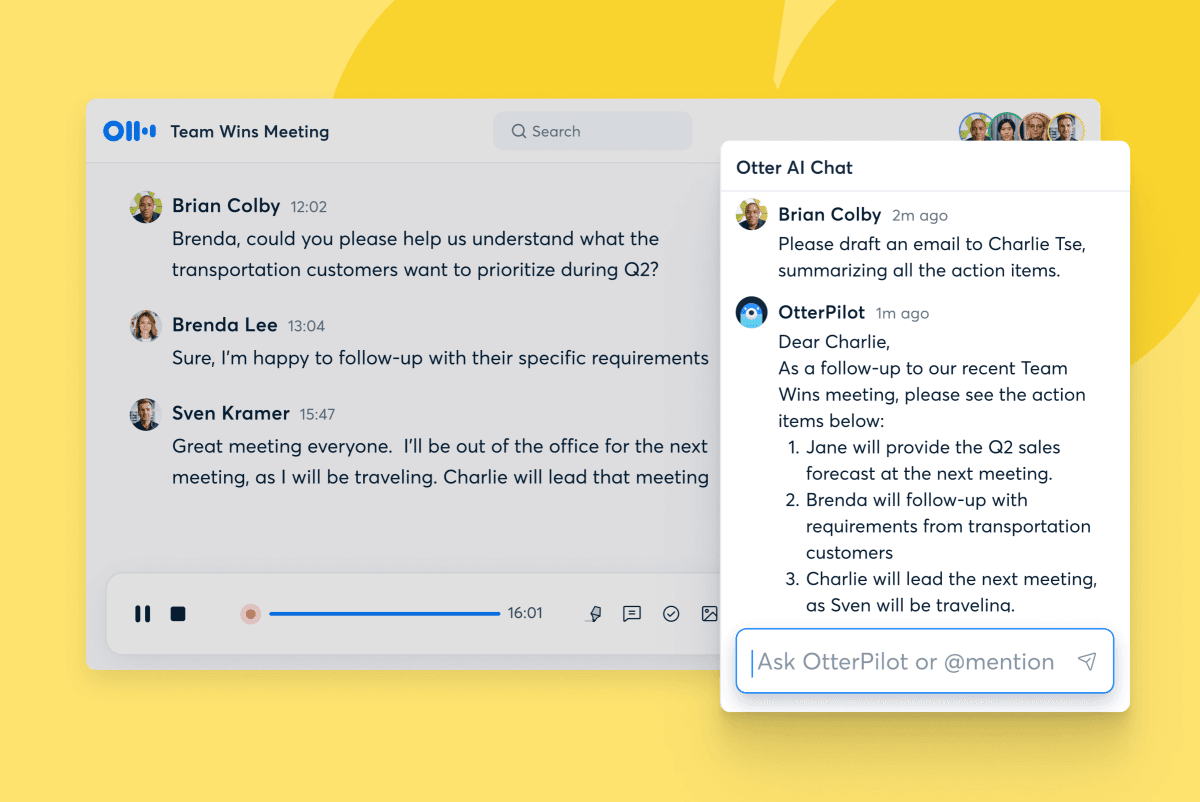
Otter’s transcription engine is built on top of a customized speech-to-text model. In clean conditions — a native English speaker on a decent headset, low background noise, one person talking at a time — accuracy lands around 93–95%. That’s genuinely good. You can read the transcript without constantly cross-referencing audio to patch errors.
The number degrades meaningfully in real-world conditions. Heavy accents drop accuracy into the low-to-mid 80s. Cross-talk (two people speaking simultaneously) produces garbage — Otter typically cuts to one speaker and drops the other, occasionally merging both into incoherent output. Poor microphone quality — laptop speakers, phone audio, bad Wi-Fi — has a bigger impact on accuracy than most users expect.
Speaker identification is one of Otter’s genuine strengths. The diarization (the process of attributing speech to specific speakers) is among the best in this category. It correctly distinguishes speakers even when voice characteristics are similar, and it updates speaker labels retroactively if you rename them — so a transcript labeled “Speaker 1, Speaker 2” becomes “James, Sarah” with a couple of clicks, updating every instance throughout the document.
What Otter doesn’t do well: technical jargon, acronyms, and proper nouns it hasn’t encountered. If your team’s product is called something like “Klairu” or “Splynx,” expect consistent misrecognition. The workaround is Otter’s custom vocabulary feature (Business plan), which lets you add a list of words the engine should know. It helps, but it requires upfront investment that smaller teams often skip.
Every meeting that goes through Otter produces an AI-generated summary automatically. The summary is structured: it groups discussion by topic, not chronologically, which is more useful than a paragraph that says “first James talked about the budget, then Sarah talked about the timeline.” You get a topic-by-topic breakdown that reads like an executive summary a good chief of staff might write.
Action items are extracted separately. Otter scans the transcript for commitments (“I’ll send that by Thursday,” “let’s follow up on the pricing model”) and surfaces them as a bulleted list with the person who made the commitment and the approximate timestamp. The extraction isn’t perfect — it catches maybe 80–85% of genuine action items, and occasionally flags things as action items that weren’t. But it’s dramatically faster than manually combing a transcript for commitments.
The summary and action items are shareable by link — useful for including non-attendees. You can also push the summary to Slack, email it to the team, or export it to Notion. The Business plan adds Salesforce and HubSpot sync, which is where the value compounds for sales teams: every customer call automatically appends its summary and action items to the relevant CRM contact without anyone doing manual data entry.
Otter’s early summaries (2022-era) were frustratingly generic — almost everything produced the same boilerplate structure. The current generation, backed by improved large language models, produces substantively different summaries depending on meeting type. A sales call summary looks nothing like a product planning summary. The meeting type detection is automatic.
AI Chat is where Otter’s positioning as “more than a transcription tool” becomes concrete. Once you have a few weeks of meeting transcripts in Otter, AI Chat gives you a conversational interface to query all of them simultaneously.
Practically: you can ask “What did the client say about the Q3 deadline in our last three calls?” and get an answer with timestamps linking back to the exact moments. You can ask “What action items from this month are still unresolved?” and get a compiled list. You can ask “What has been said about competitor pricing across all our sales calls this quarter?” and get an aggregated answer from dozens of meetings you’d never have time to manually review.
This shifts Otter from a tool for note-taking into a tool for institutional memory. Teams that have been running Otter for six months have an organizational archive they can actually query. New hires can ask AI Chat what decisions were made about the product architecture six months ago and get a sourced answer in thirty seconds, instead of pulling three people into a meeting to reconstruct the context.
AI Chat also works within a single meeting. During or after a call, you can ask “What are all the open questions from this meeting?” or “Draft a follow-up email based on what was agreed.” That on-demand synthesis is the feature most people use most often in the first month, before the archive is large enough for the cross-meeting queries to shine.
The limitations are worth stating. AI Chat works best in English and on clearly spoken audio — the same conditions that favor transcription accuracy. If your archive contains a lot of poor-quality audio, AI Chat’s answers will reflect those transcription errors. It’s not a magic corrector. It’s only as good as the underlying transcript.
The most significant evolution in Otter’s product over the past year has been the shift from reactive to proactive. Classic Otter waited for you to record a meeting, then gave you a transcript. The new agents don’t wait.
The Meeting Agent is the most dramatic departure from the original product: it can speak inside your meetings. Connect it to Zoom (Teams and Meet support is rolling out), and the Meeting Agent can be voice-activated to answer questions during a call by drawing from your entire meeting archive. Ask it “what did we agree on pricing in our last call with this client?” and it answers out loud, in the meeting, to everyone in the room.
The use case that makes this click: a sales rep is on a discovery call and the prospect asks a detailed technical question the rep isn’t sure about. Instead of saying “let me check and get back to you,” the rep triggers the Meeting Agent, which queries the company’s meeting history and product documentation and answers directly. Deal velocity goes up. Follow-up emails go down.
It also handles scheduling and task creation by voice command during meetings — “Meeting Agent, schedule a follow-up with this team for next Thursday” — integrating with calendar apps to actually book the time. That’s the early version. The roadmap points toward agents that can complete a much wider range of tasks without leaving the meeting context.
The SDR Agent is targeted at sales and marketing teams and does something genuinely novel: it can run autonomous product demos on your website for inbound visitors, without a human salesperson present. A prospect lands on your site at 11pm, clicks “Get a Demo,” and has a live interactive demo with an AI that answers real product questions, handles objections, and books a follow-up call with a human rep if the prospect qualifies.
The integrations are serious: Salesforce and HubSpot for CRM pushing, Chili Piper and Calendly for meeting booking, and full conversation logging back into Otter’s archive. It’s a niche feature — most of PixlRun’s readers aren’t running sales-qualified lead funnels — but it signals what Otter sees as the ceiling for the product. Not just meeting notes. Meeting infrastructure.
The Sales Agent operates in real-time during customer calls and functions as a silent coach. It listens to the call, monitors for objections, compares what’s being said against your winning deal patterns, and surfaces relevant guidance in a sidebar only the rep can see. After the call it drafts a personalized follow-up email and pushes a call summary into your CRM automatically.
This is enterprise-focused functionality and the pricing reflects it — the Sales and SDR agents are available on Business and Enterprise plans, with the SDR Agent requiring a custom demo. For SMBs, these agents are largely out of reach. But they represent the clearest articulation of what Otter is building toward: AI that doesn’t just document meetings but actively improves their outcomes.
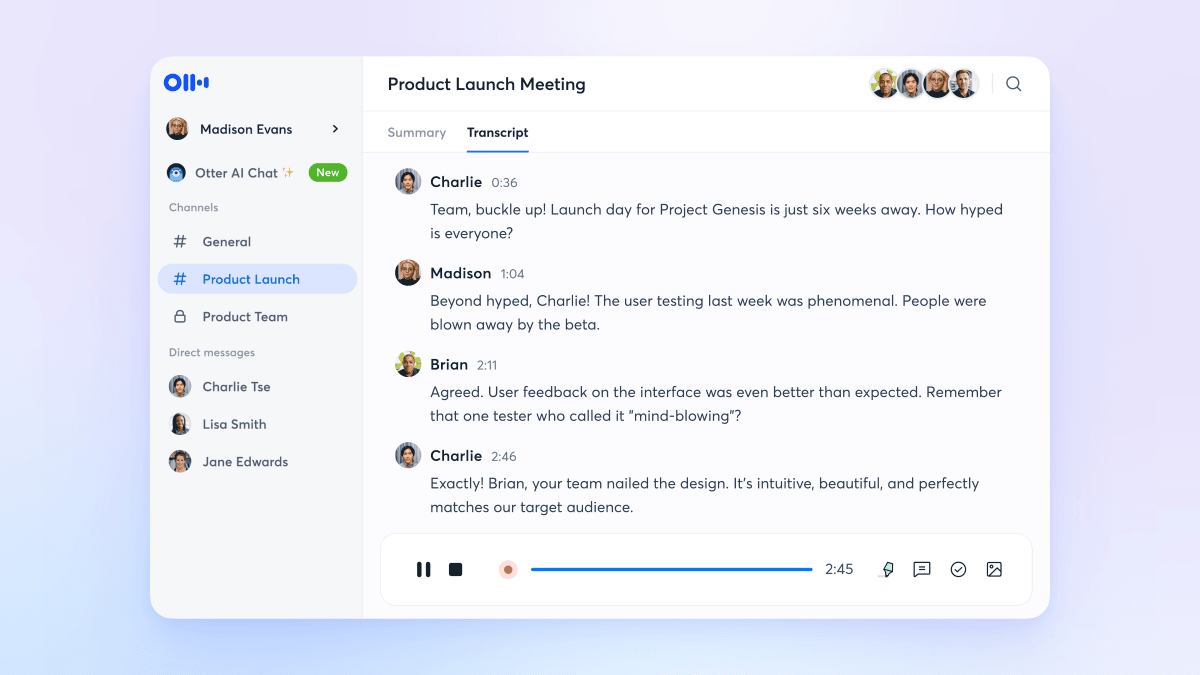
Connect Otter to Google Calendar. OtterPilot joins every call automatically. During calls, focus entirely on the client — no split attention between listening and note-taking. OtterPilot captures everything.
After each call: review the AI-generated summary (takes 3–4 minutes). Edit the action item list to confirm assignments. Share the summary link to the client thread via Slack or email. Done.
At end of week: use AI Chat to pull a cross-client action item list — “what action items from this week are assigned to me across all calls?” — and build the week’s task list from that single query.
The qualitative shift isn’t just time saved. When you stop taking notes, you actually listen differently. Client relationships improve. The note quality improves too — a transcript of what was actually said beats hand-written summaries that filter through the note-taker’s attention and bias.
The problem: distributed teams make decisions in meetings, and the people who weren’t in the meeting (different timezone, out sick, joined three months after the decision) have no way to reconstruct why things are the way they are. Documentation exists in theory; in practice it’s always out of date.
Otter replaces documentation as the source of truth for decisions. Every sprint planning, every architecture discussion, every product debate goes through OtterPilot. Summaries go into a shared Notion workspace automatically via Otter’s Notion integration.
Six months in: when a new engineer asks “why did we choose Postgres over MongoDB for this?”, the answer isn’t “I don’t remember, ask James.” It’s “search Otter for ‘database architecture’ from October.” The conversation is there, verbatim, with the reasoning that won the argument. Onboarding time drops. Repeated debates about settled questions stop happening.
Professional transcription services charge $1–2 per audio minute. A 60-minute interview costs $60–120. At four interviews per week, that’s $240–480/month just for transcription. Otter Pro at $8.33/month eliminates that cost almost entirely.
Workflow: record the interview via the Otter iOS app (or import an existing recording). Transcript is ready in roughly the same duration as the recording — a 60-minute interview produces a transcript in about 60–75 minutes. Speaker identification labels the source and the journalist automatically.
The accuracy caveat applies here most strongly: if the interview subject has a strong accent, speaks quickly, or uses a lot of technical terminology, manual cleanup is required. Budget 20–30 minutes of editing per hour of audio in hard cases versus 5–10 minutes in easy ones. Still massively cheaper than professional transcription, but not zero-effort.
AI Chat over the interview archive is the bonus use case: “What has everyone I’ve interviewed this year said about remote work?” produces a thematic synthesis across dozens of interviews that would have taken days of manual review. For long-form journalism and research, this is genuinely new capability.
Transcription accuracy is the one metric every buyer asks about first, and it’s also the most misleading in isolation. Here’s how Otter measures up against the two tools most likely to be on your shortlist:
bench –tool=all –metric=accuracy,diarization,summary-quality multiple published 2026 tests
Otter edges ahead on raw accuracy and speaker identification in clean conditions. Where it loses to Fathom on the free tier is a meaningful gap — Fathom offers unlimited free transcription for individuals, which is a legitimate reason to choose it if budget is the primary constraint. Fireflies sits between the two on most dimensions.
This section exists because it’s the thing nobody puts in the marketing copy but everybody needs to know before they deploy a meeting bot.
OtterPilot joins meetings as a visible participant. People can see it. This is the right design — hidden recording is both ethically wrong and, in many jurisdictions, illegal. But visibility alone doesn’t solve the consent problem. Many meeting participants assume joining a call means they’re not being recorded. The presence of a bot named “Otter.ai Notetaker” is a signal, but it’s a subtle one that participants accustomed to large meeting lists may miss.
The professional standard for using meeting AI bots in 2026 is to announce recording at the start of the call. Something as simple as “just a heads up, we’re using Otter to transcribe this call for our notes” covers consent in most business contexts. For calls with clients or external parties in regions with strict recording laws (California’s CCPA, GDPR in Europe, Canada’s PIPEDA), this announcement isn’t optional — it’s legally required in some interpretations.
In the US, recording consent law varies by state. Some states (California, Florida, Illinois) require all parties to consent to being recorded. If you’re on a call with someone in a two-party-consent state, recording without their knowledge can expose you to civil liability. OtterPilot’s visibility in the participant list helps but is not a substitute for verbal notice. When in doubt, announce it.
On data privacy: Otter holds your transcripts on its servers. For free and Pro users, Otter states it uses anonymized data to improve its models — this is disclosed in the terms of service. Business and Enterprise plans come with stronger data controls: you can request that your data not be used for model training, and Enterprise adds HIPAA compliance as an add-on for healthcare customers. If you’re handling sensitive conversations — legal, medical, financial — the Business plan minimum is the right posture.
a/otter.ai b/fireflies.ai
Fireflies.ai is the other big name in AI meeting notes. Both have auto-join bots, both produce summaries and action items, both have AI search over meeting history. The differences live in the details and the pricing structure. Fireflies’ free tier is more generous (800 minutes vs Otter’s 300), but its transcript quality and speaker identification trail Otter in most independent tests.
Verdict: Otter for teams that care about transcript quality and want the most powerful AI Chat. Fireflies for budget-constrained teams or those who want more CRM integration breadth at Pro tier. Try both — both offer free tiers. You’ll know within a week which one fits your meetings better.
a/otter.ai b/fathom
Fathom is the cleaner, simpler, cheaper option. Its free tier has no minute limits for individuals — a legitimately compelling offer. The trade-off is that Fathom is a Zoom-first product (Teams and Meet support is more limited), lacks Otter’s cross-meeting AI Chat depth, and doesn’t have anything analogous to the Meeting Agent or SDR Agent.
Verdict: Fathom if you’re an individual who mostly uses Zoom and wants free. Otter if you work in a team, use multiple platforms, or need the cross-meeting AI Chat capability. The free tier gap is real — but so is the feature gap.
A fair review of Otter includes the things that genuinely frustrate users:
Three hundred minutes per month sounds reasonable until you realize that’s five 60-minute meetings. Anyone with a moderately meeting-heavy work life will hit the limit in week one. The free tier exists to demonstrate the product, not to support real workflows. Otter knows this — the limit is a funnel mechanic, not a genuine offer. To their credit, Pro at $8.33/mo is cheap enough that the friction is short-lived for anyone who finds the product useful. But don’t sign up for the free tier expecting it to last.
The 93–95% accuracy figure is for clean audio. Real meetings aren’t clean. Background noise from open-plan offices, call quality issues on mobile, overlapping voices in a brainstorm — all of these push accuracy down. For meetings where word-for-word accuracy matters (legal proceedings, medical consultations), Otter is not a substitute for professional human transcription. It’s a tool for meeting notes, not a court reporter.
The Meeting Agent that can speak inside calls is rolled out incrementally and initially limited to Zoom. It’s impressive as a technical demo, but reliability in production is still variable — it can mishear voice commands, misattribute context from the wrong meeting, or simply not respond in time to be useful during a fast-moving conversation. Worth knowing about, worth trying, not yet worth building a workflow around for most teams.
If your meetings contain genuinely sensitive information — M&A negotiations, attorney-client privileged conversations, security research — storing full transcripts on Otter’s cloud servers is a non-starter regardless of what the privacy policy says. The Business and Enterprise plans give you more control, but they don’t give you on-prem deployment. For regulated industries, evaluate carefully.
AI Chat is powerful when your transcript archive is accurate. When it isn’t — because the underlying audio was poor — AI Chat confidently synthesizes the wrong answers. There’s no quality indicator on individual transcripts that warns you “this one is 70% accurate.” You’d need to manually review to know. Most users don’t, and they occasionally get misleading AI Chat answers as a result.
Otter learns to recognize voices over time if you consistently label speakers correctly. After a few meetings with the same people, it starts auto-labeling accurately. Don’t skip the renaming step — it compounds.
Business plan users can create structured note templates — predefined sections like “Agenda,” “Decisions,” “Action Items,” “Open Questions.” The AI fills them in automatically post-meeting. A five-minute template setup saves five minutes of editing per meeting, every meeting.
Before a meeting with lots of product names, technical terms, or acronyms, add them to your custom vocabulary list. The model picks them up immediately and accuracy on those terms jumps noticeably.
During a meeting, any participant can tap or click to highlight a segment of the live transcript. Highlights are marked for easy review in the final document. Training attendees to highlight the moments that matter (decisions, commitments, disagreements) makes the post-meeting review dramatically faster.
AI Chat works better with explicit time context. “What did we decide about pricing?” gets a vaguer answer than “What did we decide about pricing in Q1 2026?” The more you constrain the query, the more precise the synthesis.
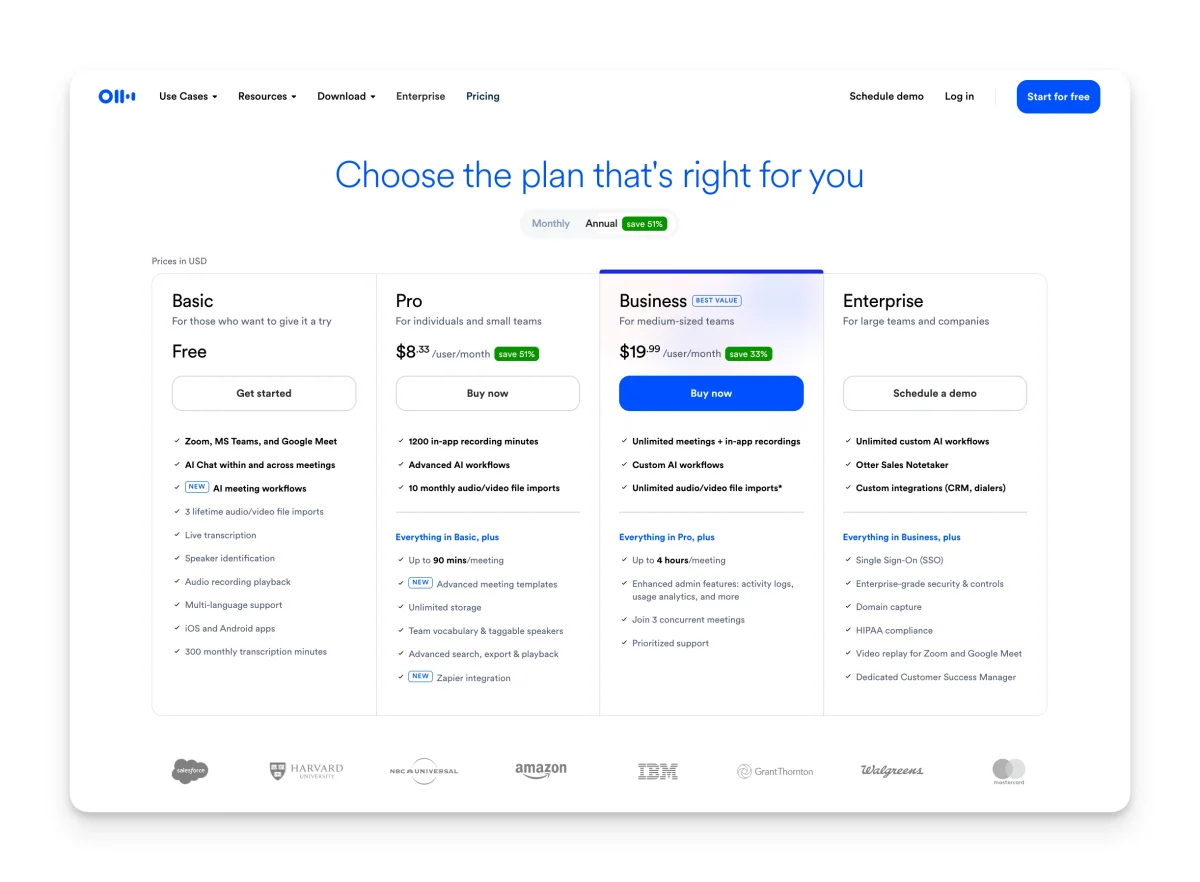
Otter’s pricing is straightforward. The complexity is understanding what you actually get at each tier.
Free: 300 minutes per month, 30-minute cap per conversation, three lifetime file imports. This is enough to evaluate the product over a week or two, and genuinely useful for very light users (one or two short calls per week). For anyone with a real meeting load, it runs out fast.
Pro at $8.33/user/month (billed annually — $16.99 month-to-month): 1,200 minutes per month, 90 minutes per meeting, 10 imported files per month. The 1,200-minute bucket works out to 20 hours of transcription — enough for a medium meeting load. This is the right plan for individuals, freelancers, and small teams up to about three or four people. The annual price is genuinely reasonable.
Business at $19.99/user/month (annual — $30 monthly): Unlimited meeting recordings, up to 4-hour meeting length, unlimited file imports, concurrent meeting support (up to 3 simultaneous), custom vocabulary, team management features, Salesforce and HubSpot sync, and advanced analytics. The correct plan for any team of five or more where meetings drive decisions.
Enterprise: Custom pricing. Adds SSO, SCIM, HIPAA compliance (as an add-on), custom AI workflows, and dedicated support. Typically mid-four-figures annually per organization.
The comparison to human note-taking or professional transcription doesn’t need much math: professional transcription at $1.25 per minute costs $75 for a single 60-minute meeting. Pro plan at $8.33/mo covers 1,200 minutes. The ROI question at Pro pricing is answered in the first meeting of the month.
No. OtterPilot joins as a bot — only the person who invited it needs an Otter account. Other participants get access to the shared live transcript during the meeting and can receive a summary link after, without signing up.
Yes. All paid plans support file imports — audio or video files you upload manually. Pro allows 10 imports per month; Business is unlimited. The free plan allows only three lifetime imports total.
Yes. The iOS and Android apps let you record in-person conversations directly on your phone. The transcription and speaker identification still work, though quality depends more heavily on mic placement when you’re not using dedicated call audio.
Otter’s primary language is English, and accuracy is best for English. Spanish and French transcription support has been added, with more languages in the roadmap. If your meetings are primarily in languages other than English, test carefully before committing to a paid plan.
HIPAA compliance is available as an add-on on Enterprise plans. Business plan alone is not HIPAA-compliant. If you’re in healthcare and handling PHI in meetings, you need the Enterprise tier with HIPAA add-on, and you should review Otter’s BAA (Business Associate Agreement) before proceeding.
Yes. You can delete individual transcripts or your entire account. Otter’s privacy policy states that deleted data is purged from their systems. For Business and Enterprise users, data retention policies can be configured. Free and Pro users should consult the current privacy policy for details on training data use before uploading sensitive recordings.
OtterPilot on the Business plan can join up to three meetings simultaneously under your account. This is useful for sales managers who want to monitor multiple rep calls at once, or for ops teams that run parallel onboarding sessions. Pro plan is limited to one concurrent meeting.
You can exclude specific meetings from OtterPilot’s auto-join behavior by declining the bot in the join request, or by configuring exclusions in your Otter calendar settings. You can also set OtterPilot to only join meetings you explicitly flag, rather than joining everything automatically.
Otter has done something rare: it turned a commodity utility (transcription) into genuine infrastructure. OtterPilot removes the activation energy that killed every other note-taking system teams tried before it. AI Chat turns months of meeting history into a queryable knowledge base. And the new Meeting Agent signals an ambition to move from documentation to participation.
The gaps are real: free tier limits are tight, audio quality matters more than marketing suggests, and the agent features are still maturing. But for any team running more than six hours of meetings per week — which is most remote-first teams — Otter Pro at $8.33/mo is one of the highest ROI software purchases available. The math isn’t close.
Every verified price, limit, and model change we have tracked for Otter.ai.
One email when Otter.ai changes price or limits. No account, no spam.