AI Tool

Devin
Cognition
Devin
Autonomous AI software engineer that takes a ticket, spins up its own VM, writes code, runs tests, and opens a PR — while you do other things.
Autonomous AI software engineer that takes a ticket, spins up its own VM, writes code, runs tests, and opens a PR — while you do other things.
In March 2024, Cognition AI dropped a demo video that broke the internet. Devin, they said, was the world’s first AI software engineer. Not a copilot. Not an assistant. An autonomous agent that could take a task — a bug report, a feature brief, a refactoring request — spin up its own development environment, write code, run tests, iterate on failures, and open a pull request. Without a human at the keyboard.
The demo showed Devin passing a Upwork freelancing task, writing and deploying a full-stack app, and even finding and fixing its own bugs mid-execution. Twitter erupted. Think pieces declared the end of junior developer jobs. Cognition’s seed round was priced at a $2 billion valuation before the product was publicly available. The hype cycle moved at venture-capital speed.
Cognition was founded in 2023 by Scott Wu, Steven Hao, Walden Yan, Tanmay Gupta, and Russell Kaplan — all former competitive programmers with backgrounds at Google DeepMind, Scale AI, and Waymo. Wu in particular was a legendary competitive coder, having won gold at International Olympiad in Informatics. The founding thesis: reasoning at software engineering scale required purpose-built architecture, not off-the-shelf model fine-tuning.
What followed the March 2024 launch was more complicated than the demo suggested. By January 2025, a widely circulated evaluation by the Answer.AI team documented Devin completing just 3 of 20 real-world tasks. The Register and TweakTown ran headlines about the world’s first AI engineer failing 85% of assigned tasks. Cognition’s response was measured — they acknowledged the evaluation, noted that real-world task difficulty was not uniform, and pointed to their SWE-Bench score of 13.86% as more representative than a 20-task study. The gap between hype and reality was the story of Devin’s first year.
In spring 2025, Cognition launched Devin 2.0 with an agent-native IDE, meaningfully improved performance, and a dramatic pricing reset: from $500/month flat to a $20 Core tier plus usage-based Agent Compute Units. Then, in July 2025, Cognition made a move nobody saw coming: it acquired Windsurf, the AI IDE spun up by Codeium, after Google’s reverse-acquihire of Windsurf’s leadership team left its 250-person engineering org without direction. The combined entity closed a $400M round at a $10.2B valuation. Cognition went from an ambitious demo to a $10B company in about 18 months.
The core insight behind Devin is a different model of human-AI collaboration than any coding tool before it. Tools like Cursor or Claude Code are assistive — you stay at the keyboard, you write prompts, you review suggestions in real time. Devin is autonomous and async — you hand it a task, walk away, and come back when it’s done.
The technical architecture reflects this. When Devin receives a task, it provisions its own isolated virtual machine — a real Linux environment with a file system, terminal, browser, and code editor. It reads the relevant codebase, forms a plan, writes code, executes tests, reads error output, and iterates. It can browse documentation, run shell commands, install packages, push to branches, and open GitHub pull requests. All of this happens without human input until the PR is ready for review.
This is not a chatbot that pastes code into a text box. It is closer to a remote junior engineer who works asynchronously on Slack — you assign a ticket, they disappear, and a PR appears in your queue a few hours later. Whether that’s a good thing depends entirely on what the ticket is.
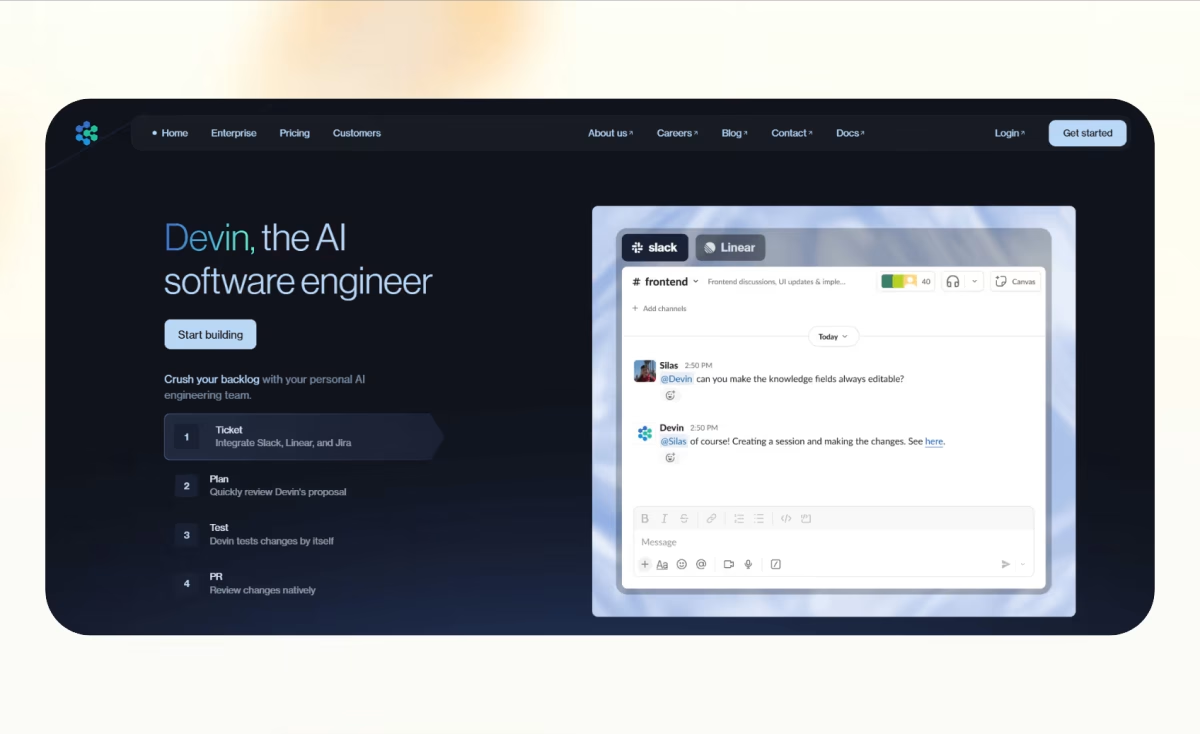
In practice, teams use Devin in three ways. First, via the web interface: log in to devin.ai, write a task description, attach a repo, and let it run. You can check in via a session panel that shows a live log of what Devin is doing — like watching a screen share of a remote dev. Second, via Slack: @Devin in any channel with a task, and it picks it up like a notification. Third, via Linear or Jira: assign a ticket to Devin, or add a label, and the integration triggers an autonomous run. For teams already living in Linear, this is the most seamless path — the issue to PR loop is nearly invisible.
The sandboxed VM is the key architectural decision. Unlike assistive tools that run code in your local environment (introducing security and reproducibility concerns), Devin works in a cloud-isolated container. Every session starts fresh. Your production environment is never touched. This matters more than it might seem — autonomous agents that write and execute arbitrary code in a shared environment are a security nightmare; Devin avoids that class of problem entirely.
The planning and execution loop looks roughly like this:
The plan step is worth pausing on. Devin writes its intention in natural language before touching any code — “I’ll modify the auth middleware in /lib/auth.ts, add a rate-limit wrapper, and update the three route handlers that skip the check.” You can read the plan, intervene if it’s wrong, and save yourself the ACU cost of a bad execution. This is the single most important habit for controlling costs and catching misunderstandings early.
Sessions can also be interactive — you can message Devin mid-run to course-correct, add context it missed, or tell it to abandon a path. Think of it less like setting a timer and more like messaging a remote contractor who can read your Slack messages while they work.

Devin’s integration story is where the async-engineer metaphor becomes tangible. Connecting GitHub is table stakes — without repo access, Devin can’t read your codebase or push branches. But the workflow integrations are what determine whether Devin actually gets used.
devin label. It reads the issue description, analyzes scope, and can post an implementation plan as a comment before starting. Closing the feedback loop between issue and PR is seamless for teams already working in Linear.The Linear + GitHub + Slack combo is where Devin actually changes a team’s workflow. Write a tight ticket in Linear, assign it to Devin, walk away. An hour later, Slack notifies you the PR is up. Review it. Merge it. The ticket closes automatically. For well-scoped tickets, this is genuinely magical. The bottleneck is writing tight tickets — something most teams could improve regardless of AI tooling.
Honest take: the first time Devin successfully opens a PR on a task you handed it fifteen minutes ago, it feels like a category shift. Not because of the code quality — the code is roughly what a junior engineer would produce — but because you genuinely did nothing. You assigned a ticket. You made a coffee. There is a working PR in your queue. That experience is novel in a way that’s hard to describe to someone who hasn’t felt it.
The second thing you notice is the uncertainty. With Cursor or Claude Code, you’re present for every step. If the model goes wrong, you catch it immediately and redirect. With Devin, it disappears for 30 minutes and comes back with either a working PR or a session log documenting 30 minutes of wrong turns. The autonomy that’s the product’s strength is also its primary failure mode. Devin can spend 45 minutes pursuing an approach that any working developer would have abandoned in five minutes, simply because it lacks the contextual common sense to know when to give up and ask for help.
The best mental model is a capable but inexperienced remote contractor with no domain knowledge of your system. You can hand them a well-scoped, isolated task and expect it to be done reasonably. If the task requires implicit knowledge of your system’s quirks, undocumented conventions, or non-obvious constraints, they’ll produce something plausible-looking that’s subtly wrong. Devin is exactly that contractor — and as with any contractor, the quality of the brief determines the quality of the output.
The task: every public page in our marketing site needed <meta og:title>, <meta og:description>, and <meta og:image> tags using the page’s existing title and a fallback image. Twelve route files, each needing the same pattern applied consistently.
We assigned the Linear ticket to Devin. Fifteen minutes later, the plan appeared as a comment on the issue: identify all public routes, read each layout.tsx or page.tsx, add the generateMetadata export using Next.js’s metadata API, default to the fallback image URL where no route-specific image existed.
Thirty minutes after that, the PR was open. Twelve files touched, all consistently. The only manual review point: one route was pulling its title from a database query, and Devin had correctly identified that it couldn’t know the query return type at build time — it added a TODO comment instead of guessing. That’s honest. We filled in that one case ourselves in five minutes.
This seemed like a reasonable task to delegate. Auth migration: swap JWT tokens for HTTP-only session cookies, update the middleware, update the client-side token storage. We wrote a Linear ticket with about six sentences of context.
The session log tells the story. Devin started well — found the auth middleware, identified the JWT verification flow, proposed a plan that looked sensible. Then things unraveled. Our token refresh logic was implemented in a custom hook that Devin never discovered, because it was named useSession rather than anything with “auth” or “token” in the filename. Devin replaced the server-side JWT but left the client refreshing a token that no longer worked.
The PR looked reasonable on first glance. Tests passed — we hadn’t written tests for the refresh flow (our fault, not Devin’s). The bug surfaced in manual QA, 20 minutes after a hypothetical merge would have broken production sessions for logged-in users. Total ACU cost for the failed session: approximately 18 ACUs, or $40.50. Plus another $20 in our own debugging time to understand what Devin had done and undo it.
A utility module — date formatting, string transforms, currency rounding — with zero test coverage. Well-defined inputs and outputs. No external dependencies. A perfect candidate for delegation.
Devin’s session took about 35 minutes. It read the module, identified all 14 exported functions, read three existing test files to match our test style and naming conventions, and produced a test file with 47 test cases. Coverage went from 0% to 91% on the module.
The remaining 9%: two edge cases in the currency rounding function where behavior at half-cent boundaries wasn’t specified in the code. Devin flagged both in a PR comment — “Behavior at 0.5-cent boundary is ambiguous; I’ve tested the current behavior but this may not be intended.” That kind of flag is valuable. We confirmed the current behavior was correct and merged.
Quality assessment: the tests were competent but not inspired. They covered happy paths thoroughly. Boundary cases were hit-or-miss. We added about 8 tests ourselves for the more adversarial input scenarios. The 35-minute Devin session replaced what would have been a 90-minute manual task — but the 90-minute version would have been slightly more thorough.
When Cognition launched Devin, they published a benchmark score of 13.86% on SWE-Bench Lite — a dataset of real GitHub issues requiring code fixes. At the time, that was state-of-the-art. By early 2025, frontier models were hitting 40-55% on SWE-Bench. Devin’s score, once a headline achievement, became context for a harder question: how does benchmark performance translate to real-world reliability?
The Answer.AI evaluation in January 2025 is the most cited honest answer. Twenty real tasks from a research team familiar with AI tooling. Three successes. Three inconclusive. Fourteen failures. The team’s conclusion was direct: “We couldn’t discern any reliable pattern for which tasks would succeed. Tasks that looked similar to our early successes would fail in unexpected ways.” The specific failure modes they documented — Devin spending days on impossible paths, hallucinating security vulnerabilities, getting tunnel vision in debugging — match what other early adopters have reported.
The gap is real, and it has a structural cause. SWE-Bench problems are well-scoped, have a ground-truth answer, and test a narrow slice of software engineering. Real-world tasks are open-ended, ambiguous, and loaded with implicit context that no benchmark can capture. The score is not a lie — it’s a measure of a specific capability in a controlled setting. The field continues to confuse that score with general software engineering reliability, and that confusion is partly on the labs that promote it.
The 13.86% SWE-Bench score and the “first AI software engineer” framing will make you overestimate Devin’s capabilities on real tasks. In independent evaluations, success rates on realistic tasks have been substantially lower. Treat Devin as a capable tool for narrow, well-specified work — not as a reliable autonomous engineer for complex, context-heavy problems.

The most frequent failure mode: Devin can only know what’s in the codebase and what you explicitly tell it. Every team has conventions, architectural decisions, and constraints that exist in developers’ heads but nowhere in the code. Devin doesn’t know that you never use class components in React anymore, that the /lib/legacy folder is a no-touch zone, or that your database migration process has three manual steps that have to happen in a specific order. It will blithely violate all of these because it cannot know about them. The fix is writing more complete task briefs — but the completeness requirement can negate the time savings.
When Devin hits a failing test or error, it iterates. Sometimes this is exactly right — a real engineer would try five approaches before finding the fix. But Devin lacks the meta-awareness to recognize when a problem is fundamentally not solvable with the approach it’s taken. The Answer.AI team documented this precisely: Devin would “spend days pursuing impossible solutions rather than recognizing fundamental blockers.” In a time-billed system like ACUs, this is expensive in both money and productivity.
The most dangerous failure mode: PRs that look correct on review, pass tests (if they exist), and ship a subtle bug. Unlike a junior engineer who might say “I wasn’t sure about this part,” Devin presents its output confidently. It doesn’t always flag uncertainty — and when it doesn’t, reviewers may miss what they should be scrutinizing. This argues for a strict policy: all Devin PRs get a thorough review, not a quick scan.
The ACU model creates budget risk that flat-rate tools don’t. Devin doesn’t pre-quote you a cost estimate before starting a task. It runs, it bills, and you see the ACU consumption in the session log after the fact. A task that should take 3 ACUs can hit 25 if Devin gets stuck in a debugging loop. Teams that have adopted Devin at scale recommend setting per-session ACU limits — a safeguard Devin supports but doesn’t advertise prominently.
You can message Devin while it’s working, but the experience is more like sending a Slack message to someone in a meeting — you don’t know if they’re reading it or when they’ll respond. Devin is optimized for set-and-forget. If your workflow requires tight back-and-forth iteration, an assistive tool at your side is a better fit than an async agent in a separate process.
a/devin b/claude-code
Claude Code is Anthropic’s terminal-based coding agent. It runs locally, operates in your actual filesystem, and works interactively — you watch it type, you redirect it in real time. The contrast with Devin’s async-cloud model is total.
Verdict: Devin for tasks you can fully specify in writing and don’t need to watch. Claude Code for everything that requires you to stay in the loop. Most experienced teams end up using both — Devin for delegatable grunt PRs, Claude Code for active development sessions.
a/devin b/cursor
Cursor is the leading AI-native editor — a VS Code fork where AI is built into every keystroke. It is an assistive tool for developers who are actively coding, not an autonomous agent. The comparison is somewhat apples-to-oranges, but they do compete for the same budget line.
Verdict: If you only buy one tool, buy Cursor. The reliability advantage matters more than the autonomy novelty for most developers. Add Devin to the stack when you have a specific backlog of delegatable tickets — it earns its cost in that specific scenario.
a/devin b/windsurf
Windsurf is now part of Cognition after the July 2025 acquisition — so this comparison is increasingly internal. In the near term, both products continue to operate independently. Windsurf is an AI-native IDE (Cursor competitor); Devin is an autonomous agent. Same parent company, very different products.
Verdict: Post-acquisition, Cognition is likely integrating both products’ strengths over time. For now, they serve genuinely different use cases — pick based on whether you want an editor assistant (Windsurf) or an async agent (Devin).
Devin’s pricing went through a full reinvention with Devin 2.0 in spring 2025. The old $500/month flat rate — enterprise-only in practice — became a tiered model with a $20 entry point. The headline looks accessible. The math behind it is more complicated.
An Agent Compute Unit (ACU) represents roughly 15 minutes of Devin’s active session time. On the Core/Pro tier, overage ACUs cost approximately $2.25 per ACU. On the Teams plan, the rate drops slightly. The critical thing about ACU billing: Devin does not pre-quote you the cost before starting a task. It runs. Then it bills. A task you estimated at 3 ACUs can run to 20 if Devin gets stuck debugging. Teams have reported budgeting for $20 and receiving invoices for $400 in their first active month.
Set per-session ACU limits in Devin’s settings before you deploy this to a team. Without a cap, runaway debugging sessions will generate unexpected charges. Run the Core plan for 30 days and log every session’s ACU consumption before committing to a higher-tier plan — your real usage pattern is the only number that matters for budgeting.
After seeing the failure modes and the cost structure, the honest answer to “who should use Devin” is narrower than the marketing suggests.
Include: what the task is, what files are relevant, what conventions to follow, what NOT to touch. Devin reads this before writing a single line of code. A good brief takes 5 minutes and saves 20 minutes of cleanup.
When Devin posts its implementation plan — either as a session log or a Linear comment — read it carefully. Catching a wrong assumption in the plan costs you nothing. Catching it in the PR costs you the ACUs for the entire session.
Devin supports configuring a maximum ACU spend for a session. Use it. A hard cap at 10 ACUs means a runaway debugging loop stops billing at $22.50 instead of $90. The cap also forces Devin to surface a blocker rather than silently iterate forever.
Writing tests for existing, well-defined utility functions is the highest-reliability Devin task category. The inputs and outputs are specified in code. The test framework is visible. Conventions can be matched from examples. This is the best first task for any team evaluating Devin.
Devin does not always flag uncertainty. Apply the same scrutiny you’d give a pull request from a junior engineer who joined last week and hasn’t asked enough questions yet. The code may be functionally correct and architecturally naive.
Like a .cursorrules file for Cursor, a DEVIN.md at repo root can document conventions, off-limits directories, preferred patterns, and team context that Devin reads before starting. Cognition supports this pattern. Every team deploying Devin at scale should have one.
Both, depending on the task. For narrow, well-specified tasks — test writing, dependency upgrades, mechanical refactors, small UI changes — Devin delivers. For anything requiring deep system context or complex reasoning, it fails more often than it succeeds. Don’t evaluate it on the launch demo. Evaluate it on the 20-task Answer.AI result, and select tasks accordingly.
The $20/mo base is the floor, not the real number. Every task consumes ACUs (roughly $2.25 each), which represent approximately 15 minutes of active session time. A realistic active individual user spends $60–150/month. A team with meaningful throughput spends $300–600/month. Set per-session ACU limits and track consumption for 30 days before budgeting.
No. Devin works in an isolated cloud VM. It can push branches and open PRs on GitHub, but it does not have access to your production systems unless you explicitly grant it. Merge decisions stay with humans. Nothing ships to production without a review-and-merge step.
Cognition acquired Windsurf in July 2025 after Google’s reverse-acquihire of Windsurf’s leadership left its engineering team without direction. Cognition kept the team, the product, and the brand. Both Devin and Windsurf continue operating as separate products while Cognition works on integration. The combined company raised $400M at a $10.2B valuation post-deal.
Yes. Multiple sessions can run simultaneously on Pro and above. This is one of Devin’s genuine advantages over human engineers — you can spin up three Devins on three separate tickets while you focus on architecture or code review. Cost scales linearly with sessions, so it’s a power-user feature for teams with appropriate budgets.
Devin runs in Cognition’s cloud infrastructure. Your code is read by the system during sessions. Enterprise customers get SAML/SSO and custom data terms. If your organization has strict code-egress policies, verify with your security team before connecting production repos. Devin’s isolated VM model prevents it from affecting your live systems, but your code does leave your machines for inference.
A file you add to your repo root that documents conventions, no-touch zones, patterns to follow, and context that Devin should know before starting any task. Think of it as the equivalent of a contractor onboarding doc — it dramatically improves output quality and reduces the “but we don’t do it that way” PR rejections.
They serve different modes of work. Claude Code is an interactive, local, real-time coding agent — you watch every action and redirect immediately. Devin is an async, cloud-based agent — you hand it a task and come back to a PR. If your workflow is hands-on and iterative, Claude Code. If you want to delegate and walk away, Devin. Most power users deploy both.
Anything with significant implicit context — authentication systems, core data models, anything that requires knowing your team’s unwritten conventions. Anything security-critical where a subtle bug is a breach. Anything where cost of failure exceeds cost of just doing it yourself. Start conservative and expand the task envelope as you calibrate what succeeds.
Devin is a real product that does a real thing. For well-scoped, low-ambiguity tasks — writing tests, updating dependencies, mechanical refactors, small isolated features — the ticket-to-PR loop works, and it works asynchronously in a way no assistive tool can match. For anything requiring deep system knowledge, complex reasoning, or tight feedback loops, the failure rate is too high and the cost of failure is real — both in ACUs and in the engineering time required to review and fix bad PRs.
The honest framing: Devin is not the autonomous AI engineer the 2024 demo implied. It is a capable async coding agent with a meaningful success rate on a specific category of task. That’s genuinely valuable. Teams who understand that framing, select tasks carefully, manage ACU spend proactively, and treat every Devin PR with proper review discipline will get positive ROI. Teams who deploy it as advertised and hand it complex, ambiguous work will bounce off it frustrated and $400 poorer.
If you live in Linear, have a backlog of delegatable tickets, and can write tight briefs, Devin earns a serious look. If you’re choosing your first AI coding tool, start with Cursor or Claude Code — the reliability advantage matters more right now.
Every verified price, limit, and model change we have tracked for Devin.
One email when Devin changes price or limits. No account, no spam.