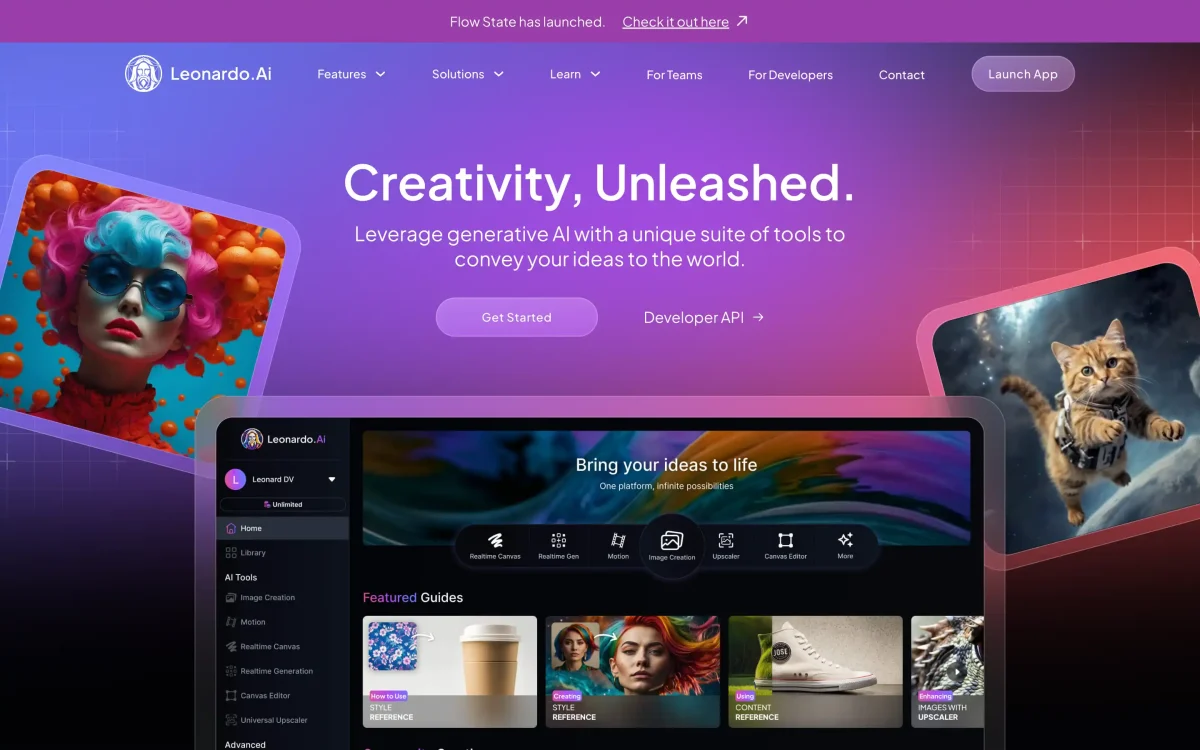
The go-to image generation studio for game developers and concept artists — custom model training, ControlNet guidance, character consistency, and 3D texture maps in one managed platform.
Leonardo.Ai was founded in Sydney, Australia in 2022 by a team that included Jachin Bhasme, Chris McNally, and JJ Fiasson — creative technologists with backgrounds in gaming, VFX, and applied ML. Their starting premise was specific: the game development industry needed an AI image generator that worked like a production pipeline, not a novelty prompt box. That meant custom models trained on your own style, fine-grained compositional control, consistent characters across a project, and an API that plug into existing game engines and asset pipelines.
The Sydney origins matter because Australia’s game dev and VFX communities are smaller and tighter than Silicon Valley — Leonardo launched directly into that world, building relationships with indie studios and AAA concept artists from day one. By late 2023, word had spread through game jams and Discord servers: if you needed a tool that produced tileable textures, character concept sheets, and stylized environments with your studio’s visual language baked in, Leonardo was the address.
Before the Canva acquisition, Leonardo raised approximately $38.8 million from backers including Blackbird, Smash Capital, Samsung Next, and TIRTA Ventures. The team grew to about 120 people, split between engineering (mostly model research and platform infrastructure) and product. By mid-2024, the platform was processing millions of image generations per day with a user base skewed heavily toward professional creatives rather than casual experimenters.
The free tier — consistently generous with a daily credit allowance — was a deliberate growth strategy. Make the tool accessible enough that students, hobbyists, and junior artists discover it, then convert the subset that are serious professionals to paid plans. It worked: Leonardo’s conversion rate from free to paid was reported to be among the highest in the generative AI space at the time of acquisition.
The Canva acquisition — and why it matters in 2026
On July 29, 2024, Canva announced it was acquiring Leonardo.Ai for an undisclosed sum (a mix of cash and stock). All 120 employees joined Canva, including the full executive team. Canva framed the deal as part of its push to dominate the “visual AI” category through Magic Studio, its generative AI suite.
The immediate reaction from Leonardo’s professional user base was anxiety: would Canva’s consumer-first DNA dilute the tool’s depth? Would the platform shift toward low-friction “anyone can use this” features at the expense of the ControlNet controls, custom LoRA training, and API access that made it valuable to game studios?
A year and a half later, the verdict is nuanced. Leonardo has continued to ship serious professional features — Phoenix 2.0 arrived in early 2026 with the Consistent Character Engine as a major headline. The API remains active and well-documented. The platform has not been absorbed into Canva’s interface (the two still run on separate domains and separate accounts). What has changed: development pace feels somewhat slower than the sprint-and-ship cadence of 2023, and the organizational structure now includes Canva’s slower review cycles.
NOTE · independence preserved (so far)
Leonardo continues to operate independently under Canva’s ownership. You don’t need a Canva account to use Leonardo, and Leonardo-trained models are not automatically available in Canva’s Magic Studio. The integration roadmap is being built carefully, not rushed.
The upside of the Canva umbrella is real: significantly more compute budget for model training, access to Canva’s design user base as a feedback pool, and the infrastructure stability that a multi-billion-dollar company provides. For professional users, the honest read is: Leonardo is better-resourced than it was pre-acquisition, but slightly less scrappy.
What Leonardo actually is
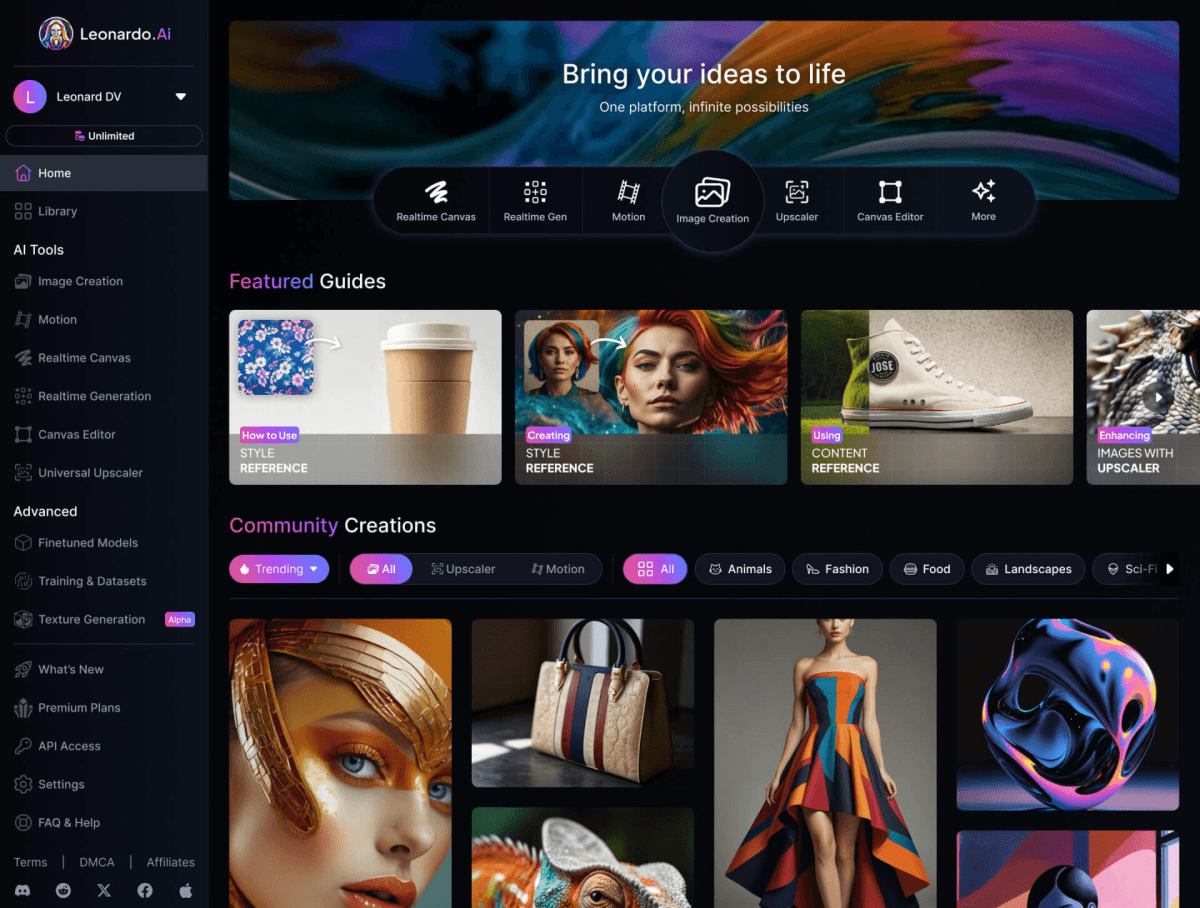
Strip away the marketing and Leonardo is a web-based image generation studio with four pillars that distinguish it from the generic “type a prompt, get an image” tools:
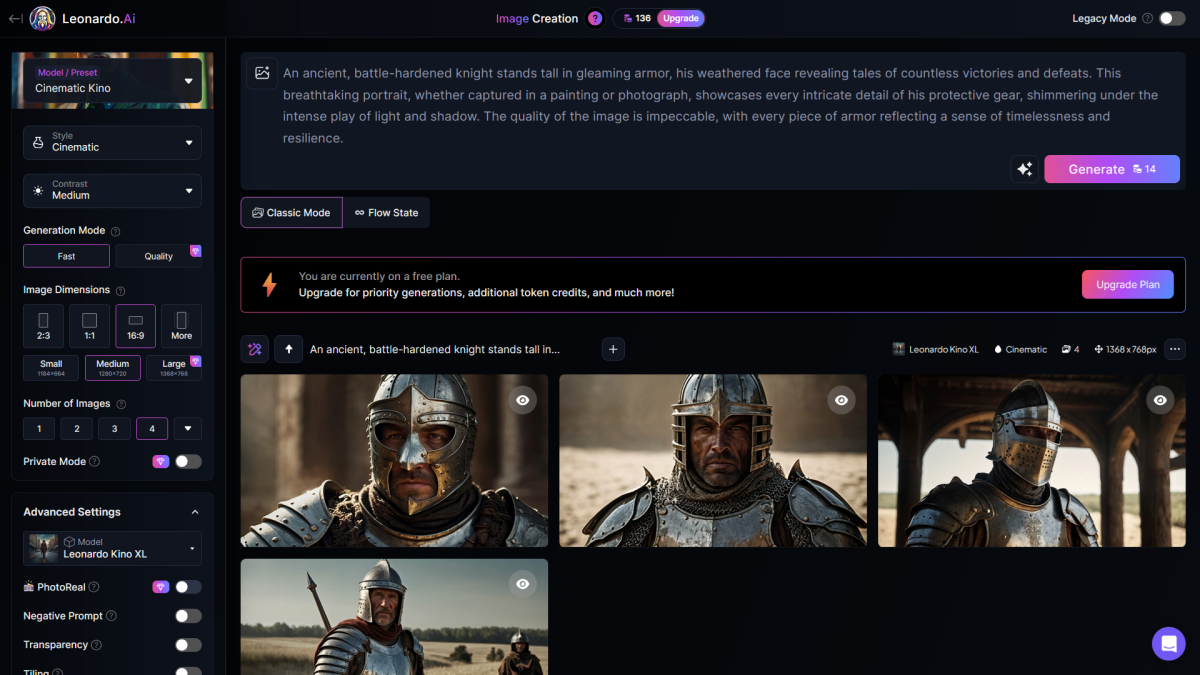
Model variety — a library of fine-tuned community and platform models spanning anime, photorealism, game assets, illustration, concept art, and architecture. You pick the base model that fits your aesthetic, then tweak from there.
Image Guidance (ControlNet) — stacked controls for pose, depth, sketch, edges, and color palette. You’re not just writing prompts — you’re steering composition at a structural level.
Custom model training (LoRA) — upload 10-20 reference images, train a fine-tuned model on your style, character, or product. The trained model is yours, stored in your account, and can be combined with platform-trained Elements for layered style control.
Realtime Canvas — a drawing surface where strokes turn into AI-rendered art as you sketch. Supports inpainting, outpainting, and composite editing in a unified workspace.
These four pillars are not equally available across all tools. Midjourney has no ControlNet, no LoRA training, and no canvas. Stable Diffusion locally gives you all of them but requires technical setup and self-hosting. Leonardo bundles everything in a managed web platform with a generous free tier. For game studios that want the depth of local SD without the devops overhead, that combination is hard to beat.
leonardo-ai · leonardo-ui.png
fig · The Leonardo workspace · source: fountn.design
The model ecosystem
The breadth of Leonardo’s model library is one of its most underrated advantages. On most AI image tools you work with a single foundation model. On Leonardo, you choose from dozens — organized by style, use case, and technical architecture.
Platform-trained models
Leonardo’s in-house models include Leonardo Diffusion XL (the general-purpose workhorse), Leonardo Vision XL (photorealistic portraits and scenes), Anime Pastel Dream (cel-shaded illustration), AlbedoBase XL (game asset textures and environments), and DreamShaper (painterly concept art). Each has a distinct visual voice and different token cost per generation.
Community models
The community model library is enormous — hundreds of fine-tuned models submitted and rated by users. This is the Stable Diffusion community’s culture of sharing model weights, adapted for a managed platform. You can browse by category (cyberpunk, fantasy, architecture, product design), sort by community rating, and pin favorites to your workspace. The quality variance is wide: the top-rated community models are excellent; the long tail is hit-or-miss.
Elements system
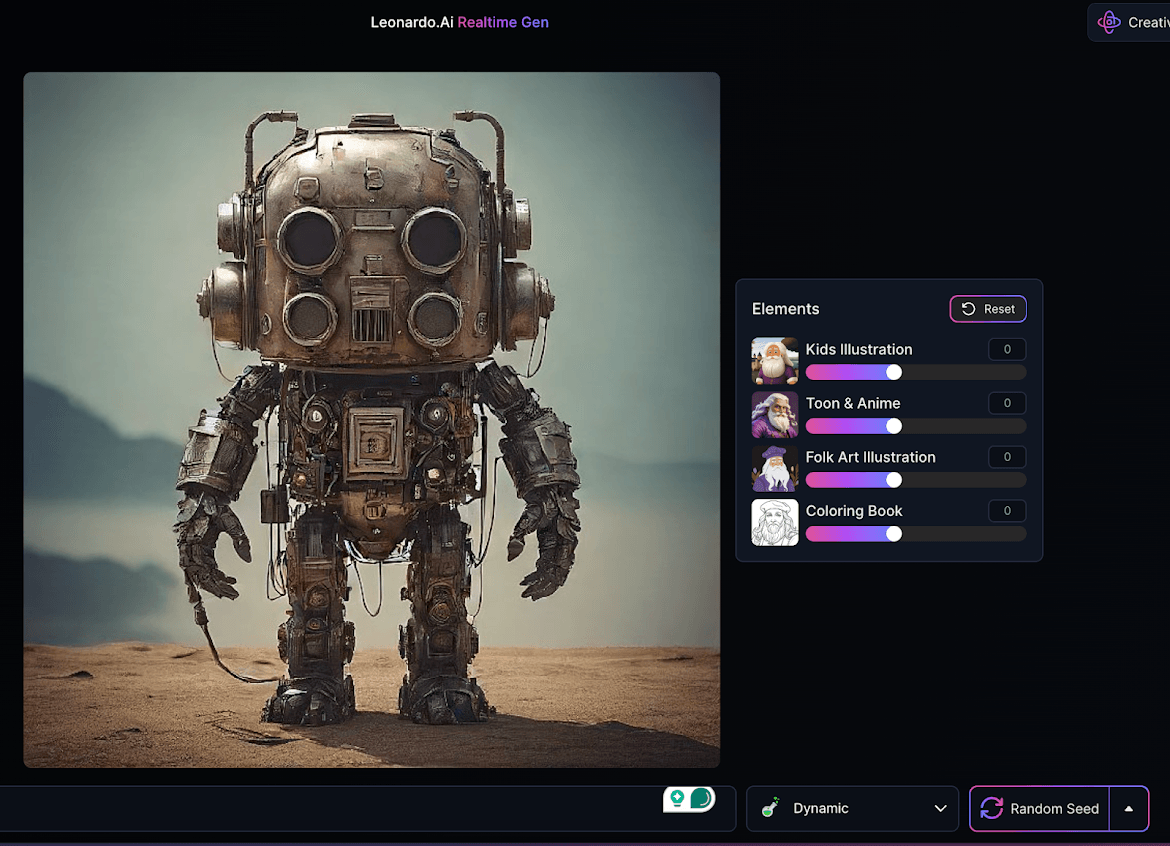
Elements are lightweight style modifiers — essentially LoRAs at inference time. You can stack multiple Elements on a single generation: apply a “painterly watercolor” Element and a “fantasy architecture” Element simultaneously. The system was a significant differentiator when it launched in 2023 and remains genuinely useful for building a consistent visual style across an asset library without full model training.
Phoenix 2.0: the flagship model in 2026
Phoenix 2.0, released in early 2026, is Leonardo’s current flagship model and the result of the compute investment that came with the Canva acquisition. It represents a meaningful step up from the original Phoenix release in several specific areas.
The most significant addition is the Consistent Character Engine — a system that maintains character identity at inference time without requiring you to retrain a model. You provide reference images and descriptors, and Phoenix 2.0 holds the character’s appearance, proportions, and distinguishing features stable across different poses, expressions, and scenarios. This is the feature game concept artists had been asking for since 2022: the ability to generate a character in a running pose, then in a combat stance, then in a close-up expression sheet, and have all three look like the same character.
Character consistency was previously only achievable through custom LoRA training — a process that required time, technical knowledge, and paid credits. Phoenix 2.0’s inference-time approach doesn’t require training. You provide references, describe the character, generate. The system isn’t perfect — results degrade on highly unusual or complex character designs — but for the typical fantasy RPG or sci-fi shooter character brief, it’s accurate enough to be production-useful.
Beyond character consistency, Phoenix 2.0 brings improved prompt adherence (complex multi-element compositions now come out closer to the described scene) and better handling of stylized aesthetics. The model excels at game-adjacent styles: high-fantasy illustration, sci-fi concept design, stylized 3D-render aesthetics, and the rich-color graphic novel look that indie games favor. Where it remains genuinely weaker than Midjourney is in photographic realism — Phoenix 2.0 has a slight “digital painting” quality that’s excellent for game assets and a liability for commercial photography.
Image Guidance: ControlNet done right
Image Guidance is the feature that separates Leonardo from the prompt-and-pray workflow. It stacks multiple ControlNet parameters, letting you steer composition, pose, depth, and line structure simultaneously. In practice, this is the difference between “I described a scene and got something roughly like it” and “I controlled exactly what came out.”
The available guidance modes include Depth (enforce spatial depth map from a reference), Sketch (generate from line art, preserving structure), Pose (OpenPose-style skeleton control for character positioning), Edge (Canny-style structural edges), QR Code (embed scannable codes into generated art), and Contrast (preserve light/dark structure from a reference). You can upload up to six images and describe how they should interact: “this character holding this weapon, in the color palette of this environment reference.”
The practical workflow for game asset production typically chains two or three modes. A concept artist might start with a rough 3D blockout exported from Blender, run it through Depth + Sketch guidance to establish the structural skeleton, then generate several stylized variations to explore color and material. What would previously take a full day of manual painting takes a morning of guided generation and refinement.
TIP · stack depth + sketch for hard-surface assets
For vehicles, weapons, and architecture, combining Depth guidance (from a 3D reference) with Sketch guidance (from line art) produces consistent proportions while preserving the stylized hand-drawn quality. This is the fastest path from 3D blockout to concept art in the current toolchain.
Image Guidance also covers the standard img2img workflow — take any reference image and regenerate it at varying “creativity strength” levels from near-identical to loosely inspired. This is the fastest way to iterate on existing art: bring a rough sketch, set creativity to 60%, generate ten variants, pick the direction that works, iterate. The creative feedback loop that used to require days of revision passes now happens in minutes.
Realtime Canvas: the sketch-to-art pipeline
The Realtime Canvas is one of Leonardo’s most visually striking features — and one of the most genuinely useful for concept artists who think in sketches rather than words. You draw rough shapes on a drawing surface (either with a stylus, a mouse, or by importing a sketch), and as you draw, the AI transforms your strokes into polished rendered artwork. The transformation happens at interactive speed, continuously updating as you add or modify marks.
A creativity slider controls the degree of AI interpretation. At low creativity, the generated image stays close to your shapes — useful when you’ve sketched a specific building layout and want to see it rendered in a style. At high creativity, the AI takes your marks as loose suggestions and generates freely — useful for exploring visual directions from minimal input.
The Canvas workspace also handles inpainting (select a region and regenerate only that area — the go-to fix for incorrectly rendered hands, missed details, or unwanted elements) and outpainting (extend the image beyond its original boundaries, useful for adjusting aspect ratios or expanding a character bust to a full-body shot). Both tools are accessible without leaving the canvas, making the iteration loop tight enough for professional use.
The limitation worth knowing: the Realtime Canvas is web-based and depends on Leonardo’s inference infrastructure. On congested servers, the “real-time” can become “near-real-time” with a half-second lag that breaks the flow of sketching. This happens more during peak hours (evening UTC, when North American users are most active). The Artisan plan’s priority queue access reduces this significantly but doesn’t eliminate it entirely.
Custom model training: the professional differentiator
Custom LoRA training is what converts Leonardo from “a good image generator” to “an image generator that knows your studio’s visual style.” The workflow is straightforward: curate 10-30 reference images that represent the aesthetic or character you want to capture, upload them with descriptive captions, name the model, and train. Training typically takes 20-40 minutes depending on server load. The resulting fine-tuned model is stored in your account and can be used in any generation.
The number of model trainings per month is the key differentiator between paid tiers. The Apprentice plan ($12/mo) allows one training per month — enough for a solo artist maintaining a single character or style. Artisan ($30/mo) allows five trainings — a team working on multiple characters or exploring multiple visual directions. Maestro ($60/mo) allows twenty trainings, which covers a small studio running parallel production pipelines.
What makes the training genuinely useful for game production is the ability to combine a custom-trained model with platform-trained Elements and standard prompting. You can train a model on a specific character, then apply an Element for “combat illustration style,” then use ControlNet pose guidance to put the character in a specific position. The combination produces consistent character art in a defined style in a controlled composition — which is almost exactly what game concept art pipelines need.
3D texture generation: the sleeper feature
One of Leonardo’s least-discussed features is its dedicated 3D texture generation pipeline. Give it a text prompt and a 3D model reference, and it produces texture maps — albedo (base color), normal, and roughness — directly from the description. The maps are designed to be plug-in ready for Unity and Unreal Engine without manual conversion.
This workflow is specific enough that it won’t matter to users outside the game development pipeline. For the people it’s designed for — environment artists who need to texture dozens of assets per sprint without painting each one from scratch — it’s a significant time saver. The quality is not on par with a hand-painted texture by a specialist, but for background and secondary assets where production time matters more than visual perfection, it’s a credible solution.
The 3D texture feature also integrates with the Image Guidance system: provide a reference texture from your existing library to maintain stylistic consistency, then generate variations. A stone wall from your existing dungeon tileset can seed ten additional stone variations in the same material language, eliminating the visual inconsistency that happens when you hand-paint assets across different artists.
Three real workflows, end-to-end
case-study #01 · game character concept pipeline
Generate a full character sheet for an indie RPG protagonist
Start by training a custom model on 20 reference images of the intended visual style — a mix of hand-curated fantasy illustration samples that capture the right color palette, line weight, and aesthetic. Training takes about 25 minutes on Artisan priority queue. While training runs, sketch three loose character silhouettes in the Canvas.
With the model ready, enable Phoenix 2.0 with the Consistent Character Engine and load the trained LoRA on top. Generate the standing hero pose first — this becomes the “anchor reference” for the character’s face, proportions, and key costume elements. Add this image as a character reference in the Consistent Character Engine.
With the anchor set, generate the remaining seven poses using OpenPose skeleton guidance: running, idle, attack, damage, crouch, jump, crouch-attack. The Consistent Character Engine keeps the face and silhouette recognizable across all eight. Export the winning variants, use Canvas inpainting to fix the two hands that generated incorrectly, and batch the expression sheet with a single prompt change (“same character, extreme emotion expressions: angry, sad, surprised, laughing”).
// wall-clock: 4 hours from blank canvas to approved character sheet · manual equivalent: 2-3 days per senior artist
case-study #02 · environment exploration for concept art
Rapid concept exploration for a sci-fi space station interior
scope: 3 distinct zone types × 5 variants each · context: pre-production mood board
The brief: explore the look of three zone types — engineering deck, command bridge, and crew quarters — for an early pre-production mood board. Each zone needs five variants showing different color stories and levels of structural complexity. Fifteen images total, first pass in half a day.
Export three rough gray-box perspectives from Blender. In Leonardo, set up Image Guidance with Depth enabled on each blockout. This locks the camera angle and spatial layout while allowing full visual interpretation of surface material, lighting mood, and detail level. Pair it with the AlbedoBase XL model and a custom-trained “hard-surface sci-fi” LoRA from a previous project.
Each zone generates five variants in about ten minutes. Art direction review selects the strongest per zone. A second pass uses Canvas outpainting to extend two images from portrait to landscape format, and inpainting to swap a repeating element in the background. Total generation cost: approximately 600-700 Artisan tokens. Result: a visual direction locked before a single hour of illustration work.
// pre-production concept pass: 4 hours · comparable quality from manual illustration: 2-3 weeks at equivalent scope
case-study #03 · texture pipeline for a dungeon tileset
Generate 40 tileable dungeon textures with consistent material language
A solo developer building a dungeon crawler needs 40 distinct tileable textures across four material categories. The visual style is “dark fantasy, stylized not photorealistic.” Budget: a single Artisan month’s token allowance.
Set up a “seed texture” per material: one stone wall, one wooden plank, one rusted metal, one burlap fabric — each generated to establish the style. Use these four seeds as Image Guidance references for all subsequent generations in their category. Color palette consistency is enforced by reference, meaning all forty textures share the same dark, desaturated color story without manually adjusting every prompt.
The 3D texture pipeline handles six of the forty (the ones where normal and roughness maps are most critical for lighting response). The remaining thirty-four use standard generation with img2img variation at 40-50% creativity to produce tileset family cohesion. Export, run through the Unity material importer, and the first dungeon floor is walkable by end of day.
// 40 production textures: 1 day · cost: ~800 tokens (Artisan budget) · manual equivalent: 2-week sprint for an environment artist
Midjourney is the reigning champion of raw aesthetic output — its photorealistic portraits and environments are among the best AI-generated images available anywhere. The comparison with Leonardo is really a question of workflow depth versus visual quality ceiling.
leonardo wins at
ControlNet guidance (pose, depth, sketch, edges)
custom LoRA model training on your style
character consistency across multiple poses
3D texture map generation for game engines
realtime canvas + inpainting workflow
API access for pipeline integration
community model library depth
midjourney wins at
raw aesthetic quality ceiling
photorealistic portrait and scene rendering
fastest path from prompt to stunning image
consistent output quality without tweaking
simpler pricing (no token counting)
Verdict: Midjourney for aesthetic output quality and casual use. Leonardo for game asset production, character consistency, and any workflow where you need structural control. Most serious game artists end up with both — Midjourney for mood boards, Leonardo for production assets.
Leonardo vs Stable Diffusion
a/leonardo b/stable-diffusion
Stable Diffusion (and its successors including Flux) is the open-source alternative: maximum flexibility, zero subscription cost if self-hosted, and access to the same ControlNet and LoRA systems that Leonardo is built on. The question is whether the managed platform is worth the cost over the self-hosted route.
leonardo wins at
zero technical setup — works in a browser
managed infrastructure, no GPU required
consistent uptime and performance
curated model library, rated by community
team collaboration and asset storage
stable diffusion wins at
no subscription cost (hardware only)
Flux 2 Pro photorealism is significantly better
unlimited generations on your own GPU
full local control, no data leaves your machine
plugin ecosystem (ComfyUI, A1111) is enormous
Verdict: Self-hosted SD/Flux if you have a capable GPU, technical comfort, and a high-volume workflow. Leonardo if you want professional-grade control without the devops overhead — or if you’re on a team that needs shared access to models and generations.
Where Leonardo falls short
Photorealism lags behind
This is the most important limitation to understand before subscribing. Phoenix 2.0 is excellent at stylized, illustrated, and painterly aesthetics. It is not competitive with Midjourney or Flux 2 Pro for photorealistic output. Skin texture, lighting accuracy on reflective surfaces, and the “this is a photograph” quality that commercial photographers need — Leonardo doesn’t nail these. If your primary use case is product photography, fashion, or hyper-realistic portraits, this is the wrong tool.
Token counting creates cognitive overhead
Unlike Midjourney’s flat “unlimited generations” plans, Leonardo’s token system means you’re constantly aware of consumption. Higher-resolution generations, multiple guidance modes stacked together, and premium models all cost more tokens per generation. This is rational pricing, but it creates decision fatigue: do I try a higher-res variant, or save the tokens? Professional users adapt quickly and learn to budget, but new users consistently find it frustrating compared to competitors with simpler pricing structures.
The free tier is restrictive in meaningful ways
The free tier’s daily allowance sounds generous until you encounter its most significant restriction: all free-tier generations are public by default. They appear in the community feed. Character consistency, custom model training, and private generation require a paid plan. This is the right business model — but if you’re evaluating Leonardo for professional use, the free tier doesn’t represent the full tool. Budget for at least the Apprentice tier during evaluation.
Canvas performance on peak hours
The Realtime Canvas depends on shared inference infrastructure. During peak hours, the interactive generation that makes sketch-to-art feel fluid becomes noticeably laggy. The Artisan priority queue reduces this, but the tool’s appeal is fundamentally about real-time response — any degradation in that responsiveness breaks the workflow. Local alternatives (ComfyUI with a fast GPU) will always win on raw latency for this use case.
Post-acquisition pace
The cadence of significant new feature releases has slowed since the Canva acquisition. Pre-2024, Leonardo was shipping major features every four to six weeks. In 2025 and into 2026, the pace feels closer to quarterly. The features that have shipped (Phoenix 2.0, the Consistent Character Engine) are high quality, but users who chose Leonardo for its aggressive release velocity may notice the difference.
WARNING · free tier generates publicly
Any image generated on the free tier is visible in Leonardo’s community feed. If you’re prototyping commercial work, proprietary characters, or anything confidential, use a paid plan with private generation enabled from day one.
Pricing, in real terms
Leonardo’s token system is more complex than competitors’ flat plans, but it’s also more transparent about what you’re actually paying for. Here’s how the four tiers break down in practice:
Free ($0/mo) gives approximately 4,500 tokens per month — roughly 8-10 standard images daily. All generations are public. No character consistency, no custom model training. Good for evaluation; not viable for professional work.
Apprentice ($12/mo) provides 8,500 tokens, one model training per month, and private generation. This is the minimum viable plan for a hobbyist artist or student doing serious creative work. The single model training per month is the key constraint — you can maintain one custom character or style, but swapping frequently requires waiting for the monthly reset.
Artisan ($30/mo) is the professional sweet spot. 25,000 tokens, five model trainings, API access, and priority queue. The token volume supports roughly 1,400-1,560 standard images per month — enough for a working concept artist’s full production load. API access opens up scripted automation, batch generation pipelines, and integration with Unity/Unreal asset workflows.
Maestro ($60/mo) is the high-volume tier: 60,000 tokens, twenty model trainings, maximum priority. Built for small studios running parallel production pipelines or agencies handling multiple client style guides simultaneously.
Annual billing saves roughly 17-20% across all paid tiers. Tokens never expire and don’t cap — the monthly number is your replenishment rate, not a hard ceiling. Unused tokens from one month roll over, which matters for creative workflows that spike around project deadlines.
leonardo-ai · leonardo-pricing.png
fig · Plans and tokens · source: capcut.com
When to choose Leonardo (and when not to)
Choose Leonardo if:
You make game assets, concept art, or stylized illustrations professionally
You need character consistency across multiple poses, expressions, or scenarios
Compositional control (pose, depth, sketch guidance) is part of your workflow
You want to train a custom model on your studio’s visual style
You need API access for pipeline integration with a game engine
You want SD-depth tooling without self-hosting a local setup
Skip Leonardo if:
Your primary need is photorealistic output (use Midjourney or Flux)
You only generate images occasionally and want the simplest possible interface
You have a capable GPU and are comfortable with ComfyUI or Automatic1111
Token budgeting creates cognitive friction you don’t want in your creative flow
What’s next for Leonardo
// roadmap · signaled directions · 2026 and beyond
Canva Magic Studio integration — Leonardo’s generation capabilities are expected to progressively power Canva’s generative tools. The degree of integration will determine whether Leonardo’s brand stays distinct or gets absorbed into the Canva design suite.
Motion 2.0 maturity — Leonardo’s video generation feature is currently a secondary offering behind dedicated tools like Runway Gen-3 and Sora. The roadmap points toward higher-fidelity video with character consistency from still references — a natural extension of the current Phoenix engine.
3D asset expansion — The 3D texture pipeline is expected to expand from texture maps to full 3D asset generation: mesh, UV, and material in one workflow. This would be significant for game studios running tighter production cycles.
Enterprise team features — Multi-seat account management, team-level style libraries, and shared model training are in development — the natural evolution toward studio and agency workflows.
FAQ
Is Leonardo AI still independent after the Canva acquisition?
Yes — as of mid-2026, Leonardo operates independently. You don’t need a Canva account, and the two platforms run separately. Canva’s technology has not been merged into the Leonardo interface. Integration with Canva’s Magic Studio is ongoing but gradual.
How does character consistency work in Phoenix 2.0?
The Consistent Character Engine maintains character identity at inference time — you provide reference images and describe the character, and Phoenix 2.0 locks the key visual features across different poses and expressions. No retraining required, though complex or highly unusual character designs may need a custom LoRA for best results.
Do unused tokens carry over?
Yes. Tokens don’t expire and unused monthly tokens roll over. This is particularly useful for project-based creative workflows with uneven generation volume — slow months accumulate a buffer for high-intensity production periods.
Can I use my generated images commercially?
Yes, on paid plans. Free-tier generations have different terms — review Leonardo’s licensing policy before using free-tier output in commercial work. Paid-tier generations grant you full commercial rights to use the images.
How does Leonardo compare to Stable Diffusion locally?
Leonardo is built on Stable Diffusion architecture and uses the same ControlNet and LoRA systems. The difference is managed infrastructure versus self-hosted. Leonardo wins on ease of use, team collaboration, and zero setup time. Local SD wins on unlimited volume, zero ongoing cost (hardware only), and full data privacy. If you have a capable GPU and technical comfort, local SD remains more cost-effective at high volumes.
Is the API available on all paid plans?
API access starts at the Artisan plan ($30/mo). The Apprentice plan ($12/mo) does not include API access. If pipeline integration with a game engine or automation scripts is your use case, budget for Artisan minimum.
What’s the difference between Elements and custom model training?
Elements are lightweight inference-time style modifiers — think of them as adjustable style filters. Custom model training (LoRA) creates a fine-tuned model with your own reference images baked in. Elements are faster and combinable; custom models are more powerful for establishing a specific character or consistent visual identity. Power users stack both.
Does Leonardo work for video generation?
Leonardo has a video generation feature (Motion), but it’s not a reason to choose the platform in 2026. Dedicated tools — Runway Gen-3, Sora, and Kling — significantly outperform it on video quality and temporal consistency. Leonardo’s strengths are in still image generation and game asset workflows.
The verdict
leonardo-ai-review · v1.0 · latest Game Asset Pick
The game artist’s studio. Not a Midjourney replacement.
Leonardo AI is the most complete managed platform for game asset production and stylized creative work. The Phoenix 2.0 model with Consistent Character Engine, stacked ControlNet guidance, custom LoRA training, 3D texture maps, and a real-time sketch canvas add up to a tool that no single competitor matches for this specific use case. The free tier lets you evaluate honestly, and the Artisan plan at $30/mo supports a professional artist’s full monthly production load.
Where it loses: photorealistic output trails Midjourney and Flux meaningfully, token counting adds cognitive overhead that flat-rate tools avoid, and the post-Canva-acquisition development pace has slowed. It’s not the best tool for every image generation need. It is the best managed platform for the game developer, concept artist, or indie studio who needs structural control, character consistency, and a workflow that scales beyond “type a prompt and hope.”