AI Tool

Stable Diffusion
Stability AI
Stable Diffusion
Open-weights AI image model you run locally — free per image, fully customizable, no content filters.
Open-weights AI image model you run locally — free per image, fully customizable, no content filters.
Stable Diffusion is an open-weights text-to-image model — Stability AI trains it, publishes the weights publicly, and anyone can download them, run them locally, fine-tune them, or build products on top. That last sentence is the thing that makes Stable Diffusion categorically different from every other AI image tool in this review series. Midjourney is a black box you rent. DALL-E 3 runs on OpenAI’s servers. Stable Diffusion lives on your hard drive.
The project traces back to a collaboration between Stability AI, LMU Munich’s CompVis lab, and Runway ML in 2022. The first public release — Stable Diffusion 1.4 — landed in August 2022 and immediately went viral. For the first time, a serious text-to-image model was free, downloadable, and ran on consumer GPUs. The community explosion that followed — tens of thousands of fine-tunes, extensions, and tools built on top of SD in the first twelve months — is still one of the fastest open-source adoption curves in AI history.
Since then, Stability AI has iterated through SD 2.x, SDXL (2023), SD 3 (2024), and the current Stable Diffusion 3.5 family released in October 2024. Each generation brought architectural improvements: better prompt adherence, higher native resolution, faster inference, and more controllable fine-tuning. SD 3.5 Large’s 8.1B-parameter Multimodal Diffusion Transformer (MMDiT) architecture is the most capable version to date, and the first that PixlRun considers genuinely competitive with closed commercial models for demanding professional work.
The key framing: Stable Diffusion is not a product with a login screen. It’s a model family with a sprawling ecosystem of interfaces, extensions, and community-trained derivatives built around it. Understanding that ecosystem — the frontends, the control tools, the model libraries — is what separates someone who generates a few blurry images and gives up from someone who runs a profitable image-generation pipeline.
Stability AI released three variants in the SD 3.5 family, each targeting a different hardware/speed/quality tradeoff. Choosing the right one for your use case is the first real decision you make.
The flagship. 8.1 billion parameters, up to 1 megapixel output, MMDiT architecture with Query-Key Normalization for training stability. This is the model that competes with commercial tools on quality benchmarks — strong typography, diverse outputs across styles (photorealism, illustration, 3D), and reliable complex prompt adherence. Hardware requirement: a GPU with 16GB+ VRAM for comfortable local use, though 12GB is possible with memory optimizations. Generation time: 20-40 seconds per image on an RTX 4080 at default steps.
Adversarial Diffusion Distillation (ADD) compresses the Large model down to a version that generates in just four inference steps — roughly 4-6 seconds per image on the same hardware. Quality is visibly lower than the full Large model but still usable for rapid iteration and batch workflows. This is the variant you reach for when you need volume: concept exploration, variation sets, storyboards where speed matters more than polish. The quality-per-second math strongly favors Turbo for anything that isn’t final output.
The accessible entry point. 2.5 billion parameters, improved MMDiT-X architecture, 0.25 to 2 megapixel output, and a minimum VRAM requirement of 9.9GB (excluding text encoders). This is the variant designed to run “out of the box” on consumer GPUs in the RTX 3070/3080 tier — the mainstream gaming card market. Quality is noticeably below Large but meaningfully ahead of older SDXL-era models. The Medium model is also the easiest to fine-tune efficiently, making it the first choice for custom LoRA workflows on mid-range hardware.
If you have an RTX 3080 (10GB) or similar: start with SD 3.5 Medium. If you have an RTX 4080/4090 or 16GB+ VRAM: SD 3.5 Large. If you’re iterating fast and need volume: SD 3.5 Large Turbo. All three use the same community license — free for personal and commercial use under $1M annual revenue.
There is no login screen, no web UI to sign up for. Getting your first SD 3.5 image requires: downloading a frontend (more on that below), downloading the model weights (~16GB for Large, ~5GB for Medium), and pointing the frontend at them. On a clean machine with decent internet, that’s a 30-60 minute process. This is not Midjourney’s “type a prompt and get art in 15 seconds” experience. This is a deliberate trade — you accept friction up front in exchange for permanent, unlimited, private generation afterward.
The first actual generation is a revelation for anyone coming from SaaS tools. There’s no prompt queue. There’s no content filter blocking your concept. There’s no pricing meter ticking. You type the prompt, hit generate, and it runs on your GPU. The image lands in a folder on your hard drive. Nobody else has seen it. You can run 500 variations overnight for free. That’s the promise. For the right user, it’s transformative.
Where beginners consistently get stuck: the model’s output quality is highly sensitive to prompt engineering and sampler settings. Out of the box, with a vague prompt and default settings, SD 3.5 Large produces mediocre results — nothing that would impress someone used to Midjourney’s curated aesthetic. The model is powerful, but it’s an instrument that rewards the player who learns it. The ceiling is very high; the floor is lower than closed tools.
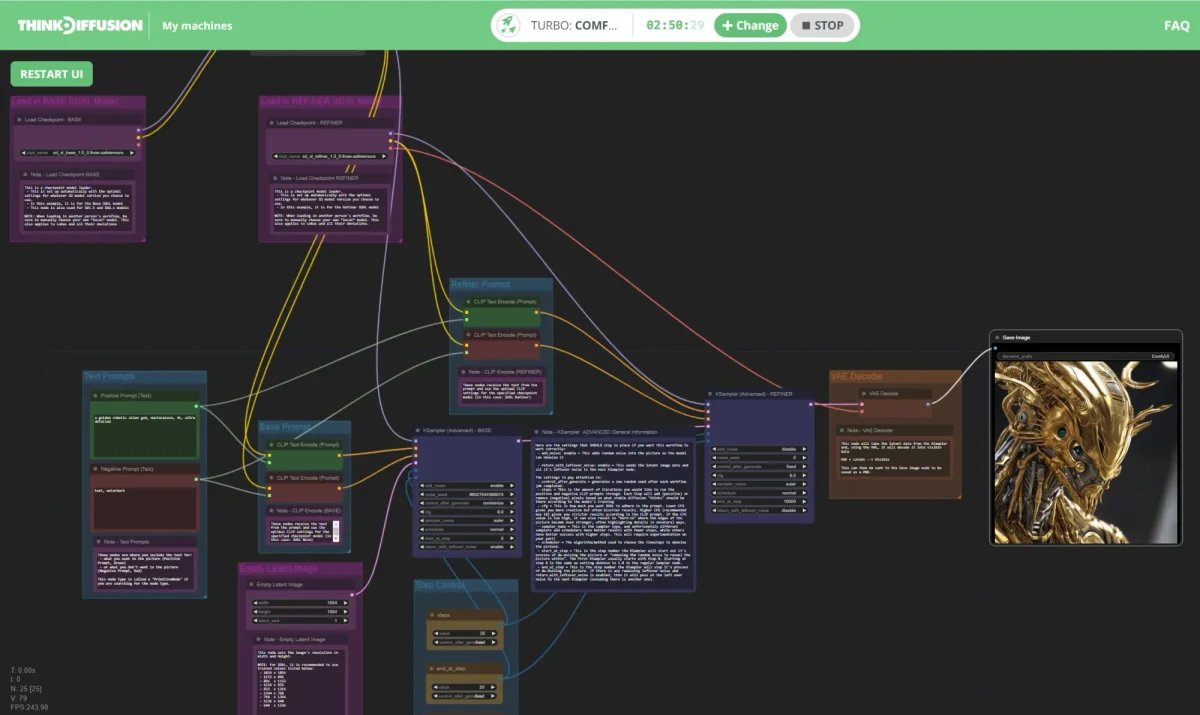
The model weights are just numbers — you need a frontend to run them. Three interfaces dominate the ecosystem, and choosing between them is one of the most consequential decisions a new SD user makes.
ComfyUI is a node-based workflow editor. Every step of image generation — model loading, conditioning, sampling, decoding, upscaling — is a visual node you connect with wires. It looks like a signal-routing graph, because that’s essentially what it is. The upside: unlimited workflow customization. You can build generation pipelines of arbitrary complexity, chain multiple models, add custom Python nodes, and reproduce any workflow by sharing the JSON graph file. The downside: it’s steep. The learning curve from “opened ComfyUI for the first time” to “generated a useful image with a sensible workflow” is measured in hours, not minutes.
In 2026, ComfyUI is the industry-standard interface for power users, developers, and studios. If you’re building a production pipeline, selling a generation service, or doing complex multi-stage work (img2img, inpainting, ControlNet, upscaling, in one graph), ComfyUI is the right tool. It also manages VRAM more efficiently than the alternatives — nodes load and unload models as needed, letting complex multi-model workflows run on 8GB cards that would choke in other interfaces.
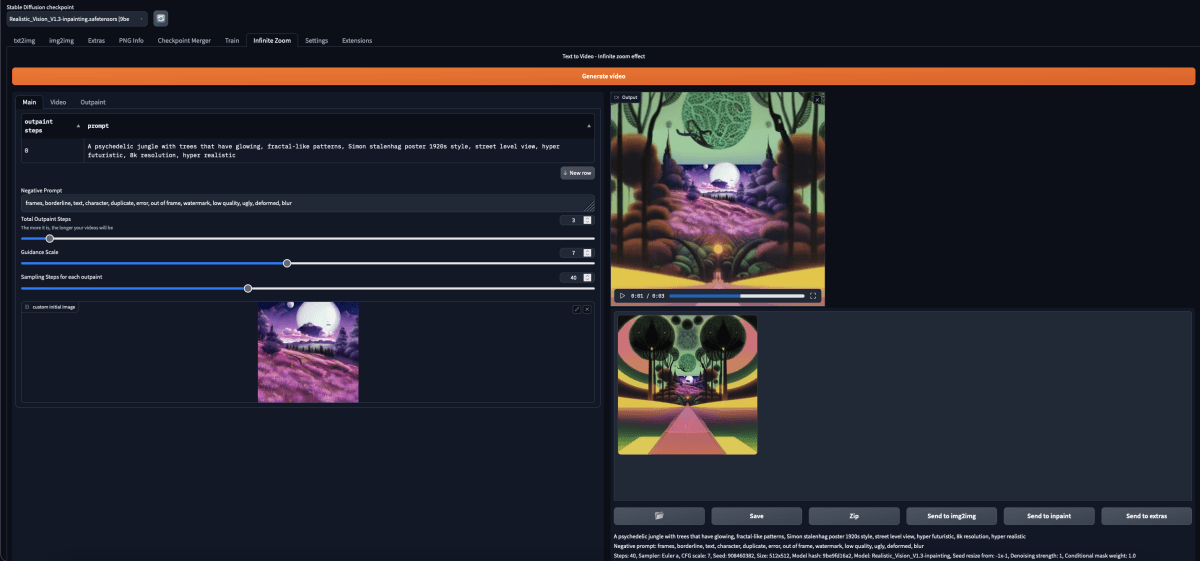
Forge is a fork of AUTOMATIC1111 by the same developer who wrote ControlNet. It keeps A1111’s familiar dropdown-and-sliders UI while adding VRAM optimization, native Flux/SD 3.5 support, and 10-30% generation speed improvement. On low-VRAM GPUs (8-10GB), Forge’s memory management can deliver up to 75% faster generation versus vanilla A1111. In 2026, Forge is the recommended starting point for the vast majority of users who want a full-featured interface without ComfyUI’s learning investment.
A1111 is still the most-documented SD interface in existence, with tutorials, extensions, and how-to guides covering virtually every use case. The extension ecosystem is massive. But development has slowed — Forge is a better version of the same thing with active maintenance and better SD 3.5/Flux support. If you’re starting fresh in 2026, go to Forge instead of A1111. If you’re already running A1111 with a set of extensions that work, switching may not be worth the disruption.
Install ComfyUI Manager as your first step in ComfyUI. It adds a one-click node installer/updater that transforms the otherwise painful extension install process into something manageable. Without it, keeping nodes updated is a manual Git pull exercise that will consume your afternoon.
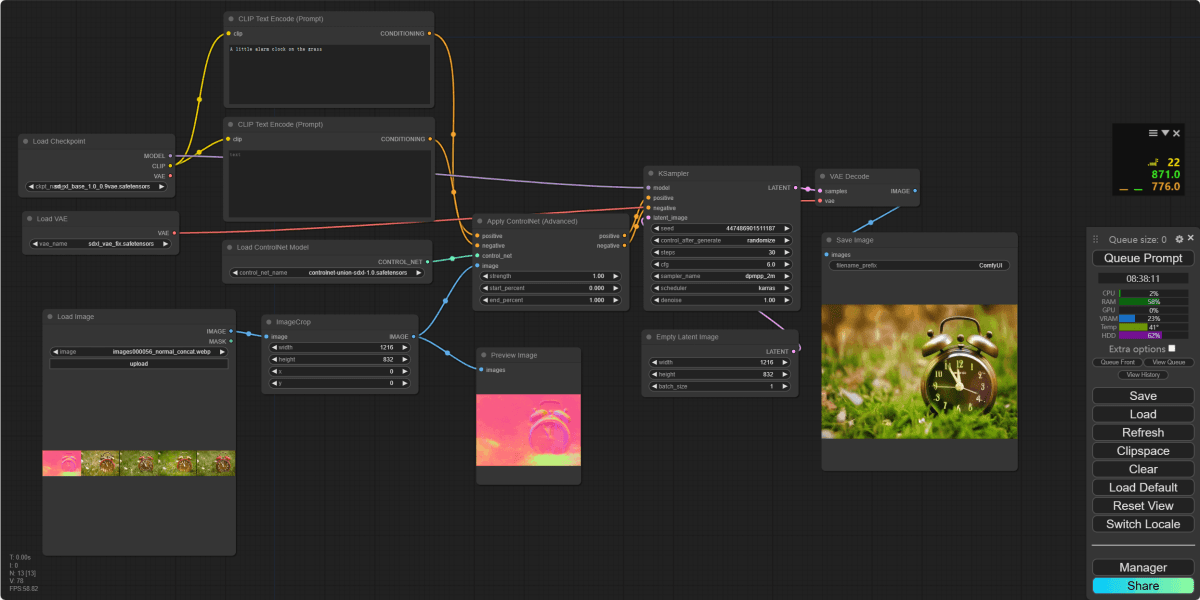
ControlNet is an extension architecture that lets you condition image generation on a structural guide — a pose skeleton, a depth map, a Canny edge map, a scribble, a surface normal map — rather than prompt text alone. The result is that you can specify not just what you want generated but how it should be arranged spatially. This is the feature that makes Stable Diffusion a professional production tool rather than a toy.
Practical examples of what ControlNet unlocks: generate a product photo with a specific object angle by conditioning on a depth map from a 3D render; create consistent character poses across a storyboard by feeding skeleton data from one image to generate another; inpaint a face onto a body that matches the original pose exactly. None of this is possible with Midjourney or DALL-E 3’s prompt-only interface.
SD 3.5 has native ControlNet support built into the architecture via the MMDiT design. ControlNet implementations for SD 3.5 Large were released by the community within weeks of the model’s launch. In ComfyUI, ControlNet is a node you drop into your workflow. In Forge/A1111, it’s an extension panel in the sidebar. The setup is more involved than a simple toggle, but the capability gap it creates versus closed tools is substantial.
For practical use: pose ControlNet (OpenPose skeleton) is the most-used for character work. Depth ControlNet is the most reliable for composition and perspective control. Canny edge ControlNet is useful for preserving line art or architecture. Most complex professional workflows combine two or three ControlNets in parallel — using depth for macro composition and pose for character placement simultaneously.
LoRA (Low-Rank Adaptation) is a lightweight fine-tuning technique that trains a small set of adjustment weights — typically 50-150MB — that modify the base model’s output toward a specific style, subject, or concept. Loading a LoRA is like installing a “style plugin” on top of the base model. You can stack multiple LoRAs simultaneously, adjust each one’s influence weight, and mix styles in ways that are simply impossible with closed tools.
Training a custom LoRA requires 20-50 reference images and completes in 2-6 hours on an RTX 3080 or better using tools like kohya_ss or SimpleTuner. For SD 3.5, the ComfyUI workflow uses a LoraLoaderModelOnly node between the checkpoint loader and the sampler. The result: a model that knows your brand’s product, a specific illustrator’s style, a consistent character design, or anything else you can provide reference images for. This is the capability gap that matters most for commercial use — no SaaS tool lets you embed custom training into every generation.
For SD 3.5 Medium specifically, LoRA training is more accessible than with the Large model — fewer parameters to update, faster training, lower VRAM requirements. The Medium model’s MMDiT-X architecture also simplifies fine-tuning compared to older architectures, making it the first SD generation where custom training feels genuinely accessible to a solo practitioner rather than requiring a dedicated GPU server.
CivitAI is a community-run model repository and social platform built entirely around Stable Diffusion. It hosts tens of thousands of user-trained models: LoRAs, fine-tuned checkpoints, embeddings (textual inversions), upscale models, and ControlNet preprocessors. Everything is tagged, rated, reviewed, and accompanied by example images and recommended prompts. It’s the npm registry of the Stable Diffusion world — the place you go before training your own model, because someone has probably already trained something close to what you need.
For SDXL-era models, CivitAI hosts over 50,000 LoRAs and fine-tunes. The SD 3.5 catalog is newer and smaller but growing quickly — by mid-2026, there are thousands of SD 3.5-compatible models covering styles from anime and illustration to photorealism, product photography, and architectural visualization.
The community dimension of CivitAI is underrated. Model pages often include detailed prompting guides, optimal sampler settings, and use-case notes from the creator. Finding a well-reviewed LoRA with good documentation is worth hours of trial-and-error. The flip side: some models on CivitAI are trained on copyrighted material or artist styles without consent — a real ethical and legal consideration for commercial users. For commercial work, vet your models, stick to Community License-compliant checkpoints, and prefer models with clear training data disclosure.
Not all CivitAI models are safe for commercial use. A LoRA trained on a specific living artist’s work may expose you to copyright claims even if the underlying SD 3.5 model is freely licensed. For commercial pipelines, use base SD 3.5 checkpoints (Stability AI community license) and LoRAs with explicit commercial permissions or ones you’ve trained yourself on licensed material.
An e-commerce brand needs 40 product hero shots across different background environments. Traditional photoshoot: $3,000-8,000 and a week of scheduling. The SD 3.5 workflow: photograph the product on a neutral background, extract a depth map, feed it to ControlNet depth, and generate the product placed into any environment the client specifies.
The workflow in ComfyUI connects: a depth preprocessor node that generates a depth map from the source photo, a ControlNet node with that depth map as the conditioning signal, the SD 3.5 Large checkpoint, and a prompt describing the target environment (“modern kitchen countertop, natural window light, warm tones”). The depth ControlNet preserves the product’s 3D shape and placement while the model freely generates the surrounding environment.
Results at full resolution (1024×1024): consistent product rendering with natural shadow integration and light matching. The model occasionally mishandles reflective surfaces or transparent packaging — those shots require manual inpainting cleanup in a second pass. Imperfect, but the ROI math is straightforward: 40 shots in an afternoon, iterating until the client approves each one.
An indie game studio needs 200+ character illustrations in a consistent art style across multiple poses and scenarios. Without AI, this is a multi-month illustration contract. With SD 3.5, the workflow is: establish a style reference set (30-50 images defining the target aesthetic), train a style LoRA on SD 3.5 Medium using kohya_ss, then use that LoRA plus an OpenPose ControlNet to generate characters in any pose while maintaining visual consistency.
LoRA training: 48 images, 2,000 training steps, approximately 3 hours on an RTX 3080. The resulting LoRA file is 120MB. Loaded into ComfyUI at a weight of 0.7, every generation inherits the established illustration style. An OpenPose ControlNet node takes skeleton data extracted from a reference pose and constrains the character’s body layout.
Output quality: high enough for game assets at mobile/indie resolution. Not photorealistic, which is appropriate for the stylized aesthetic. The studio can iterate on costume variations, expressions, and scenarios without briging back an illustrator for every new scene — the illustrator defines the LoRA style, and the AI handles volume production within that style. This is a genuinely new creative workflow that didn’t exist two years ago.
A legal firm needs custom graphics for client presentations — deal diagrams, conceptual illustrations, cover images. The constraint: client confidentiality means no content can pass through external APIs. Midjourney, DALL-E 3, and Adobe Firefly are all ruled out — they process prompts on vendor servers.
The solution: a single server-grade workstation with an RTX A6000 (48GB VRAM) running Stable Diffusion Forge with SD 3.5 Large. Staff access it through a browser via the local network. Prompts and images never leave the firm’s infrastructure. The IT team manages the model updates; no accounts, no API keys, no vendor relationship beyond downloading the weights.
Usage patterns: about 15-20 generations per day across three attorneys, primarily conceptual and abstract imagery rather than realistic photography. The legal team found the 30-40 second generation time per image acceptable for their use case. Total infrastructure cost: hardware amortized over 3 years plus electricity. Zero per-image cost, zero third-party data exposure.
Here’s a concrete example of what SD 3.5 Large responds to when you treat the prompt as a structured instruction rather than a casual description:
With this level of prompt specificity and those sampler settings, SD 3.5 Large produces product photography that holds up for web and print use — accurate shadows, convincing steam, appropriate depth-of-field blur, and the lighting direction specified. The same prompt in Midjourney would also produce good results but wouldn’t allow you to tweak the CFG scale to dial in prompt adherence, add ControlNet for a specific object shape, or run 50 seed variations overnight for free.
Where the model struggles: glass and mirrors (reflections are often inconsistent), hands in close-up (the classic AI limitation), and very specific text rendering in non-English scripts. SD 3.5 improved typography meaningfully over SDXL but it’s still not reliable for short text in images. For compositions where precise text is required, a compositing pass in Photoshop or Figma is standard practice.
The local-run promise only lands well if your GPU is in the right range. Here’s what each tier actually gets you:
bench –model=sd35 –hardware=consumer-gpus approx. performance
Apple Silicon (M2/M3/M4 Macs with unified memory) runs SD 3.5 Medium well through ComfyUI with the MPS backend — generation is slower than a comparable NVIDIA GPU but fully functional. M3 Max or M4 Max Macs (48-64GB unified memory) can handle SD 3.5 Large. For Mac users, SD 3.5 finally makes “local generation on a MacBook Pro” a realistic workflow, not a frustrating experiment.
a/stable-diffusion-3.5 b/flux-2
Flux 2 (Black Forest Labs, 2026) is the closest open-model competitor to SD 3.5 — also open-weights, also runs locally, also supported in ComfyUI and Forge. Flux 2 Pro produces native 4-megapixel output and leads benchmarks on photorealism and prompt adherence. SD 3.5 fights back on customizability and the depth of the existing ecosystem.
Verdict: Flux 2 for best-possible quality on a single generation. SD 3.5 for custom model workflows, ControlNet, and projects where ecosystem depth matters. Many serious users run both — Flux 2 for hero shots, SD 3.5 for controlled production pipelines.
a/stable-diffusion-3.5 b/midjourney-v7
Midjourney V7 is the best closed-tool image generator by aesthetic quality — its training produces images with a distinctive polish and artistic confidence that SD 3.5 struggles to replicate out of the box. The comparison is almost unfair in isolation, but the real question is always: what does each tool enable?
Verdict: Midjourney for people who want beautiful images immediately. SD 3.5 for people who want control, privacy, or zero per-image cost. A designer exploring concepts leans Midjourney. A studio running a production pipeline leans SD 3.5.
Stable Diffusion’s pricing story is one of the most nuanced in AI tooling. There are effectively four tiers depending on how you use it.
Download the weights, run locally, generate unlimited images. Cost: $0 per image, forever. The only requirement under the Stability AI Community License: your organization has annual revenue under $1M. If you’re under that threshold — individual creators, freelancers, small studios, indie developers — you can use SD 3.5 commercially with no restrictions and no payment. The Community License also permits fine-tuning, LoRA training, and building products that incorporate the model.
If your annual revenue exceeds $1M and you’re using SD 3.5 in a commercial product or service, you need an Enterprise License from Stability AI. Pricing is custom — contact their sales team. This tier also unlocks consulting support, custom training assistance, and implementation services. For a serious commercial deployment, the enterprise relationship is worth pursuing regardless of revenue threshold.
Stability AI’s developer platform at platform.stability.ai offers API access on a credit system (1 credit = $0.01). Approximate costs per generation at default quality: SD 3.5 Large at ~6.5 credits ($0.065), Large Turbo at ~4 credits ($0.04), Medium at ~3.5 credits ($0.035). At those rates, 1,000 images cost $35-65 depending on model. This is competitive with Midjourney’s per-image equivalent and much cheaper than DALL-E 3, but obviously more expensive than running locally.
The $20/month membership plan includes 6,000 credits (~90-170 API images depending on model) plus full commercial use rights and Discord community access. It’s most useful for users who want API access without managing local hardware — freelancers, small agencies, anyone who wants the flexibility of cloud generation with commercial licensing clarity. For high-volume use, the math pushes toward local hardware; for occasional use, the membership simplifies the billing.
The Community License’s $1M revenue threshold is based on your organization’s total annual revenue — not revenue specifically from AI-generated work. If your agency bills $1.2M a year across all clients and you use SD 3.5 for one project, that’s technically an Enterprise License requirement. Most small studios are under the threshold; growing agencies should check.
The honest answer is that SD 3.5 is not the best tool for a majority of people who want to generate images. If you want to start generating images this afternoon with no GPU and no setup, Midjourney or Leonardo AI are better starting points. If you want the best-quality single images from an open model, Flux 2 has overtaken SD 3.5 on benchmarks.
Stable Diffusion is the right tool for a specific set of use cases where its open-weights architecture is genuinely decisive:
If none of those apply to you — you’re a marketer who needs one concept image a week, a blogger who wants to illustrate posts, a product designer doing quick moodboards — the SaaS tools will serve you better. SD 3.5 rewards deep investment. It doesn’t reward casual use.
For SD 3.5 Medium, you need at least 9.9GB VRAM — an RTX 3080 or similar is the practical minimum for a good experience. SD 3.5 Large needs 12GB minimum and is comfortable at 16GB+. If you don’t have a dedicated GPU, the Stability AI API or platforms like Leonardo AI let you run SD models in the cloud.
Yes, under the Stability AI Community License, as long as your organization’s total annual revenue is under $1M. Above that threshold, you need an Enterprise License. Individuals, freelancers, and small studios are covered by the free Community License.
SD 3.5 uses a Multimodal Diffusion Transformer (MMDiT) architecture rather than SDXL’s UNet design. In practice: SD 3.5 Large has better prompt adherence, better typography, more consistent complex scenes, and a higher quality ceiling. SDXL has a much larger ecosystem of fine-tunes and LoRAs (50,000+ vs thousands for SD 3.5) since it has been out longer.
Start with Stable Diffusion WebUI Forge if you’re new. It has a conventional UI with dropdowns and sliders, and all the core features including ControlNet and LoRA support. Switch to ComfyUI when you outgrow Forge’s workflow limitations — typically when you need multi-stage pipelines, custom node logic, or reproducible workflow graphs.
With effort (good prompts, correct sampler settings, ControlNet guidance), SD 3.5 Large produces images that hold up in professional work. But Midjourney V7’s aesthetic quality is better out-of-the-box — it has a curated, polished look that SD 3.5 doesn’t match without significant prompt engineering. The gap is real and shouldn’t be minimized. SD 3.5 wins on control, privacy, and cost; Midjourney wins on instant aesthetic quality.
SD 2.x was widely considered a regression from SD 1.5 — its training choices produced stiff outputs and the new VAE was disliked by the community. SDXL (2023) recovered ground but still used a UNet architecture with known limitations. SD 3 (2024) introduced the MMDiT transformer architecture, and SD 3.5 refined it — the quality jump from SDXL to SD 3.5 Large is the most significant in the project’s history.
Yes, for LoRA fine-tuning. Training a LoRA on SD 3.5 Medium requires an RTX 3080 or equivalent and takes 2-6 hours for 20-50 reference images using kohya_ss or SimpleTuner. Full model fine-tuning (DreamBooth) requires more VRAM and time. For most use cases — embedding a style, subject, or character — LoRA training on consumer hardware is sufficient.
Yes. ComfyUI and Forge both support Apple Silicon via the MPS backend. SD 3.5 Medium runs on M2 Pro and above (16GB unified memory minimum for comfortable use). M3 Max or M4 Max (48-64GB) can handle SD 3.5 Large. Generation is slower than comparable NVIDIA hardware but fully functional — a legitimate option for Mac-native creative workflows.
SD 3.5 Large isn’t the easiest AI image tool, and it’s not the prettiest out of the box. It’s the one that gives you the weights, the ecosystem, and the control architecture to build anything you want — and then charges you nothing per image to run it. For privacy-first workflows, custom fine-tuning, high-volume production, and developers building image products, nothing else comes close. For everyone else, start with Midjourney and graduate to Stable Diffusion when you need what it specifically offers: ownership, customization, and zero ongoing cost.
The 8.2 score reflects genuine limitations — steep setup curve, below-Flux raw quality, hardware dependency — alongside what is genuinely the most capable open-weights image model available in 2026. Get comfortable with ComfyUI, learn ControlNet, and the ceiling is higher than any closed tool will let you reach.
Every verified price, limit, and model change we have tracked for Stable Diffusion.
One email when Stable Diffusion changes price or limits. No account, no spam.