Shutdown data checked Oct 26, 2026 · 41 apps tracked · 20 dying now · next: Crunchyroll (Nintendo Switch app) in 3 days
Shutdown data checked Oct 26, 2026 · 41 apps tracked · 20 dying now · next: Crunchyroll (Nintendo Switch app) in 3 days
AI Tool
MA
Murf AI
Murf AI
Murf AI
AI voiceover studio with 200+ voices, word-level controls, and built-in integrations for Canva, Google Slides, and PowerPoint — built for eLearning, corporate video, and IVR at scale.
Murf AI was founded in 2020 by Ankur Edkie and Sneha Roy, two engineers who had worked on speech and NLP at Nvidia and Amazon. Their founding thesis was narrow but well-aimed: the professional voiceover market — explainer videos, corporate training, IVR systems, eLearning — was dominated by expensive voice talent and time-consuming recording sessions. AI voice generation was already technically viable, but no one had packaged it into a self-service studio that non-technical users could actually operate without a sound engineering background.
The first public version launched in 2021 as a browser-based script-to-audio tool. Even at that early stage, Murf differentiated on the studio layer rather than the voice engine itself. Competitors at the time (Resemble, PlayHT) were API-first — you called them from code. Murf was studio-first — you opened a browser, pasted a script, picked a voice, and got an audio file. That positioning locked in an audience of eLearning developers and corporate marketers who wanted production output, not developer infrastructure.
The Gen 2 voice engine launched in late 2024, upgrading the underlying neural architecture to a generative model trained on over 70,000 hours of ethically sourced speech data. The result was a measurable jump in naturalness — particularly in pacing variation, sentence-level prosody, and multi-lingual consistency. Murf’s Falcon API, released in November 2025, added real-time TTS capability at 55ms model latency and sub-130ms time-to-first-audio, opening a segment of use cases (IVR, voice assistants, live-captioned events) that the studio product couldn’t serve.
By 2026, Murf has roughly 4 million registered users, with its core business firmly in the enterprise and mid-market L&D segment. It is not a unicorn story yet, but it is a profitable niche player with a defensible position — the go-to AI voiceover studio for organizations that need clean, consistent corporate narration and don’t want to manage a voice actor retainer.
What Murf actually is
The clearest mental model: Murf is a browser-based voiceover studio where the voice talent has been replaced by AI. You bring the script. Murf brings 200+ AI voices across 35+ languages. You adjust timing, emphasis, and pacing on individual words. You sync to a video timeline. You export WAV or MP3. Done.
Three things the product does that a basic TTS API does not:
Word-level controls — pitch, speed, emphasis, and pause adjusted per word without re-generating the full take. This is the detail that makes Murf a studio, not just a synthesizer.
Timeline editor — sync your voiceover to a video or slide presentation directly in the browser. The kind of feature that replaces a round-trip through Premiere for simple corporate videos.
Say It My Way — record yourself reading a line, and Gen 2 matches your tone and inflection in the output. A director’s tool: you don’t need to write a prompt, you just demonstrate.
What Murf is not: it is not a voice cloning tool for general consumers. Cloning is Enterprise-only. It is not a real-time conversational AI voice. The Falcon API addresses latency, but the product is still oriented toward pre-recorded voiceover, not live-streamed dialogue. And it is not the most emotionally expressive voice platform on the market — that’s ElevenLabs’ territory, and Murf doesn’t try to compete there directly.
The studio workflow, end to end
The typical Murf workflow starts at the script editor. You paste or type your text, which is automatically segmented into sentences. Each sentence becomes an independently controllable audio block — you can change the voice, the pacing, and the emphasis on any block without touching the rest. This block-based structure is what makes Murf practical for real productions. Corporate training scripts are 2,000-word narrations with five different section tones: intro, instruction, caution, summary, outro. With Murf, you pick a different voice style per section and the transitions are seamless.
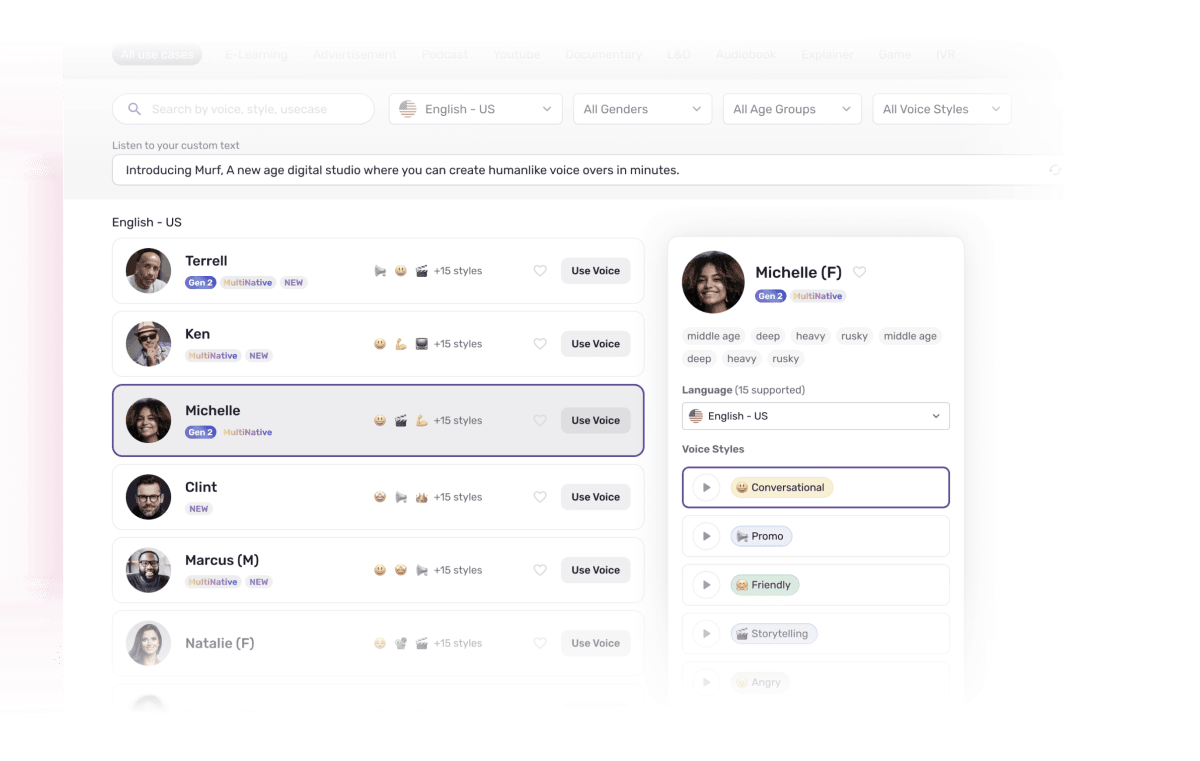
Voice selection is sorted by language, accent, gender, age range, and tone. Filtering to “English US, female, middle-aged, professional” gives you a focused shortlist rather than 200 options at once. Gen 2 voices carry style tags — Narrator, Newscast, Excited, Calm, Authoritative — so you can match voice personality to content type without auditioning every option.
Once you have a voice and a take you’re mostly happy with, the word-level editor is where professional polish happens. Click any word, and a properties panel opens on the right: pitch slider, speed slider, emphasis toggle, pause duration control. You can exaggerate a single keyword for instructional stress, add a half-second pause before a transition phrase, or slow down a URL being read aloud so listeners can type it. These controls work without regenerating audio — they apply post-processing to the existing generation, which makes iteration genuinely fast.
The timeline panel at the bottom is optional but powerful for video work. Drop in your MP4 or slide export, and Murf shows you waveform-aligned voiceover blocks. Drag to sync. You can extend or compress blocks to match slide timing without re-recording. Export sends you a single mixed-down MP4 with the voiceover baked in, or separate video and audio tracks if you prefer to finish in an external editor.
NOTE · the workflow inflection point
The real value of Murf’s studio layer only becomes clear once you try to replicate it with a raw API. Calling ElevenLabs or PlayHT programmatically gets you audio fast — but adding word-level emphasis, syncing to a timeline, or reviewing ten voice variants without writing code takes hours. Murf does all of it in a browser with no engineering. For non-technical L&D teams, that difference is everything.
murf-ai · murf-studio.png
fig · The Murf Studio · source: murf.ai
The voice library and Gen 2
Murf’s current library contains 200+ voices across 35+ languages and 10+ accents. The English catalog is the deepest, with Gen 2 voices covering regional US, UK, Australian, and Canadian accents. Spanish, French, German, Hindi, Portuguese, and Japanese have solid coverage. Languages outside that core tier have fewer voice options per accent.
Gen 2 is Murf’s most advanced model, trained on over 70,000 hours of ethically sourced speech and producing audio at 44.1kHz — CD quality. The jump from Gen 1 is most audible in three areas:
Prosody variance — Gen 1 voices had a recognizable pattern-repeat rhythm after about 30 seconds. Gen 2 varies sentence stress more naturally, so long-form narration doesn’t feel robotic by paragraph four.
Multilingual parity — Gen 2 voices in French and German no longer sound like transliterations of English phonemes. The accents are native-shaped. This matters enormously for European corporate content.
Pronunciation accuracy — Murf reports 98.8%+ word-level accuracy on their English catalog in rigorous testing, and similar gains across multilingual voices. Technical terms still trip it up occasionally, but the failure rate is meaningfully lower than Gen 1.
The Variability feature in Gen 2 is underused by most customers but worth knowing: for a given sentence, you can generate three to five distinct versions with slightly different interpretations and pick the best one. It’s the equivalent of asking a voice actor for alternate reads. For critical lines — a product tagline, a course title, a brand announcement — this removes the “good enough” compromise that TTS usually forces.
Word-level controls: the professional edge
Most AI voice tools give you one knob: speed. Murf gives you four: pitch, speed, emphasis, and pause — applied per word. This granularity sounds minor until you’re producing actual content, at which point it becomes the difference between voiceover that sounds AI-generated and voiceover that sounds directed.
The practical applications are specific. An eLearning course about pharmaceutical dosing needs the drug name pronounced with deliberate emphasis and a slight pace reduction — you do that in Murf with two clicks. A corporate explainer ending with a website URL needs a half-second pause before the URL and a slower pace through it — two more clicks. A news-style company update benefits from slightly elevated pitch on each bullet point opening, to signal a new item — a sentence-level pitch nudge across the script.
None of these adjustments require regenerating the entire audio file. They apply to the rendered output in real time. This is Murf’s most important technical detail: the post-processing layer is fast enough that a non-technical producer can iterate on timing and emphasis the way a video editor iterates on cuts — rapidly, with immediate feedback, without waiting for a full re-render on every change.
The Say It My Way feature takes direction one step further. Record a two-to-three second clip of yourself saying a line the way you want it, and Gen 2 models the AI voice’s tone and inflection against your sample. You don’t need to articulate what “more urgent” or “warmer” means in slider terms — you just demonstrate it. For L&D developers who know exactly what they want but can’t describe it technically, this closes a gap that no amount of parameter documentation could.
Voice cloning: the gated power feature
Murf’s voice cloning feature lets you create a custom AI voice from a two-minute audio sample. The cloned voice generates unlimited voiceovers in 20+ languages — meaning a single recording session with your brand’s spokesperson can produce narration in Spanish, French, German, Hindi, and Japanese without booking additional talent.
The results for brand voice consistency are genuinely strong. The clone preserves speaker timbre, pacing rhythm, and baseline affect — enough that a corporate audience familiar with the original voice recognizes it in AI-generated content. Edge cases like laughter, whispering, and high-emotion moments don’t clone well, but for the narration use case (calm, professional, mid-range speech), accuracy is high.
WARNING · Enterprise-only gating
Voice cloning is not available on Creator or Business plans. It is Enterprise-only, with pricing available only on request. There is no self-serve trial or evaluation option. For small studios or individual creators who want to clone their own voice, this pricing gate is a hard stop — look at ElevenLabs (Starter plan, $5/mo) or Resemble AI for accessible cloning.
murf-ai · murf-voices.png
fig · The voice library · source: techradar.com
Murf Dub: translating existing content
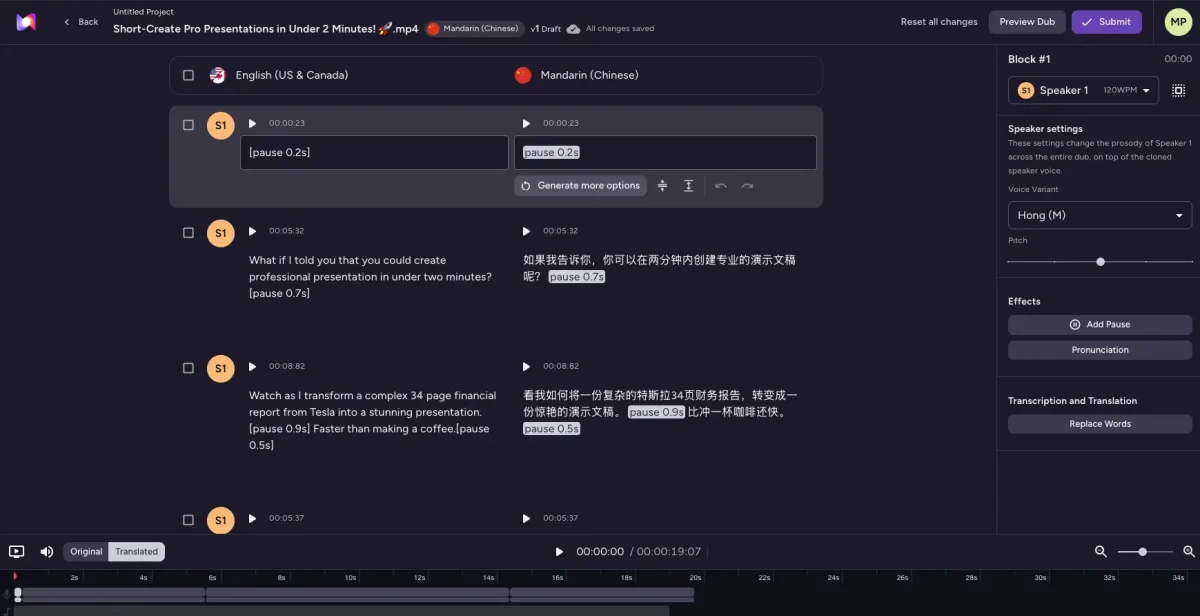
Murf Dub is a separate product within the Murf ecosystem, purpose-built for dubbing existing video or audio content into other languages. You upload your video, Murf transcribes the original audio, translates it, and synthesizes a dubbed version in the target language — preserving the original speaker’s timing, background audio, and sound effects.
The practical use case is localization at scale. A corporate training course built in English and recorded with real voice talent can be dubbed into Spanish, French, German, Italian, and Hindi without re-recording. The dubbed voices are Murf AI voices in the target language (not the original speaker’s voice, unless you’ve cloned it through Enterprise). Background audio and music are preserved in the mix.
Murf Dub currently supports dubbing in 25+ languages and accents. The quality delta from professional human dubbing is most visible in prosody: the AI dub matches word timing to the original speaker’s cadence, which sometimes creates slightly unnatural pacing in the target language. For corporate training content — where delivery precision matters more than entertainment naturalism — this trade-off is almost always acceptable.
TIP · pairing Dub with voice cloning (Enterprise)
If you have a cloned voice via the Enterprise plan, Murf Dub can use that clone for the dubbed output — so the localized versions sound like the same person speaking the target language. For a global brand with a recognized spokesperson, this is a significant consistency win over using a generic AI voice for dubbed versions.
API and the Falcon engine
Murf offers two API access points: the standard TTS API for batch voiceover generation, and the Falcon API for real-time applications.
The standard TTS API exposes the full voice library — 150+ voices across 26 languages — for programmatic voiceover generation. Pricing is usage-based at approximately $0.03 per 1,000 characters, with a $2 minimum purchase. For eLearning platforms that auto-generate course narration from slide text, or content management systems that produce product description audio, this is a clean integration with predictable per-unit cost.
The Falcon API, launched November 2025, is the real-time layer: 55ms model latency with sub-130ms time-to-first-audio. This places it at the fast end of production TTS APIs, comparable to the leading latency benchmarks in the category. IVR systems, voice-assisted web apps, real-time captioning services, and customer support bots are the target use cases. The Falcon API is priced at $0.01 per minute of generated audio — cheaper per unit than the character-based API for longer continuous speech.
API access is available from the Business plan upward; the standard API tiers by usage, and Falcon has its own pricing schedule. Voice cloning via API (to use your custom voice in programmatic generation) remains Enterprise-only. Developer documentation is clean and the endpoint is OpenAI-compatible in structure, which means existing integrations using similar APIs require minimal porting effort.
Integrations: the non-technical user’s strongest argument
Murf’s integration suite is the clearest evidence that it is targeting L&D and marketing teams, not developers. The native connectors it ships are exactly what corporate content producers live in:
Canva — generate Murf voiceovers directly inside Canva presentations and social videos, without leaving the design tool. Available on Creator plan and above.
Google Slides — add narration to existing slide decks with a Murf sidebar plugin. Click a slide, paste the script for that slide, generate, move on.
PowerPoint — same capability via a plugin for Windows PowerPoint. The add-in is a paid add-on on Business plans.
Adobe — export to Adobe Premiere and After Effects via standard audio formats. Not a deep integration, but the file formats work natively.
No competitor in the AI voice space has this specific combination. ElevenLabs has an API and a web editor, but no Canva or Google Slides integration. PlayHT has an API and a studio, but the integrations are shallower. For a corporate L&D developer who lives in Google Slides and Canva and just needs narration on top of existing content, Murf’s integration layer removes the entire “how do I get audio into my presentation” question from the workflow.
murf-ai · murf-dub.png
fig · Murf Dub across languages · source: max-productive.ai
Three real workflows, end to end
case-study #01 · eLearning narration at scale
Narrate a 12-module compliance training course
team: L&D developer, solo · scope: ~18,000 words narration · format: SCORM package
The scenario is standard in corporate L&D: a compliance course that needs to be narrated, updated annually, and distributed in three languages. Previous approach: hire a voice actor, record in a studio, pay $800-1,200 per language, wait two weeks for scheduling and post-production. Total: $3,600 and six weeks for a first run, then $1,200 and two weeks for every annual update.
With Murf: paste each module script into the editor, select a consistent voice for the course (one of the Gen 2 authoritative-narrator voices), adjust emphasis on regulatory term names and numbered lists, export WAV files, import into the authoring tool. The three-language versions use Murf Dub on top of the English master, with per-language terminology adjustments in the script before dubbing.
The L&D developer spends roughly 4-6 hours producing the initial narration pass for all 12 modules. Adjustments and revisions happen in the Murf editor in minutes — changing a sentence because the compliance policy updated doesn’t require rebooking a studio. Annual updates drop from two weeks to a half-day.
// cost comparison: $3,600 external studio → $99/mo Business plan · time-to-first-audio: 6 hours vs 2 weeks
case-study #02 · IVR phone tree for a regional service company
Build 40 IVR audio prompts for a customer service line
team: in-house marketing manager, no audio background · scope: 40 prompts, ~600 words total
IVR audio is the most friction-laden small-scale voiceover job in existence. Forty short clips, each needing professional warmth, consistent pacing, and correct pronunciation of brand and product names — none of which a generic TTS API handles well without manual tuning. Previously: expensive voice actor booking for a session that feels overqualified for “press 1 to reach billing.”
The Murf workflow: create a project with 40 script blocks, one per IVR prompt. Select a warm, mid-range female voice from the Gen 2 catalog. Export each as a separate WAV at 8kHz for telephony compatibility (Murf supports export format selection including 8kHz mono). For brand name pronunciations, use the phonetic override field — type the phonetic spelling, and Murf uses that rendering. Forty prompts, consistent voice, correct brand names, done in under two hours.
The phonetic control is specifically what makes Murf viable for IVR over generic TTS. Any regional business name, product brand, or industry term that a general model mispronounces can be corrected once, and the correction persists across the entire project.
// 40 IVR clips: 2 hours in Murf · consistent voice across all prompts · zero studio booking
Narrate weekly explainer videos in English + Spanish + Portuguese
creator: solo educator, YouTube channel · cadence: one video per week · audience: English + LATAM
A solo YouTube educator producing finance explainer videos — the exact type of creator Murf’s Creator plan is priced for. The content is narration-heavy with moderate pacing variation: clear explanations, not performance. Recording your own voice, editing in Audacity, and doing rough mixing takes about three hours per video for someone without a professional audio background.
With Murf: paste the script (which already exists as the video script), select the same consistent narrator voice for brand recognition across the channel, export, drop into DaVinci Resolve alongside the screen recording. Under an hour. The Spanish and Portuguese versions use Murf Dub on the finished English audio, with a quick script review by a native speaker to catch translation-level issues before publishing.
The quality ceiling here is honest: a human narrator with personality and delivery variation will outperform the Murf voice in watch-time metrics for entertainment-adjacent content. But for pure educational explainers — where clarity and consistency matter more than charisma — Murf narration is indistinguishable from competent human narration in viewer testing, and it’s available at 2 AM when the editing session wraps.
This comparison comes up constantly, and the answer is cleaner than most people expect. The tools are complementary, not competitive — they solve different problems for different teams. ElevenLabs is the emotional expressiveness leader. Murf is the workflow integration leader. Your use case determines the winner, not an objective quality ranking.
murf wins at
studio UI — non-technical users ship without code
Canva, Slides, PowerPoint integrations
word-level timing and emphasis controls
video timeline sync in-browser
corporate/L&D/IVR voice quality and consistency
multilingual parity — Gen 2 non-English voices
elevenlabs wins at
emotional range — audiobooks, advertising, drama
voice cloning accessible at Starter tier ($5/mo)
voice-to-voice real-time conversion
wider developer ecosystem and API maturity
more expressive tonal range per voice
Verdict: If you work in L&D, corporate video, IVR, or eLearning — use Murf. If you’re producing audiobooks, brand advertising, entertainment content, or need cheap accessible voice cloning — use ElevenLabs. Most professional audio teams end up with both.
Where Murf falls short
Emotional ceiling is real
Murf’s Gen 2 voices are excellent at the neutral-to-warm professional register and poor at everything outside it. Ask a Murf voice to sound genuinely excited, sorrowful, or sardonic and you get an overdriven version of the neutral voice — louder, faster, slightly higher pitched — rather than authentic emotional coloring. For advertising creative, character narration, or any content where the voice is supposed to carry emotional weight, Murf will disappoint. This isn’t a bug — it’s a design choice. The platform optimizes for clean informational delivery, not emotional performance.
Technical vocabulary mispronunciation
Pharmaceutical drug names, legal terms, product brand names, city names in non-English locales, and industry jargon all require manual phonetic correction. The Murf studio has a phonetic override field specifically because this is a known limitation, and it works — but it requires you to know which words will be mispronounced before you finalize audio. Reviewers consistently flag this as the most time-consuming manual step in the Murf workflow. Build a phonetic correction library for your domain early, and maintain it across projects.
Voice cloning gated behind Enterprise
The hard cutoff at Enterprise pricing for voice cloning is the single most complained-about limitation in user reviews. ElevenLabs offers voice cloning at $5/mo. Resemble AI makes it available mid-tier. Murf’s Enterprise-only gate means most individual creators and small businesses — exactly the personas Murf’s Creator and Business plans are targeting — simply cannot access the feature. If voice cloning is in your requirements, check pricing before signing up.
No real-time conversational voice
The Falcon API delivers low-latency audio, but Murf’s product architecture is built around pre-scripted voiceover, not conversational AI. There’s no session management, no multi-turn dialogue model, no streaming token generation from a conversational LLM. If you’re building a voice assistant, a customer support bot with dynamic responses, or any product where the voice needs to respond to unpredictable user input, Murf is not the right layer. ElevenLabs Conversational AI or a combination of an LLM API plus a real-time TTS endpoint is the right architecture for that use case.
Per-year generation limits feel tight on annual plans
The Creator plan at $19/mo (annual) provides 24 hours of generation per year — 2 hours per month. For a solo eLearning developer with a large course catalog, this runs out quickly. Business at $66/mo gives 96 hours per year (8 hours per month), which is more realistic for production use. The monthly billing option on Business gives 20 hours per month, which is significantly more generous but costs $99/mo — the annual vs. monthly trade-off math here is not simple. Do the hours-per-month calculation before choosing a billing cycle.
murf-ai · murf-pricing.png
fig · Plans and pricing · source: blog.unrealspeech.com
Pricing in real terms
Murf’s pricing structure is freemium with a hard usage ceiling that makes the free tier impractical for production work.
The Free plan gives 10 minutes of total lifetime generation with no downloads and no commercial rights. It is useful for evaluation only. You will exhaust it in one demo session.
The Creator plan — $29/mo billed monthly, $19/mo billed annually — is the entry point for actual production. It includes 24 hours of generation per year (2 hours/mo), 200+ voices, 20+ languages, commercial rights, unlimited downloads, and Canva integration. For a solo content creator who produces consistent volume but not heavy production loads, this is the plan to start on.
The Business plan — $99/mo billed monthly, $66/mo billed annually — adds 96 hours/year of generation on annual billing (or 20 hours/month on monthly billing), team collaboration with multiple editor seats, priority rendering, Google Slides and PowerPoint integrations, and API access. For any team producing regular course content or managing multiple concurrent projects, Business is the correct tier. The gap between Creator and Business in features — not just hours — is significant enough that most production teams skip Creator entirely.
The Enterprise plan is custom-quoted and adds voice cloning, dedicated account management, SSO and advanced access controls, and compliance certifications including SOC 2 Type II, ISO 27001, HIPAA, and GDPR. For regulated industries (healthcare training, financial services eLearning) or any organization that requires voice cloning as part of brand standards, Enterprise is the only viable option.
The Falcon API is billed separately from studio plans at $0.01 per minute. Standard TTS API access is available from Business upward at approximately $0.03 per 1,000 characters.
NOTE · annual vs monthly math
On the Business plan, annual billing gives you 96 hours per year (8 hours/mo) for $66/mo. Monthly billing gives you 240 hours per year (20 hours/mo) for $99/mo. If you consistently use more than 8 hours per month, monthly billing is a better deal per-hour despite the higher nominal rate. Run the numbers against your actual output volume before committing to annual.
Extensive voice library, good API DX, strong podcast-specific features
$29/mo
FAQ
Is Murf AI good enough to replace a real voice actor?
For corporate narration, eLearning, IVR, and explainer content — yes, in most cases. For advertising, audiobooks, character performance, or anything requiring genuine emotional delivery — no. Gen 2 voices are clean and professional, but the emotional ceiling is real. If your content needs a voice that sounds like a person who cares about what they’re saying, a human narrator is still the better choice.
Can I try voice cloning before committing to Enterprise?
No. Voice cloning is Enterprise-only with custom pricing and no self-serve evaluation option. If this is a requirement, contact Murf’s sales team for a demo. If you need cloning at an accessible price point, ElevenLabs (Starter at $5/mo) or Resemble AI are the alternatives to evaluate.
How does Murf handle pronunciation of brand names and technical terms?
Through phonetic overrides in the script editor. You can type a phonetic spelling for any word, and Murf uses that rendering instead of the default. It works reliably, but it requires knowing in advance which words will be mispronounced. Build a project-level phonetic correction library during your first production run and reuse it.
What audio formats does Murf export?
MP3, WAV, and FLAC are the primary export formats. Sample rate selection (including 8kHz mono for telephony/IVR) is available. For video projects, you can export a mixed-down MP4 with the voiceover baked in, or separate audio and video tracks.
Is Murf HIPAA compliant? Can I use it for healthcare training?
HIPAA compliance is available on the Enterprise plan, which includes a Business Associate Agreement (BAA). Creator and Business plans are not HIPAA compliant. If your eLearning content includes PHI, you need Enterprise.
Does Murf work for real-time voice in apps or chatbots?
The Falcon API (launched November 2025) delivers sub-130ms latency, which is suitable for many real-time applications. However, Murf’s architecture is not built for conversational multi-turn dialogue. For IVR prompt playback, real-time caption reading, or server-triggered audio generation, Falcon API works. For a fully conversational voice agent that responds dynamically to user input, ElevenLabs Conversational AI or a custom LLM + TTS stack is the right architecture.
Murf vs ElevenLabs — which should I start with?
Start with Murf if you’re producing eLearning, corporate training, IVR, YouTube explainers, or any content where a non-technical team member needs to manage voiceover without writing code. Start with ElevenLabs if you need voice cloning at low cost, emotionally expressive delivery, or a developer-first API with a strong ecosystem. Many production teams end up using both for different content types.
Can I use the same Murf voice for video and audio content consistently?
Yes. Select a voice, note the exact voice name and style settings, and apply them to every project in your organization. Gen 2 voices are deterministic given the same settings — the same voice selection will produce consistent character across all your content. This is what makes Murf practical for brand voice standardization across a large course catalog.
The verdict
murf-ai-review · v1.0 · latest L&D Pick
8.0/10
+ studio workflow + Gen 2 voices + integrations + multilingual
The professional’s voiceover studio. Not the emotional powerhouse.
Murf AI earns its place as the default recommendation for L&D teams, corporate video producers, and eLearning developers. The Gen 2 voice engine is clean and consistent. The studio workflow — word-level controls, timeline sync, phonetic overrides — is the most polished non-technical production environment in the category. The Canva, Google Slides, and PowerPoint integrations remove friction that every other voice platform ignores. The Falcon API makes real-time use cases viable for the first time.
The honest limitations: the emotional range is capped, voice cloning is priced out of reach for most users, and the generation-hour limits on annual plans require careful capacity planning. ElevenLabs beats it on expressiveness and accessible cloning. But for the specific use cases Murf is built for — high-volume informational narration, multilingual localization, and workflow-integrated voiceover for non-technical teams — nothing else is as complete a product.
If you’re producing eLearning at scale, managing IVR audio, or building a consistent narration track for YouTube or corporate video and you don’t want to manage a voice actor relationship: this is the tool.
// facts checked 2026-06-02
Keeping tabs
Change history
Every verified price, limit, and model change we have tracked for Murf AI.
No changes detected since we started tracking — that's a good sign.
Verified October 2026
Watch this tool
One email when Murf AI changes price or limits. No account, no spam.