AI Tool

Suno
Suno
Suno
AI music generator that creates full songs with vocals from a text prompt — v5.5 adds voice cloning and custom model training.
AI music generator that creates full songs with vocals from a text prompt — v5.5 adds voice cloning and custom model training.
Suno is an AI music generation platform built around a deceptively simple premise: describe a song in plain language, and the model writes it, performs it, and produces it — in under a minute. You get a finished audio file with lead vocals, harmonies, instrumentation, and a mixed master. No DAW, no plugins, no musician required.
Founded in 2022 and headquartered in Cambridge, Massachusetts, Suno was built by a small team of machine learning researchers and musicians who came largely from Spotify and academic ML labs. The company raised $125 million in a Series B round in 2024, with Lightspeed Venture Partners leading, and has since grown into one of the most-used AI audio tools on the internet — claiming over 12 million registered users by early 2026.
The product is entirely web-based. There is no desktop app, no mobile app to install. You go to suno.com, describe your song, and generate. The interface is clean enough that a non-musician can produce something in under two minutes, yet deep enough that producers and composers have built real workflows on top of it.
Three things separate Suno from the noise in the AI audio space:
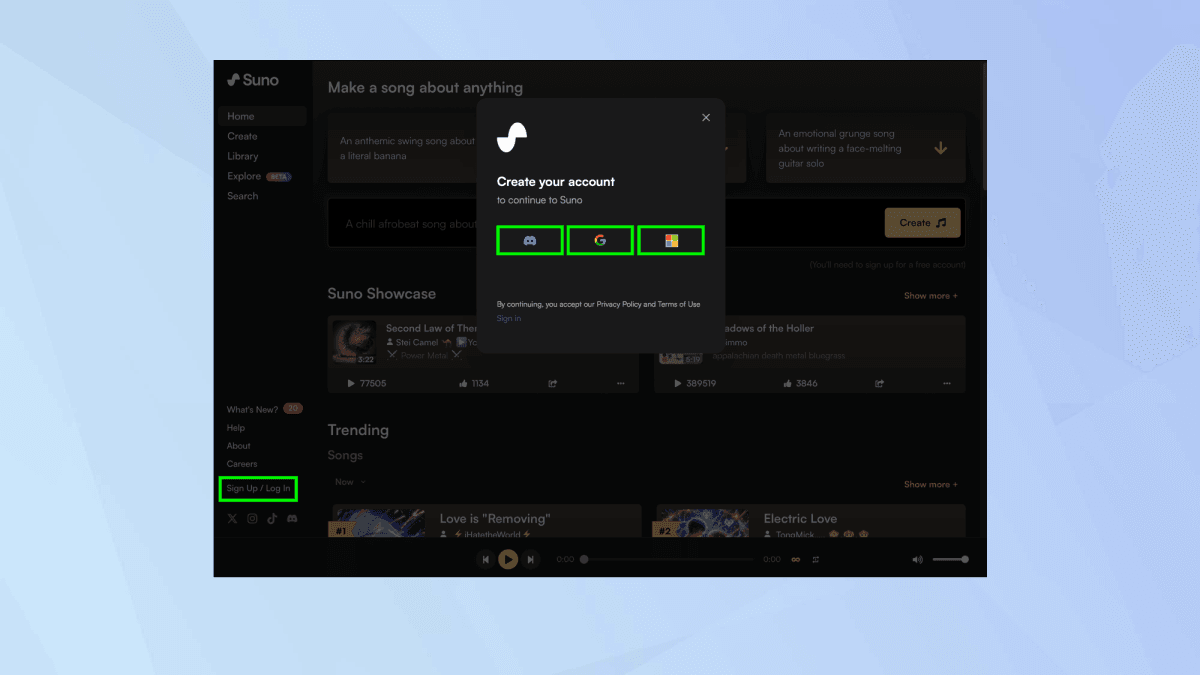
The onboarding is frictionless. You don’t need to enter payment details to start. Free accounts get 50 credits that refresh daily — roughly ten songs. Hit the big “Create” button, type your prompt, choose Custom or Instrumental mode, and click Generate.
The two generation modes matter:
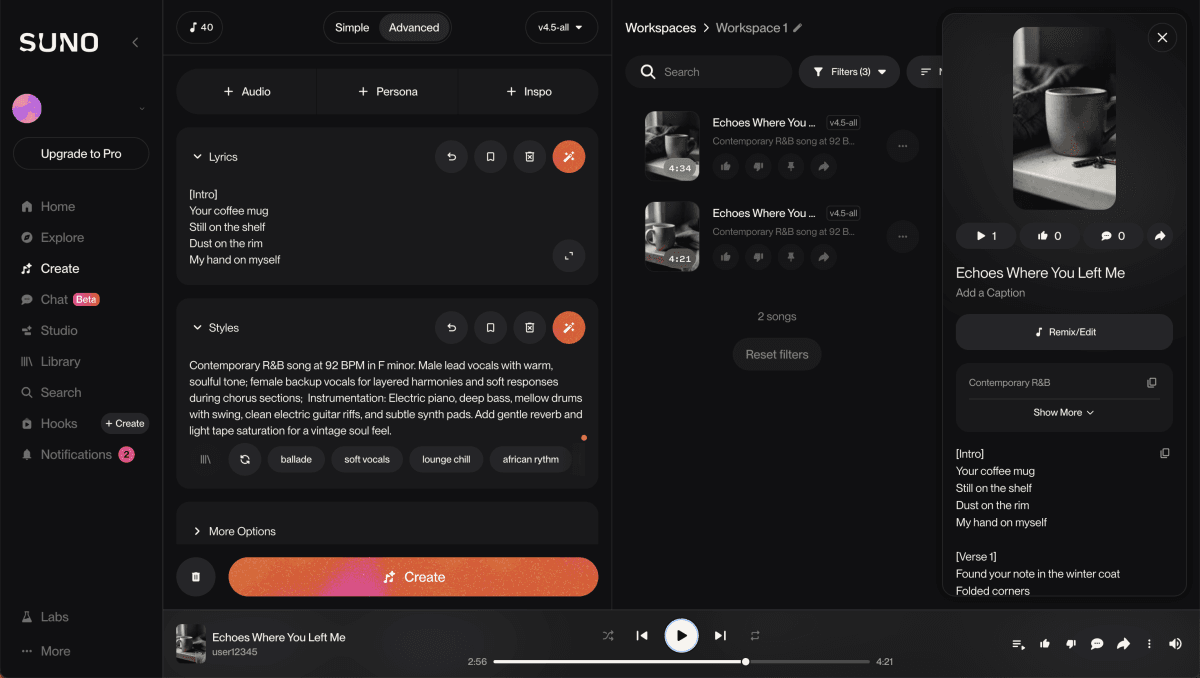
In Custom mode, you control style descriptors and supply your own lyrics if you want. In Simple mode, Suno writes lyrics, picks instrumentation, and arranges everything from a single sentence. Both modes can produce excellent results; Custom gives you the levers to iterate systematically.
The first time a Suno-generated song genuinely surprises you — the vocal phrasing landing right, the melody hooky, the arrangement breathing correctly — is the moment the tool stops feeling like a toy. That moment usually comes within the first five songs.
Generate in pairs. Suno always produces two variations per prompt. The first is rarely the keeper — the second often is, or one verse from each. Always generate at least two rounds before settling on a direction. Iteration costs 5 credits per song; treat it like bracketing a photo exposure.
Suno has shipped four model generations that matter. Here is what each one actually delivered:
v4 was the model that made Suno credible. It extended song length to four minutes, improved lyric coherence across full compositions, and produced mixes that didn’t sound like they were generated from a spectrogram. Before v4, most Suno outputs had a distinctive “AI shimmer” — an airy, slightly unreal quality to the high frequencies. v4 significantly reduced this. It also introduced the Song Editor, which let users extend songs, re-generate specific sections, and adjust the arrangement post-generation.
v4.5 was specifically targeted at two things: vocal performance and song duration. The vocal model received its largest upgrade to date — adding genuine emotional range, from delicate whispered lines to belted power hooks, with better vibrato and more natural phrasing. Song length jumped to eight minutes, which opened up Suno for longer-form content: full podcast intros, film score cues, and extended ambient pieces. The Covers and Personas features also received major upgrades — Covers could now preserve melodic structure through genre swaps, and Personas could be combined with Covers for layered transformations.
v5 (internally codenamed “chirp-crow”) was the biggest architectural jump. The audio quality moved from “convincing demo” to “could pass on a streaming platform.” Mix depth improved substantially — kick drums punch, reverb tails decay naturally, vocal sibilance is controlled. v5 also shipped the first version of Suno Studio, an in-browser multitrack editor that gives access to the underlying stems: vocals, bass, drums, harmony, and instrumentation on separate tracks. Up to 12 time-aligned WAV stems can be exported for use in Ableton, Logic Pro, or any external DAW. This changed Suno from a destination into a starting point.
v5.5 added three personalization features that collectively move Suno from “generate music” to “generate your music.” First: Voices, a voice cloning system that captures your own vocal character and applies it to AI generations. You upload or record a sample; Suno verifies it against a spoken phrase and locks your voice to your account. Generations using your voice hear your timbre, not a generic AI vocal. Second: Custom Models, which let Pro and Premier subscribers train up to three personalized versions of v5.5 on a catalog of at least six songs — useful for locking in a specific sonic signature across a series of tracks. Third: My Taste, a recommendation system that learns your generation patterns to surface more relevant style suggestions. My Taste is available even on Free.
The Song Editor is the feature that separates Suno from single-shot generators. After generating an initial track, you can extend it from any point — forward or backward in time. Want a longer outro? Extend from the bridge. Want a completely different intro before the existing verse? Insert before the first section. The editor maintains audio continuity across the extension boundary, which is technically impressive — transitions don’t click, pitch doesn’t drift.
Structural re-generation is also available section by section: re-do just the chorus, keep everything else. This is where iterative workflows become viable. A professional workflow looks like: generate a rough structure in three rounds, pick the best skeleton, then section-edit each part individually until everything is exactly right.
A Persona captures the stylistic and sonic “essence” of a song — a snapshot of its feel, tempo range, and instrumentation palette. You can apply a saved Persona to new generations to maintain stylistic consistency across multiple tracks. For anyone building a soundtrack, playlist, or audio brand identity, Personas are essential: they stop you from having to re-describe the same sonic DNA in every prompt. Since v4.5, Personas can be combined with Covers — you can genre-swap a track while preserving its structural Persona.
Covers let you feed Suno an existing song (your own original, not copyrighted third-party tracks) and transform it into a different genre or style. The model preserves melodic contour and harmonic content while reinterpreting arrangement and production. A fingerpicked folk song becomes a synth-pop banger. An acoustic demo becomes an orchestral piece. Since v4.5, melodic preservation through the transformation is notably better — the output is recognizably derived from the source, not just a vague approximation.
Stem separation is available to Pro and Premier subscribers on v5+ generations. You get up to 12 time-aligned WAV stems. Suno Studio (Premier-tier full feature set) is an in-browser multitrack editor where you can adjust individual stem levels, apply light processing, rearrange sections, and export the full mix or individual stems. The practical use case: generate a track in Suno, export stems, finish production in your DAW. It’s not a replacement for a real DAW session, but it’s a massively accelerated starting point.
Generate at 5.5, export stems, drop the vocal stem into your DAW, tune it with Melodyne, and layer your own production underneath. The result sounds like a collaboratively produced track — because functionally, it is. Suno handles the arrangement; you handle the production polish.
MILO-1080 is a 16-track step sequencer and synth designer integrated into Suno Studio, aimed at producers who want granular control over the generation process rather than a text prompt. It lets you build patterns, define synth voices, and then use those patterns as seeds for AI generation. This is a significant departure from Suno’s prompt-first philosophy and signals where the product is heading — toward a full generative music workstation, not just a text-to-audio tool.
This is the section where most Suno reviews either oversell or undersell. The honest answer is: it depends heavily on the genre and the prompt specificity.
Suno’s strongest genres are the ones that tolerate slight stylization — indie pop, lo-fi hip-hop, folk-adjacent singer-songwriter, cinematic orchestral, synth-wave, and most electronic styles. In these genres, v5.5 productions are genuinely competitive with mid-budget human productions. The vocal performances in pop and R&B have real emotional quality; phrasing and dynamics are not robotic.
Lyrics are consistently better than you’d expect. Suno writes full verses and bridges with internal rhyme scheme, thematic consistency, and occasionally genuine poetic quality. When you supply your own lyrics, the model matches syllable weight to melody naturally — line endings land on beat, stresses fall correctly. This is the hardest thing to fake in music AI, and Suno handles it better than every other AI music tool currently available.
Complex jazz, progressive rock, metal with technical guitar work, and classical performance remain the genres where Suno’s weaknesses are most exposed. In jazz, improvisational elements sound composed and mechanical — the model knows the vocabulary of jazz but not the spontaneity of it. In metal, fast picking and lead guitar lines have a synthetic quality that is immediately apparent to listeners familiar with the genre. Bass guitar across all genres tends to be the weakest individual stem — functional and rhythmically correct, but thin in tone.
Vocal articulation is also imperfect at very high tempos or with dense lyrical lines — fast rap verses and complex melismatic passages sometimes distort or slur. This has improved from v4.5 to v5.5 but hasn’t been fully resolved.
quality-by-genre.sh –model=v5.5 –metric=production-realism subjective
The requirement: 50 unique background tracks matching the destination and mood of each episode. Budget before Suno: license stock music at roughly $30–60 per track, meaning $1,500–3,000 for the series.
With Suno Pro, the workflow was: establish a Persona for the series’ baseline sonic identity (world-influenced acoustic, mid-tempo, warm), then generate destination-specific variants. For a Japan episode: “Japanese acoustic guitar, shakuhachi flute, meditative, 90 BPM, no vocals.” For a Morocco episode: “Gnawa-influenced percussion, oud, humid heat vibe, hypnotic.”
Across three sessions, 50 tracks were generated and curated. Roughly 30 required a second round of generation to get the right feel; five needed manual section extension to hit the right runtime. Total time: about 8 hours. Total cost: one month of Pro at $8.
The game needed 12 loopable tracks for different zones. The challenge: Suno songs have natural beginnings and endings, not loop points. The workflow combined Suno with Audacity: generate the track, export stems, identify the cleanest loop section in the middle four bars, trim and crossfade in Audacity.
The stems access (Premier) was essential here. The vocal stem was removed entirely (this is a game; no lyrics wanted). The bass and drums stems were slightly re-levelled to sit lower in the mix at loop points. The result: 12 tracks that sound like a professional ambient soundtrack. The game shipped on Steam; not a single player mentioned “AI music.”
Where Suno saved the most time: the ideation phase. Trying 12 different ambient directions in a single evening is only possible when generation takes 60 seconds per track. With a human composer, this phase alone would take weeks and cost thousands.
The scenario: a songwriter with original lyrics but no studio access and a home-recording setup that sounds like a bathroom. The goal: demos that communicate the song’s commercial potential without the technical limitations of a home recording.
The workflow with v5.5 Voices: record a clean vocal sample at home, upload it to Suno, create a Voice. Describe the production style, paste the original lyrics. Generate. The output has the songwriter’s actual voice, singing a professional-sounding production.
The result is not a master recording and should not be pitched as one. But as a demo — a vehicle for communicating the song’s melody, feel, and commercial hook — it’s dramatically more effective than a bedroom recording. Three demos were pitched to a publisher contact. Two generated callbacks. The publisher understood immediately that these were AI-assisted demos, not finished recordings. That’s the right use case for the tool.
This deserves a full section, not a footnote. Under Suno’s current Terms of Service, the platform retains authorship of generated audio. As a paid subscriber, you receive a perpetual commercial license to exploit the music you generate — but Suno is technically the “author” of the output under copyright law. This means you cannot register a copyright in your name for the generated audio, you cannot sue a third party for copying it, and Suno could theoretically modify the terms of that license in the future.
For most commercial use cases — YouTube background music, ads, games, podcasts — this distinction doesn’t matter in practice. The license is broad and perpetual for songs made during your paid subscription. But for artists building a catalog with genuine intellectual property value, or for major label pitching, this is a structural limitation that no plan tier resolves.
Neither the Pro nor Premier plan includes indemnification against copyright infringement claims. If a rights holder argues that your Suno-generated track is substantially similar to a copyrighted recording, Suno will not cover your legal costs. Given the ongoing Sony Music litigation (summary judgment expected summer 2026) and independent artist class actions, this is not a theoretical risk for commercial users at scale.
Pro gives you 2,500 credits per month — roughly 500 songs at 5 credits per song. That sounds like a lot until you run a real production workflow: generate two variants per direction, extend sections, re-generate individual parts. A serious project can consume 200–300 credits in a single session. Heavy users will hit the Pro ceiling in two weeks of genuine work. Premier’s 10,000 credits are more appropriate for professional production volumes.
Suno is entirely browser-based. There is no API open to third-party developers (as of June 2026), no desktop app, and no offline capability. If Suno’s servers are slow or down, you’re blocked. For solo creators this is fine; for studios integrating AI music into a production pipeline, the lack of an API is a genuine constraint.
You cannot specify a chord progression, choose a specific key, or dictate note-by-note structure in any current Suno model. You work with style description and genre vocabulary. For composers who think in harmonic terms, this is frustrating — you describe the feel you want and hope the model interprets it correctly. MILO-1080 begins to address this for producers, but it’s early and limited to Premier.
The Covers feature requires uploading audio you have rights to. Uploading copyrighted recordings to generate “covers” is a Terms of Service violation, not a gray area. Suno actively monitors uploads. Beyond ToS, doing so during the Sony lawsuit period is genuinely risky. Covers is for your own originals, demoing chord progressions, or reference tracks you own outright.
a/free-plan b/pro-or-premier
The commercial rights question is the single most important factor for most serious users. Here is the plain-language version: Free users cannot use generated music commercially, period. Paid subscribers can, within the terms of a perpetual license.
Verdict: For content creation, games, and ads, the Pro license is sufficient. For major-label pitching, sync licensing to networks, or anything where IP ownership matters legally, consult an entertainment attorney before using Suno commercially.
Suno is operating inside one of the most contested legal disputes in the history of music copyright. Here’s what you actually need to know, without the hype on either side.
In 2024, the RIAA — representing Sony Music, Universal Music Group, and Warner Music — filed suit against Suno (and separately Udio) in the District of Massachusetts, alleging that both companies trained their models on copyrighted recordings without license or consent, constituting large-scale infringement. This is the central legal question: does training an AI on copyrighted music constitute infringement, and if so, at what scale?
By late 2025, the major label landscape had partially settled. Warner Music Group settled with Suno in November 2025 — terms include a multi-million dollar payment, a licensing partnership, and Suno acquiring Songkick from Warner. Universal Music Group separately settled with Udio in October 2025, co-launching a licensed AI music platform. These settlements signal that major labels are moving toward coexistence rather than trying to shut AI music down — but they also created an uneven landscape.
Sony Music has settled with neither Suno nor Udio. Its fair-use cases are still active as of June 2026, with a pivotal summary judgment hearing expected in summer 2026. That hearing is the one to watch — it will either validate Suno’s fair-use defense (which would be a major green light for the whole AI music industry) or establish binding precedent that training on copyrighted works requires licensing. The outcome will reshape every AI audio product’s legal posture.
Separately, a class action — Nguyen v. Suno Inc., filed November 2025 — represents independent musicians and small-label artists whose recordings may have been used in training. This is the lawsuit with more direct personal impact for working musicians, even if it has received less media coverage than the major-label suits.
For users: none of the active litigation changes your rights under your current subscription’s commercial license. Songs you generate under Pro or Premier retain their commercial license regardless of how the lawsuits resolve. The risk is forward-looking: a ruling against Suno could force model retraining, pricing changes, or service interruption. That’s a real but not imminent concern.
Suno has three tiers. The numbers below are the annual billing rates — which are the ones worth optimizing for if you’re committing to the tool.
pricing-calc.sh –billing=annual –user=1 USD · verified June 2026
The Free plan gives you 50 credits daily — approximately 10 songs. Credits reset daily but don’t accumulate. Commercial use is not permitted. Best use: evaluating whether Suno fits your workflow before committing.
The Pro plan at $8/month (annual billing, $10/month monthly) is the plan that unlocks the tool for real work. 2,500 credits monthly, access to v5.5 including the Voices feature, commercial rights, priority generation queue, stem access on v5+ tracks, and the Song Editor. For content creators, this is the plan that makes economic sense from day one.
The Premier plan at $24/month (annual billing, $30/month monthly) adds 10,000 credits, full Suno Studio access, the multitrack editor, MIDI export, and early access to features like MILO-1080. Premier is for professional production workflows: game studios, post-production, label-adjacent producers. For casual creators, the volume doesn’t justify the jump from Pro.
Credits do not carry over month to month. Add-on credit packs are available for purchase on Pro and Premier, but require an active subscription. The math for a content creator: at $8/month and 500 songs of capacity, you’re paying $0.016 per song. A stock music license for a comparable track typically costs $30–80. The economics are not subtle.

Udio is the closest direct competitor and the one most worth evaluating alongside Suno. Its settlement with UMG gives it a different legal footing — useful context if your commercial use case is specifically UMG-catalog-adjacent. The generation quality in pop and R&B is comparable; Suno leads in editing tools and credit volume per dollar. We have a full Udio review here if you want the side-by-side.
ElevenLabs is not a music competitor but is highly relevant for anyone in the audio creation space. If you need voice cloning for narration, hyper-realistic sound effects, or a proper API to integrate audio generation into a production pipeline, ElevenLabs is the answer Suno isn’t designed to be. See our ElevenLabs review for the full picture.
Yes, on Pro or Premier plans. The commercial license covers distribution to streaming platforms. Services like DistroKid and TuneCore will accept Suno-generated tracks if you have an active paid subscription. You cannot register the copyright in your name — Suno retains authorship — but you can distribute and monetize commercially.
On paid plans, yes — you’re paying for the subscription, not per-use royalties to Suno. The commercial license included with Pro and Premier lets you use generated music in revenue-generating content without additional payments to Suno. However, “royalty-free” does not mean “legally cleared” in all contexts — the ongoing Sony litigation is still unresolved.
Yes — there is an Instrumental mode that suppresses vocal generation entirely. You don’t have to write lyrics; Suno can generate them, or you can supply your own. Instrumental mode works well for background music, ambient pieces, and game audio. Lyrics are optional in all modes.
As of June 2026: Warner Music settled with Suno in November 2025 (licensing deal plus multi-million dollar payment). UMG settled with Udio. Sony Music’s case against both companies is still active, with a key hearing expected in summer 2026. The outcome of the Sony case will set significant legal precedent for AI music training. Suno continues to operate normally during this period.
Yes, in v5.5 on Pro and Premier plans. The Voices feature lets you upload or record a vocal sample, verifies it against a spoken phrase, and applies your voice timbre to AI-generated songs. The feature has age and location restrictions and requires verification. It is not a voice replacement feature for others’ voices — Suno specifically prohibits cloning someone else’s voice without consent.
No. Credits included in subscriptions do not carry over from month to month. Add-on credit packs purchased separately do persist, but require an active paid subscription to use. If you’re approaching the end of your billing cycle with leftover credits, use them — they’re gone at renewal.
For volume, speed, and cost at the initial ideation and demo phase, Suno wins decisively. For original IP ownership, nuanced genre expertise, creative collaboration, and legally unambiguous copyright, a human composer wins decisively. The best workflow combines both: Suno for rapid ideation and reference tracks, a composer to develop the best concepts into finished, owned works.
No official public API is available as of June 2026. Suno has not announced an API. This limits integration into production pipelines and third-party tools. If API access is a requirement for your use case, Udio and ElevenLabs have more openness in this area.
Suno is the most capable AI music tool available in 2026, and it isn’t close for most creative workflows. The quality ceiling on v5.5 in pop, electronic, folk, and cinematic genres is genuinely impressive. The voice cloning in v5.5 turns it from a content tool into something songwriters can actually use to communicate a song’s commercial potential. At $8/month for commercial rights and 500 songs, the value is hard to argue with.
The score isn’t a 9 or higher for two reasons: the copyright ownership structure remains structurally limited (you get a license, not ownership), and the tool’s weaknesses in complex genres are real. For anyone whose work lives in the genres where Suno shines, and who understands the legal context clearly, it earns the pick without reservation.
Every verified price, limit, and model change we have tracked for Suno.
One email when Suno changes price or limits. No account, no spam.