Adobe's commercially safe AI image and video generator — the only major tool with IP indemnification, trained on licensed content, and built natively into Photoshop.
Adobe shipped Firefly into public beta in March 2023, a few months after Stable Diffusion had already gone open-source and Midjourney had begun colonizing every designer’s Slack channel. The timing looked slow from the outside. Internally, the delay was deliberate — Adobe was solving a problem its enterprise customers cared about more than raw image quality: the training data problem.
Every other AI image generator at the time was trained on scraped internet data. The legal exposure for commercial work was unquantified and real. Getty Images had already sued Stability AI. Stock agencies were in litigation. Corporate legal teams were sending “do not use AI-generated images” memos across design departments.
Adobe’s answer was Firefly: a model trained exclusively on Adobe Stock images (licensed, with contributor compensation agreements), openly licensed content from sources like Unsplash, and public domain works where copyright had expired. The model was architected from the ground up to never have seen a Getty image, a celebrity photograph ripped from a fan site, or a living artist’s work used without consent.
The business consequence is the product’s real identity. Firefly didn’t win on model quality at launch — it won on becoming the first AI image tool that enterprise legal teams would actually approve. By September 2023 it left beta, and by early 2024 it had been adopted by major agencies, publishers, and Fortune 500 marketing teams precisely because it was the tool you could actually use.
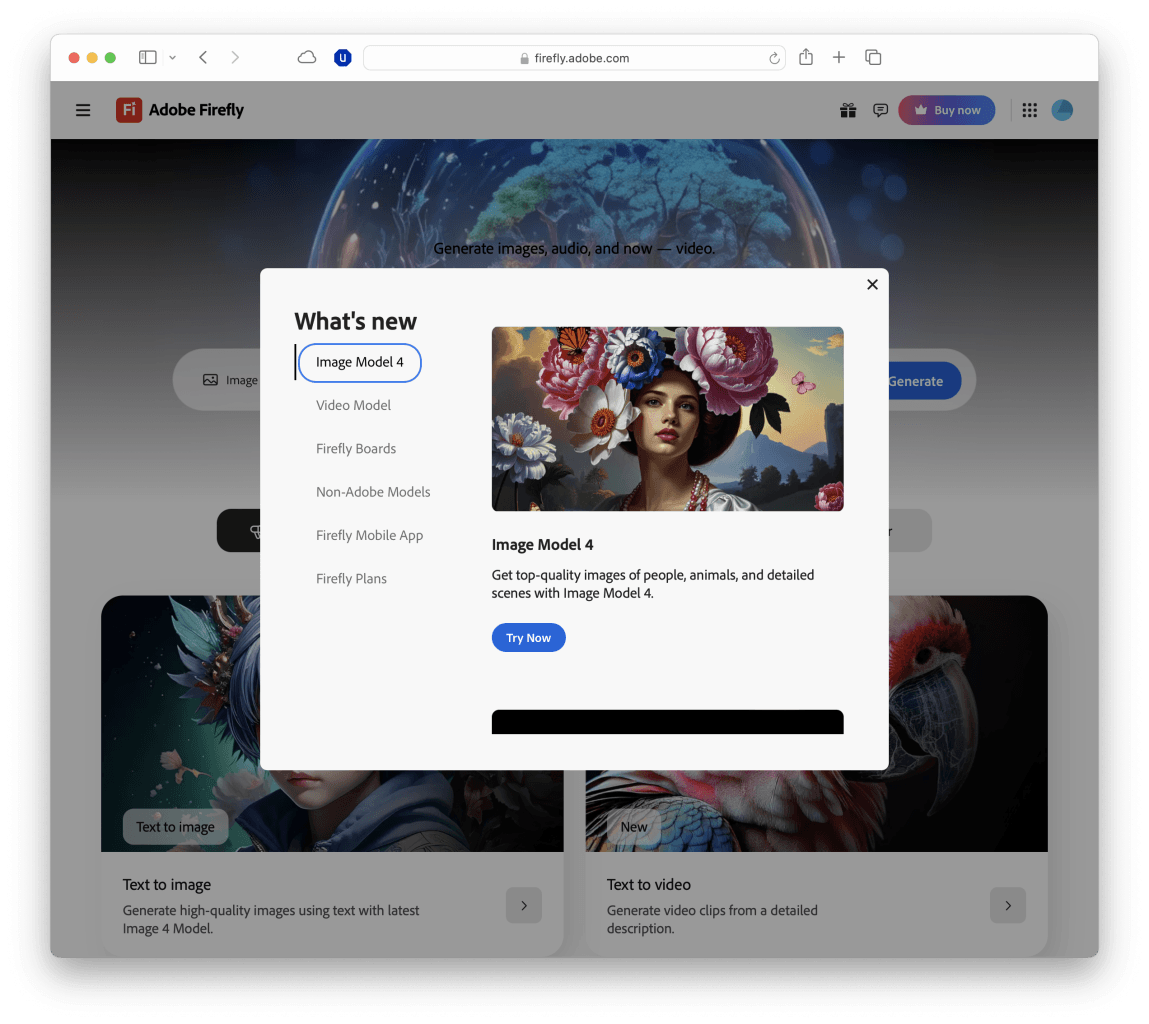
Image Model 4 and Image Model 4 Ultra shipped at Adobe MAX London in April 2025, representing a generational leap in photorealism and detail. By 2026 the platform had expanded well beyond static images into video generation, an AI-native web app, collaborative moodboarding with Firefly Boards, and a marketplace of 30+ partner models from Google, Runway, Pika, Sora, and others — all accessible from the same Creative Cloud subscription.
What Firefly actually is (in 2026)
Firefly started as an image generator. In 2026 it’s an AI creative platform with several distinct components that can be confusing if you approach it as a single product.
Adobe Firefly web app — the standalone browser-based creative hub at firefly.adobe.com. Text to image, text to video, generative fill, vector recoloring, generative expand, and access to partner models.
Firefly inside Photoshop — Generative Fill, Generative Expand, Generative Remove, Generative Upscale, and the new Fill & Expand dedicated model. The deepest integration and the most used entry point.
Firefly inside Illustrator — Generative Recolor for vector artwork, text effects, pattern generation.
Firefly Video — AI video generation, now in public beta with a browser-based timeline editor and access to partner video models.
Firefly Boards — an infinite canvas collaborative workspace for moodboarding and ideation, with direct handoff to Photoshop and Express.
Firefly API — developer access for building Firefly-powered workflows into custom tools and pipelines, with the same IP protections as the consumer product.
The common thread across all of these: every generation using an Adobe Firefly model is commercially licensed from creation, carries Adobe’s IP indemnification, and is cryptographically tagged with C2PA Content Credentials that prove its AI origin.
The IP indemnity angle — the actual product
This is the section that matters most for any reader whose work ends up in a client deliverable, a print run, or a published campaign.
Adobe provides IP indemnification for content generated using Firefly models. In practice this means: if a third party claims your Firefly-generated asset infringes their copyright, Adobe covers the cost of your legal defense. Enterprise plans extend this to full enterprise-grade indemnification with dedicated legal support.
The indemnification is only possible because of how the model was trained. Adobe can make this guarantee because it controls the training data chain from end to end: Adobe Stock contributors were compensated under updated licensing terms for their work being used in Firefly training. Openly licensed images came from sources with clear provenance. No copyrighted living artist’s style was used without consent. Adobe’s lawyers can look a judge in the eye and document what went into the model.
NOTE · what indemnification actually covers
IP indemnification covers third-party copyright claims against generated outputs. It does not cover use of trademarked logos or branded elements you add to the image yourself after generation, defamatory content, or outputs that violate Adobe’s terms of service. Read the enterprise legal FAQ before relying on this for regulated industries.
The practical effect on enterprise workflows is significant. Design teams at agencies, publishers, and brands can now generate product mockup backgrounds, lifestyle photography composites, and campaign concepts without a legal sign-off queue. The conversation shifts from “is this safe to use?” to “does this look good?”
No other major AI image platform offers this. Midjourney, DALL-E 3, Stable Diffusion, and Flux have all faced training data controversy and none provides the equivalent commercial indemnification. Adobe’s content credential system (C2PA standard) goes further — every Firefly-generated image carries a cryptographic signature you can verify in any C2PA-compatible viewer, showing it was AI-generated and by which model. For clients who need to audit their asset library for AI content, this is the only tool that self-documents.
The indemnification and Content Credentials together are why Firefly is the tool that procurement departments approve. Other tools may produce more striking images. None of them come with Adobe’s legal guarantee attached.
Image Model 4 and Image Model 4 Ultra
Image Model 4, released in April 2025, is the most significant quality leap Firefly has shipped since launch. The jump from Image Model 3 to 4 is visible in a prompt comparison: the same text prompt returns dramatically better lighting, more coherent spatial relationships, and substantially improved text rendering within images — an area where every AI image model had historically embarrassed itself.
The base Image Model 4 targets production-ready outputs: clean photorealism, reliable prompt adherence, correct hands and faces, and the ability to render legible type in posters, signage, and social cards. For most commercial use cases — product photography backgrounds, editorial illustrations, social media assets — Model 4 is the right default.
Image Model 4 Ultra is the version that competes with the best photorealistic outputs from any model. It excels specifically at:
Human portraits with complex lighting and skin detail
Photorealistic architectural and interior scenes
Small group photography with multiple subjects
Fine texture detail at print resolution
The quality gap between Image 4 Ultra and Midjourney v7 (or whatever Midjourney is shipping at time of reading) is real but narrowing. Midjourney still tends to produce images with a higher ceiling for artistic drama and mood, in PixlRun’s editorial assessment. Ultra produces images that are more consistently production-ready — fewer uncanny details, better adherence to the prompt’s literal intent, and cleaner outputs that don’t need as much post-processing before they’re client-ready.
Both models output at 2K resolution (2048×2048) as of the 2025 update, up from the previous 1024px cap. Every output is tagged with C2PA Content Credentials automatically — there is no toggle to disable provenance tracking when using Adobe’s own models.
adobe-firefly · firefly-ui.png
fig · The Firefly app · source: techradar.com
Generative Fill in Photoshop — the deepest integration
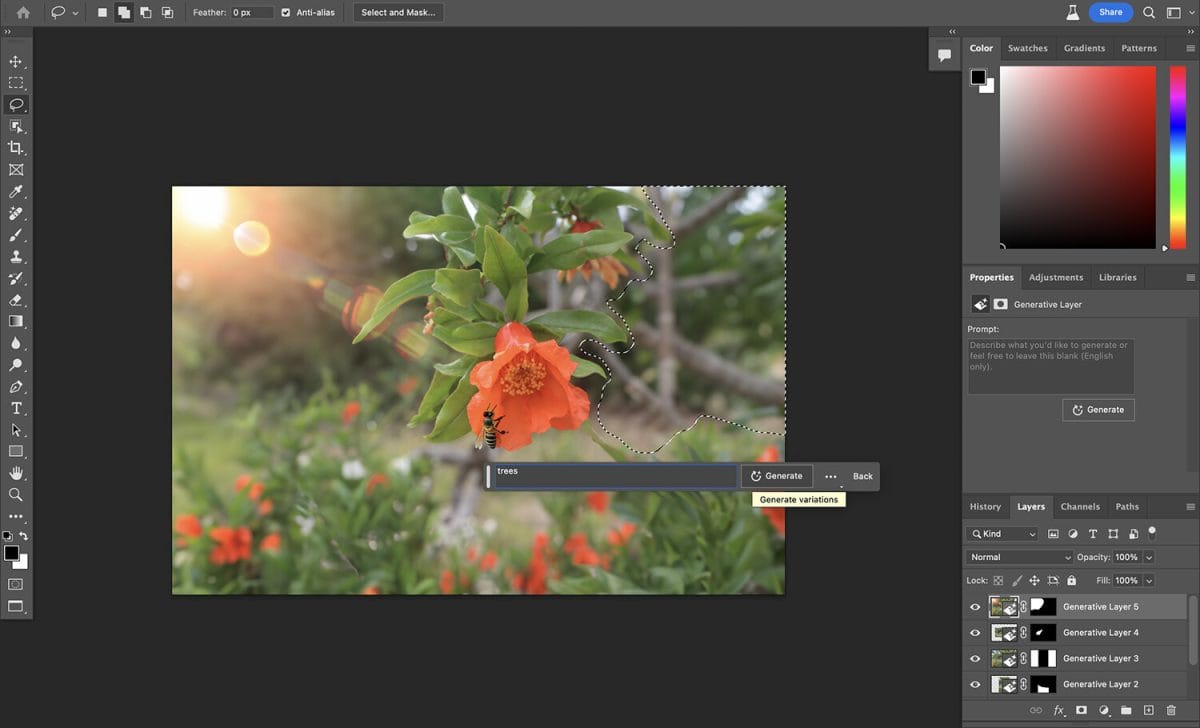
If you’re already a Photoshop user, Generative Fill is the feature that makes Firefly feel native rather than bolted on. You make a selection with any selection tool — the lasso, the object selection tool, even a rough brush stroke in Quick Mask — and hit Generative Fill. You type what you want. Photoshop generates it, seamlessly composited into your image, on its own non-destructive layer.
Three operations do 90% of the practical work:
Generative Fill — add, replace, or extend content in any selected region. The model reads the surrounding pixels and matches lighting, perspective, and style automatically.
Generative Expand — extend the canvas in any direction and fill the new space with generated content that matches the original image. The feature that makes any image the right aspect ratio for any platform.
Generative Remove — select an object, remove it, and Firefly fills the gap with plausible background content. Faster than Content-Aware Fill and significantly more accurate on complex backgrounds.
The 2026 version of the Photoshop Generative Fill model picker has expanded considerably. You can now select from Adobe’s own Firefly Fill & Expand model (the default), Firefly Image 5 (for stylistically different generations), and an array of partner models including Gemini 3.1, Gemini 3, and FLUX.1 Kontext [pro] and FLUX.2 pro. This means Photoshop is no longer just a Firefly front-end — it’s a model-agnostic generation hub where you pick the model best suited to the task while keeping your non-destructive editing workflow.
TIP · Generative Expand for multi-platform campaigns
Take a single hero image shot at 16:9. Use Generative Expand to create a 9:16 vertical version, a 1:1 square, and a wide 21:9 cinema format. The content Firefly fills matches the original well enough that 80% of the time it needs no touch-up. Multi-format campaign production that used to take hours becomes a 15-minute Photoshop session.
Generative Fill is available on desktop Photoshop, and since March 2026 the AI Assistant feature has been in public beta across Photoshop web and mobile — allowing natural language edits (“make the sky look like sunset”, “remove the person in the background”) from a mobile device. For teams whose review process happens on tablets or phones, this closes a workflow gap that used to require a desktop round-trip.
Reformat a 30-image product shoot for 6 platforms in one morning
team: 3-person design team · brief: product launch, 6 aspect ratios per image · constraint: no reshoots
The shoot produced 30 hero product images at 3:2 landscape. The campaign needed each image in 6 formats: 16:9 wide, 9:16 vertical, 1:1 square, 4:5 Instagram portrait, 2:1 Twitter card, and 21:9 cinema banner.
The workflow: open each image in Photoshop, use an action to apply Generative Expand at each target ratio, run a quick review pass to catch any generated content that needed cleanup (typically 2-3 images per batch needed a small touch), export via Creative Cloud Libraries directly to the campaign folder.
Total generated: 180 format-adapted images. The critical point: every output was covered under Adobe’s IP indemnification because Generative Expand uses the Firefly Fill & Expand model. No additional legal clearance needed before handing off to the client.
The standalone Firefly web app at firefly.adobe.com is a separate experience from the Photoshop integration and the right starting point for teams who don’t use Photoshop as their primary tool. The redesigned app launched alongside Image Model 4 in April 2025 and organized Firefly’s capabilities into a cleaner interface than its predecessor.
The core generation modes in the web app:
Text to Image — the main generation canvas. Model selector lets you switch between Firefly Image 4, Image 4 Ultra, and partner models. Style presets, aspect ratio control, and negative prompts are all surface-level — no deep parameter tuning required.
Generative Fill — available in the browser without Photoshop. Upload an image, make a selection, fill. Less powerful than the desktop Photoshop version (no full layer stack) but available on any device.
Text Effects — type a word, apply a visual style to it. Useful for social media graphics, titles, and thumbnail text without needing Illustrator.
Generative Recolor — upload a vector, describe the new color palette. Produces multiple variations instantly. Illustrator-class feature in the browser.
Structure Reference and Style Reference — upload a reference image to guide the composition or visual style of a new generation. The closest Firefly gets to Midjourney’s style-reference workflow.
The web app is also the entry point for Firefly Boards, Firefly Video, and partner model access — more on each below.
Firefly Video
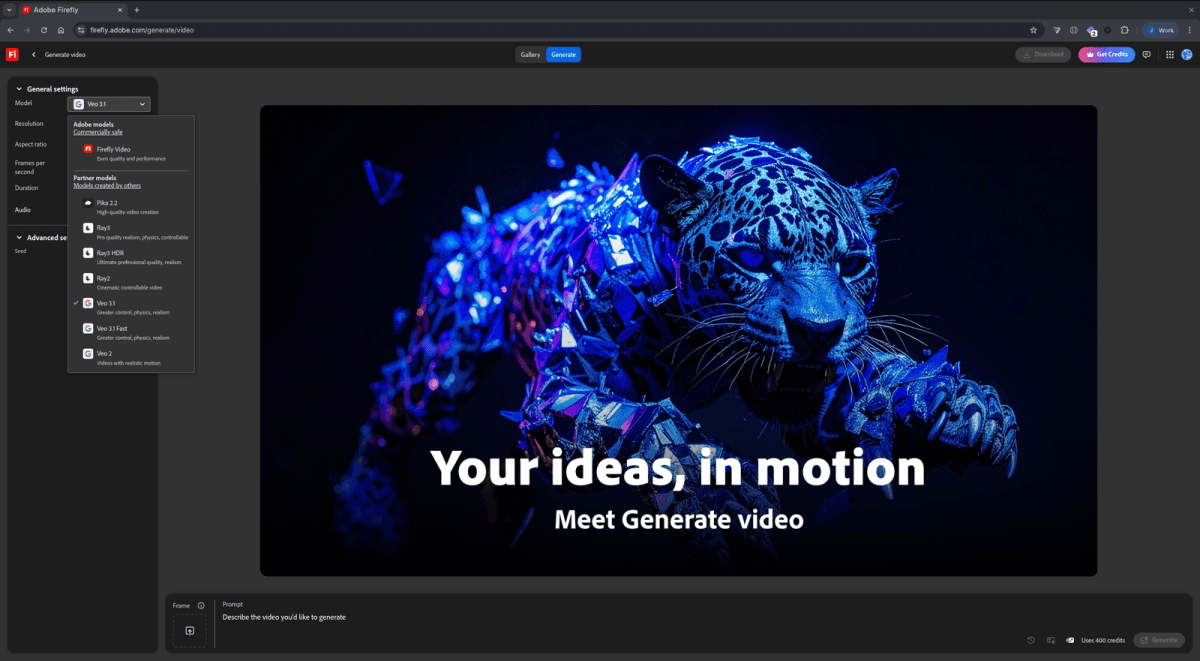
Firefly’s video generation launched as a limited beta in late 2024 and reached broader public beta by mid-2025. The 2026 version is a meaningfully different product: not just a “generate a clip” interface but a browser-based video editor with a multi-track timeline, the ability to combine Firefly-generated clips with uploaded footage, and direct handoff to Premiere Pro when you need full-scale post-production.
The Firefly Video model itself handles text-to-video and image-to-video generation. Quality sits in the middle tier among major video AI tools — noticeably below Sora 2 and Veo 3 for cinematic output, but with the same IP indemnification guarantee that applies to Firefly Image. For teams that need video assets cleared for commercial use without the legal ambiguity that comes with Sora or Runway, Firefly Video is the default-safe choice.
The more interesting play is the partner model access within Firefly Video — covered in the partner models section. The browser timeline editor positions Adobe as the aggregator layer rather than the model provider: you pick the best generation model for each clip, assemble the timeline in Firefly Boards, and hand off to Premiere. This hub-and-spoke architecture is Adobe’s real bet on video — owning the workflow layer while letting the model competition happen below.
Firefly Boards
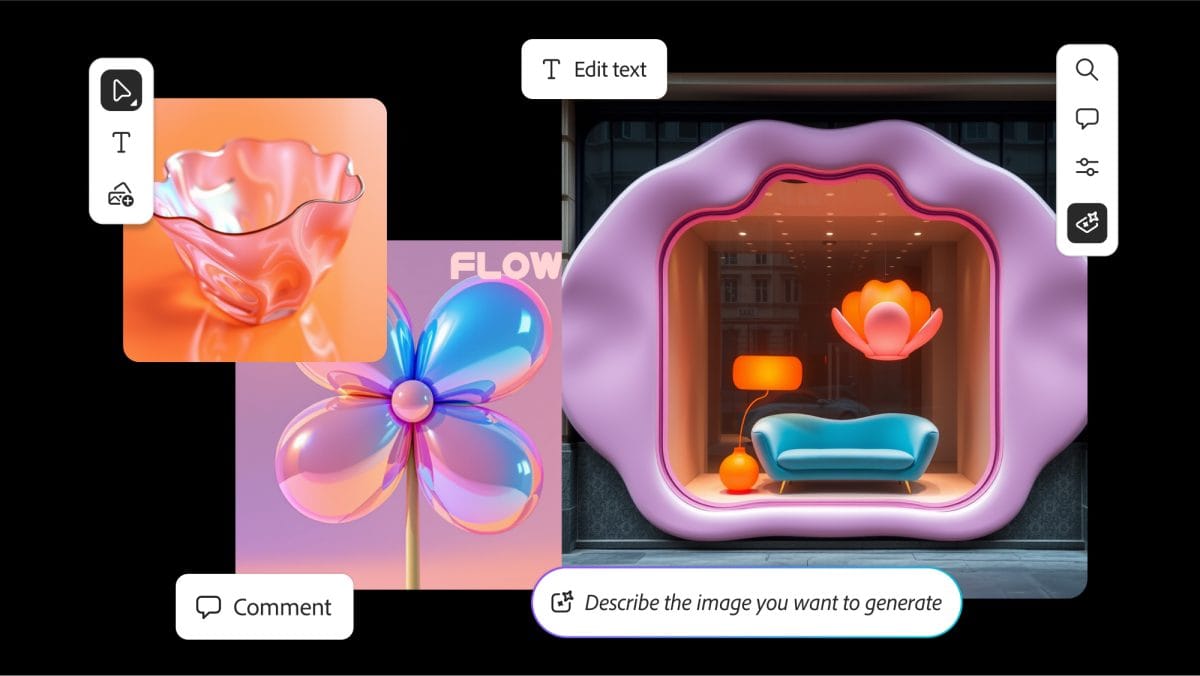
Firefly Boards is an infinite canvas workspace for creative ideation — somewhere between a Miro board and a generative AI playground. It’s the place in the Firefly ecosystem where teams collaborate before committing to a direction.
The core use case: import references, generate variations of an image concept, pin the best ones, annotate, run structure references against them, and export the approved direction straight to Photoshop or Express. For production teams that currently screenshot Midjourney outputs into a Figma file to share with clients, Boards collapses that workflow into a single native environment.
Boards also surfaces partner model video generation — you can drop a generated image onto the canvas and run it through Veo 3.1, Runway, Pika, or any of the 30+ available video models to see how it animates before committing to a full production. The iteration cycle from still to motion concept used to require three different apps and three subscription invoices. Boards does it in one.
adobe-firefly · firefly-genfill.png
fig · Generative Fill in Photoshop · source: digital-photography-school.com
Partner models — 30+ third-party models in one interface
Adobe’s partner model program is the feature that most casual Firefly users haven’t discovered and most power users can’t stop talking about.
Through the Firefly web app and Firefly Boards, you can access and run generations from models including: Veo 2, Veo 3.1, Veo 3.1 Fast (Google), Ray2, Ray3, Ray3.14 (Runway), Runway Gen-4 Video, Gen-4.5 Video, Runway Aleph, Pika 2.2, Kling 3.0, Kling 3.0 Omni, Sora 2, Sora 2 Pro (OpenAI), Marey, ElevenLabs Multilingual v2 for audio, and dozens more.
These partner model generations consume generative credits from your Creative Cloud plan — the same credit pool that powers Firefly Image and Firefly Video. One interface, one login, one billing relationship. The trade-off: partner model outputs do not carry Adobe’s IP indemnification (because Adobe doesn’t control those training datasets). The Firefly app labels partner model outputs clearly to distinguish them from natively indemnified Firefly generations.
WARNING · partner model outputs and IP coverage
Only content generated using Adobe Firefly’s own models (Firefly Image 4, Image 4 Ultra, Fill & Expand, etc.) is covered by Adobe’s IP indemnification. Outputs from partner models like Veo, Sora, Runway, Kling, or FLUX accessed through the Firefly app carry the same IP risk posture as using those tools directly. If commercial IP safety is your reason for choosing Firefly, use Adobe’s own models.
The partner model marketplace matters most for video and specialized generation tasks where Firefly’s own model quality isn’t yet at the top of the field. Rather than asking creative teams to manage six separate subscriptions, Firefly consolidates them under Creative Cloud — and signals clearly which outputs are Adobe-safe versus which come with third-party training data caveats.
Quality ceiling — the honest take
Adobe Firefly produces excellent results in its target use cases. It does not produce the most visually striking images available from any AI tool.
The gap is clearest in artistic and editorial contexts. Ask Midjourney to render “a moody cinematic portrait of a jazz musician in 1950s Chicago” and you get something that looks like it was shot by a photographer who understood the brief emotionally. Ask Firefly the same question and you get a technically correct, well-lit, commercially safe image that a client would approve without hesitation — but it doesn’t have the same soul.
Firefly wins on text rendering, prompt adherence, production-readiness, and consistency. Midjourney wins on artistic quality when the brief calls for drama. DALL-E 3, accessed through ChatGPT or the API, sits in the middle on quality and slightly above Firefly on artistic output but without indemnification and without Photoshop integration.
The practical implication: Firefly is the right tool for production workflows where the output goes to a client. Midjourney is the right tool for concept exploration and editorial work where you’re selling the mood of the image. The professionals who do both keep subscriptions to both — and use Generative Fill in Photoshop to finish what Midjourney started.
Three real workflows, end-to-end
case-study #02 · brand team, marketing assets
Generate 40 background variants for a product launch campaign
team: in-house brand team, 2 designers · output: web, OOH, social, print · constraint: must be client-approvable without legal review
A product launch needed 40 distinct lifestyle background images — no people, just environments (kitchen counter, studio desk, outdoor cafe, minimalist shelving) — to composite product renders onto. The brief from legal: no AI tools whose training data we can’t document.
Firefly was the only tool on the shortlist that cleared legal automatically. The team generated all 40 backgrounds in a single morning session using Text to Image with Image 4. Style Reference was used to keep a consistent visual language across the set — three reference images pinned as style anchors, all variants generated against them.
The result: 40 backgrounds, all 2K resolution, all tagged with C2PA credentials for the asset library audit, all covered under IP indemnification. When the client’s legal team asked for provenance documentation on the AI assets, the answer was a link to Adobe’s enterprise IP FAQ and a screenshot of the Content Credentials panel. That answer took 10 minutes. The equivalent question about a Midjourney output would have taken a week.
// 40 images · 1 morning · 0 legal review cycles · full client IP clearance
case-study #03 · solo photographer, retouching
Fix a wedding shoot where the background was unusable
tool: Photoshop Generative Fill · problem: venue background too cluttered · time: 30 images
A wedding photographer shot an outdoor ceremony with a parking lot visible in the background of 30 critical images. The traditional fix: hours of manual masking and cloning. The Firefly approach: select the background area with Object Selection, run Generative Fill with the prompt “lush garden ceremony backdrop, soft bokeh, warm afternoon light.”
Firefly’s output matched the lighting and color temperature of the existing image in 28 of 30 frames without any manual correction. The generated content appeared on its own Photoshop layer — fully reversible, fully non-destructive. The two frames that needed adjustment got a second pass with a more specific prompt describing the exact light direction visible in the subject. Total correction time: 45 minutes for 30 images.
The IP indemnification coverage of Generative Fill matters even in a personal use case like this: when those wedding photos are licensed to the couple for commercial use (as a photography business, you transfer rights), the client’s downstream commercial use is covered under Adobe’s terms.
// 30 images corrected · 45 min total · non-destructive · commercially licensed output
The generative credits model
Understanding how Firefly’s generative credits work is the single most important thing to figure out before you commit to a plan. It is also, candidly, one of the most confusing billing systems in AI tooling.
Every AI generation in Adobe’s ecosystem — image, video, fill, expand, vector recolor, partner model output — consumes generative credits. Credits reset monthly on your billing date. Unused credits expire and do not roll over. Standard image generation at Image 4 quality costs 1 credit. Video generation and Ultra model generations cost more.
The good news as of 2025-2026: Adobe introduced unlimited generations using Firefly’s own models on paid plans. This applies to standard Firefly Image 4 generations and most Generative Fill operations within Photoshop. The credit meter primarily matters for Image 4 Ultra, Firefly Video, partner model generations, and high-cost operations.
Where users get caught: running Veo 3, Sora 2, or Runway through the partner model interface burns credits at rates that vary by model and output length. A 10-second Sora 2 Pro clip can consume 50-100 credits depending on resolution and settings. If you plan to use Firefly primarily as a partner model hub for video, the credit economics change significantly and higher-tier plans start to make more sense.
adobe-firefly · firefly-render.png
fig · A Firefly render · source: wired.com
Pricing, in real terms
There are two pricing tracks: standalone Firefly plans and Creative Cloud plans that include Firefly credits.
Standalone Firefly plans (if you don’t need the full CC suite)
Free — 25 generative credits/mo, watermarked outputs on some features, limited model access. Fine for trying it once. Not useful for production.
Standard at $9.99/mo — 2,000 credits/mo plus unlimited standard image generations using Firefly’s own models. The right tier for solo creatives who primarily use Photoshop web or the Firefly app without desktop Creative Cloud.
Pro at $19.99/mo — 4,000 credits/mo, adds Adobe Express Premium. For users who need heavier partner model access or Firefly Video alongside Express.
Premium at $199.99/mo — 50,000 credits/mo. For production teams or agencies doing significant Firefly Video and partner model generation at scale.
Creative Cloud (the plan most existing Adobe users are already on)
If you’re a Photoshop, Illustrator, or Creative Cloud All Apps subscriber, Firefly is already included. Creative Cloud All Apps includes 4,000 generative credits per month alongside the full suite — more than enough for most designers using Generative Fill and Image 4 generation daily. The per-seat economics for teams make the Creative Cloud Business plan the most common enterprise entry point.
NOTE · the real value question
If you’re already paying for Creative Cloud All Apps, Firefly is essentially free. The IP indemnification alone is worth the Creative Cloud subscription cost for any team doing commercial work. Evaluating Firefly purely as an image generator against its standalone price misses the point — the value is the legal coverage attached to every pixel it generates.
Firefly vs Midjourney
a/adobe-firefly b/midjourney
Midjourney is the aesthetic benchmark for AI image generation. Firefly is the commercial safety benchmark. These tools are solving different parts of the same problem — and the best creative teams use both.
firefly wins at
IP indemnification — no other tool offers this
Photoshop integration — native, not a plugin
text rendering within images
prompt adherence and production consistency
non-destructive workflow on existing photos
midjourney wins at
artistic quality ceiling and mood
style reference and visual consistency
community and prompt engineering resources
speed of iteration for concept work
simpler pricing — no credit system to understand
Verdict: Concept phase — Midjourney. Production phase — Firefly. The professional workflow is Midjourney for direction-finding, Firefly Generative Fill for making those directions commercially usable in Photoshop. See the Midjourney review for a full breakdown.
Firefly vs DALL-E 3
a/adobe-firefly b/dall-e-3
DALL-E 3, available through ChatGPT and the OpenAI API, sits between Midjourney and Firefly on artistic quality and is the more accessible entry point for developers building image generation into their own products. See the full DALL-E 3 review.
firefly wins at
commercial IP indemnification
Photoshop and CC native integration
non-destructive editing on existing images
C2PA content credentials and provenance
enterprise legal approval process
dall-e 3 wins at
API access for developers building apps
conversational generation via ChatGPT
artistic range on some prompts
lower barrier to entry — no CC subscription
better at abstract and surreal concepts
Verdict: DALL-E 3 for developers, ChatGPT-integrated workflows, and anyone who doesn’t need Photoshop integration. Firefly for Adobe users, production work, and anything going to a client. The IP question decides it every time.
Enterprise adoption playbook
Firefly’s enterprise story is one of the cleaner ones in AI tooling because it maps to something procurement teams already understand: a vendor relationship with a contract, documented training data provenance, and defined legal accountability.
Getting legal sign-off (the fastest path)
Point legal at Adobe’s enterprise IP FAQ (available at business.adobe.com/products/firefly-business) and the Firefly Legal FAQs PDF. These documents explicitly describe what Adobe will and won’t indemnify, the training data sources, the C2PA credential system, and the enterprise plan terms. In most organizations, legal sign-off on Firefly takes days, not months. For Midjourney, the same conversation often stalls indefinitely.
Creative Cloud Teams vs individual subscriptions
For teams of 5+, Creative Cloud for Teams includes the same generative credits, adds centralized license management, and lets an admin set organization-wide policies on which models and partner integrations are accessible. The per-seat cost at Creative Cloud for Teams pricing is higher than individual plans but the admin overhead reduction is significant.
Firefly API for production pipelines
For teams generating assets at scale — e-commerce product images, automated social content, localized marketing variants — the Firefly API exposes Text to Image, Generative Fill, and Generative Expand programmatically. The same IP indemnification covers API-generated outputs. This is the path for integrating Firefly into a CMS, a DAM, or an automated campaign production workflow without having designers touch the Photoshop UI for each asset.
adobe-firefly · firefly-boards.png
fig · Firefly Boards · source: creativebloq.com
Where Firefly falls short
The aesthetic ceiling is real
Firefly’s outputs trend toward “stock photo” quality even when you don’t want that. The training dataset — Adobe Stock — has a certain commercial visual language baked in. Ask for something raw, gritty, or edgy and Firefly’s instinct is to smooth it. The same prompt that produces a hauntingly beautiful image in Midjourney produces a competent but safe image in Firefly. For creative work where the brief is to be bold, Firefly will frustrate you.
The credit system is confusing
Even after spending time with it, it’s not always clear how many credits a given operation will consume until you’re looking at the confirmation dialog. Partner model credits especially are opaque — the same Creative Cloud All Apps plan that gives you unlimited Firefly Image 4 generations will run out of credits mid-afternoon if you’re doing serious Sora 2 or Veo 3 video work. The mental model of “credits” sitting on top of a subscription that already costs $59.99/mo creates friction that competitors with flat-rate plans avoid.
Video is still catching up
The Firefly Video model’s native quality is not at the level of Sora 2, Veo 3, or Runway Gen-4. The browser-based video editor is promising but early — it lacks the fine-grained clip control that professional editors expect. Adobe is betting on being the aggregator layer (partner models) rather than the best model, but that bet requires trust in a workflow that’s still maturing.
Style consistency across generations
Midjourney’s style reference and seed systems give you reliable visual consistency across a project. Firefly’s structure reference and style reference work well within a session but don’t persist across sessions in a way that makes maintaining a visual identity easy over weeks. Each new Firefly session is effectively a fresh start unless you carefully manage your reference images manually.
No Discord community layer
Midjourney’s Discord-based community is a double-edged sword, but the prompt engineering knowledge that lives there is genuinely valuable for improving output quality. Firefly has no equivalent. Adobe’s community forums and Behance showcase exist but don’t have the same density of prompt experimentation and technique-sharing that makes Midjourney users dramatically better over time.
What’s next for Firefly
// roadmap · adobe signals · mid 2026
Firefly Image 5 — already surfacing in the Photoshop model picker. Expected broader rollout with improved artistic range aimed directly at closing the Midjourney quality gap.
Creative Agent (announced April 2026) — Adobe’s agentic AI layer that can take a brief, generate multiple concept directions, assemble them into a Firefly Board, and deliver a presentation-ready PDF — all from a natural language instruction. Positioned as the orchestration layer above individual model calls.
Premiere Pro video AI (deeper integration) — Adobe has been expanding Firefly’s role in Premiere and After Effects beyond simple generative extensions — toward AI-assisted color, transitions, and b-roll generation directly on the timeline.
Firefly Boards mobile — collaborative moodboarding on tablet, with direct generation access. In beta for iPad as of early 2026.
Expanded partner model roster — Adobe’s 30+ partner model count is expected to grow. The pattern: add each major new video model (Kling updates, Runway releases, new Veo iterations) to the partner marketplace within weeks of their public launch.
Audio generation — ElevenLabs integration is already live for voice and audio effects. Adobe’s own audio AI layer is expected as a named Firefly capability in late 2026 or early 2027.
FAQ
Does IP indemnification mean I can use Firefly outputs anywhere commercially?
For outputs generated using Adobe Firefly’s own models (Image 4, Image 4 Ultra, Fill & Expand), yes — commercial use is covered and Adobe will defend you against third-party copyright claims. Partner model outputs through the Firefly app do not carry this coverage. Always check which model generated your asset.
Is Firefly worth it if I don’t use Photoshop?
If you’re purely comparing image quality, other tools may give you better results at lower cost. Firefly’s value multiplier is the CC integration and IP safety. Without Photoshop, you lose half the product. The standalone Firefly app is good, but the deeper value is in Generative Fill and Expand inside your existing Photoshop workflow.
Can I use Firefly to generate images of real people or celebrities?
No. Firefly explicitly prohibits generating realistic depictions of identifiable real people. This is by design — it’s part of why the training data and output policies hold up legally. For any image with a face you need to control precisely, you’re shooting real photography and using Firefly for backgrounds and compositing only.
How does Firefly compare to Canva AI?
Different audiences. Canva AI is optimized for non-designers creating social posts, presentations, and simple marketing materials. Firefly is optimized for professional creative workflows inside CC applications. See the Canva AI review for a detailed comparison. If you’re not a Photoshop or Illustrator user, Canva is probably the right starting point.
What are Content Credentials and do I need to care?
Every Firefly-generated image embeds a C2PA cryptographic signature — a tamper-evident record of its AI origin, the model used, and the date. For most users this is invisible and irrelevant. For enterprise teams that need to audit their asset library for AI-generated content, or whose clients specifically require provenance documentation, it’s the only system in market that delivers this automatically.
Do generative credits roll over if I don’t use them?
No. Credits reset on your billing date and unused credits expire. Plan your monthly generation volume accordingly. For teams with variable creative production schedules, the unlimited Firefly Image 4 generation on paid plans means day-to-day image work never hits a credit wall — only video and partner model use requires credit management.
Can I access Midjourney through the Firefly app?
No — Midjourney is not currently in Adobe’s partner model program. The partner model roster includes Google (Veo), Runway, Pika, Kling, Sora (OpenAI), ElevenLabs, and others, but Midjourney remains a separate subscription accessed through its own interface and Discord.
Is Firefly suitable for print-resolution work?
At 2K (2048px) native output from Image 4, standard print use cases work — social media, web, and standard print sizes up to roughly A4/Letter at 150dpi. For large-format print (billboards, trade show graphics) you’ll need to run Generative Upscale or a third-party upscaler after generation. The 2K limit is a real constraint for high-end print production.
The verdict
adobe-firefly-review · v1.0 · latest Enterprise Standard
8.0/10
+ IP indemnified + CC native + gen-fill + partner models
The only AI image tool that enterprise legal will actually approve.
Firefly earns its place not because it produces the most beautiful images — it doesn’t — but because it’s the only tool in the space that lets professional creative teams generate assets, hand them to clients, and answer the question “where did this come from?” with a legally defensible answer. IP indemnification, C2PA Content Credentials, and deep Photoshop integration combine to make Firefly the commercial default for enterprise design workflows.
The score would be higher if the aesthetic quality gap with Midjourney were smaller and the credit system were less opaque. As it stands: if you use Creative Cloud and do commercial work, Firefly is already your tool — you’re just deciding how much of it to use. If you don’t use Creative Cloud, the IP safety story alone might be worth starting.
// facts checked 2026-06-02
Keeping tabs
Change history
Every verified price, limit, and model change we have tracked for Adobe Firefly.
No changes detected since we started tracking — that's a good sign.
Verified October 2026
Watch this tool
One email when Adobe Firefly changes price or limits. No account, no spam.